How to Update a Bathroom Without Replacing Tile: Real AI Previews
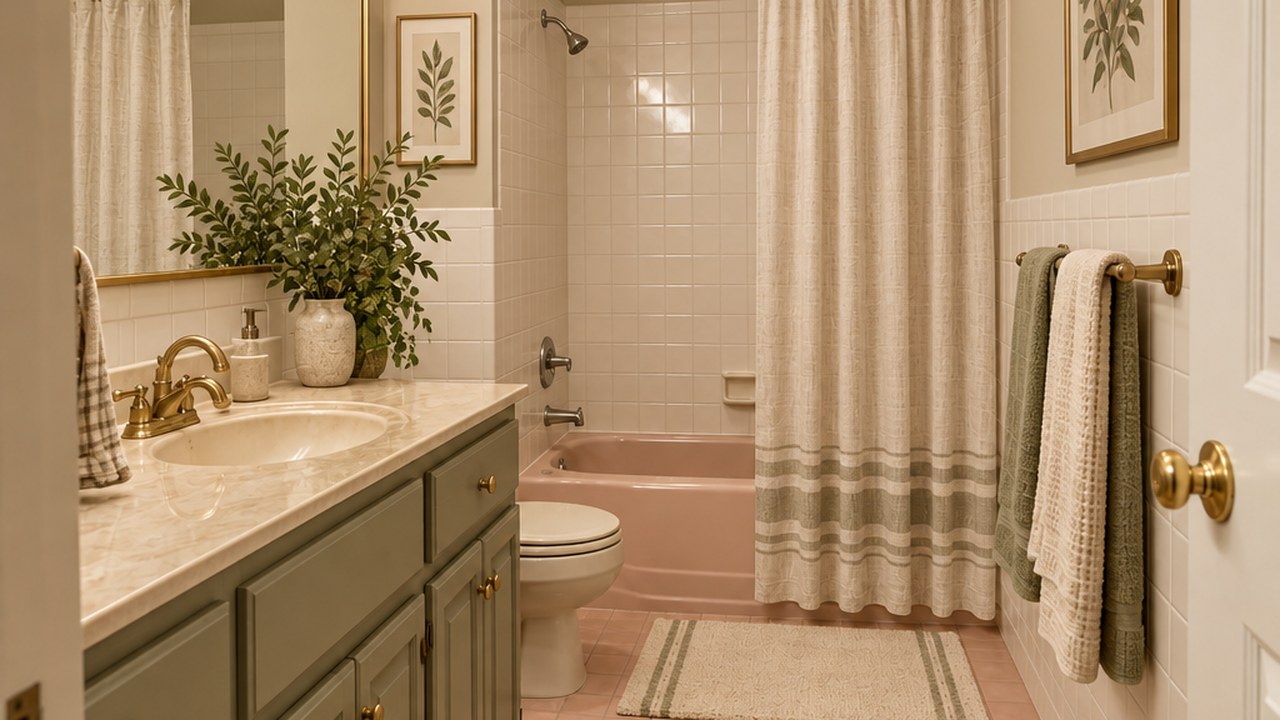
A real GenRoom Studio result for a 1980s pink bathroom: the wall tiles are painted, the tub and the floor tiles are not touched. The before photo is further down.
You can update a bathroom without replacing tile by changing everything around the tile and, where it makes sense, painting the tile itself. The moves that change the most for the least money are: paint the walls above the tile, paint the vanity, replace the mirror and the light, swap the taps and the knobs, change the shower curtain and the textiles, freshen or recolor the grout, and paint the wall tiles with a bonding primer or a tub-and-tile kit. Floors are the hardest part to paint; peel-and-stick vinyl is the easier fix there.
The catch is that you have to choose before you buy anything. Will white paint on pink tile look fresh or cheap? Navy or sage for the vanity? In the GenRoom Studio you can see each option on a photo of your own bathroom in under a minute. We took three dated bathrooms (pink 1980s tile, beige 2000s builder tile and a green-tiled rental) and tried every move from this list on them. All the results below are real and unedited, including the ones that went wrong.
What you'll find here:
- what 247 people asked for when they wanted a bathroom refresh without retiling;
- which moves give the most change, and what the pros charge if you don't do it yourself;
- three real before/after cases, one move at a time and all together;
- what painted tile really looks like, and how to prep it so it lasts;
- where the AI cheats, and how to write a request it follows.
What Do People Ask For When They Refresh a Bathroom Without Retiling?
From March to mid-October 2026, 247 GenRoom users asked for a bathroom refresh that keeps the tile, in more than 400 requests. They wrote in English, Polish, Turkish, Spanish, Italian and other languages, but the requests sound alike. A few, paraphrased and anonymised:
- "Keep the existing tile. Lighten the walls and the grout."
- "Change the wall color to cream or grey and match the trim. Leave the leaf tile and the tub as they are."
- "The wall tiles have a cartoon pattern. I want to cover them with tile paint, and the pattern must not show through."
- "Minimal, budget-friendly changes. Maybe peel-and-stick floor tiles or painting the floor tiles, plus some storage. Keep the sink, the bath and the shower."
- "Keep the grey tiles and the fixtures. Paint the wall and the ceiling, add a lit mirror next to the toilet and a black towel rail."
- "Paint the cabinets a mushroom color. Make the mirror flat and as wide as the vanity."
Three patterns stand out. People say "keep the tile" out loud, because they are afraid the AI will retile the room anyway (it sometimes does, see the limits section). About one request in six mentions the vanity or the cabinets, and about one in seven mentions the mirror. And many people give a brand paint name, which tells you they are close to buying.
Which Refresh Moves Change a Dated Bathroom the Most?
The wall tile, the vanity and the mirror are the three biggest surfaces in a typical bathroom photo. Change two of the three and the room reads as new, even if the floor and the tub stay. Here is how the moves compare:
| Move | What it changes | Effort | Reversible? |
|---|---|---|---|
| Paint the walls above the tile | The color around the tile; can calm a loud tile | One day | Yes |
| Paint the vanity | The biggest piece of wood in the room | A weekend | Yes, repaint |
| New mirror and light | The focal wall, the light on your face | Half a day, an electrician for hardwired lights | Yes |
| New taps, knobs, towel bars | The metal finish (brass, chrome, black) | A few hours to a day | Yes |
| Shower curtain, mat, towels | Softness and color, fast | Minutes | Yes |
| Recolor or clean the grout | How "busy" or dirty the tile looks | A weekend | Partly |
| Paint the wall tile | The tile color itself | Two to four days with curing | Hard to undo |
| Peel-and-stick on the floor | The floor pattern | A day | Yes, peel off |
A useful rule: start with what you can undo. Paint on the vanity and a new mirror are easy to change again. Paint on tile is a commitment: it can be painted over, but you will not get the original glaze back.
How Do You Preview a Bathroom Refresh in GenRoom?
You need one photo of the bathroom, taken from the door at eye level with the lights on. Then you have two ways to work, and they are good for different things.
One request for the whole refresh. Upload the photo, choose the mode "Refresh, no renovation" and type what to keep and what to change in the brief, for example "Paint the pink wall tiles warm white, keep the grout lines visible. Keep the floor tiles, bathtub and toilet." Press Create design. The mode is built to make a room look more expensive without renovation: paint, textiles, lighting, mirrors and plants.
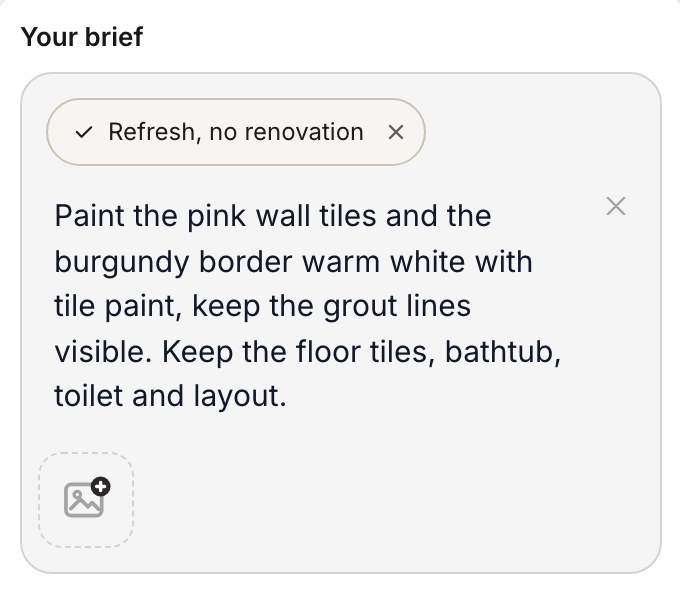 The brief: a mode plus your own words. The words decide what stays.
One change at a time in the editor. Open the photo in the editor and either select an area with the lasso and describe the change, or open Quick actions and use Recolor an object, Wall color, Floor material & color or Lighting. If you type a request without selecting anything, the Studio asks whether you want to change only one place or edit the whole photo.
Each design or edit costs 2 credits. A free account gets 6 credits without a card, enough for three tries; paid packs start at $9.99 for 36 credits (pricing). In our test, most results came back in 25 to 40 seconds; the slowest took 72.
Case 1: Pink 1980s Tile — Paint It or Work Around It?
The first bathroom is a classic: glossy pink 4-inch wall tile with a burgundy border, a pink tub, pink floor tile, an oak vanity and a Hollywood light strip. The tile is not broken. It is just very pink.
What "Refresh, no renovation" does on its own
We first ran the mode with no words at all, to see what it does by default. Then we ran it again with one sentence asking to paint the wall tiles.
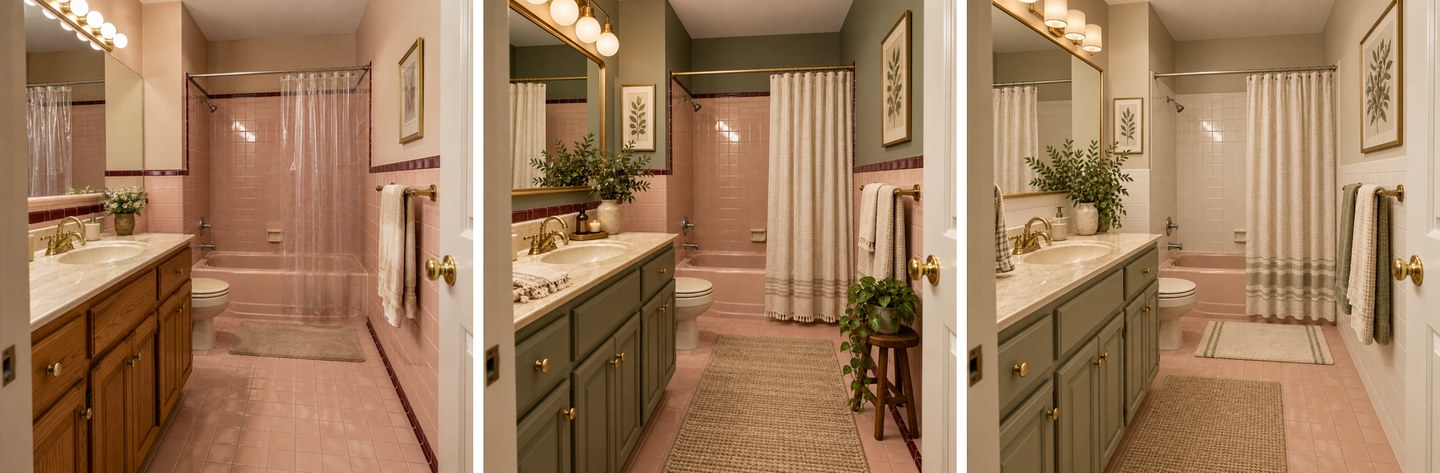 Left: the original. Middle: "Refresh, no renovation" with no words. Right: the same mode plus "paint the pink wall tiles warm white".
On its own, the mode kept the pink tile. It painted the vanity and the walls above the tile sage green, replaced the clear curtain with a linen one, added a brass-framed mirror, a jute runner and plants. That is already the classic "work around the tile" refresh, and on this bathroom it works: sage and pink are a softer pair than oak and pink.
With the one extra sentence, the wall tile and the burgundy border turned warm white, and the room stopped being a pink room. The floor tile and the tub stayed pink, exactly as asked. That is honest, too: a white tile wall next to a pink tub is what you would really get, unless you also refinish the tub.
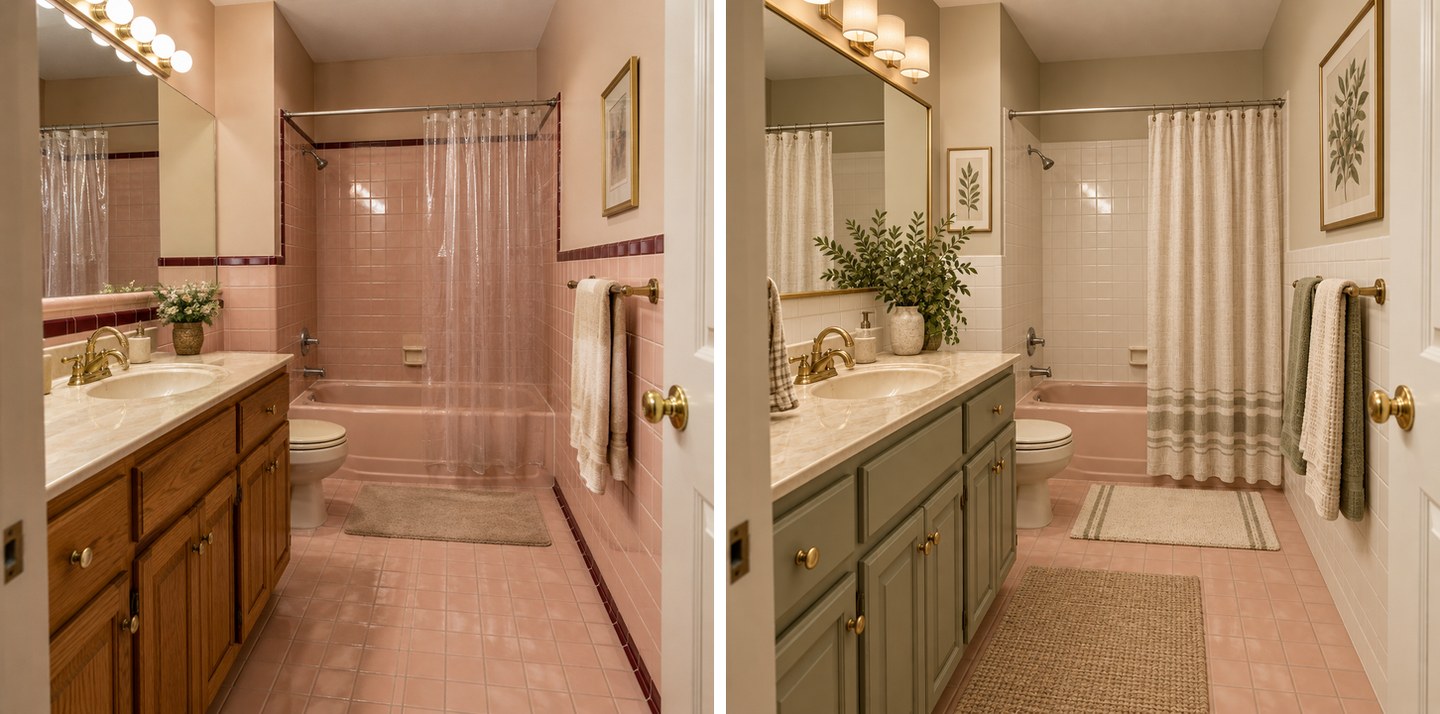 The full refresh in one request: painted wall tile, painted vanity, new mirror and light, new textiles. Same tub, same floor, same layout.
Painting only the tiles: Select area vs Recolor
If you only want to see the tile color, without the vanity and the curtain changing too, use the editor. We tried two ways on the original photo.
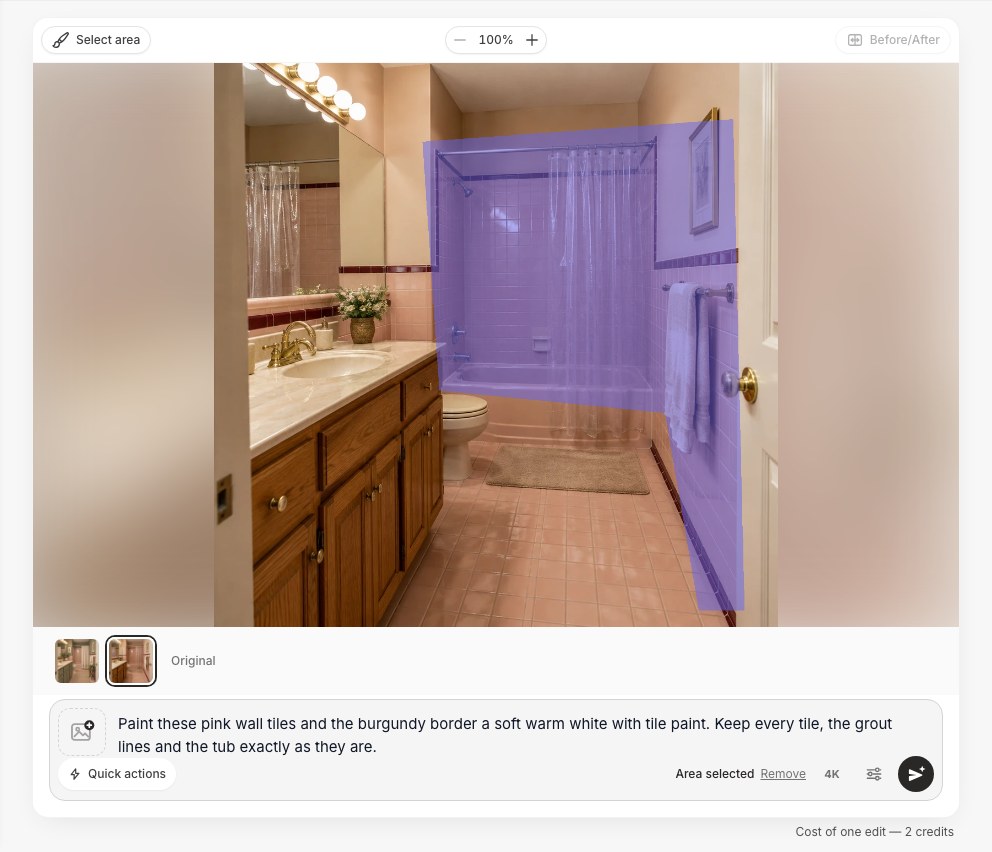 Select area → Lasso: trace the tiles, then say what to do with them.
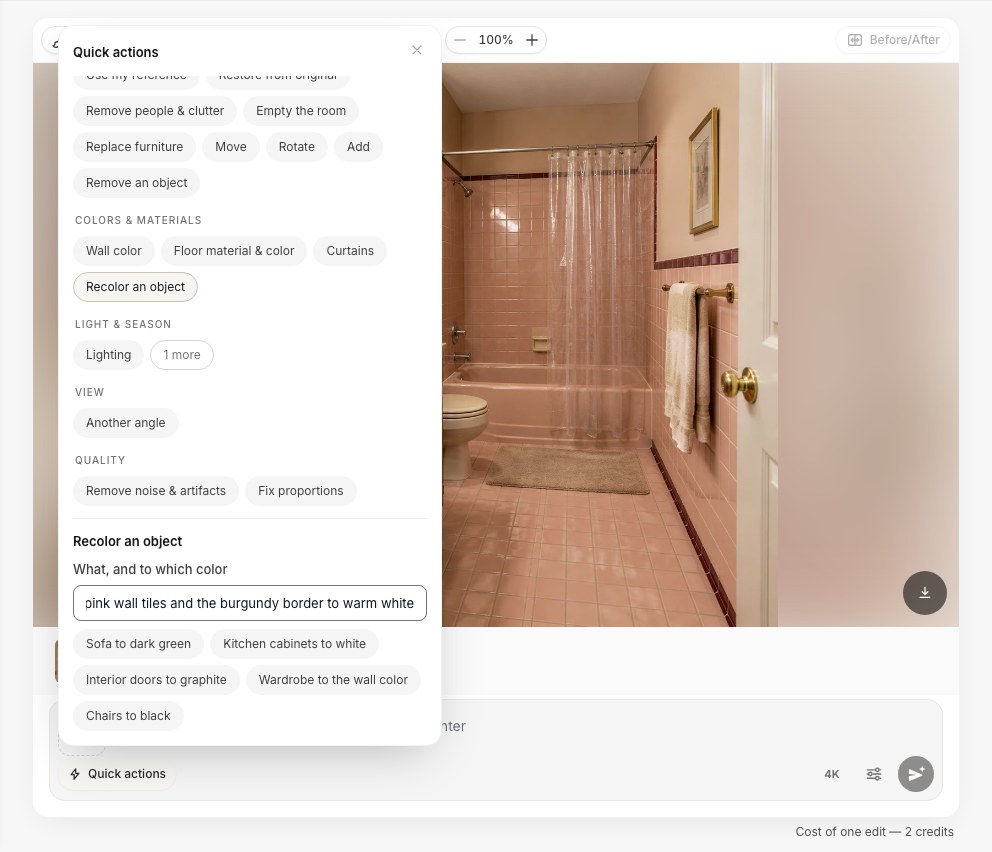 Quick actions → Recolor an object: name the object and the new color.
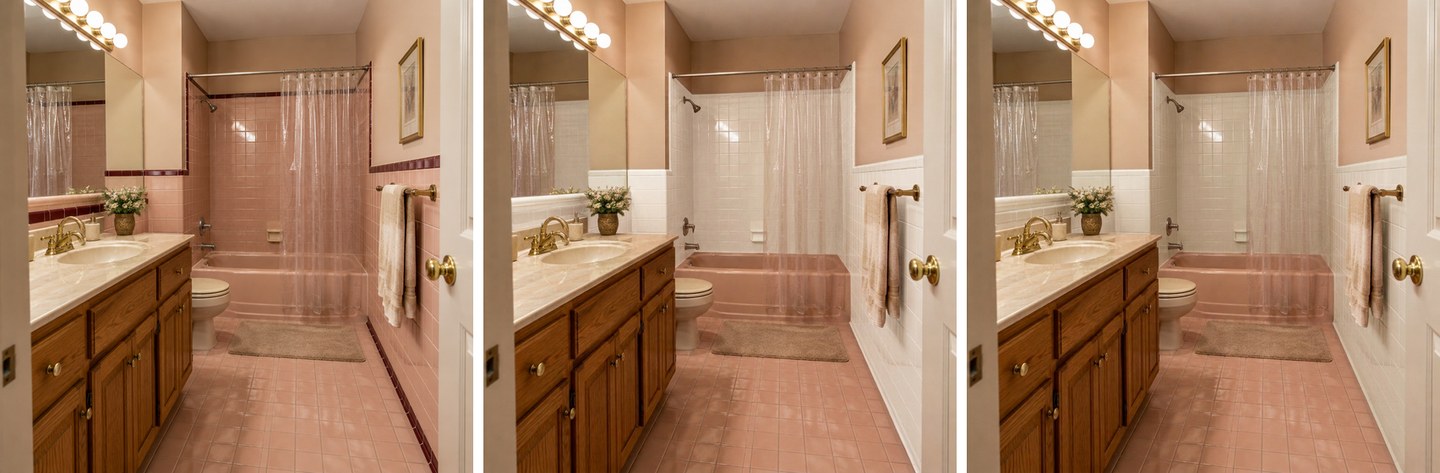 Left: the original. Middle: Select area. Right: Recolor an object. Both kept the tile grid, the tub and the vanity.
Both edits did what a tile painter would do: the tiles became white, the grid of grout lines stayed, the oak vanity, the brass faucet, the pink tub and the pink floor did not change. The selected area spread a little beyond the lasso, to the small strip of tile behind the sink, which is what you would paint anyway. Recolor an object is the faster of the two when the target is easy to name ("the pink wall tiles"); Select area is better when you want only one wall, for example just the tub surround.
What Does Painted Tile Actually Look Like?
Painted tile looks like tile in a new color, not like a smooth wall. The grid of grout lines stays visible, and the bumps and edges of each tile show through the paint. If you paint the grout the same color as the tile, the grid gets softer but does not disappear. That is why a good preview keeps the grout lines, and why we reject AI results that turn painted tile into a flat plaster wall (one of those is in the limits section).
Sheen matters too. Factory glaze is hard and evenly glossy. Paint can be satin or gloss: satin hides small flaws better, gloss wipes clean more easily. Rust-Oleum's Tub & Tile Refinishing Kit, for example, comes in both, in white and a pale grey called Coastal Fog.
Where tile paint holds up, and where it doesn't
The manufacturers are clear about the limits:
- Walls, yes. Floors, no (at least not with the same product). Rust-Oleum says its Tub & Tile Refinishing Kit is for walls and tubs only, and points to a separate floor coating for tile floors.
- Dry areas last longest. Sherwin-Williams' guide to painting tile advises avoiding floors, high-traffic areas and spots that are often wet, and says decorative wall tile away from the tub and sink is the best candidate.
- Wet walls can work with the right coating. The Rust-Oleum kit is an epoxy-acrylic coating made for tubs, shower walls and sinks, and needs 3 days of curing before it gets wet.
Real-life experience matches this. A DIY blogger who painted two showers, a backsplash and a bathroom floor published a five-year review: the painted shower walls held up well, the floor held up except the one tile in front of the sink where she stands every day, and the places where she skipped primer got nicked by bath toys. The clear topcoat she added yellowed over the years, and she would skip it next time.
How to paint bathroom tile so it lasts
These steps follow the Sherwin-Williams guide and the Rust-Oleum instructions. Always read the label of the product you buy; dry and cure times differ.
- Clean hard. Soap and water first, then the cleaner the kit asks for. Soap scum and grease are the main reason paint peels.
- Repair. Fill chips and cracks; replace grout that is crumbling or moldy (paint will not hold it together).
- Remove the gloss. Sherwin-Williams says sanding is required, because a chemical deglosser does not work on tile glaze. Wipe the dust off and let it dry.
- Prime with a bonding primer made for slick surfaces (or follow the prep steps of your tub-and-tile kit). Test a small hidden spot first.
- Paint in thin coats. A foam roller for flat tiles, a brush for the grout lines and edges.
- Let it cure before water. For the Rust-Oleum kit, that is 3 days. After that, run the exhaust fan after every shower.
- Recaulk last. Fresh silicone at the tub line and the corners makes painted tile look finished.
Case 2: Beige 2000s Builder Tile — Keep It, Change Everything Else
The second bathroom has the beige travertine-look tile that was in every new house around 2005: tan tile on the floor and the tub surround, a mosaic border strip, a cherry vanity with a speckled granite top, a three-globe light bar and a plain frameless mirror.
This tile is not ugly; it is just dated by everything around it. So here we did not paint the tile at all. We changed the five things around it in one editor request: "Keep all the tiles exactly as they are. Paint the vanity navy blue, change the faucet to matte black and the knobs to black bar pulls, replace the light bar with two black wall sconces and the frameless mirror with a black-framed mirror, and swap the tan shower curtain for a white waffle-weave one."
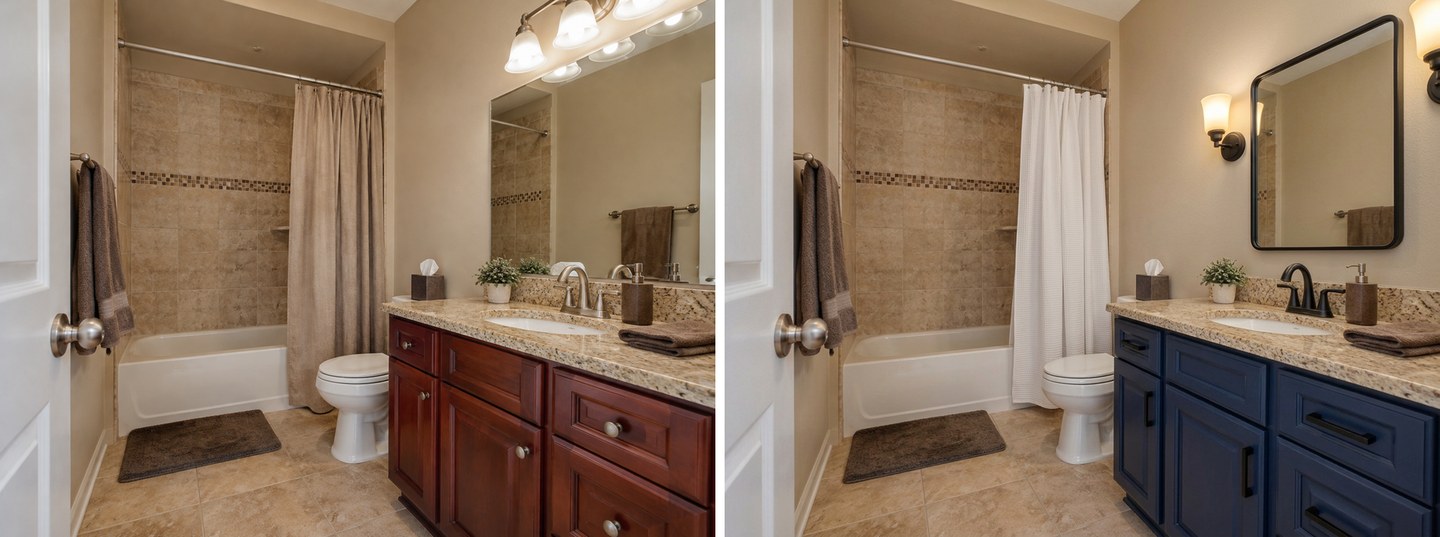 Five changes, zero tiles touched. The beige tile looks intentional next to navy and black.
All five changes came through, and the tile, the granite top, the tub and the toilet stayed exactly as they were. One detail to check: the new mirror is narrower than the old one, because we did not give a width. If you want the mirror as wide as the vanity, say so.
One change at a time
If you are not sure which move is worth it, run them one by one from the original photo and compare. Here is the vanity alone (Recolor an object → "the cherry vanity cabinet to navy blue") and the mirror and light alone (a text edit).
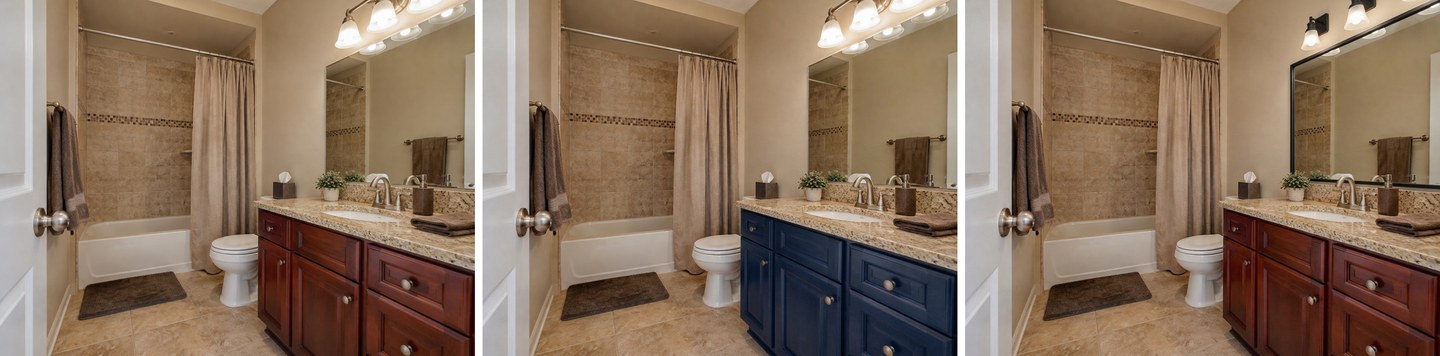 Left: the original. Middle: only the vanity painted. Right: only the mirror and the lights changed.
The painted vanity changes the room more than the mirror does, because it is the biggest dark surface in the photo. For the hardware itself (faucet styles, metal finishes, double vanities), see our bathroom vanity and fixtures visualizer guide. For the light, our guide to AI lighting design covers sconces and color temperature.
We also ran "Refresh, no renovation" on this bathroom with no words. It kept the tile again and went for a sage vanity, a brass mirror and glass-shade lights, a pleasant result, but not the one you may have in mind. The mode picks a direction for you; your words pick it yourself.
Create interior design with AI
Upload a photo of your room and get a professional design in 30 seconds. First generation is free.
Can You Change the Grout Color Without Regrouting?
Yes, if the grout is sound. Grout colorants and grout paint pens coat the existing grout, so you can make dingy grout white again or make white grout darker. They do not fix grout that is cracked, crumbling or moldy. HomeAdvisor's regrouting cost guide is blunt about that: new grout can't bond properly to old grout, so failing grout has to come out. A professional regrout of a shower costs $600 to $2,500, about $1,500 on average.
Grout color changes how the tile reads. Light grout on colored tile lets the color lead; dark grout draws the grid and makes the tile look more graphic. In the rental bathroom below, we asked only for clean white grout between the green tiles.
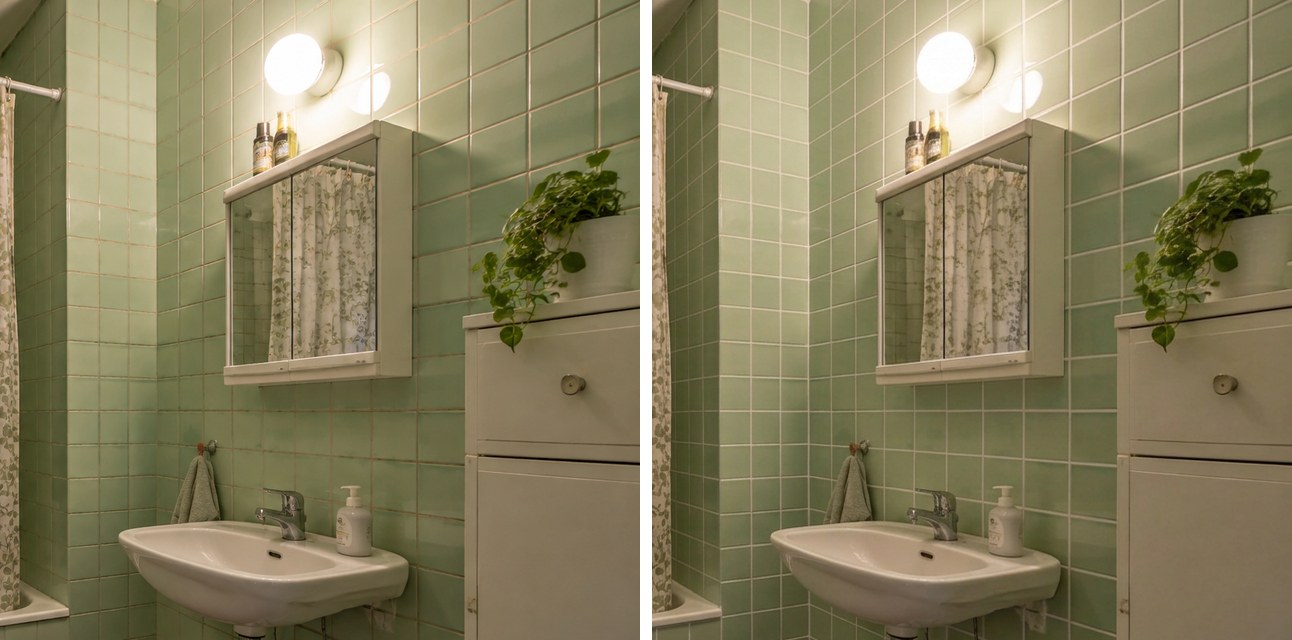 Same tiles, same grid, whiter grout. A subtle change in a photo, a big one in person.
The result is what a grout pen does: the tiles, their size and the grid stayed, and the grout went from grey to white. It is subtle in a photo, which is also honest: cleaner grout makes a bathroom look cleaner, not new. Grout requests worked well on tile with clear, visible joints. On tile with almost invisible grout, the AI had to invent the grid, and it changed the tile size (see the limits).
Case 3: A Green-Tiled Rental Bathroom
The third bathroom is a rental in a 1980s apartment block: mint green tile up to the ceiling with grey grout, a white tub with a busy curtain, a wall-hung basin, a plastic mirror cabinet and brown floor tile.
In a rental, tile paint needs the landlord's written OK, because it is hard to undo. Show them the picture first. Here is what the green tile looks like painted warm white with Recolor an object:
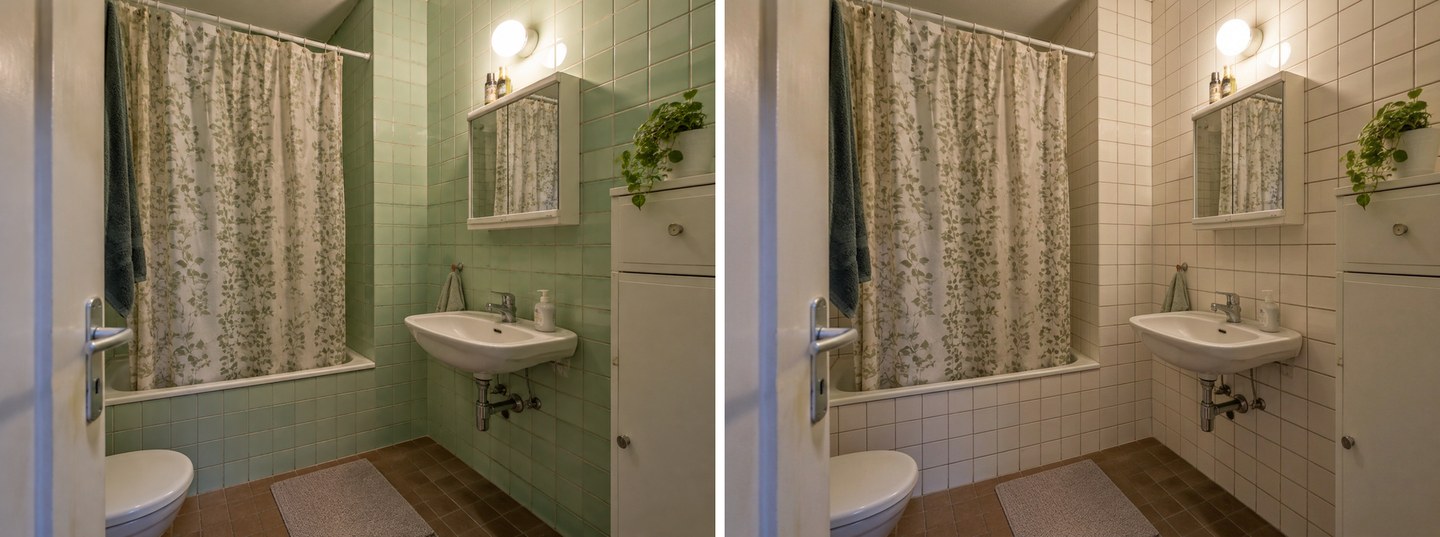 Recolor an object → "the mint green wall tiles to warm white". The grid stays, nothing else moves.
This is the cleanest tile-paint preview in our test: every tile is in the same place, the grout lines are still there, and the curtain, the basin and the cabinet did not change. If the landlord says no, you can still change a lot without paint.
Renter-friendly moves: curtain, peel-and-stick floor, removable decor
We tried two moves you can take with you when you leave: a new shower curtain (a text edit) and peel-and-stick vinyl over the floor (Quick actions → Floor material & color → "black and white checkerboard peel-and-stick vinyl tiles").
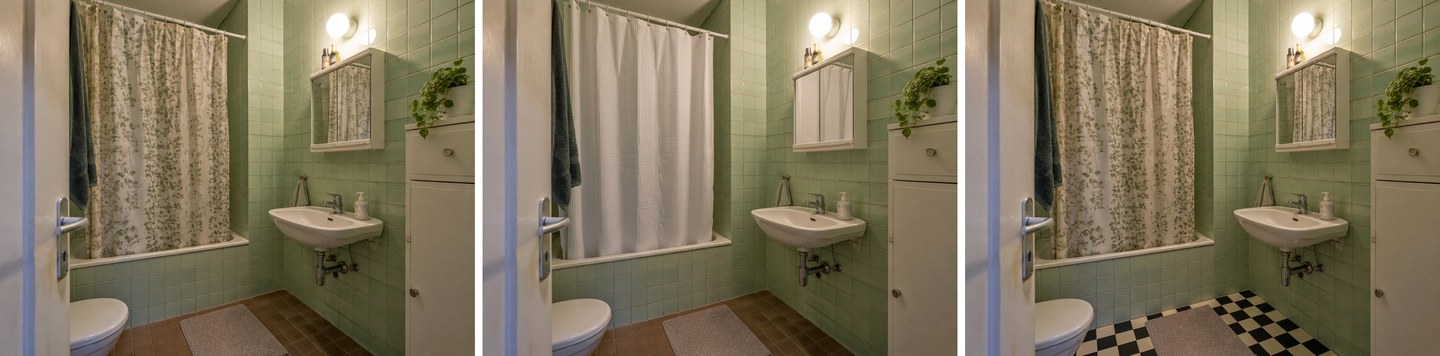 Left: the original. Middle: only the shower curtain. Right: only the floor, as peel-and-stick checkerboard.
The plain curtain alone calms the room, because the leafy pattern was fighting the green tile. The checkerboard floor is a bolder move; it is worth seeing before you buy a box of tiles, because it does not suit every tile color.
Then we ran "Refresh, no renovation" with a renter brief: "Keep the green wall tiles exactly as they are, do not paint them. Only removable changes: shower curtain, bath mat, towels, mirror, accessories and a plug-in light."
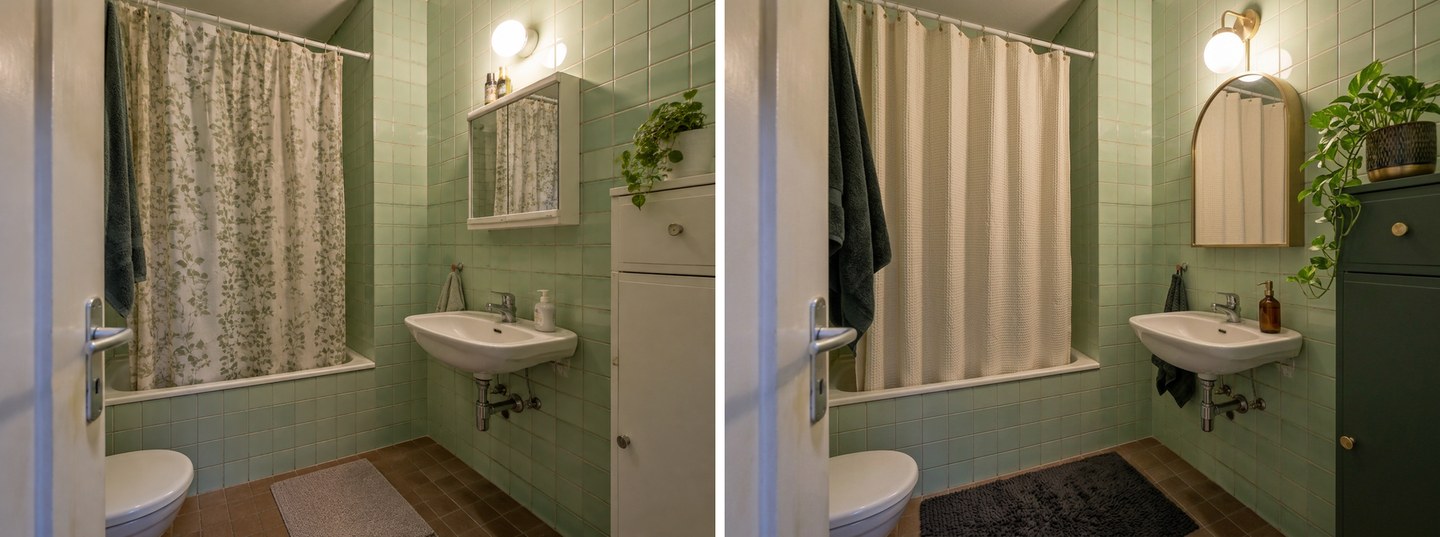 The tile stayed, as asked. But read the result like a landlord would.
The tile stayed green, as asked, and the curtain, the mat and the plants are all removable. Two things are not: the tall white cabinet came back painted dark green, and the plastic mirror cabinet was replaced by a brass arched mirror and a new wall sconce, which may mean new holes and wiring. If the cabinet belongs to the landlord, ask for "the cabinet stays white" in the brief. For more on what renters can change, see our renter-friendly makeover guide.
What Does the AI Get Wrong?
The most important limit for this topic: without clear words, "Refresh, no renovation" may repaint the tile and erase the grout lines. On the rental bathroom, the mode with no request painted over the green tile on every wall and turned it into a smooth cream wall with no grid at all. Real painted tile never looks like that.
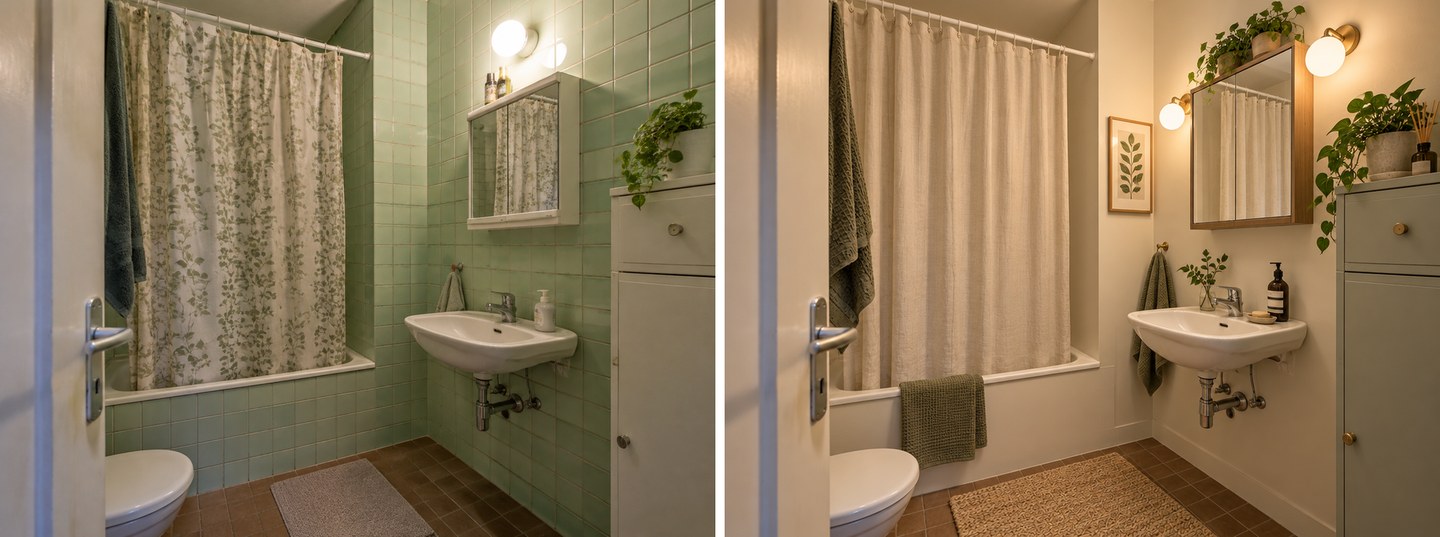 The honest limit: the tile became plaster. Painted tile keeps its grid; this preview would mislead you.
On the pink and beige bathrooms the same mode kept the tile, so you cannot predict it. Say it in the brief every time: either "keep the wall tiles as they are" or "paint the tiles, keep the grout lines visible".
The second limit: on tile with barely visible grout, the AI invents the grid. The beige tile in Case 2 has thin, almost tone-on-tone joints. When we asked for dark charcoal grout in the tub surround, the tiles came back bigger. When we asked to paint the same tiles white, they came back smaller.
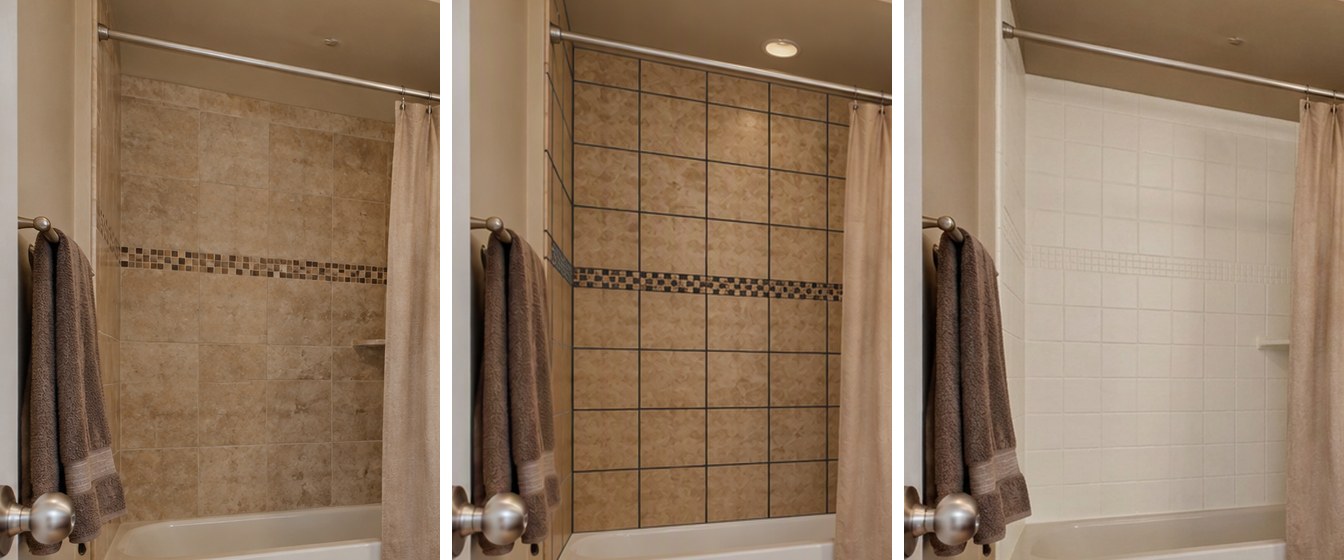 Left: the original. Middle: "dark charcoal grout", the tiles grew. Right: "paint the tiles white", the tiles shrank.
Use these as color previews, not as tile-count previews. Everything we noticed:
| What we asked | What went wrong | How to work around it |
|---|---|---|
| Refresh mode, no words (rental) | Tile painted over and the grout lines erased | Always say "keep the tiles" or "keep the grout lines visible" |
| Dark grout on low-contrast tile | Tile size changed; a small ceiling light appeared | Judge the color only; test on a photo where joints are visible |
| Paint beige tiles white (Select area) | Tile size changed; the mosaic border nearly vanished | Try Recolor an object, which kept the grid in both other bathrooms |
| Renter brief in Refresh mode | Landlord's cabinet painted, mirror cabinet replaced | Name what must stay: "the cabinet stays white" |
| Black-framed mirror, no size given | Mirror came back narrower than the old one | Give the size: "as wide as the vanity" |
| Paint the wall tiles (pink) | The pink tub stays pink | Correct, but plan for tub refinishing if the pair bothers you |
How to Write a Refresh Request the AI Follows
- Start with what stays. "Keep the floor tiles, the bathtub, the toilet and the layout." The AI changes less when it knows the fixed points.
- Name the tile and the color. "The pink wall tiles and the burgundy border to warm white" works better than "make it brighter".
- Ask for the grid. "Keep the grout lines visible" stops the plaster effect.
- One surface per edit when you compare. Vanity first, then the mirror, then the tile. Pick the original in the strip of versions under the photo before each edit, so every change starts from the same picture.
- Give sizes when they matter. "A mirror as wide as the vanity", "a 72-inch curtain".
- Use paint names if you have them. People in our data typed brand colors; the result is a close preview, not a color match. To compare wall colors, see how to try paint colors on a room photo or use the paint visualizer.
What Does a Refresh Cost Compared With Retiling?
A refresh is cheap mostly because nothing gets torn out. HomeAdvisor puts a full bathroom remodel at $6,651 to $17,660, and says demolition of tile, fixtures and old drywall alone adds $1,000 to $2,300 (remodel cost guide, updated June 2026). The refresh jobs you may hire out cost far less:
| Job | Typical pro cost (US) | Source |
|---|---|---|
| Full bathroom remodel | $6,651–17,660 | HomeAdvisor |
| Tearing out tile, fixtures and drywall | adds $1,000–2,300 | HomeAdvisor |
| Regrout a shower | $600–2,500, about $1,500 on average | HomeAdvisor |
| Refinish (reglaze) a bathtub | $337–631, about $483 on average | HomeAdvisor |
| Refinish a tub-and-shower unit | $600–1,000 | HomeAdvisor |
| Preview each move on your photo | 2 credits per design or edit | GenRoom |
Tub refinishing figures come from HomeAdvisor's bathtub refinishing guide. Paint, curtains and mirrors you do yourself depend on the products you choose, so we do not quote a number. Our whole test (17 designs and edits across three bathrooms) used 34 credits.
If after all this you decide the tile really has to go, our bathroom tile visualizer guide shows new tile on your photo, and the tub-to-shower conversion guide covers the bigger job. If the real problem is that the room doesn't work, not how it looks, start with our small bathroom layout ideas. For a full remodel in one go, start from the bathroom design page.
FAQ
Can you paint bathroom tile?
Yes. Ceramic wall tile can be painted after a deep clean, sanding off the gloss and a bonding primer, or with a tub-and-tile epoxy kit. Manufacturers recommend it for walls, not floors: Rust-Oleum's Tub & Tile kit is for walls and tubs only, and Sherwin-Williams advises against floors and spots that are often wet.
Is painting bathroom tiles a good idea?
It is a good idea when the tile is sound but the color is dated, and you plan to keep the room for a few years before a remodel. It is a poor idea on a shower floor, on cracked tile or over failing grout. Preview the color on a photo first, because paint on tile is hard to undo.
How long do painted bathroom tiles last?
It depends on the area and the prep. In one DIY blogger's five-year review, painted shower walls held up well, while floor paint wore through where she stood every day, and unprimed tile got nicked. Manufacturers do not promise a number of years; follow their prep and cure times.
Can you change grout color without removing it?
Yes, with a grout colorant or a grout paint pen on clean, sound grout. It does not repair cracked, crumbling or moldy grout, which has to be removed and replaced. In a preview, ask for "only the grout lines" and "keep every tile the same".
What is the cheapest way to modernize a bathroom?
Change what you can undo: paint the walls and the vanity, replace the mirror and the light, swap the faucet and the knobs, and change the shower curtain and the towels. Those moves change the biggest surfaces in the room without touching the tile, and you can preview each one on your photo for 2 credits.
Can I see painted tile on a photo of my bathroom?
Yes. In the GenRoom Studio, upload a photo, open the editor and use Quick actions → Recolor an object ("the pink wall tiles to warm white"), or select the tiles with the lasso and describe the paint. Ask to keep the grout lines visible, so the preview looks like painted tile and not like a plaster wall.
The Bottom Line
To update a bathroom without replacing tile, change the things around the tile first: walls, vanity, mirror, light, metal finishes and textiles. Paint the wall tile only when the color is the real problem, and only after cleaning, sanding and priming, or with a tub-and-tile kit; leave the floor to peel-and-stick or a floor coating. Before you buy a can of anything, put each option on a photo of your own bathroom in the GenRoom Studio, tell the AI what must stay, and check that the grout lines are still there.