See an Exact Paint Color by Code: RAL, NCS, HEX on Your Photo
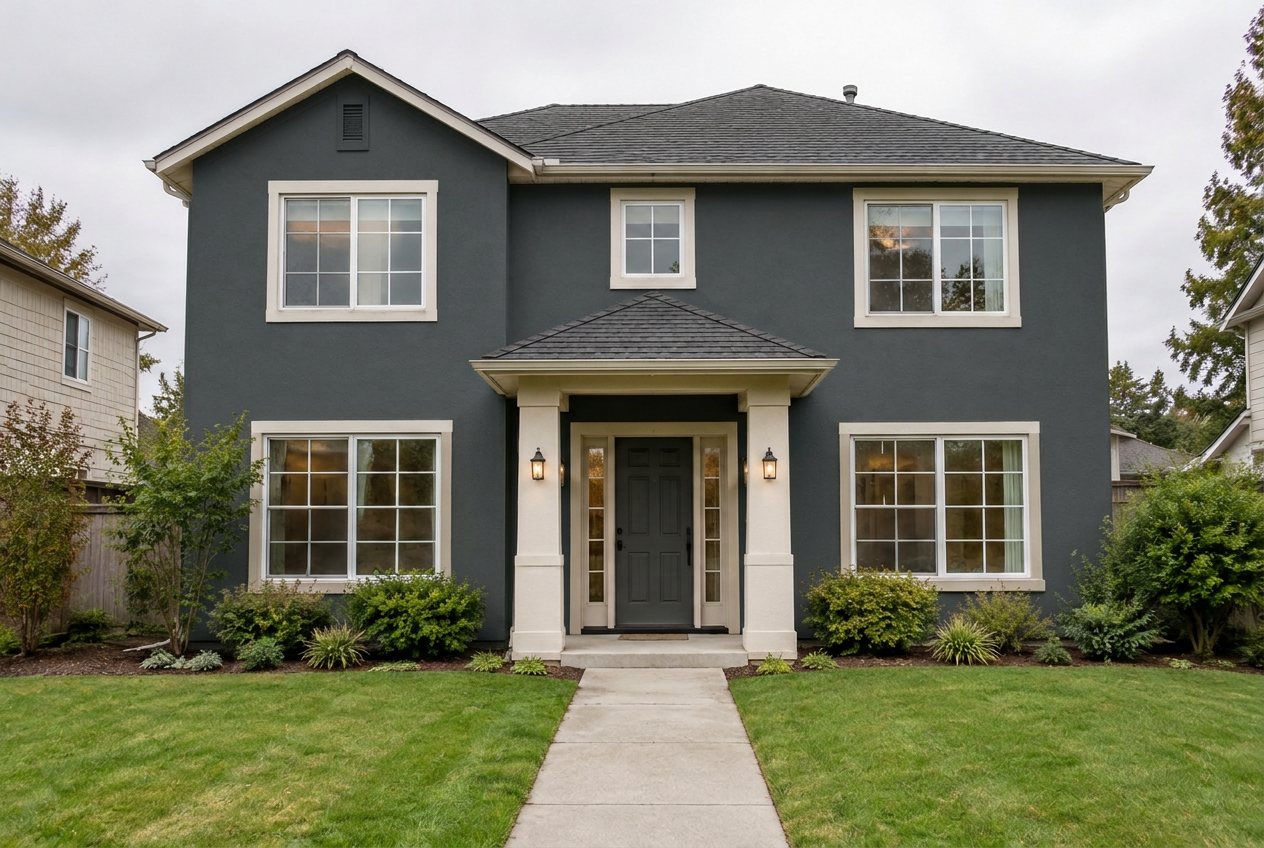
A real GenRoom result: the light beige stucco house from our test, with "RAL 7016" typed into the Facade color quick action. Only the wall color changed.
You can see an exact paint color on your own photo by typing its code instead of a color name. In the GenRoom Studio you upload a photo of your room or house, open Quick actions → Wall color (or Facade color for a house) and type a RAL code, a HEX value or an NCS code. The Studio turns each of these codes into a real color swatch and sends it to the AI together with your photo, so the wall is painted from a sample, not from a guess. A paint brand name such as Benjamin Moore Hale Navy is passed to the AI as a name only, without a swatch, so its shade depends on what the model knows about that color.
We tested all four kinds of input on a living room and a house: 13 edits, with the wall color of each result measured from the pixels and compared with the reference color. Below you will find what each code system means, the exact clicks, the measured results, where brand names work and where they drift, and a two-minute fix that brought a brand color twice as close. For general color ideas without codes, see our guide on trying paint colors on a room photo.
What do people actually type when they want an exact color?
They type the code from the fan deck, the paint can or the architect's drawing. Between 2 March and 14 October 2026, 604 GenRoom users asked for a specific paint by its code or brand name, not for "light grey" or "warm beige". Paraphrased and anonymised, their requests look like this:
- "Paint the lower white part of the wall in RAL 3018."
- "Try RAL 1000 in that niche instead of RAL 7032."
- "The grey wall should become S 4502-Y."
- "Change the wall color to SW 7621."
- "Paint the bench and the table in Bleeker Beige by Benjamin Moore."
- "Base color Sto 31437, accent on the dormer Sto 31434, windows RAL 7039."
- "Replace the brown with steel blue, RGB 70, 130, 180. Keep the white areas."
- "Main color Jotun 9904, balconies and garden wall in Jotun Twilight."
Two things stand out. First, people mix systems in one sentence: a facade color from one manufacturer, window frames in RAL, trim from a fan deck. Second, many of the requests are about the outside of a house, not only rooms. This article covers both.
Which color codes does the AI understand?
GenRoom recognizes four kinds of color input and treats them differently. We checked this in the Studio's code and in the server log of every test edit: for RAL, HEX and NCS the log shows "1 swatch", for a brand name it shows "0 swatches, 1 by brand".
| What you type | Example | What the Studio does | How close to expect |
|---|---|---|---|
| RAL Classic code | RAL 7016 | Attaches the ready RAL swatch with its official name (Anthracite grey) | Close: a real reference shade |
| HEX value | #C8B898 | Draws a swatch in exactly that color | Close: the most precise input |
| NCS code | NCS S 2005-Y20R | Computes a swatch from the notation, marked "≈" | Approximate: no licensed NCS table is used |
| Brand name or brand code | Benjamin Moore Hale Navy, SW 6204 | Passes the brand and the name to the AI as text, no swatch | Approximate: depends on what the model knows |
| Brand name + HEX | Sherwin-Williams Urbane Bronze #54504A | Swatch from the HEX plus the brand name | Close: our recommended way for brand colors |
The Studio recognizes Sherwin-Williams, Benjamin Moore, Behr, Farrow & Ball, Dulux, Jotun, Caparol and a few other brands by name and by their code formats (for example "SW 7567", "HC-154", "30YY 69/048"). KEIM codes get an approximate swatch from the color values KEIM publishes. Other manufacturers' codes, such as Sto numbers, still reach the AI, but only as words.
Plain RGB numbers ("RGB 70, 130, 180") are not converted into a swatch. If you have RGB values, convert them to HEX first (70, 130, 180 is #4682B4) and type the HEX.
How do RAL, NCS and HEX codes work?
Each system describes a color differently, and that is why the AI handles them differently.
RAL Classic is a German color collection used for facades, windows, metal and powder coating. A code has four digits; the first digit gives the color family (1 yellow, 2 orange, 3 red, 4 violet, 5 blue, 6 green, 7 grey, 8 brown, 9 white and black), so RAL 7016 is a grey and RAL 5024 a blue. The RAL overview lists the full collection; GenRoom's color library holds 213 RAL Classic shades with their names. Because every code is one fixed color, RAL is the easiest code to get right.
NCS (Natural Colour System) describes how a color looks to the eye. In NCS S 2005-Y20R, "20" is the blackness (20%), "05" is the chromaticness (5%), and "Y20R" is the hue: yellow with 20% red. What is left over, 75%, is whiteness. A neutral grey ends in "N", as in S 2000-N. The NCS notation is read in this order. The official conversion of NCS codes to screen colors is a licensed table, so GenRoom computes the color from the notation itself and marks it as approximate.
HEX is how screens write colors: #C8B898 means red C8, green B8 and blue 98 in hexadecimal, the same notation web pages use. It is the most precise thing you can give the AI, because the swatch is drawn in exactly that color.
Brand codes (SW 6204, HC-154, No. 231) are each manufacturer's own catalog numbers. They identify a paint, not a color value. Most brands show a screen color for each paint on their website, which is where you can get a HEX for it.
How do you put an exact paint color on your photo, step by step?
The whole process takes about a minute and one edit costs 2 credits.
- Take a straight, well-lit photo. Daylight from a window or an overcast sky gives the most honest color. Avoid strong yellow lamps and deep shadows across the wall.
- Open the AI editor in the Studio and upload the photo. The editor keeps everything in the picture except what you ask to change.
- Open Quick actions. Under Colors & materials, pick Wall color for a room or Facade color for a house.
- Type your code into the color field and press Enter. The field accepts a ready shade (Warm white, Greige, Anthracite and others), a color name, a RAL, NCS or HEX code or a paint brand color.
- Check the chip and apply. A chip like "Facade: RAL 7016" appears above the text field. Press the send arrow (Apply, 2 credits). In our tests the result usually arrived in 20–30 seconds.
- Compare with Before/After, then go back to the original and try the next code. Starting every color from the original photo keeps the comparison fair.
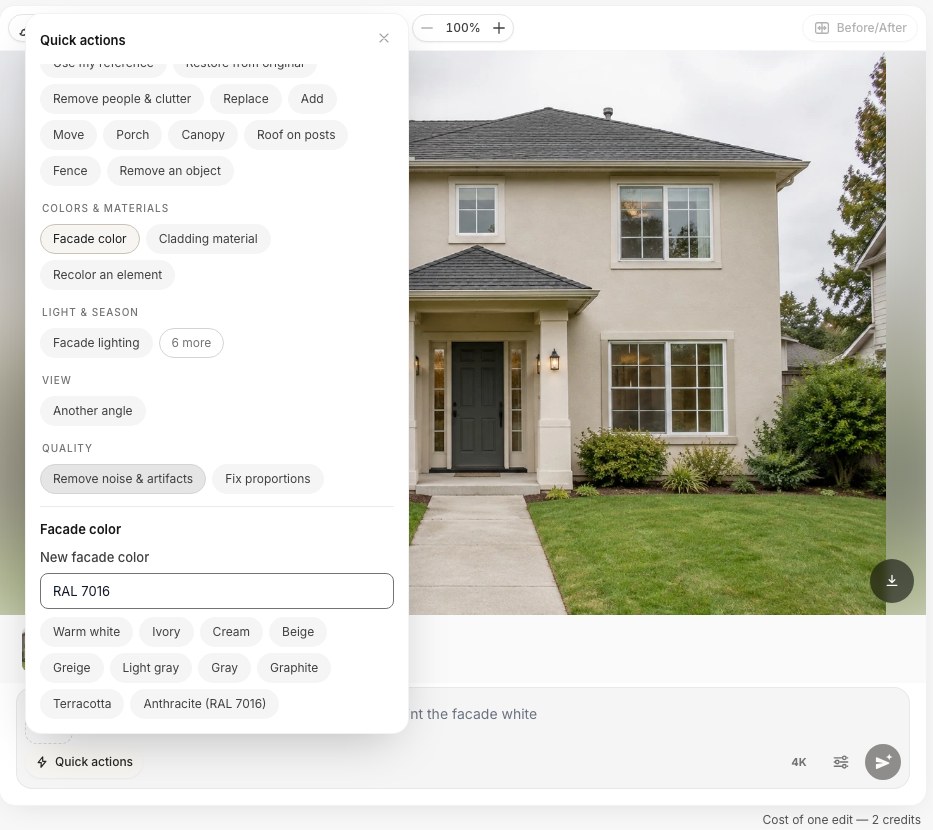 Quick actions → Facade color with "RAL 7016" typed in. For a room the same field is called Wall color.
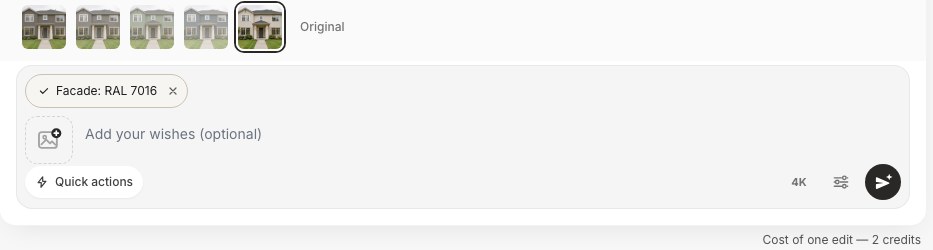 After Enter, the code becomes a chip. You can add wishes in the text field, for example "keep the trim white".
You can also write the code into your own words, for example "Paint the lower half of the wall in RAL 3018, keep the top white", in the edit field or in the design brief. When the Studio finds a code in your text, a "Color in your text" row appears under the field with the swatch it will send. A code that does not exist, such as RAL 7099, is shown as "not in the table, check the code" before you spend a credit.
Does it work on the outside of a house?
Yes, and the result is easiest to judge on a facade, because a house has large plain wall areas. We took one photo of a light beige stucco house and typed three different inputs into Facade color.
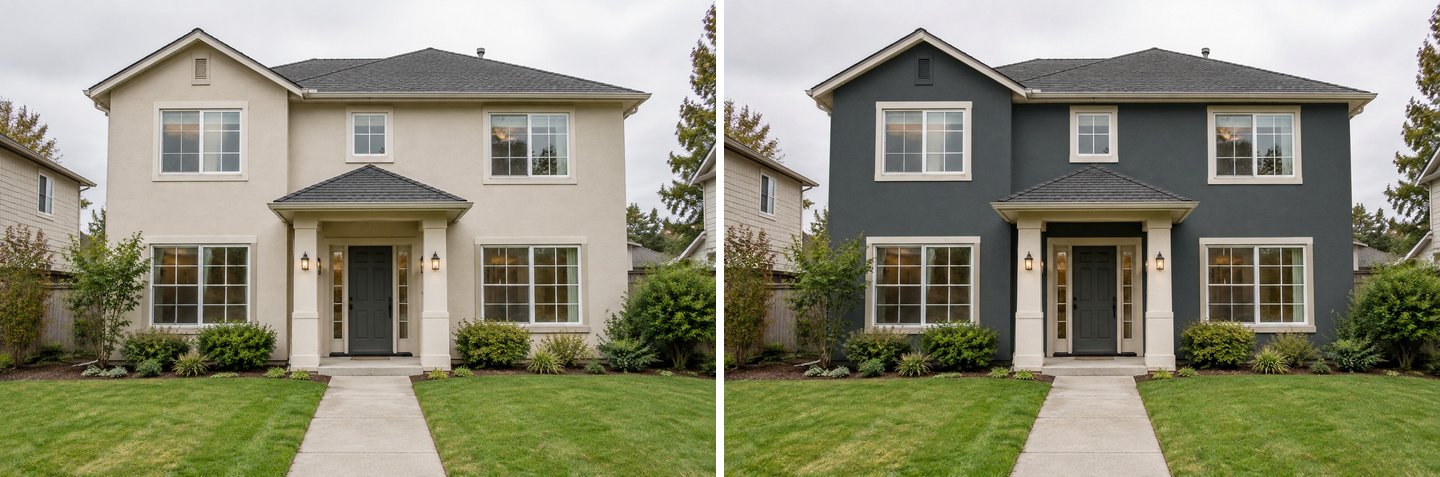 Left: the original. Right: "RAL 7016" in Facade color. The windows, trim, roof, front door and planting stayed exactly where they were.
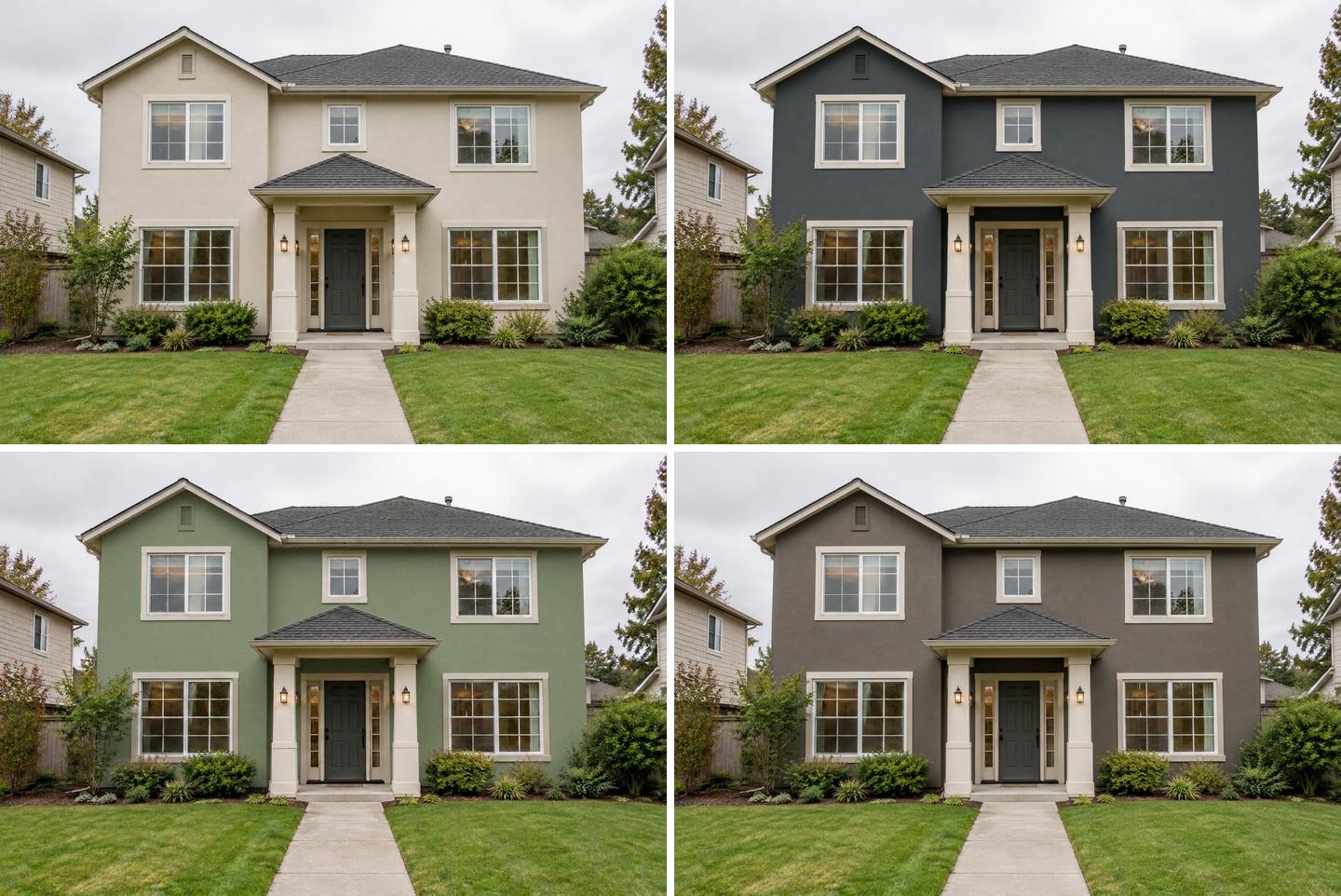 Top left: original. Top right: RAL 7016. Bottom left: HEX #9CAF88. Bottom right: "Sherwin-Williams Urbane Bronze" typed by name, without a code.
All three edits changed only the stucco. The trim stayed white, the porch kept its shape and nothing was added to the garden. The colors behaved the way real paint does outside: in daylight the dark anthracite reads a little lighter than its chip, and the sage green reads a little greyer and darker under an overcast sky.
The exterior paint visualizer page has a code field that shows you what the Studio will understand before you upload anything: a RAL or HEX code becomes "exact colour sample", a brand name becomes "by name, approximate".
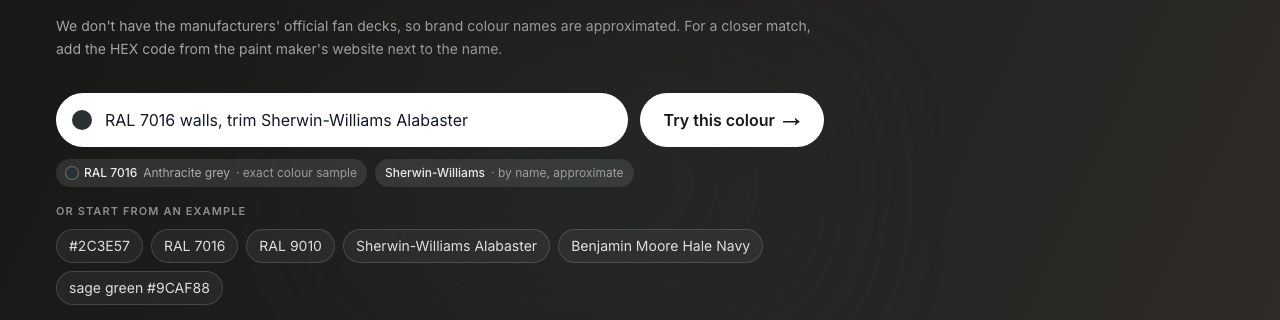 The exterior paint page reads your codes as you type: RAL 7016 is an exact sample, the brand color is matched by name.
For broader facade color advice (60-30-10 palettes, trends, historic homes), read our AI house paint color visualizer guide.
How close is the color on the wall? We measured it
We measured every result. For each edit we took the median color of the same patch of wall in the result and compared it with the reference HEX of the code. The living room was shot in soft daylight; the house under an overcast sky.
One thing to know before reading the numbers: a wall in a photo is never the color of the paint chip. In the original living room, the off-white wall measured #B0A99E, a mid grey-beige, simply because of the light in the room. So a painted wall that comes out darker than its reference is normal. What matters is whether the hue and the depth of the color are right.
| Input | Reference color | Wall in the result (median) | Our verdict |
|---|---|---|---|
| HEX #C8B898 | #C8B898 | #AA987D | Same warm tan, darker in the room's light |
| RAL 5024 Pastel blue | #5D9B9B | #688988 | Same blue-green, a little greyer |
| NCS S 2030-G10Y | ≈ #8AD78D (computed) | #8AB47E | Followed the swatch; the swatch itself is brighter than a paint maker's value |
| Benjamin Moore Hale Navy (name) | #434B56 (listed) | #424C53 | Practically identical |
| Sherwin-Williams Sea Salt (name) | #CDD2CA (listed) | #AEAFA7 | Right soft grey-green, darker in the room's light |
| SW 6204 (code only) | #CDD2CA (listed) | #A4A79C | Recognized, slightly darker than by name |
| RAL 7016 Anthracite grey (facade) | #293133 | #4A5051 | Same grey, lighter in daylight |
| HEX #9CAF88 (facade) | #9CAF88 | #7F886F | Same sage, greyer under an overcast sky |
| SW Urbane Bronze (name, facade) | #54504A (listed) | #6F665D | Right family, noticeably lighter and warmer |
| SW Urbane Bronze + #54504A (facade) | #54504A (listed) | #61594F | About twice as close as the name alone |
Brand reference values are the screen colors listed for these paints on Match My Paint Color. They are screen approximations of physical paint, like every HEX of a brand color.
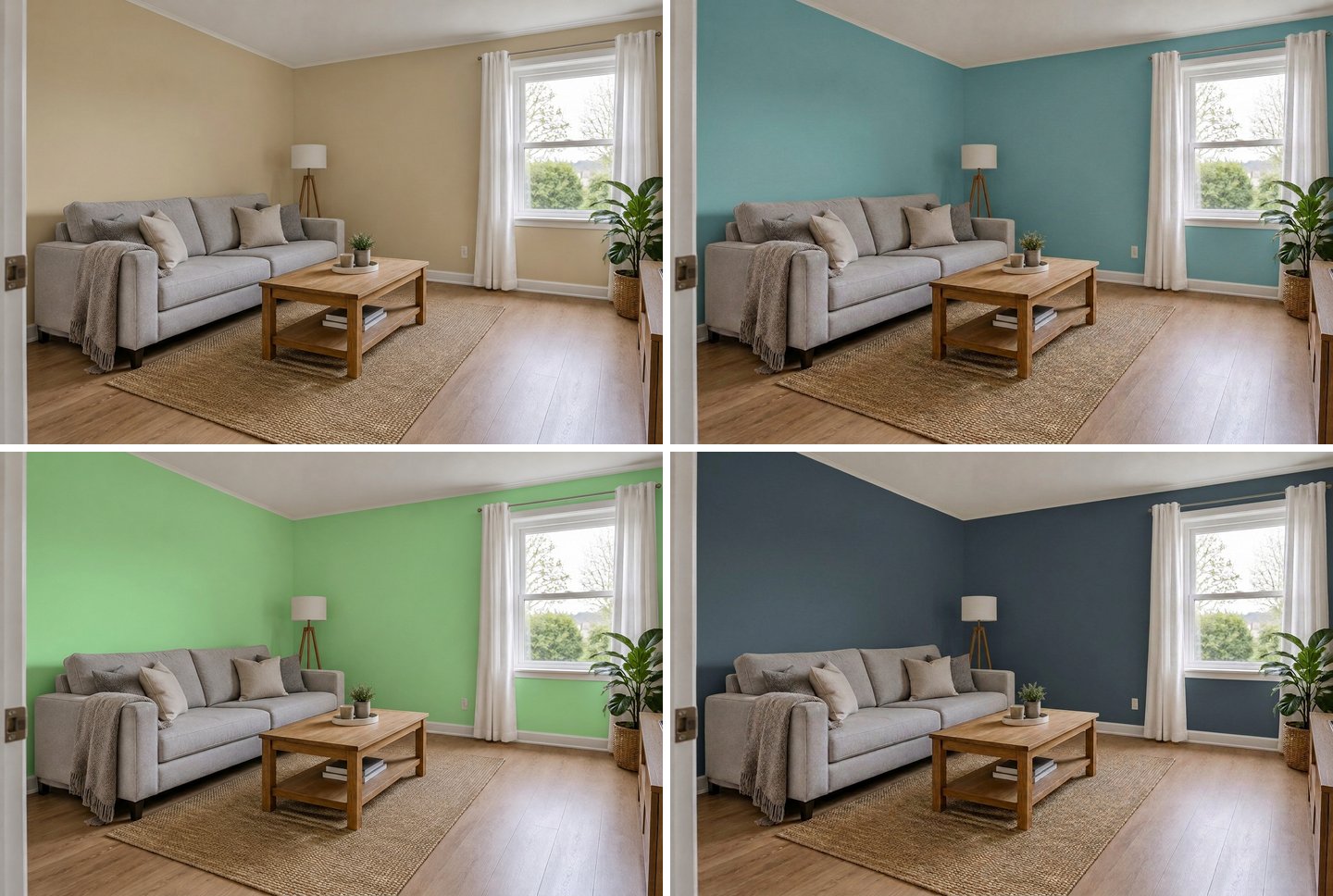 One room, four kinds of input. Top: HEX #C8B898 and RAL 5024. Bottom: NCS S 2030-G10Y and "Benjamin Moore Hale Navy". Furniture, floor, ceiling and trim stayed the same.
In all 13 edits the AI changed only the painted walls. Inside, the furniture, floor, white baseboards, ceiling and curtains stayed put; outside, the windows, trim, roof and garden did. That is what the Wall color and Facade color actions are built for.
Create interior design with AI
Upload a photo of your room and get a professional design in 30 seconds. First generation is free.
Do paint brand names like Sherwin-Williams or Benjamin Moore work?
Partly. A well-known brand color typed by name usually lands close, because the image model has seen that paint many times. A less common name, or a bare catalog number, is a guess. GenRoom does not have the manufacturers' official color tables, so it never invents a swatch for a brand color; it passes the name to the AI and says so on screen.
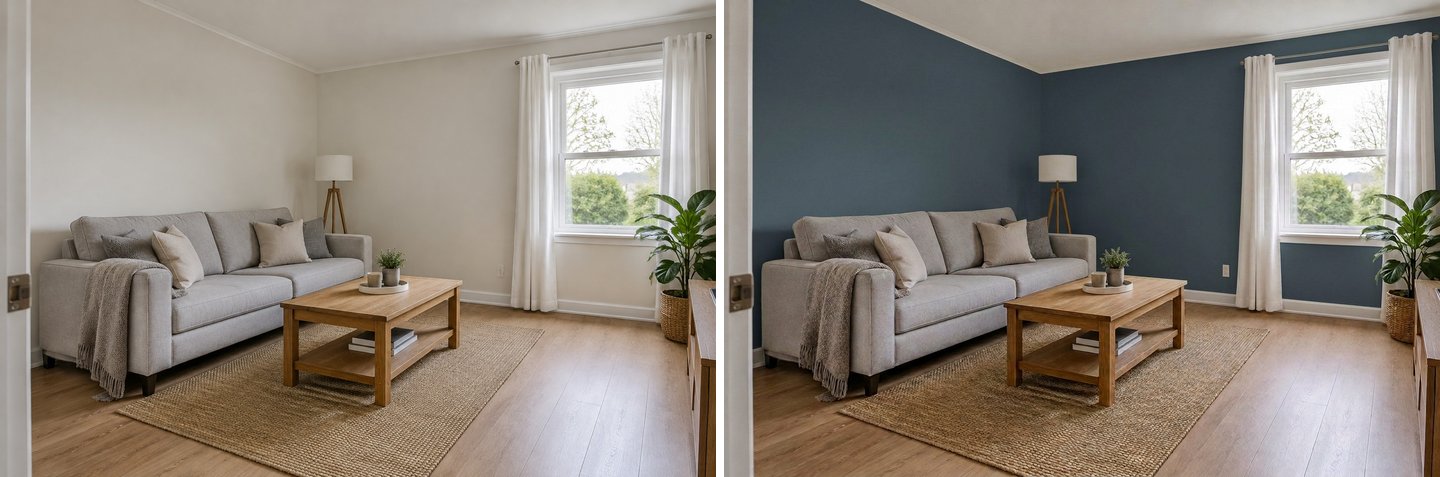 "Benjamin Moore Hale Navy" by name. The measured wall color, #424C53, is almost exactly the listed #434B56: a famous color the model knows well.
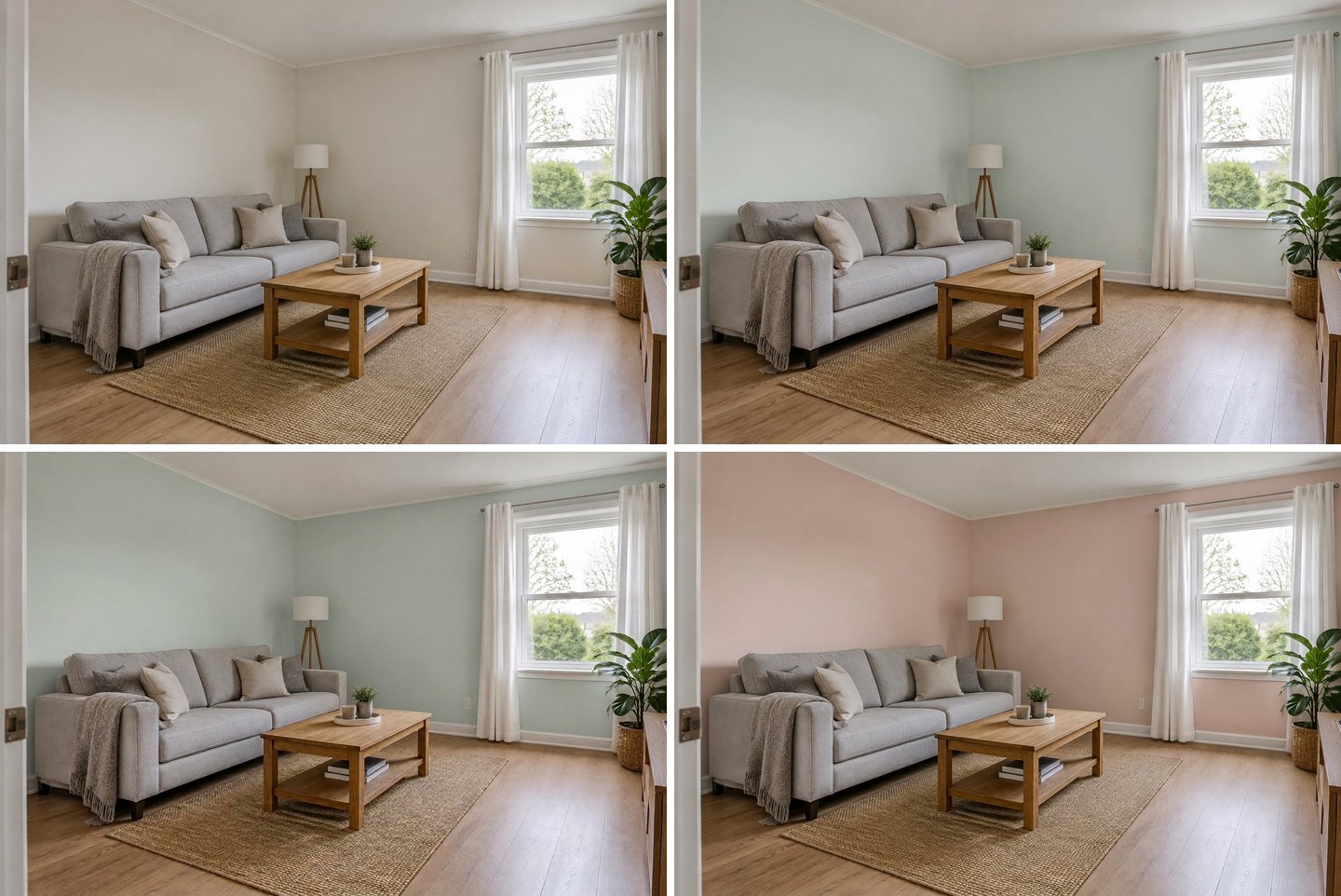 Top left: original. Top right: "Sherwin-Williams Sea Salt". Bottom left: "SW 6204", the same paint by code only. Bottom right: "Farrow & Ball Setting Plaster". All three are in the right color family; none came with a swatch.
Urbane Bronze shows the limit. By name alone, the facade came out lighter and warmer than the paint. With the paint's HEX typed after the name, the same edit on the same photo got about twice as close.
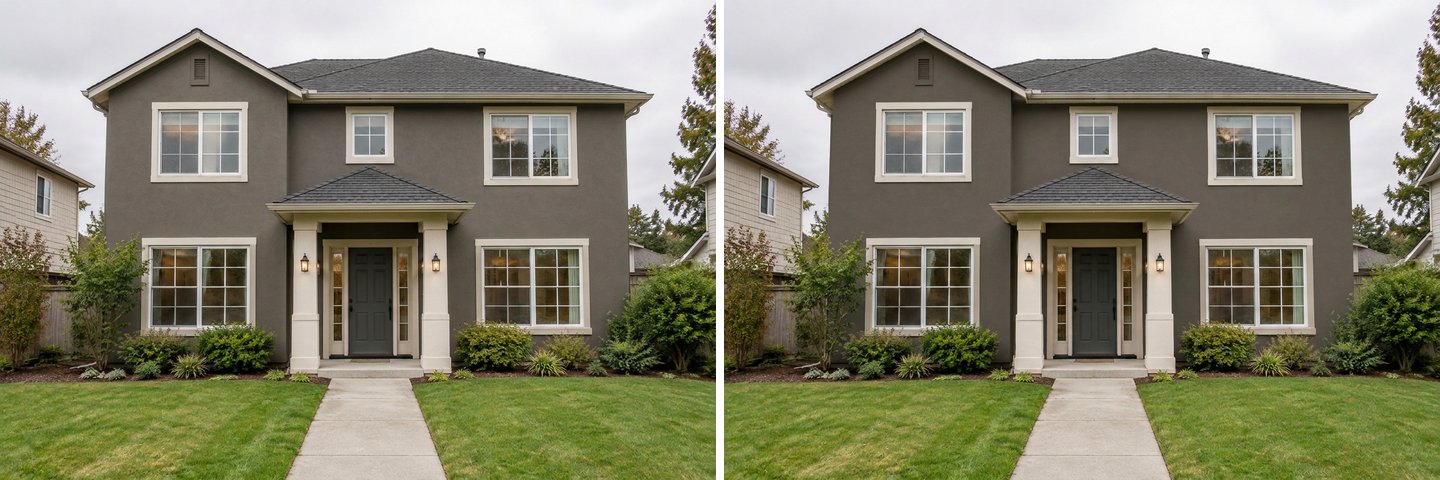 Left: brand name only. Right: brand name plus the paint's HEX. Adding the HEX gave the AI a real swatch.
How to get the HEX of a brand paint color
- Open the paint's page on the manufacturer's website and look for HEX or RGB values; many brands list them next to the color, often with the LRV (light reflectance value).
- If you only see RGB, convert it to HEX with any color converter.
- Type the name and the HEX together, as in our test: "Sherwin-Williams Urbane Bronze #54504A".
- Keep the name in the field. The HEX gives the AI the exact screen color; the name tells it what kind of paint it is.
Remember that a brand's HEX is itself a screen approximation of a physical paint. It is the best digital value you will find, but the chip in the store is still the final word.
GenRoom is not affiliated with any paint manufacturer. Brand names in this article are examples of what people type.
Why is an NCS color only approximate?
Because the official NCS-to-screen table is licensed, the Studio calculates the swatch from the code. For the light, soft colors people use most (S 1002-Y50R, S 2000-N, S 2005-Y20R) the calculation is close, and on the wall such a code gives a gentle shift, for example from off-white to a light greige. For stronger colors it can drift. Our test code S 2030-G10Y, a soft sage, was computed as ≈ #8AD78D, a brighter mint than the RGB value listed for Taubmans paint in the same code, 136, 189, 151 (#88BD97).
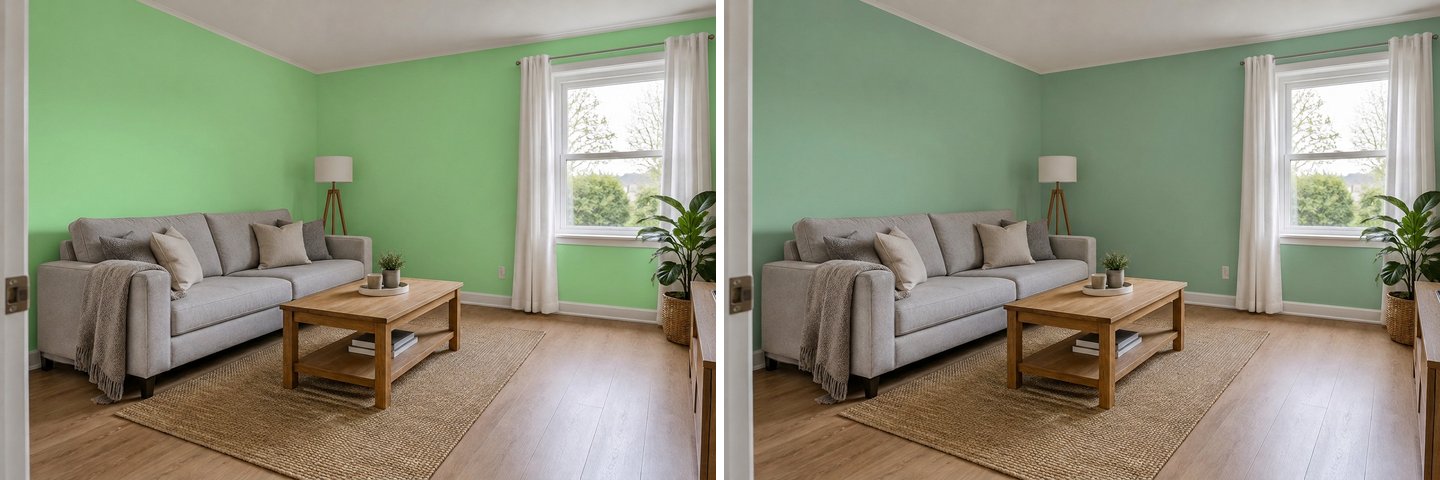 Left: "NCS S 2030-G10Y", with the computed swatch. Right: "#88BD97", the RGB a paint maker lists for that code. Both edits followed their swatch faithfully; the swatches themselves differ.
The lesson: the AI follows whatever swatch it gets. With NCS, look at the "≈" swatch in the Studio first. If it looks brighter or duller than your paper sample, ask your paint shop for the HEX or RGB of that code in their paint line and type that instead.
How do you check a code in the color library first?
Open the Colors library on the right of the editor. It has four tabs: Palette (curated interior and facade shades), RAL (popular shades and all 213 RAL Classic colors), NCS (a short selection, or type any code) and HEX. Type a code to see its swatch, name and value before you use it; Add attaches that swatch to your edit as a color reference.
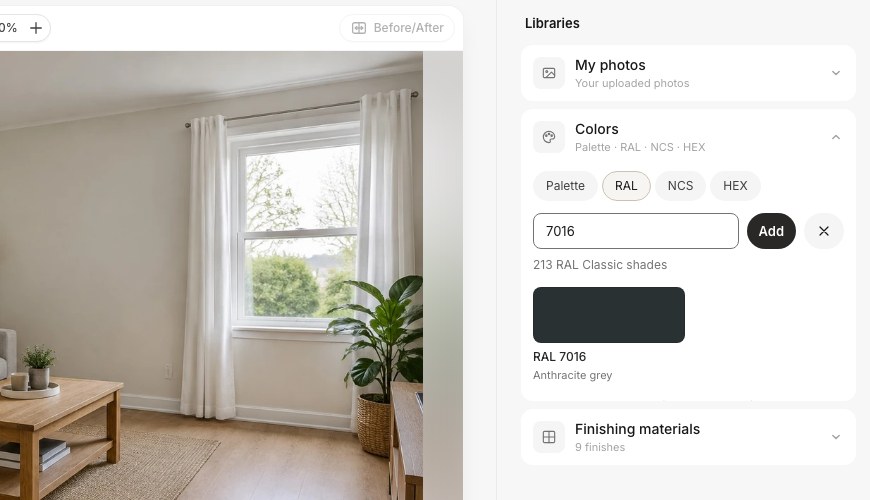 RAL tab: "7016" finds Anthracite grey among 213 RAL Classic shades.
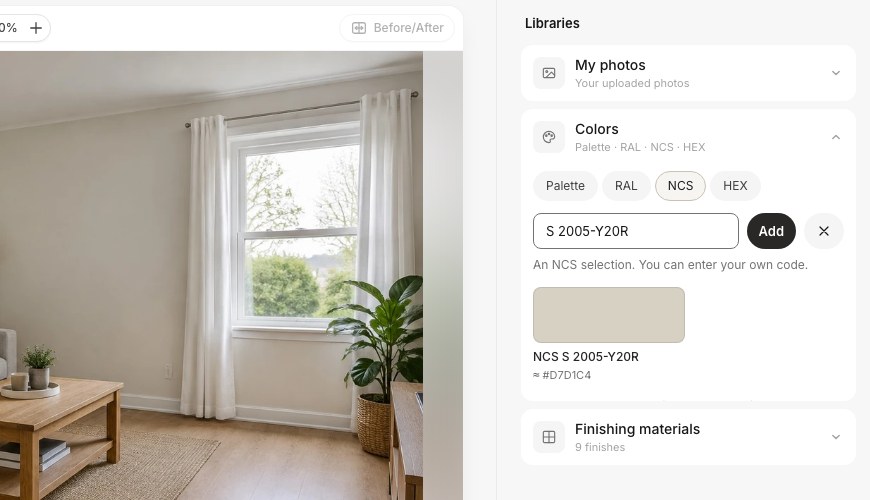 NCS tab: any valid code gets a computed swatch, marked "≈". Invalid codes (a hue that does not exist, blackness plus chromaticness over 100) are refused with an explanation.
The library is also a quick way to browse. If you know you want "a RAL grey for the windows", the RAL tab with all 7000-series shades is faster than guessing codes.
What can still go wrong with exact colors?
Codes make the color precise, but a photo is not a paint chip. These are the limits we saw:
- Light changes everything. A wall in shade reads darker; a wall lit by a warm lamp reads warmer. Dark colors outside in daylight look lighter than their chip, exactly as real paint does.
- Mid-strength colors can come out a little greyer. RAL 5024 and the sage #9CAF88 kept their hue but lost some saturation in our tests.
- Brand names are matched from memory. Famous colors (Hale Navy, Sea Salt) were close; Urbane Bronze by name was too light. Add the HEX for anything you are about to buy.
- NCS is computed. Fine for light, soft codes; check the "≈" swatch for strong ones.
- RGB numbers and unlisted brands are words only. Convert RGB to HEX; for unlisted brands use the HEX from their site.
- Sheen and texture are not part of a code. Say "matte", "satin" or "smooth stucco" in the wishes field if it matters.
- Your screen is not calibrated paint. Judge the result for direction (lighter or darker, warmer or cooler), then buy a sample pot and paint a large patch on the real wall.
What does it cost?
Each edit costs 2 credits, whatever kind of code you type. A free account comes with 6 credits, enough for three color tries, with a small watermark. Paid packs are one-time payments, not subscriptions: Start $9.99 for 36 credits, Basic $19.99 for 100 and Pro $39.99 for 300. Testing five codes on one wall costs 10 credits. The paint visualizer page shows more interior examples.
FAQ
Can I see a RAL color on a photo of my house?
Yes. Upload the photo in the GenRoom editor, open Quick actions → Facade color and type the code, for example "RAL 7016". The Studio attaches the official RAL swatch with its name, and the AI repaints the walls while keeping windows, trim and roof.
Can I enter a HEX code to change my wall color?
Yes. Type the HEX, for example "#C8B898", into Wall color or into your own sentence. The Studio draws a swatch in exactly that color and sends it with the photo. HEX is the most precise input you can give.
Does the AI know Sherwin-Williams or Benjamin Moore colors?
It recognizes the brand names and their code formats, but GenRoom has no official brand color tables, so there is no swatch. Famous colors such as Hale Navy came out very close in our tests; others drift. Type the brand's HEX next to the name for a closer match.
Is the NCS color exact?
No, it is approximate. The official NCS screen values are licensed, so the Studio computes the color from the notation and marks it "≈". It is close for light, soft codes; for stronger codes, use the HEX or RGB your paint supplier lists for that code.
Why does the painted wall look darker than my paint chip?
Because the AI keeps the light of your photo. A shaded wall in a real room also looks darker than the chip in your hand. Compare the result with the original photo, not with the swatch on screen.
Can I paint the trim or the window frames in a different code?
Yes. Write it in your own words in the edit field, for example "walls RAL 7016, window frames RAL 9010, keep the door". Each code gets its own swatch. For one specific area, use Select area to mark it first.
The Bottom Line
To see an exact paint color on your photo, type the code, not a description. RAL and HEX codes become real color swatches and gave the most predictable results in our tests; NCS works as a computed approximation; brand names are matched by name, which works for famous colors and drifts for others. For any brand paint you are about to buy, add its HEX after the name. Upload a photo in the GenRoom Studio, open Quick actions → Wall color or Facade color, and test your shortlist before you open a single can.