Empty Lot Design With AI: See Your House and Garden Layout First
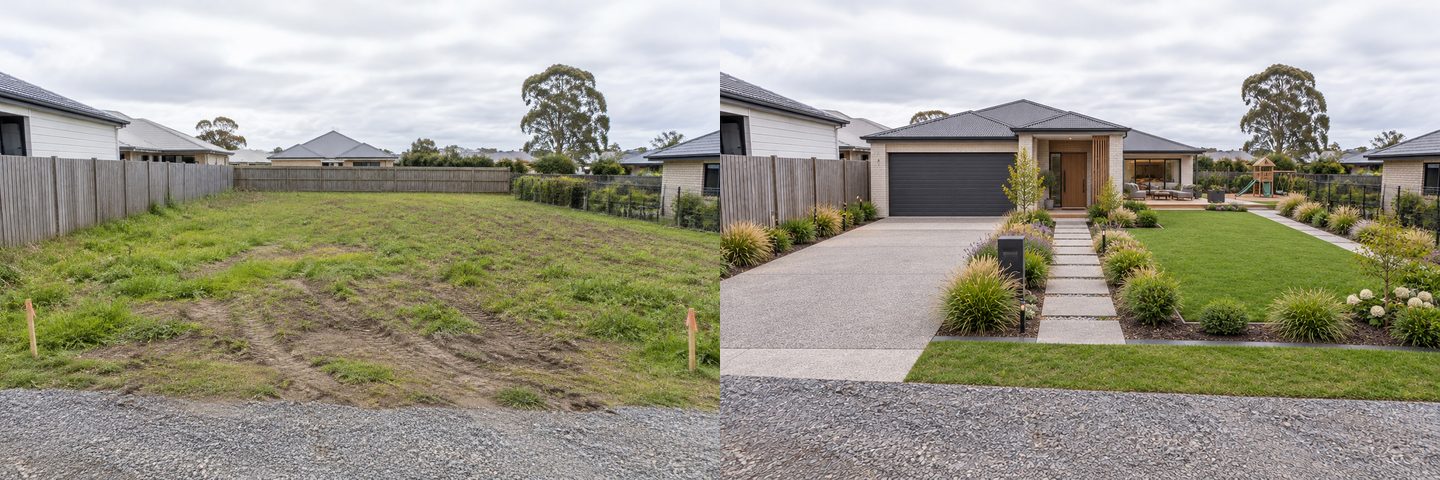
One real GenRoom result. Left: a photo of a vacant lot. Right: "House & garden" with the "Zones around the house" option and the Contemporary style. Nothing else was typed.
You can see where a house, a driveway, a garden and a terrace could go on an empty lot by uploading a photo of the bare plot to an AI design tool and asking for a layout. In GenRoom, a photo of an undeveloped plot gets its own question, "What do we do with the photo?", with three answers: landscape the plot, build a house, or design the house and the garden together. In about 20–30 seconds you get the same plot from the same spot with a house and a finished garden on it.
That is a mood picture, not a site plan. The AI does not know where your boundaries are, how far the house must stand from them, which way is north or how big the plot really is. What it does well is let you compare two or three arrangements on your own land in an afternoon, so the first meeting with an architect starts with "this one, but turned" instead of a blank sheet.
Between March and mid-October 2026, 109 people asked the GenRoom Studio in their own words to show a house, a garden or both on an empty plot. Below are the exact steps we followed, three layouts on one flat lot, two on a sloped rural plot, a cabin placed in a chosen spot, and every mistake we caught.
If your house is already standing but unfinished, our guide to designing an unfinished house exterior fits better. If the plot is full of weeds and junk, start with cleaning up an overgrown yard.
What Do People With an Empty Plot Ask For?
Most people with a bare plot bring numbers, directions and a room list, and want to know where everything fits. Here is how they put it to GenRoom, shortened, translated where needed and anonymised:
- "The plot is 39 by 40 meters, with a 4-meter sliding gate on the north side."
- "Build a simple house, 10 by 13 meters: a living room, two bedrooms, a bathroom, a separate kitchen and dining room. A yard with a play area and parking for a car."
- "The plot is 900 square meters and slightly sloped. I want four terraces: in front of the house, at the back, on the left and on the right."
- "I don't want to change the fence or the terrace. I only want to use the part of the plot that is empty now."
- "Put the house on the east side. The barbecue on the east, a fire pit with seats and a swing on the west."
- "I want to build a small home in this yard. How would I do that?"
The common thread: the land is bought or about to be bought, nothing is drawn yet, and the owner wants to see a few options before paying for drawings. The trouble is that a photo model cannot use most of these numbers precisely. The table shows what it can and cannot take from a request.
| What you know | Can the AI use it on a photo? | What to do instead |
|---|---|---|
| Plot size (e.g. 23 × 26 m) | No, it does not measure the photo | Keep it for the architect; describe proportions ("narrow and deep") |
| Room list (2 bedrooms, separate kitchen) | Only as a rough size of the house | Ask for "single-storey" or "two-storey" and a footprint shape |
| North, sun, prevailing wind | No, it cannot see orientation | Describe positions on the photo: "left", "back", "near the gate" |
| Where the house, drive and garden go | Yes, in words or with a selected area | Name the place in the photo or select it |
| Style of the house and the garden | Yes, from the style list or your words | Pick up to three styles for three variants |
| Slope and terraces | Partly; it may flatten the hill | Check the result against the photo (see Example 2) |
What Can AI Show on a Photo of an Empty Lot, and What Can't It?
AI can show how a house and garden might look in a given spot on your plot, seen from where you took the photo. It cannot tell you whether that spot is allowed, buildable or sensible for sun and drainage. Those answers come from a survey, local rules and a designer.
What the pictures are good for:
- Comparing arrangements. House at the front or the back, driveway left or right, garden in front or behind. Each version costs one click.
- Seeing proportions in context. How much of the plot a house eats, how the neighbours' houses frame it, how long a driveway looks.
- Choosing a character. A barn-style house with a meadow, or a Mediterranean bungalow with gravel and lavender.
- Talking to people. A partner, a builder or an architect understands a picture faster than a list.
What they are not: a site plan, a floor plan, a planning application or a cost estimate. We come back to this in "What a real site plan needs" below.
How to See a House and Garden on Your Lot (Step by Step)
Upload a photo, answer "What do we do with the photo?", pick a mode, a style and press "Create design". In detail:
- Take the photo from the street or the gate, standing where people will first see the house. Hold the phone at eye level and get both side boundaries in the frame if you can. Overcast light hides less than harsh sun.
- Open the Studio and choose "Design from a photo". Upload the picture. GenRoom reads it and sets the type to "Yard".
- Answer "What do we do with the photo?" It appears when the AI sees an undeveloped plot or one with works in progress, marked "an empty plot". "Landscape the plot" keeps it a garden, "Build a house" puts a house on it, and "House & garden" designs both in one style.
- Pick a mode. "Build a house" has three options: "Move-in ready", "Floor-to-ceiling windows" and "With entrance & driveway". "House & garden" has "House and garden", "Zones around the house" and "Planting around the house".
- Add your layout in "Your brief". This is where you say where things go: "set the house back at the far end", "driveway along the right fence". Ready tasks under "What to build" add a "Single-story house", "Two-story house", "House with a garage", "House and guest house" or "House at the back of the plot".
- Choose a style, or up to three. For "Build a house" you get house styles (Tudor, Contemporary, Minimalist, Hi-Tech, Scandinavian, Barnhouse, Classic and more, 14 in all). For "House & garden" you get garden styles such as English Cottage Garden, Japanese Garden or Mediterranean. Each style makes a separate design.
- Press "Create design". Every next variant runs from the original photo, and the thumbnails under the picture let you flip between versions or open "Before/After".
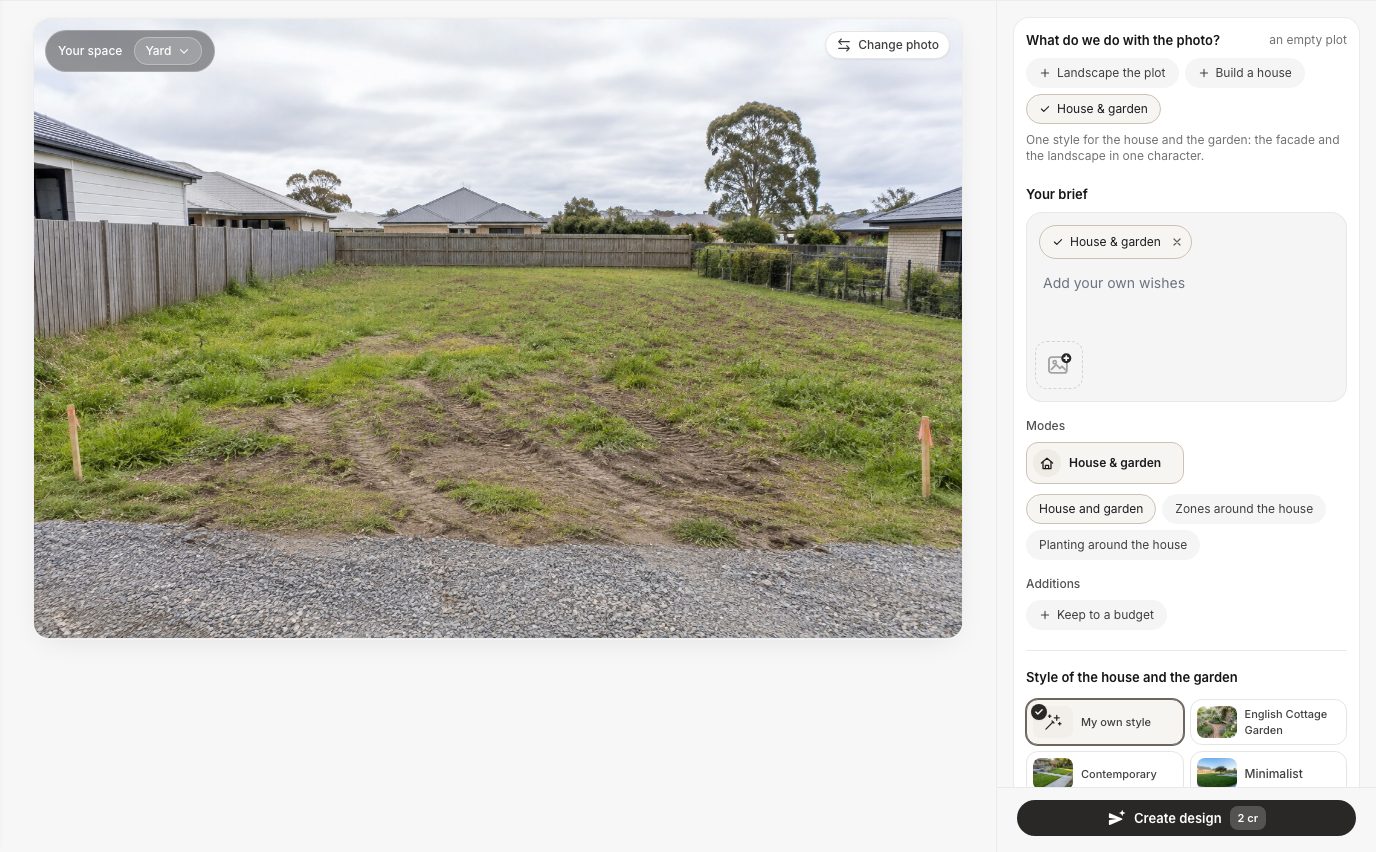
The Studio on our vacant lot. The plot was recognised as "an empty plot", so the three choices appear above the brief.
If the question does not appear, the AI has read your plot as a finished garden. That happened twice in our tests: a fenced plot with a freshly mown lawn and a meadow on a hillside were both treated as ordinary yards. The fix is simple. Type the house into "Your brief" ("Build a single-storey timber house near the top of the slope…") and press "Create design". On the meadow that worked first time (Example 2).
Example 1: Three Layouts on the Same Flat Lot
On one flat suburban lot, three runs gave three genuinely different arrangements, and the fences, neighbours and street stayed where they were. The photo shows a vacant plot of rough grass and bare soil with tyre tracks and two orange survey stakes, a board fence on the left and at the back, a wire fence on the right and a gravel verge in front.
Layout A: the house in the middle, garage on the left, terrace behind
With "House & garden", the "Zones around the house" option and the Contemporary style, GenRoom drew a single-storey brick house with a garage on the left, a concrete driveway to it, a paved path from the street to the front door, a lawn, and behind the house on the right a terrace with lounge furniture and a children's play tower (see the cover image). The option asks for exactly that: parking by the entrance, an entrance area, a terrace behind the house and a kids' area, linked by paths. We typed nothing.
Layout B: the house at the back, driveway along the right fence
For the second layout we switched to "Build a house", chose "With entrance & driveway" and Scandinavian, and wrote one line in the brief: "Set the house back at the far end of the plot. Run the driveway along the right fence. Leave a big front lawn."
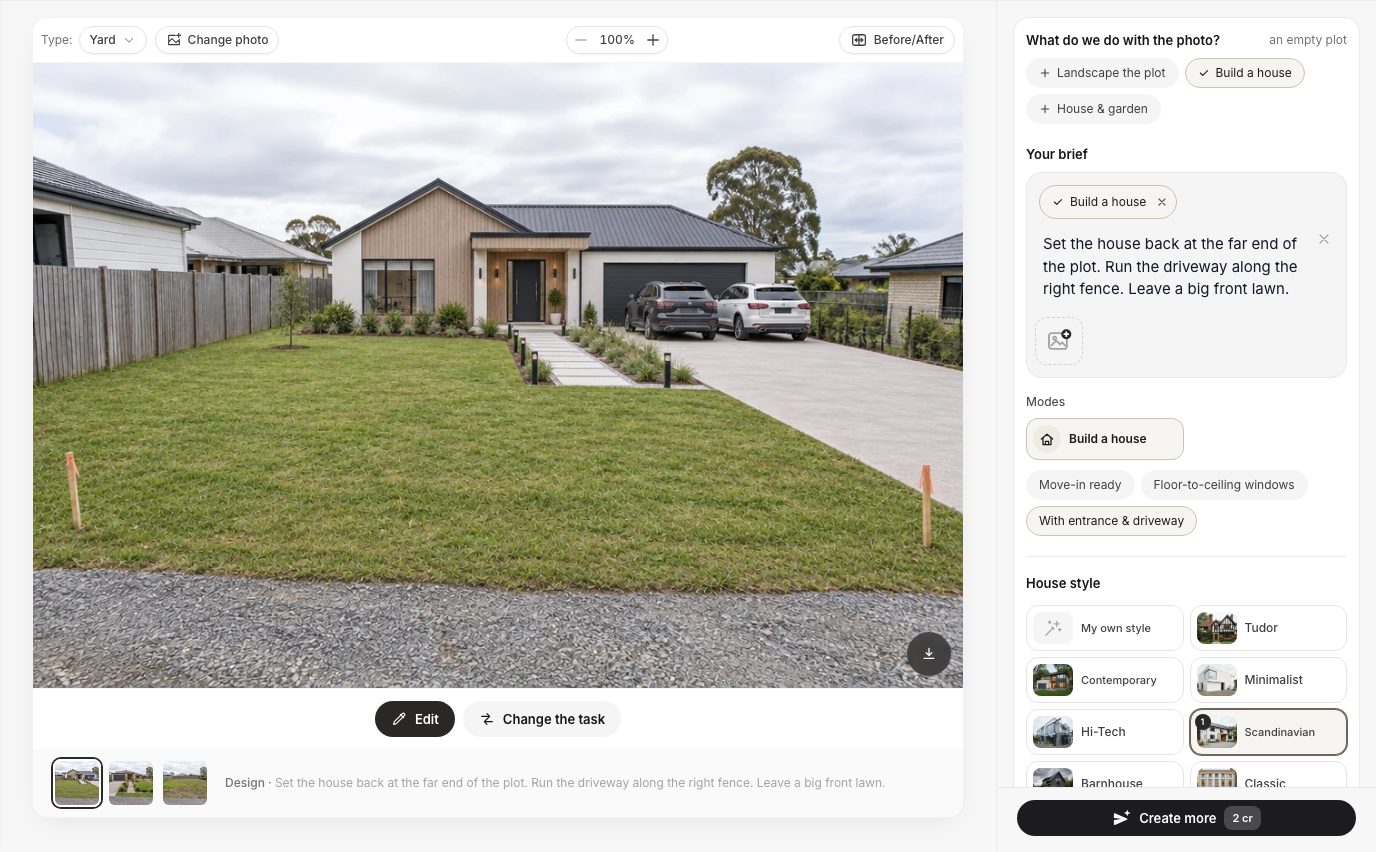
"Build a house" with a typed layout. The thumbnails at the bottom hold the earlier versions of the same plot.
It followed all three instructions. The house sits against the back fence, the driveway runs along the right side to a wide garage, and the front half of the plot is lawn. It even kept the two survey stakes in the foreground, which is a good sign the camera did not move.
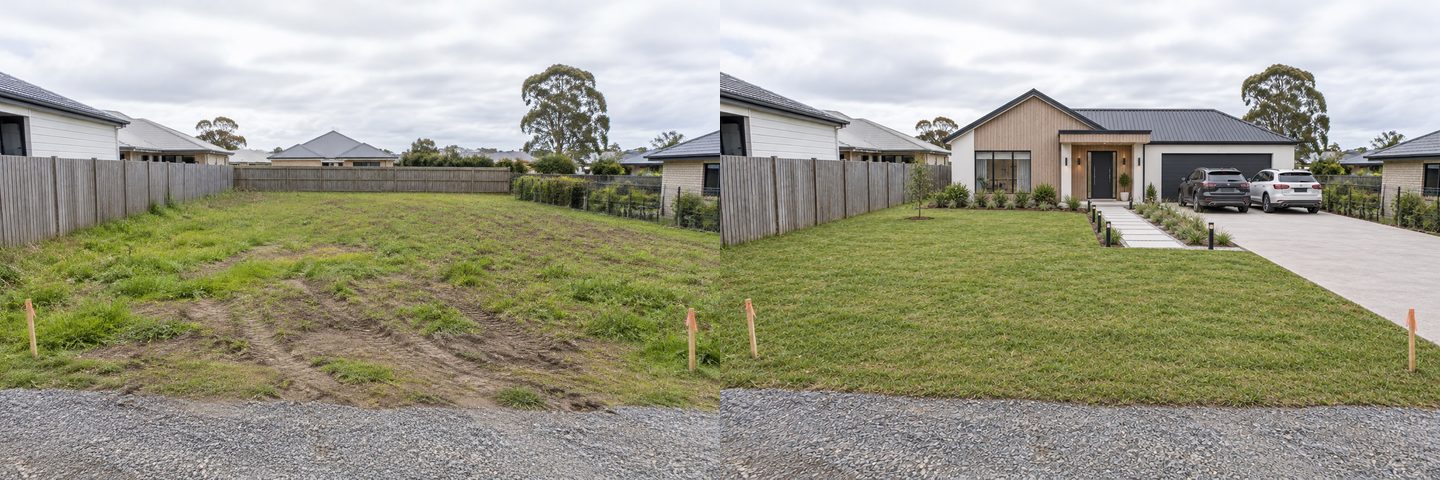
Left: the original photo. Right: "Build a house", "With entrance & driveway", Scandinavian, plus a one-line brief. The two cars were not requested.
Layout C: the house on the left half, vegetable beds in the back corner
The third run used "House & garden", the "House and garden" option, the Mediterranean style and this brief: "Single-storey L-shaped house on the left half of the plot. Covered terrace facing the garden. Vegetable garden with raised beds in the back right corner."
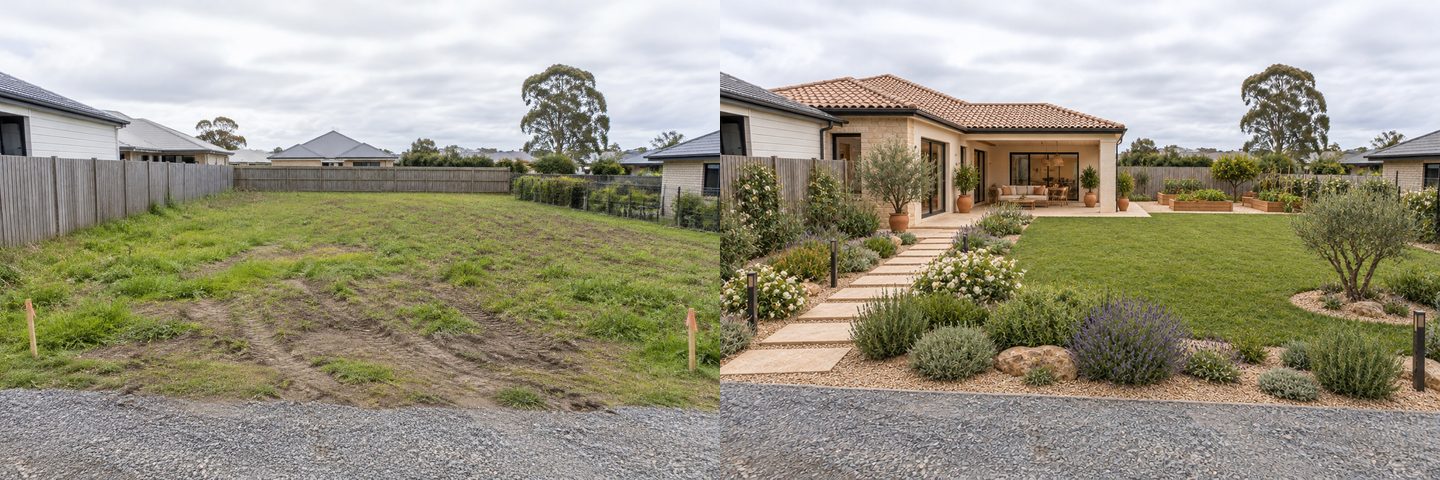
Left: the original photo. Right: "House & garden" with a typed layout. The house moved to the left and the right half became garden.
The house moved to the left, the covered terrace faces the lawn, and four raised beds sit in the back right corner. Two things to notice. The "L" is barely an L; it reads as a rectangle with a deep porch. And there is no driveway at all, because we did not ask for one. The AI fills the gaps with garden, not with things you will need. For more on bed sizes and paths, see our vegetable garden layout guide.
Comparing the three layouts side by side
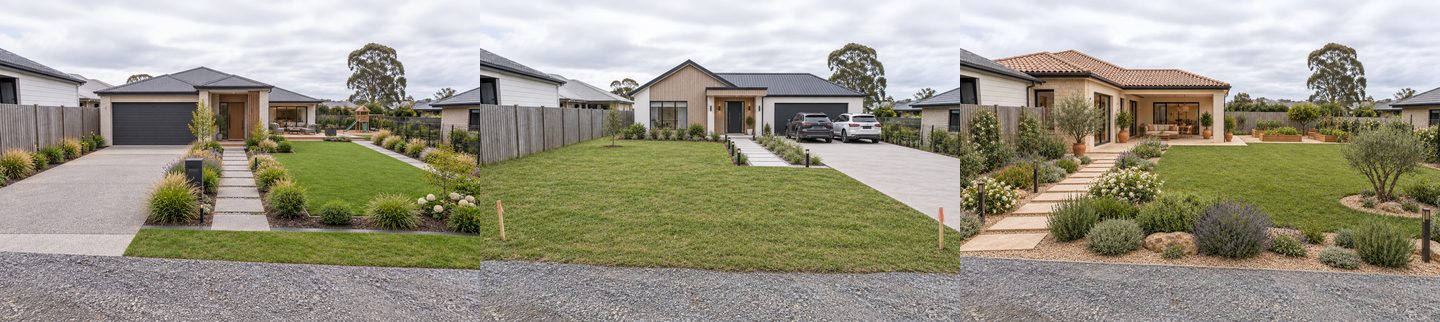
The same lot, three runs, 6 credits. Layouts A, B and C from left to right.
Put next to each other, the three pictures turn into questions you can take to a designer. The table is what we would write on the back of the printout.
| Layout A | Layout B | Layout C | |
|---|---|---|---|
| House position | Middle of the plot | Against the back fence | Left half |
| Driveway | Left side, short | Right side, long | None (not asked for) |
| Main outdoor space | Behind the house, private | Front lawn, visible from the street | Side garden facing the terrace |
| Garden for growing food | No | No | Raised beds, back right |
| Question for the architect | Does a front garage fit the setbacks? | Is a long driveway worth the paving cost? | Where does the car go? |
None of the three answers which is right for this plot. That depends on where the sun comes from, what the rules allow and how you live. But it is much easier to say "B, with the beds from C" than to describe a house in words.
Example 2: A Sloped Rural Plot
On a hillside meadow the AI placed a house in both runs, but it also made the hill gentler than it is, so check the slope against your photo. The plot is a grassy slope rising away from a dirt track, with a post-and-wire fence on the left, a line of mature trees along the top and hills in the distance.
GenRoom read this photo as a finished yard, so the "What do we do with the photo?" question did not appear. We typed the house instead: "Build a single-storey timber house with a wide terrace near the top of the slope, in front of the trees. A gravel driveway climbs from the track to the house. Keep the meadow, the fence and the trees."
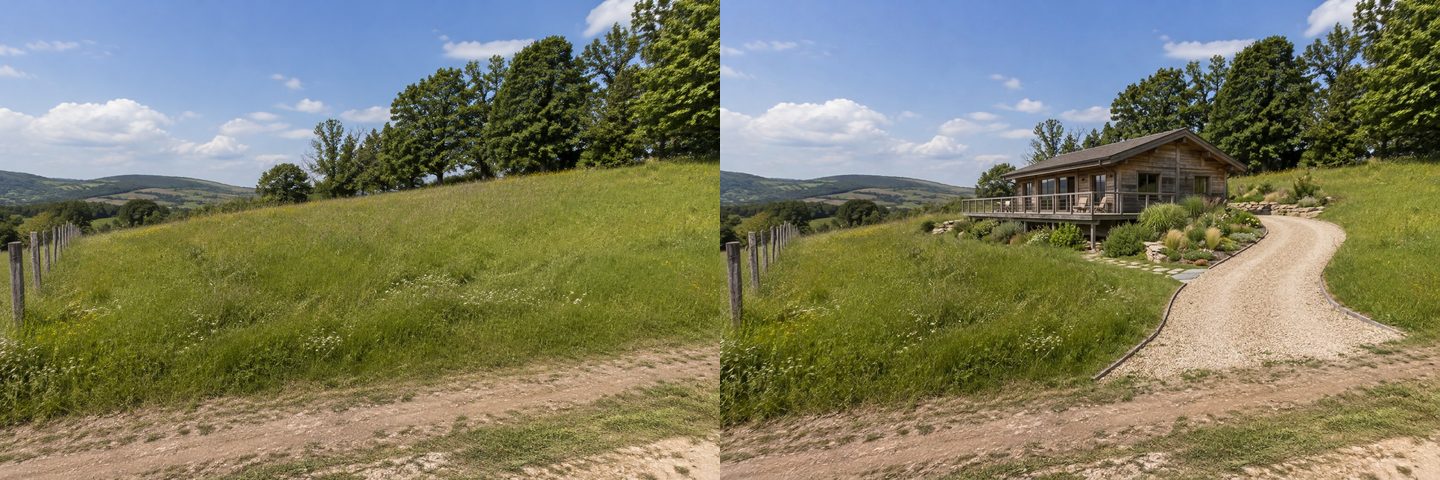
Left: the original photo. Right: a typed brief with no mode. The track, the fence and the tree line stay, but the hill is noticeably flatter than in the photo.
For a second option we asked for the opposite arrangement: "Build a compact two-storey house low on the slope, close to the track, set into the hillside with a stone retaining wall. Terraced garden beds and steps climb the slope behind it to a sitting area under the trees."
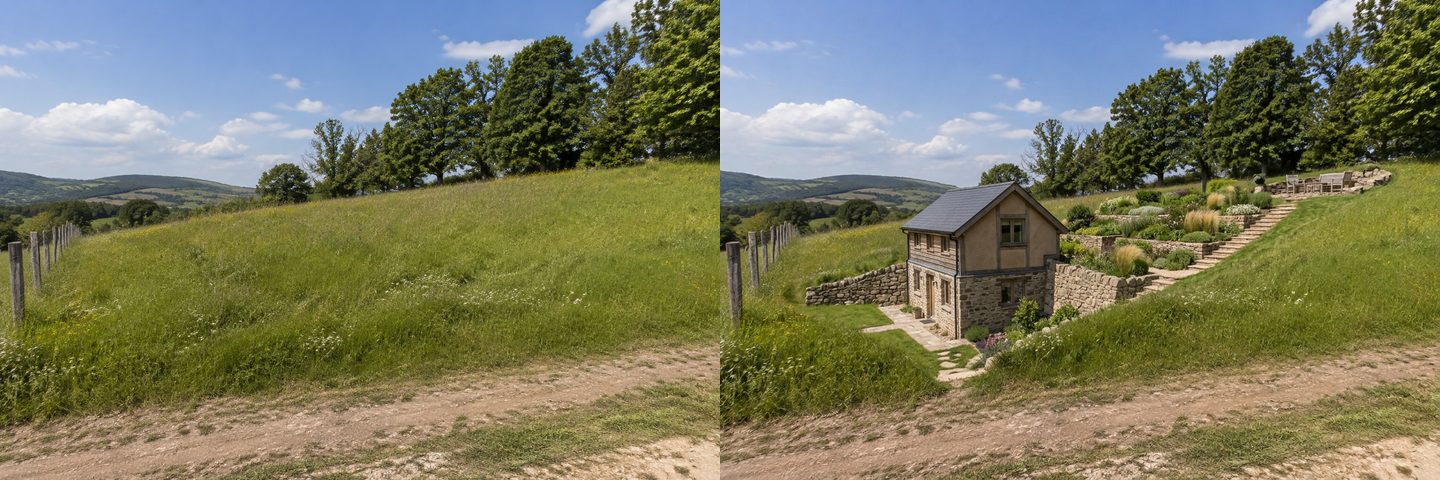
Left: the original photo. Right: the house low on the slope with terraces behind it. The AI redrew some trees and again softened the hill.
Both layouts are useful for one decision: a house up the hill with the view and a long drive, or a house by the track with a short drive and a terraced garden to climb. Neither picture tells you what the earthworks would cost. In both runs the slope came out gentler than in the photo, which makes the uphill house look easier to reach than it would be. Treat any sloped result as optimistic.
How to Place a House or Cabin Exactly Where You Want It
To put a building in one particular spot and leave the rest of the photo alone, select that area in the editor and describe what goes there. This is what one person asked for: "In the area I will mark on the photo, add…". We used it on the fenced plot with the mown lawn.
- Open the photo in the AI editor (Studio, then "AI editor", then your photo).
- Press "Select area" and choose "Lasso" or "Brush". Draw around the spot, and include the space above it, because a building is taller than the grass.
- Confirm the selection and type what goes there. We wrote: "Place a small single-storey prefab cabin with a wooden deck here, sized for a real plot. Keep everything outside the selected area as in the photo."
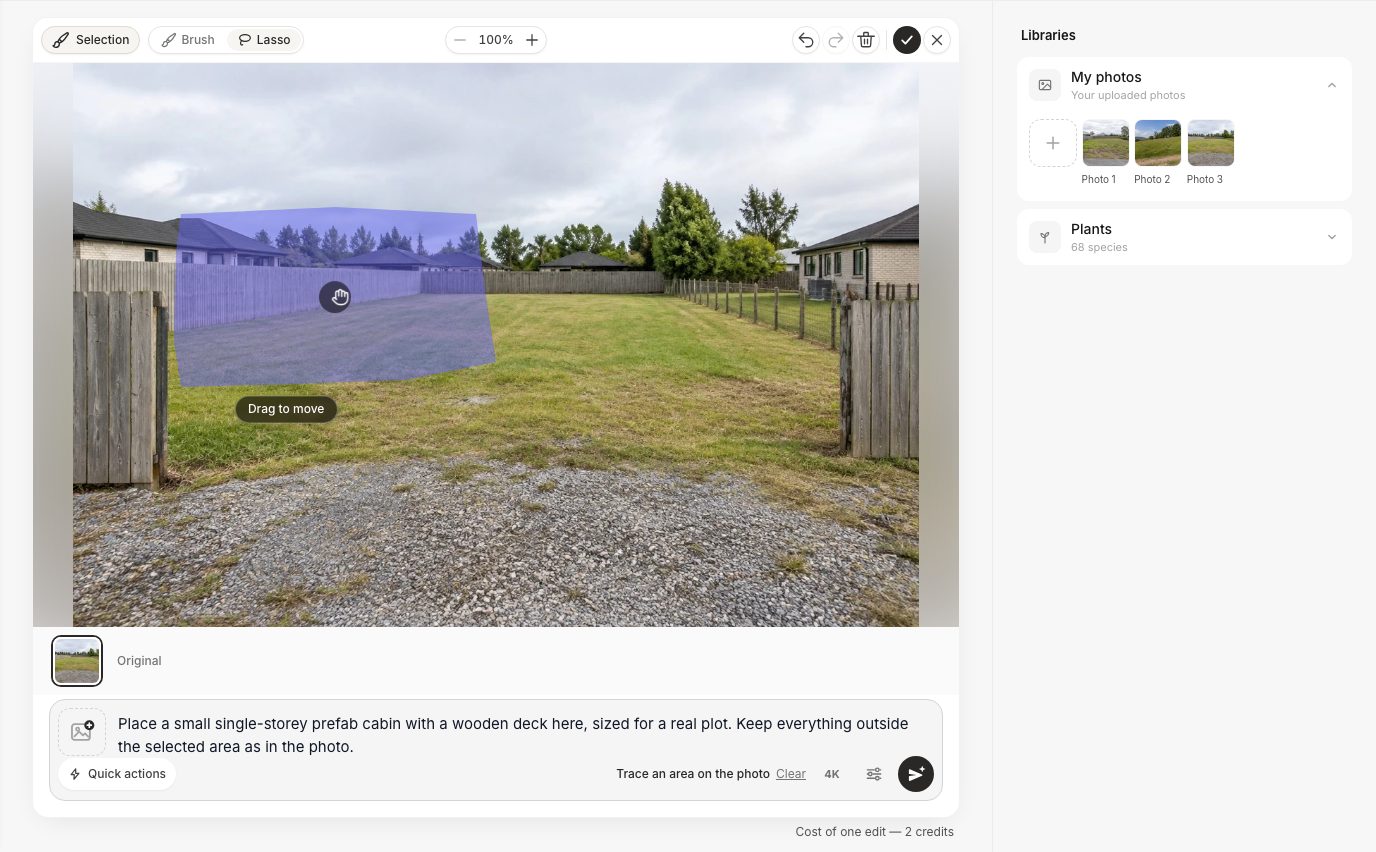
The editor with a lasso selection. Only the selected area is redrawn.
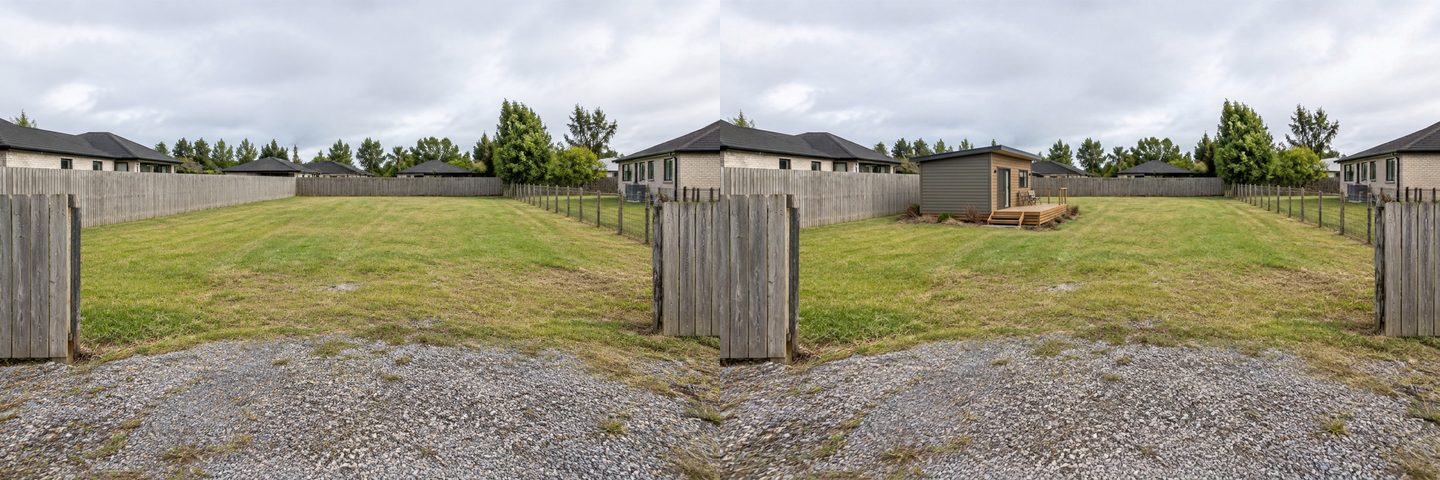
Left: the original photo. Right: one selection and one sentence. The fences, the neighbours' houses and the gravel did not change.
This was the most faithful result of the whole test: the cabin landed inside the selection and everything else stayed as photographed. It is the best tool for "garden studio here or there?" or "guest house next to the porch". The same trick works for a play area (see our kid-friendly backyard ideas).
No Photo of the Plot Yet? Start From a Description
If you have not been to the plot, or the photo is useless (snow, night, a car in front), describe the house in "Create without a photo". Choose "Facade", then a type of building such as "Private house", "Cottage" or "Cabin", describe the space and pick a style.
We wrote: "A single-storey barn-style house about 10 by 13 meters on a flat plot with a fence: two bedrooms, a covered terrace at the back, a gravel parking space for one car by the entrance and a small lawn with a play area."
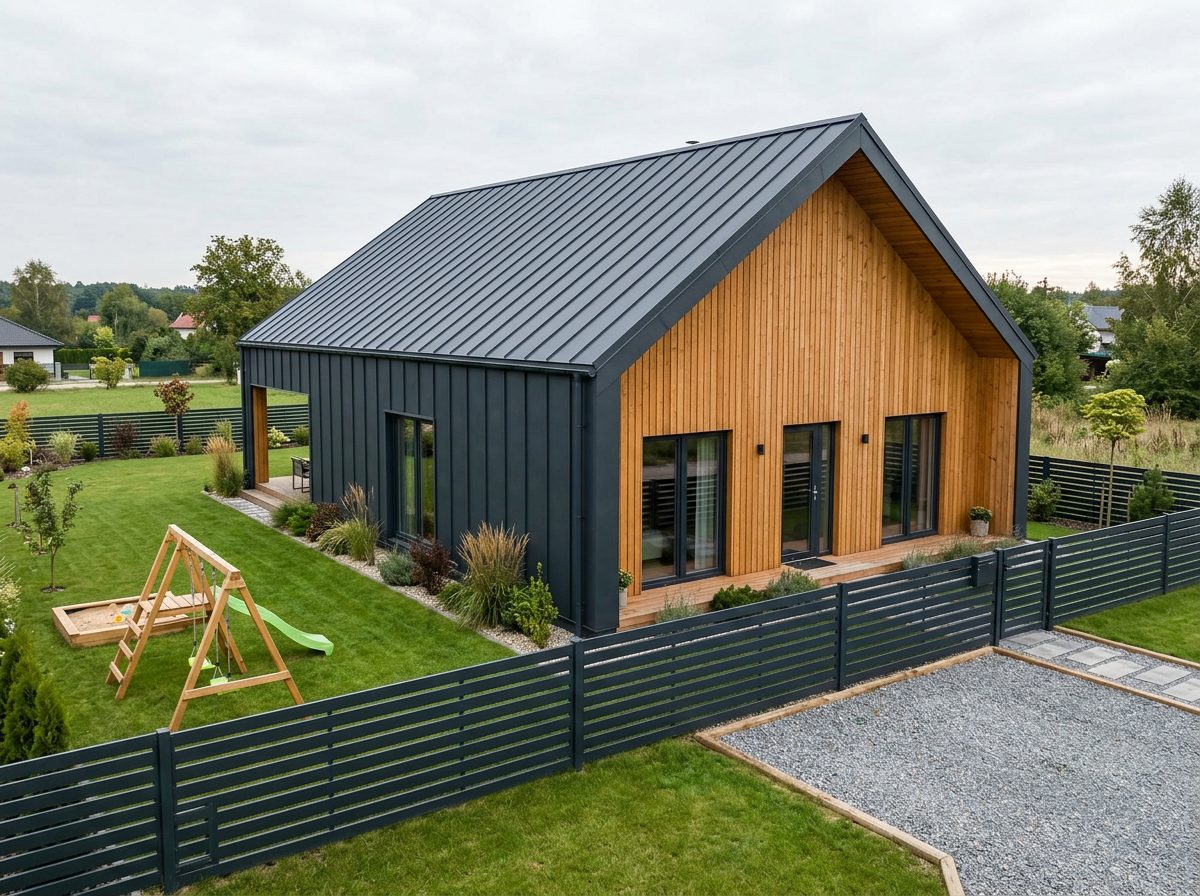
"Create without a photo", Facade, Private house, Barnhouse style. This is someone's plot, not yours.
It gives a believable house, a swing and a gravel parking space. It is a concept for the style and the massing only: the plot, the neighbours and the fence are invented. When you have a photo of the real land, switch to the steps above.
Create facade design with AI
Upload a photo of your home and get a new facade in the chosen style in 30 seconds. First generation is free.
Where the AI Gets It Wrong (Honest Limits)
We kept every result from this test, and these are the problems we saw or that follow from how the tool works. None of them make the pictures useless, but each one is a reason not to treat them as a plan.
- No boundaries or survey. The AI sees fences, not property lines. A fence can be inside or outside the legal boundary, and the picture cannot tell.
- No setbacks or rules. Whether the house in Layout A may stand that close to the street, or the one in Layout B that close to the back fence, depends on local zoning, which the AI does not know.
- No orientation. It cannot see north. A terrace "behind the house" may be the shady side.
- Invented scale. The three houses on the same lot have different widths and roof heights. Typing "10 by 13 meters" sets a mood, not a measured footprint.
- The hill gets flatter. On the sloped plot both results softened the slope and redrew some trees.
- Extras you did not ask for. Two cars in Layout B, a play tower in Layout A (that one the option did ask for).
- Gaps you forgot. Layout C has no driveway because we did not mention one.
- Plot detection is not perfect. A mown lawn and a hillside meadow were read as finished yards, so the empty-plot question did not appear. Typing the house into the brief worked around it.
- One viewpoint. You see the plot from where you stood. What happens behind the house is a guess.
- Survey stakes may vanish. In Layouts A and C the orange stakes were replaced by planting. They mark corners for a reason; keep them in mind when you look at the picture.
What a Real Site Plan Needs (That a Photo Can't Give You)
A real site plan starts from measured boundaries and local rules, not from a picture. The usual steps are well documented; here are the ones that change where the house can go.
- A base map to scale. The University of Wisconsin extension guide to landscape planning starts with a lot plan drawn to scale with north marked, and lists what to record: the lot lines, existing trees and underground and overhead utility lines.
- Zoning, setbacks and restrictions. The same guide tells you to check local zoning, setback rules and deed or subdivision restrictions. Your local planning office is the authority; the rules decide the area you can build on before any style choice.
- Buried utilities. In the US, 811 is the free national service to request that underground lines be marked a few business days before any digging, including planting trees and installing fences. Other countries have their own services.
- Soil, slope and drainage. If the plot needs a septic system, the EPA lists soil type, site slope and lot size among the factors that decide which system fits. The Wisconsin guide also asks you to note runoff and low spots where water collects.
- Sun. The US Department of Energy's passive solar design guide says windows should face within 30 degrees of true south and stay unshaded from 9 a.m. to 3 p.m. in winter. That is for the Northern Hemisphere; south of the equator, read north.
The Wisconsin guide also recommends sketching several alternative layouts and keeping the workable ones. That is exactly the step where AI pictures help: they make the alternatives vivid enough to argue about.
How to Use the Pictures With an Architect or Builder
Bring two or three layouts, not ten, and say what you like about each. A short brief saves a paid meeting.
- Print or save the before photo and each layout, with the brief you typed under it.
- Mark what you liked: "house at the back from B", "beds from C", "garage on the left from A".
- Add the facts the AI does not have: the measured plot size, the survey or deed plan, where north is, where water and power come in, and how steep the slope is.
- List the rooms and the budget, since the pictures say nothing about either.
- Ask the questions from the comparison table: setbacks for a front garage, the cost of a long driveway, where the car goes.
The architect will redraw everything to scale. Your pictures just get the conversation to the right options faster.
Briefs That Worked (Copy and Change)
Short, positional sentences worked best. Name places in the photo (left, right, back, near the gate) rather than compass points, which the AI cannot see.
| Goal | Brief we used or would use |
|---|---|
| House at the back, big front garden | "Set the house back at the far end of the plot. Run the driveway along the right fence. Leave a big front lawn." |
| House to one side, garden on the other | "Single-storey house on the left half of the plot. Covered terrace facing the garden. Vegetable garden with raised beds in the back right corner." |
| House up a slope | "Build a single-storey timber house with a wide terrace near the top of the slope. A gravel driveway climbs from the track to the house. Keep the meadow, the fence and the trees." |
| House low on a slope | "Compact two-storey house low on the slope, close to the track, set into the hillside with a stone retaining wall. Terraced beds and steps behind it." |
| Keep what exists | Add "Keep the fence, the gate and the neighbours' houses as in the photo." |
If the plot should stay a garden for now, pick "Landscape the plot" and the "Plan by zones" mode, which divides the plot into dining, grill, fire pit and kids' areas linked by paths. For more garden-only ideas see the AI landscape design page.
How Much Does It Cost?
One design or one edit costs 2 credits. Every layout in this article was one run, so the whole test (three layouts on the flat lot, two on the slope, one cabin edit and one house without a photo) took 14 credits. A new account gets 6 free credits without a card, enough for three layouts (free results carry a watermark). After that, credit packs start at $9.99 for 36 credits, with no subscription; see pricing.
FAQ
Can AI design a layout for my empty lot?
It can show a layout on a photo of your lot: where a house, driveway, garden and terrace might sit, in a chosen style. It cannot produce a measured site plan, check setbacks or tell you the best orientation. Use it to compare options, then have a designer draw the real plan.
Can I get a site plan or a floor plan from a photo of my plot?
No. A photo has no scale, no boundaries and no north. GenRoom gives you a picture of the plot with a house on it. For a floor plan of the house itself you need drawings; GenRoom can furnish rooms from an existing floor plan, but it does not draw one from a plot photo.
Will it work on a sloped lot?
Yes, it placed a house on our hillside in both runs. But both results made the slope look gentler than it is and redrew some trees. Treat sloped results as optimistic, and ask an engineer about retaining walls and access.
How do I put the house in a specific spot?
Either say where in the brief ("at the far end", "on the left half", "along the right fence") or open the photo in the AI editor, select the spot with the lasso or brush and describe what goes there. The selection was the most precise method in our test.
Can it tell me which way my house should face?
No. The AI cannot see north or the sun's path. For energy and daylight, the US Department of Energy advises that windows face within 30 degrees of true south in the Northern Hemisphere. Check orientation on a map and tell your designer.
Is it free to try?
A new account gets 6 free credits, enough for three layouts at 2 credits each. Free results carry a watermark. Paid packs start at $9.99 for 36 credits and are not a subscription.
What kind of photo works best?
An eye-level photo from the street or the gate, in daylight, with both side boundaries in the frame. We only tested eye-level photos, not drone shots. If the plot is overgrown, tidying it in the picture first can help (see our guide to overgrown yard cleanup).
The Bottom Line
Empty lot design with AI is a fast way to see two or three arrangements of a house, a driveway, a garden and a terrace on your own land before you pay for drawings. In our test GenRoom followed positional instructions well, kept fences and neighbours in place and placed a cabin exactly where we selected. It also invented scale, flattened a hill and left out a driveway we forgot to ask for. Use the pictures to choose a direction and brief your architect, and let the survey and local rules decide the rest. Upload a photo of your plot in the Studio to try your first layout.