Kid- and Dog-Friendly Backyard Ideas, Designed on Your Photo
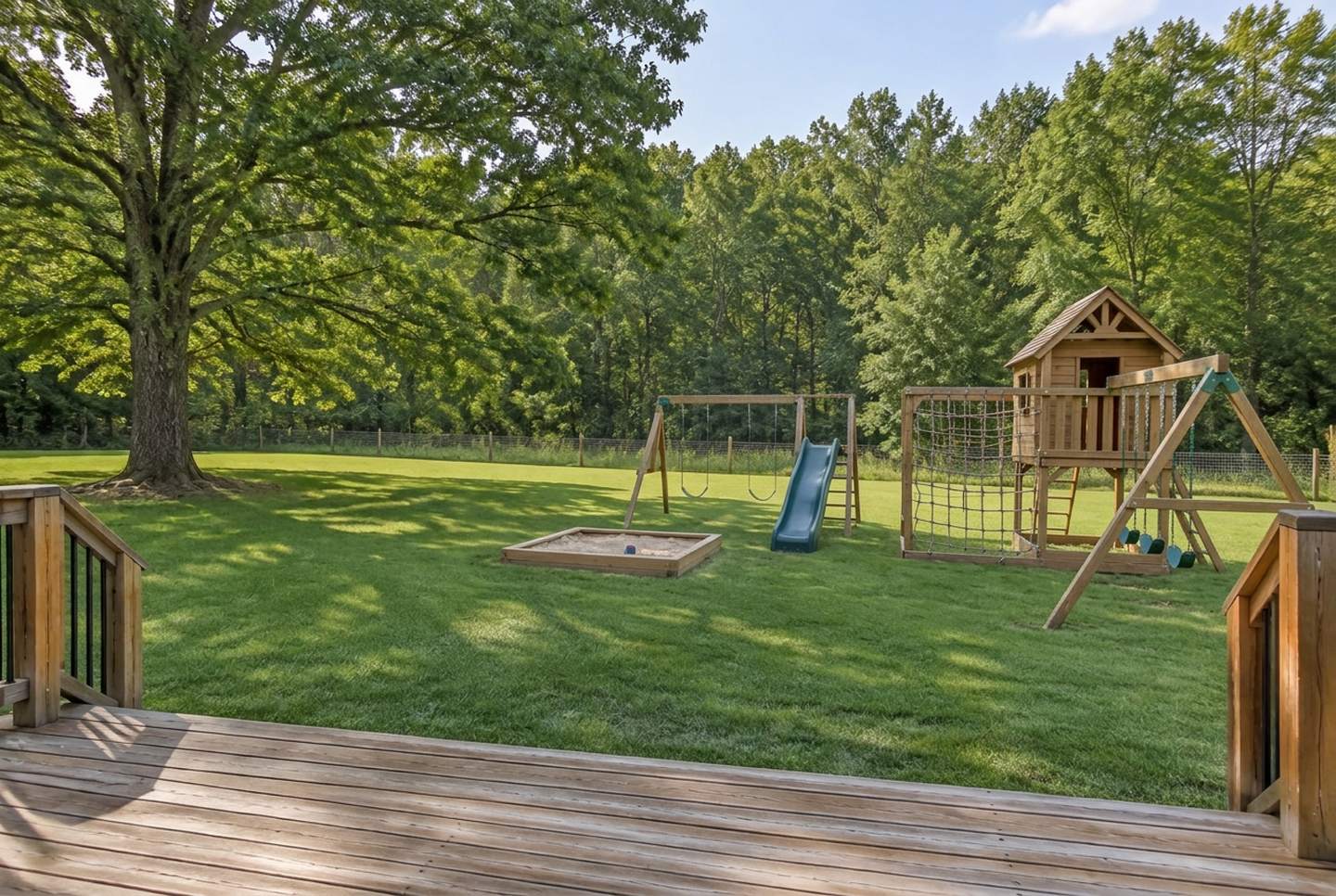
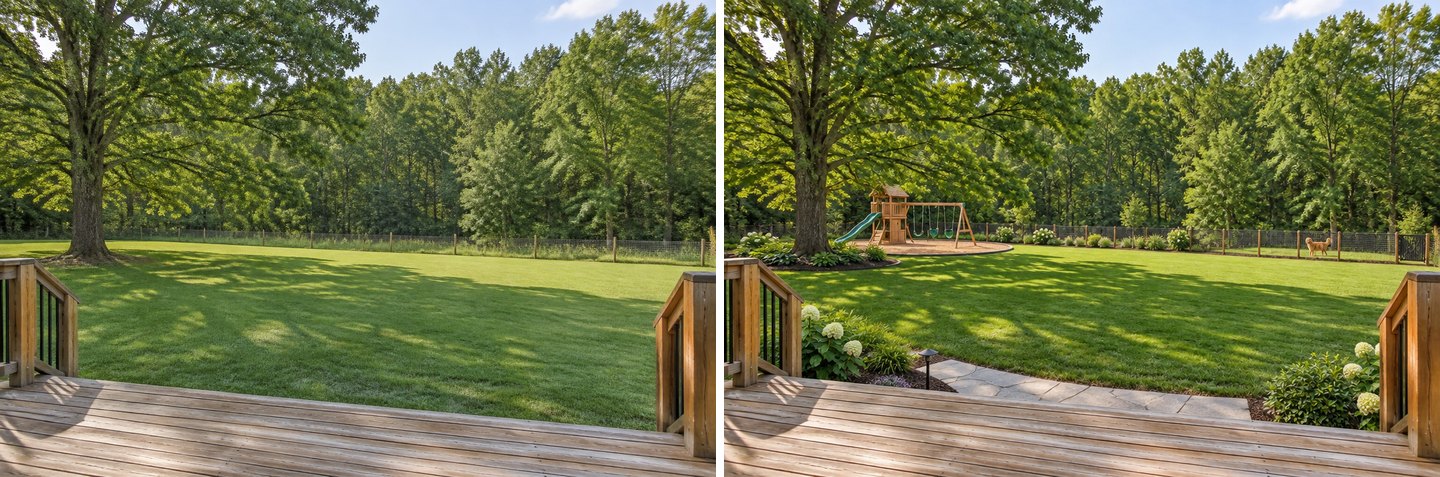
A real GenRoom result: the "Kids play area" task plus one sentence ("for kids aged 7 to 11: a climbing frame with a rope net, two swings and a small playhouse"). The deck, the oak, the fence and the forest are from the original photo. Note that the AI set everything on grass. More on that below.
The fastest way to test kid-friendly backyard ideas is to try them on a photo of your own yard. You upload one picture, add a play area, shade or a dog run, and about 30 seconds later you see the same view with the change in place. Your fence, trees and house stay where they are, so you can judge scale and position before you buy a swing set or rip up the lawn.
This is a real need, not a guess. Between March and mid-October 2026, 145 people described a play area, a swing set, a sandbox or a space for their dog to the GenRoom Studio in their own words. Below we show the exact Studio path, thirteen real results from three ordinary yards, the safety numbers a picture can't show (from the CPSC and the ASPCA), and the places where the AI got it wrong.
What Do Families Actually Ask For?
Most requests are about one of four things: play equipment, a safe boundary, a tough surface, and space for a dog. Here is how people put it, translated where needed, shortened and anonymised:
- "I want a swing, a sandbox and a trampoline."
- "Sunbeds and a beach table, a sandbox with a swing, a trampoline and a neat green lawn."
- "Add a children's play area here for kids aged 7 to 11."
- "A well-kept lawn, a fence against the forest, and a play area for the children."
- "Leave a large space on the left for the dog."
- "A grass area for the dogs and a concrete area for sitting."
- "A family-friendly, water-wise yard."
- "Keep the swing frame behind the raised bed where it is."
- "Move the play equipment. This is the main entrance."
- "A track for battery-powered cars, wide enough for two side by side."
- "Native plants and nature play, and use the rocks next to the white pole."
Two patterns stand out. First, people know where things should go: on the left, behind the raised bed, away from the entrance. Second, they rarely want a full redesign. They want to add one or two family features to a yard they already have, and keep the rest. The Studio's ready tasks are built for exactly that. They add one thing and leave the rest of the yard alone.
What Makes a Backyard Kid- and Dog-Friendly?
A family yard works when each activity has its own zone, its own surface and a clear line of sight from the house. Children need a play zone with a soft surface and enough clear space around the equipment. Dogs need a durable route they can run without destroying the lawn, and a boundary they cannot get through. Adults need somewhere to sit where they can see both.
Here is a quick map of the zones, with the safety points that come from reputable sources:
| Zone | What it needs | Surface | What the sources say |
|---|---|---|---|
| Swing set, slide, climbing frame | Level ground, clear space, visible from the house | Deep loose-fill (wood chips, engineered wood fiber, rubber mulch, sand or pea gravel) | CPSC: at least 6 ft from fences, sheds, trees and the house; no grass, dirt or concrete under elevated equipment |
| Sandbox, playhouse, mud kitchen | Shade, away from swings | Lawn or paving is fine | CPSC: ground-level equipment needs no protective surfacing; keep sandboxes away from swings |
| Shade | Over play and seating | — | CPSC: keep bare metal slides and platforms out of direct sun; a north-facing slide gets the least sun |
| Dog run | A route along the fence the dog already uses | Gravel or mulch with an edge | Your call: pick something you can rake and hose down |
| Boundary | No gaps at the bottom, a gate that latches | — | A solid fence to the ground is the usual fix for dogs that squeeze or dig |
| Planting | Non-toxic plants where the dog spends time | — | ASPCA keeps a searchable list of toxic and non-toxic plants |
The CPSC figures come from its Outdoor Home Playground Safety Handbook, written for backyard play sets rather than public parks. The plant notes come from the ASPCA's toxic and non-toxic plant list. We come back to both in the checklist at the end.
How Do You Add a Play Area to a Yard Photo?
Upload the photo, tick "Kids play area" under Outdoor living, choose where it goes, and press Create design. That is the whole path. It takes under a minute and costs 2 credits. Step by step:
- Take a wide photo from where you usually stand, such as the back door, the deck or the patio. Get the fence line and any big tree in the frame. Those are the things you will measure against.
- Upload it in the Studio. The Studio recognises a yard on its own (you can switch it with "Your space" if it guesses wrong).
- Open Ready tasks → Outdoor living → Kids play area. The task adds "a swing, a slide and a sandbox".
- Click Refine to pick the spot: Away from the driveway, In the far corner, or In the open area. Then add a note in the field below if you have one: the children's ages, the surface, what to keep.
- Press Create design. In our tests a result came back in 24–45 seconds.
- Want to change the result itself? Open it in the Editor and type the change, or select an area with the brush. Every new design starts from your original photo. Edits in the Editor build on the picture you opened.
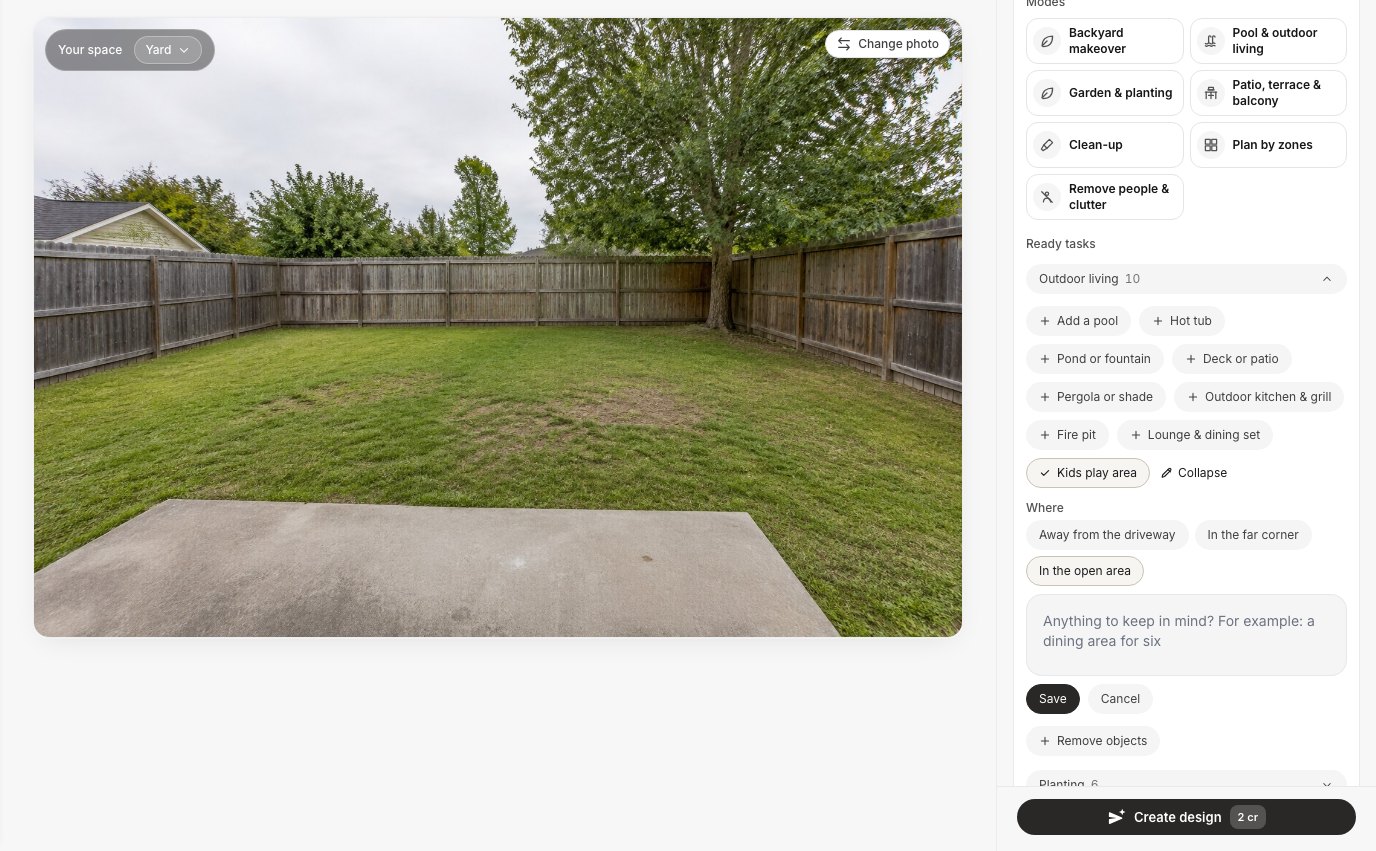 The "Kids play area" task in GenRoom, with "In the open area" picked. The default is "Away from the driveway", which matches CPSC advice to keep home play areas away from roads and driveways.
Other tasks in the same list help a family yard too. "Pergola or shade" has a shade sail option. "Paths & fences → New fence" swaps the boundary. The "Plan by zones" mode lays out the whole plot at once. You can tick several tasks for one design.
Same Lawn, Two Play Areas: What a One-Line Note Changes
Without a note, the AI drew a nice-looking play set on bare grass, close to the fence and the tree. One extra sentence gave it a wood-chip bed and a separate sandbox. This was the most useful test we ran, because it shows the gap between "looks right" and "is set up right".
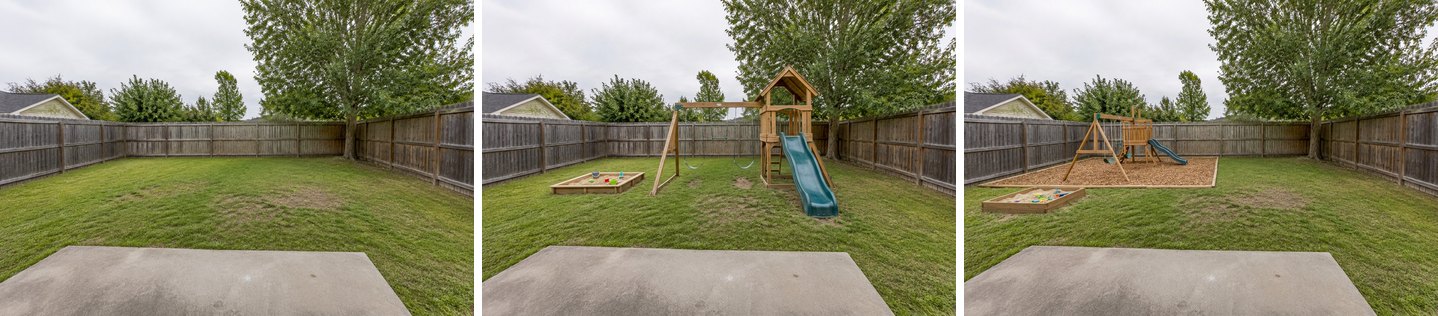 Left: the original yard. Middle: "Kids play area" in the open area, no note. Right: "In the far corner" plus a note asking for deep wood chips past the equipment, a sandbox apart from the swings, and everything set back from the fence and the tree.
The default result (middle) is not wrong as a picture. But by the CPSC's numbers it would be a poor build: the slide almost touches the tree trunk, the swing beam sits near the back fence, and there is nothing under the equipment but grass. The handbook says grass and dirt don't count as protective surfacing, because wear and weather reduce how well they absorb a fall. It also says to keep equipment at least 6 feet from fences, sheds, trees and the house.
The note version (right) moved the set into the left corner, laid a wood-chip bed that runs past the equipment, and put the sandbox to one side. The camera, fence boards, tree and patio slab are unchanged in both results.
Here is the note we used, word for word:
a wooden swing set and a slide on a deep bed of wood chips that runs well past the equipment on every side, a sandbox kept apart from the swings, everything set back from the fence and the tree
Add Shade Without Losing the Surfacing
Shade is easy to add, but say what must stay, or the AI may rebuild the play area its own way. We ticked "Pergola or shade", picked "Shade sail", and first wrote only "stretched over the swing set and the sandbox". The sail appeared, but the wood-chip bed was gone. On the second try we added "keep the swing set, the sandbox and the wood chip bed", and got the result below.
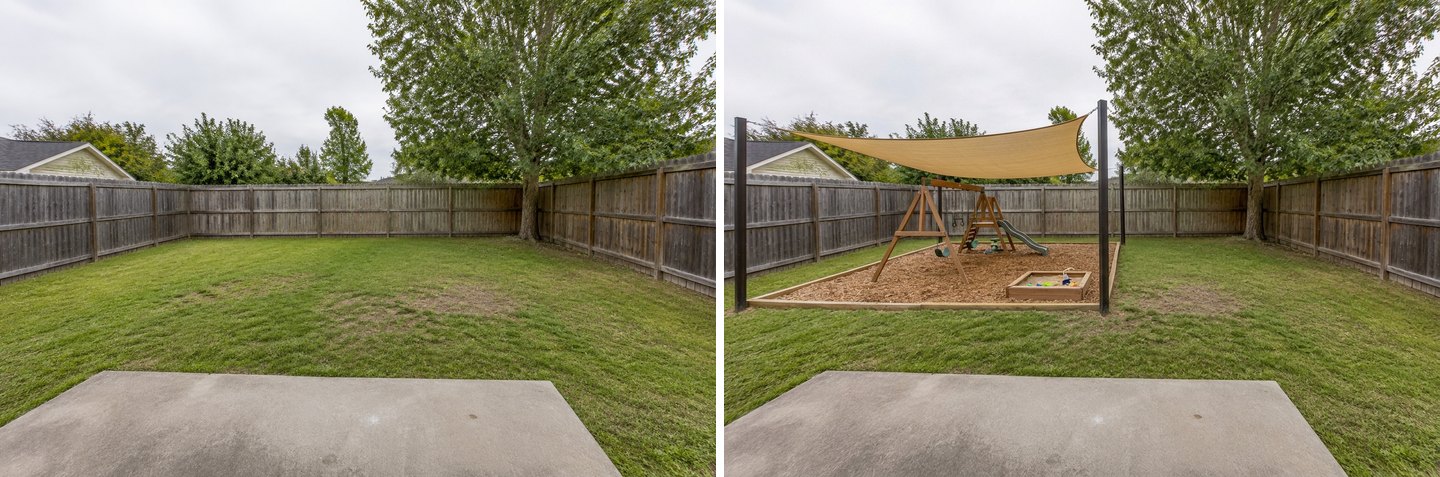 "Pergola or shade" → "Shade sail", with a note naming what to keep. The sail sits on four posts over the play area. The fence, tree and patio are unchanged.
Look closely and you will spot a new problem: the sandbox is now inside the swing area. The CPSC handbook says to separate active and quiet play, for example by keeping sandboxes away from swings. The picture is a good shade study. For the layout, trust the version where you told it to keep the sandbox apart.
Put a Playhouse Exactly Where You Want It
If you know the spot, select it with the brush and describe the change. The AI then works inside that area only. This suits a playhouse, a mud kitchen or a sandbox. Those are ground-level features, and the CPSC says ground-level equipment such as a sandbox or a playhouse needs no protective surfacing.
In the Editor, click Select area → Lasso, draw around the spot, then type what you want and send it. One edit costs 2 credits.
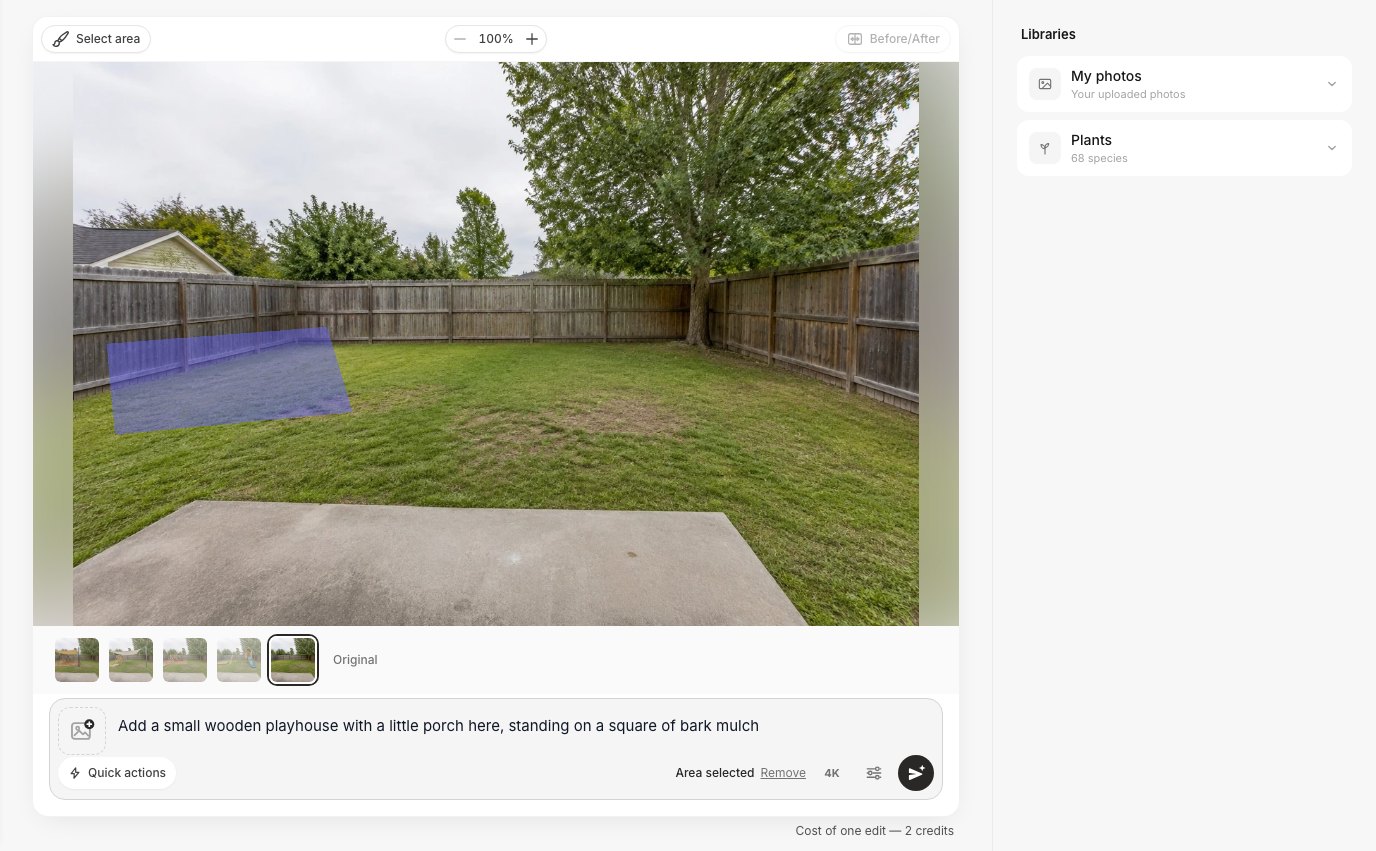 Select area → Lasso in the GenRoom Editor. The lawn, fence and tree outside the selection are not touched.
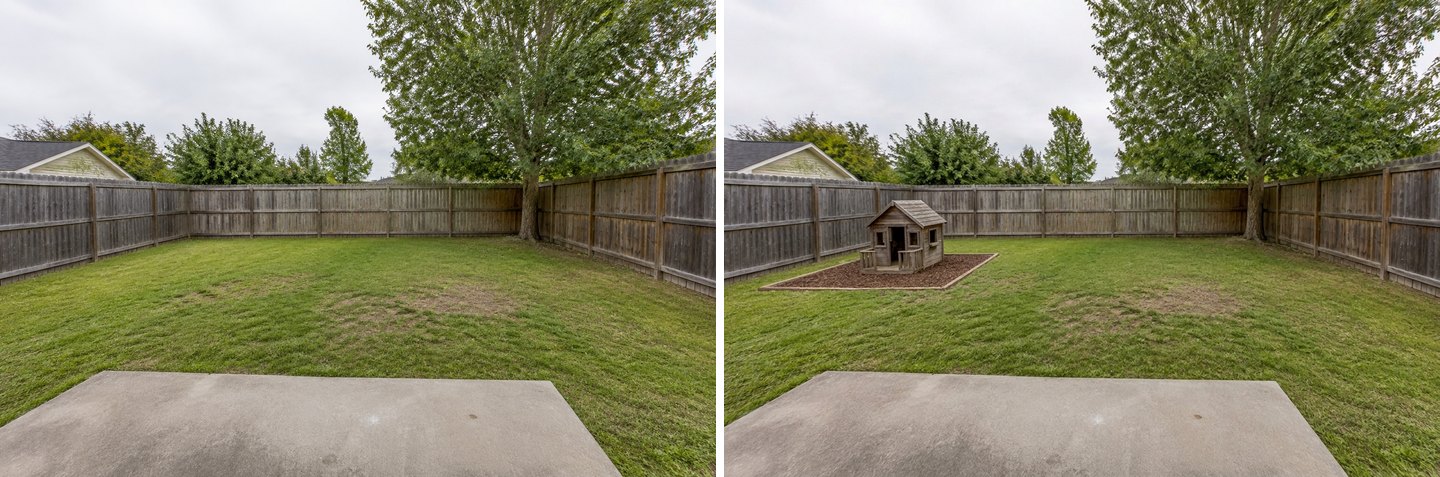 The playhouse landed inside the drawn area, on a bark mulch square. Everything else is the original photo.
The playhouse came out smaller than we pictured, but it sits exactly where we drew. Use this to settle position and footprint. Then check the real product's dimensions against a tape measure on the lawn.
Big Yard by the Woods: A Play Set for Ages 7 to 11
On a large plot, the task plus an age range gave a bigger set: a climbing net, two swing frames, a slide, a playhouse and a sandbox. This mirrors a real request ("a play area here for kids aged 7 to 11"). We used "Kids play area" → "In the open area" and one note: "for kids aged 7 to 11: a climbing frame with a rope net, two swings and a small playhouse."
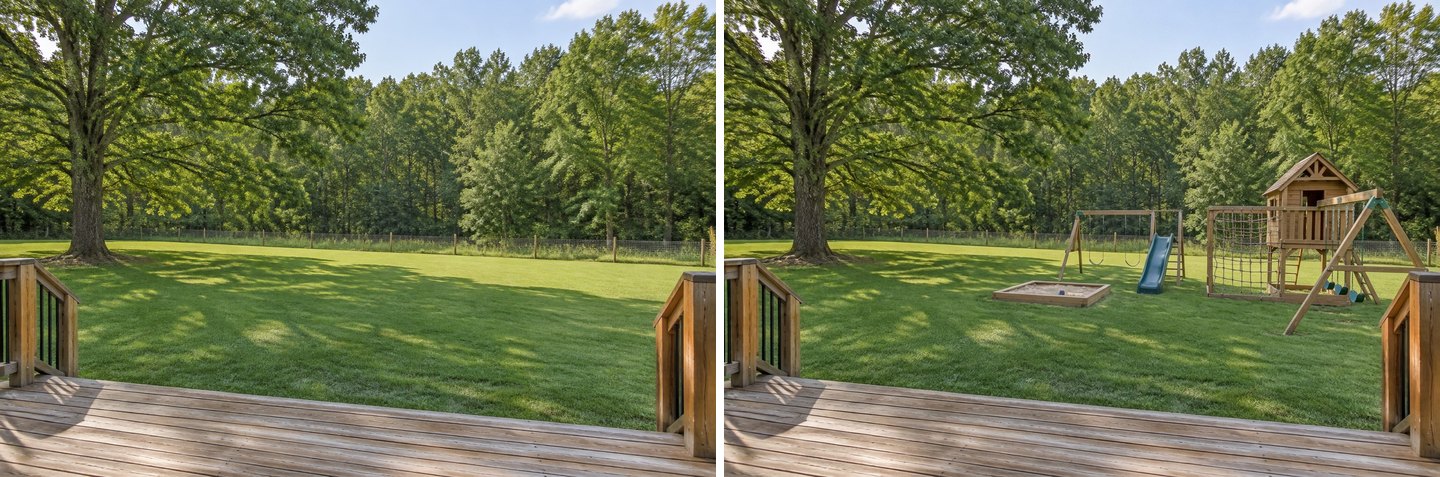 "Kids play area" with an age range in the note. The deck, oak, fence and forest edge stay as in the photo.
The equipment is placed in the open, clear of the oak, and can be seen from the deck, which the CPSC recommends. Two things to fix in the real build: everything again sits on grass, and the sandbox is close to the swings. Add "on wood chips" and "the sandbox apart from the swings" to the note, or fix it in the Editor.
Plan the Whole Yard by Zones
"Plan by zones" lays out the entire plot: dining, a grill, a fire pit, a kids' area and a pool if there is room, linked by paths. It is a mode rather than a task, so it redesigns the whole yard while keeping the house, the boundaries and the large trees.
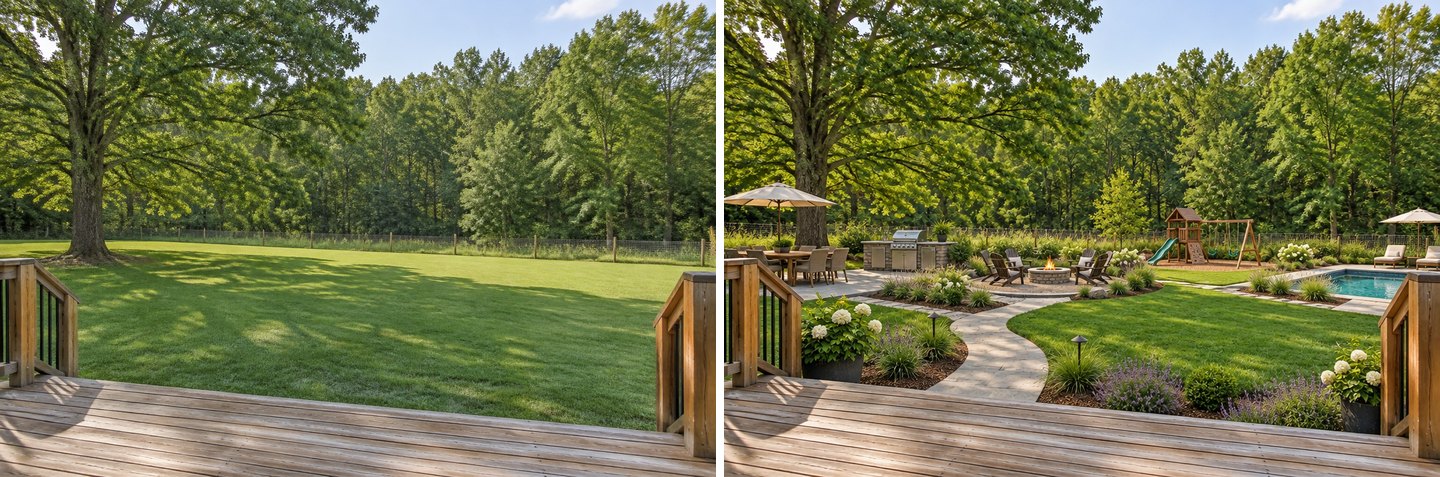 "Plan by zones" with no note. The mode added a pool on its own, because its brief includes "a pool if there is room".
Two honest notes about that default result. It added a pool, which is the last thing some families of toddlers want. And the beds by the deck are full of white hydrangeas and lavender. The ASPCA lists both as toxic to dogs (more on plants below).
So we ran the same mode again and wrote what this family needs in "Your request":
Family yard for two young kids and a dog, no pool: a play area with a swing set on wood chips that can be seen from the deck, a sturdy lawn for running, a shaded seating area, and a fenced dog run along the back fence
 "Plan by zones" plus a family brief. No pool this time. A wood-chip play area, a big open lawn, and a fenced dog run along the back fence.
The brief won. There is no pool, the swing set stands on wood chips in view of the deck, and a separate fenced run follows the back fence. The "shaded seating area" is missing, and the play area sits close to the oak's canopy. The CPSC tells you to avoid low overhanging branches and to keep 6 feet from trees. Treat this as a layout sketch, then nudge the play area into the open with an edit.
Create facade design with AI
Upload a photo of your home and get a new facade in the chosen style in 30 seconds. First generation is free.
Dog-Friendly Backyard: A Dog Run, Tougher Ground and a Solid Fence
There is no dedicated "dog" task in the Studio, so describe the dog's needs in your own words. It works well. Dogs tend to wear a track along the fence, exactly where they patrol. The cheapest fix is often to stop fighting that track and turn it into a proper run.
We typed one request into "Your request" on a small side yard with a worn dirt track:
A dog-friendly yard: turn the worn dirt track along the chain-link fence into a pea gravel dog run with a timber edge, a dense hard-wearing lawn in the middle. Keep the house, the fence, the gate and the shrubs.
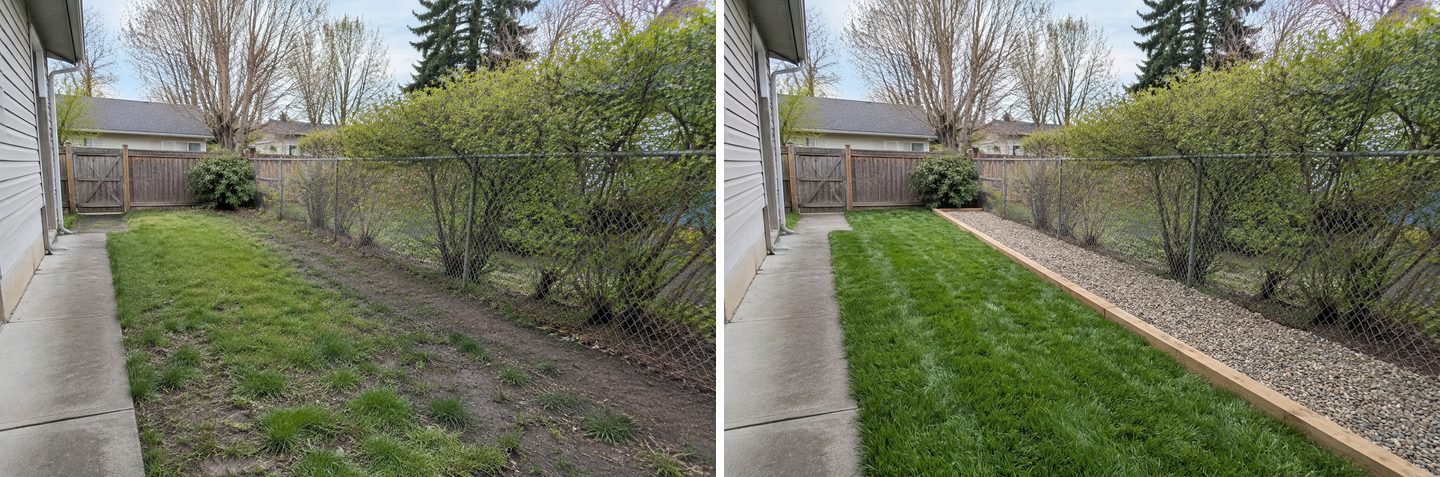 One typed request. The worn track became a gravel dog run with a timber edge. The house, path, gate, shrub and chain-link fence stay.
Then we opened that result in the Editor and asked for a better boundary. A chain-link fence lets a determined dog see, and sometimes squeeze through, everything happening next door:
Replace the chain-link fence on the right with a solid wooden fence about 1.6 m tall that reaches the ground with no gaps. Keep the gravel dog run, its timber edge, the lawn, the gate and the shrubs as they are.
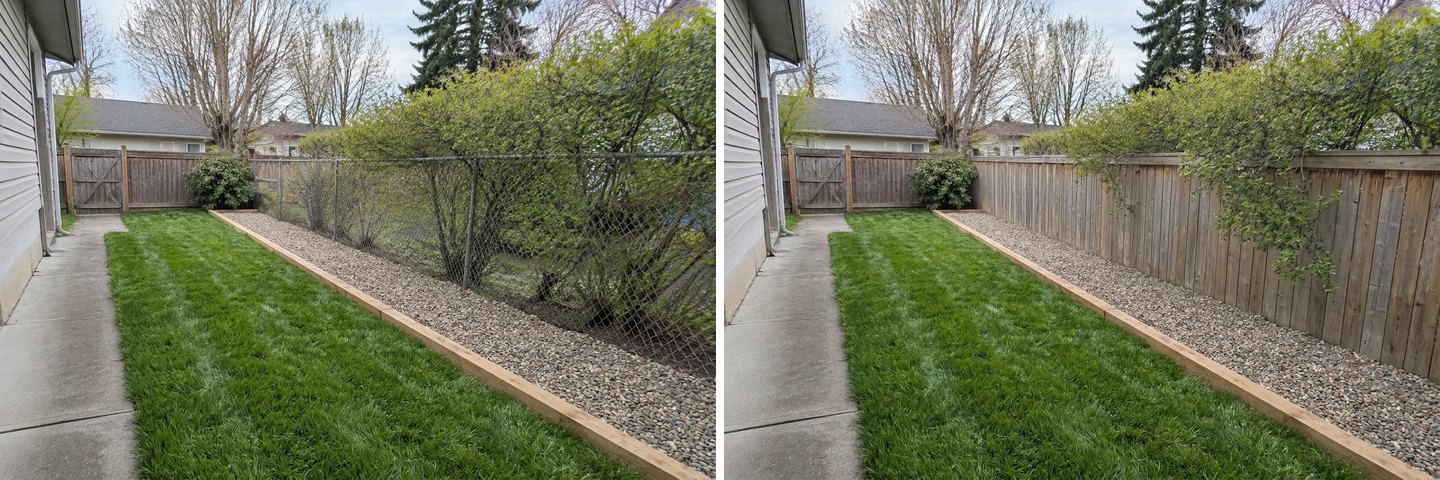 An Editor edit on top of the previous result. The new fence reaches the ground. The gravel run, timber edge, lawn and gate stay as they were.
This is the right way to stack changes. The Editor builds on the picture you opened. A new design from "Ready tasks" would start again from the original photo, and the dog run would vanish. If you would rather cut the lawn altogether, our lawn replacement guide compares grass, gravel and artificial turf on the same photo. If the whole yard is a jungle before you even start, begin with an overgrown yard clean-up.
Plants: What the Library Shows, and What It Doesn't Tell You
The Studio's Plants library has 68 species you can add to a photo, but it does not mark which ones are toxic to pets. Check before you plant. Several familiar garden plants in the library are on the ASPCA's toxic list.
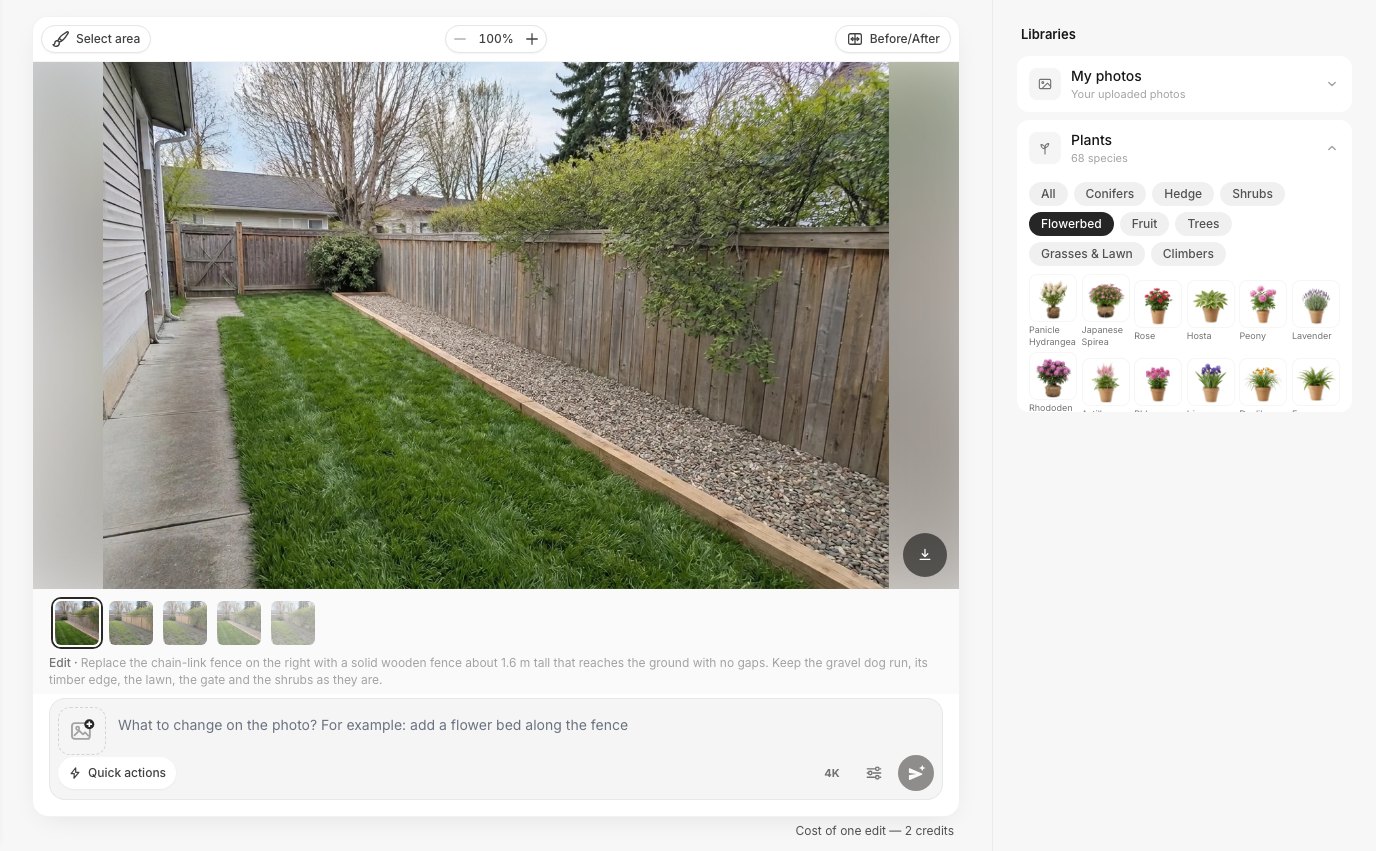 The Plants library (68 species) on the Flowerbed filter. Click a tile and choose "As a reference" or "Place on the photo".
We checked the library's common garden plants one by one against the ASPCA's plant pages:
| Plant in the library | ASPCA listing |
|---|---|
| Hydrangea | Toxic to dogs, cats and horses |
| Hosta | Toxic to dogs, cats and horses |
| Lavender | Toxic to dogs, cats and horses |
| Rhododendron (listed by ASPCA under Azalea) | Toxic to dogs, cats and horses |
| Tulips | Toxic to dogs, cats and horses (highest concentration in the bulb) |
| Boxwood | Toxic to dogs, cats and horses |
| Wisteria | Toxic to dogs, cats and horses |
| Oleander | Toxic to dogs, cats and horses |
| Rose | Non-toxic to dogs, cats and horses |
| Petunia | Non-toxic to dogs, cats and horses |
For the dog yard we picked Petunia, clicked "As a reference", and asked for "a narrow bed of these petunias along the lawn edge next to the concrete path".
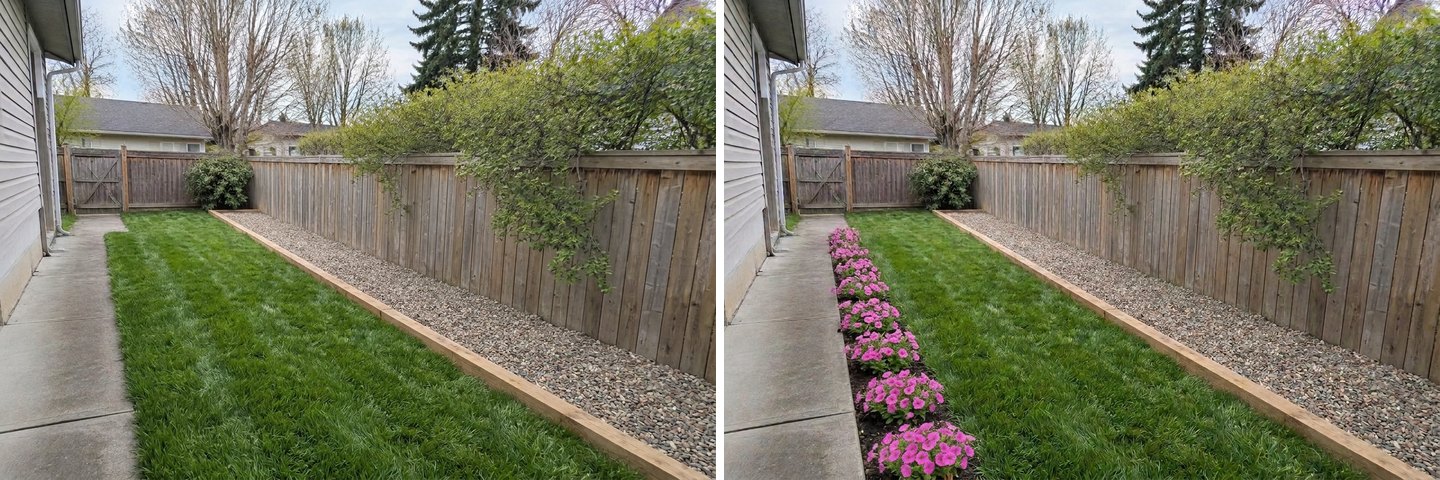 Petunias from the library, placed with one sentence. The fence, gravel run and gate are unchanged.
Remember that the AI also adds plants on its own when a mode redesigns a yard. In our "Plan by zones" runs it chose hydrangeas and lavender. The design still works as a layout. Just swap the species when you buy, and check any plant you are unsure of on the ASPCA list.
Where Does the AI Get It Wrong?
It draws what looks right, not what is safe, and it does not measure anything. Here is what we saw across 13 generations on three yards:
- Play equipment lands on grass by default. Every play area we created without a note sat on lawn. The CPSC says grass and dirt aren't protective surfacing. Ask for wood chips or rubber mulch in the note.
- Clearances are not checked. The default slide almost touched a tree trunk, and the family layout put the swings under an oak's canopy. The AI doesn't know the 6-foot rule, or the rule that swings need twice the beam height of clear space in front and behind.
- Sandboxes drift next to swings. It happened in two results. Say "the sandbox apart from the swings" every time.
- Modes bring their own ideas. "Plan by zones" added a pool and pet-toxic plants until we wrote a brief that said otherwise.
- A follow-up task can undo earlier details. Our first shade-sail run removed the wood chips because we hadn't asked to keep them. New designs start from the original photo, so stack changes in the Editor.
- Scale is approximate. The brushed playhouse came out smaller than we pictured. The Studio doesn't measure your yard, so check real product sizes on the ground.
- No dog-specific task. You have to type the dog run, the fence height and the surface yourself. It worked well when we did.
Before You Build: A Short Safety Checklist
Use the picture to choose the layout, then check it against the CPSC numbers before you buy or dig. All of the following comes from the CPSC's home playground handbook, unless marked otherwise:
- Why it matters: about 50,000 children a year go to U.S. emergency rooms after injuries on home playground equipment, and about 80% of those injuries come from falls.
- Site: level ground, away from roads and driveways, visible from the house. Clear away low branches, overhead wires, stumps, roots, large rocks and concrete.
- Clearance: at least 6 feet from the house, fences, sheds, trees and poles. In front of and behind swings, allow twice the height of the top bar.
- Surface: never concrete, asphalt, grass or dirt under elevated equipment. Use at least 9 inches of wood mulch or chips, engineered wood fiber or shredded rubber for equipment up to 8 feet high, or 9 inches of sand or pea gravel for equipment up to 5 feet. Start with about 12 inches, because it compresses to about 9. Extend it at least 6 feet beyond the equipment in every direction.
- Openings: gaps between rails, rungs and posts should be smaller than 3½ inches or larger than 9 inches, so a head can't get trapped.
- Ropes and cords: several children die on home playgrounds each year, often after getting entangled in ropes, cords, leashes or clothing drawstrings. Never attach loop-forming items such as ropes, jump ropes or a pet leash to the play set.
- Sun: keep bare metal slides and platforms out of direct sun. A north-facing slide gets the least.
- Plants (ASPCA): check every species where the dog spends time on the ASPCA plant list.
If your plan includes water, read our garden pond guide first. It covers the child-safety advice on ponds. For more on fence styles and gates, see AI fence and gate design.
Notes That Worked: Copy and Adapt
Short, concrete notes beat long wish lists. Name the equipment, the surface, the spot and what must stay. These notes all gave usable results in our tests:
| Goal | Where to type it | Note that worked |
|---|---|---|
| Safer play set | Kids play area → Refine | "a wooden swing set and a slide on a deep bed of wood chips that runs well past the equipment on every side, a sandbox kept apart from the swings, everything set back from the fence and the tree" |
| Older kids | Kids play area → Refine | "for kids aged 7 to 11: a climbing frame with a rope net, two swings and a small playhouse" |
| Shade over play | Pergola or shade → Shade sail → Refine | "stretched over the swing set and the sandbox; keep the swing set, the sandbox and the wood chip bed exactly where they are" |
| Playhouse in one spot | Editor → Select area | "Add a small wooden playhouse with a little porch here, standing on a square of bark mulch" |
| Whole family yard | Plan by zones + Your request | "Family yard for two young kids and a dog, no pool: a play area with a swing set on wood chips that can be seen from the deck, a sturdy lawn for running, a shaded seating area, and a fenced dog run along the back fence" |
| Dog run | Your request | "turn the worn dirt track along the fence into a pea gravel dog run with a timber edge, a dense hard-wearing lawn in the middle. Keep the house, the fence, the gate and the shrubs" |
| Dog-proof fence | Editor | "Replace the chain-link fence with a solid wooden fence about 1.6 m tall that reaches the ground with no gaps. Keep everything else as it is" |
If you want a full makeover of the yard rather than family features, the AI backyard design guide walks through the "Backyard makeover" mode and more styles. For more finished examples, see the landscape design and patio design pages.
FAQ
Can AI design a kid-friendly backyard from a photo of my yard?
Yes. In GenRoom you upload the photo, tick "Kids play area" under Outdoor living, choose where it goes and press Create design. A result with a swing, a slide and a sandbox comes back in under a minute. Your fence, trees and house stay as in the photo. It is a visual for deciding the layout, not a construction plan.
Is there a free AI tool for backyard play area ideas?
A free GenRoom account (no card) gives 6 credits. One design or edit costs 2 credits, so you can try three ideas: say, the default play area, one with a safety note, and a dog run. Free results carry a watermark. Packs without a watermark start at $9.99 for 36 credits, paid once, not a subscription. See pricing.
What is the best surface under a swing set?
The CPSC recommends at least 9 inches of loose-fill, such as wood mulch or chips, engineered wood fiber or shredded rubber mulch, for equipment up to 8 feet high. Sand or pea gravel works for equipment up to 5 feet. It should extend at least 6 feet around the equipment, and further in front of and behind swings. Grass, dirt and concrete are not protective surfacing.
How far should a play set be from a fence or tree?
At least 6 feet from fences, sheds, trees, poles and the house, according to the CPSC's home playground handbook. Swings need a clear distance in front and behind equal to twice the height of the top bar. The AI does not apply these rules on its own, so put them in your note and check the real spacing with a tape measure.
How do I make my backyard dog-friendly?
Give the dog a durable route, often a gravel or mulch run along the fence where it already patrols. Make the boundary solid to the ground, with a gate that latches. Choose plants that the ASPCA lists as non-toxic. In GenRoom there is no separate dog task, so type these wishes in "Your request" or as an Editor edit. Our dog run test worked in one request.
Can I keep my existing swing set or trampoline in the design?
Yes. Say so in the note ("keep the swing frame behind the raised bed where it is") or select only the area you want changed with the brush. If you'd rather see the yard without them, the "Remove objects" task under Outdoor living has a trampoline option.
The Bottom Line
Kid- and dog-friendly backyard ideas are easy to find. What's hard is knowing how they will look in your yard, next to your fence and tree. In our tests the "Kids play area" task, "Plan by zones" and a few typed requests turned three ordinary yards into believable family yards in 24–69 seconds each. The picture shows you where the swings, the shade and the dog run fit.
What the AI won't do is keep children safe for you. By default it set play equipment on grass, close to trees and fences, and next to the sandbox. Write the surfacing and spacing into your note, then check the real build against the CPSC handbook and your plants against the ASPCA list. Upload a photo of your yard and try three ideas on the free credits.