AI Room Lighting Design: See Your Lights On Before You Buy
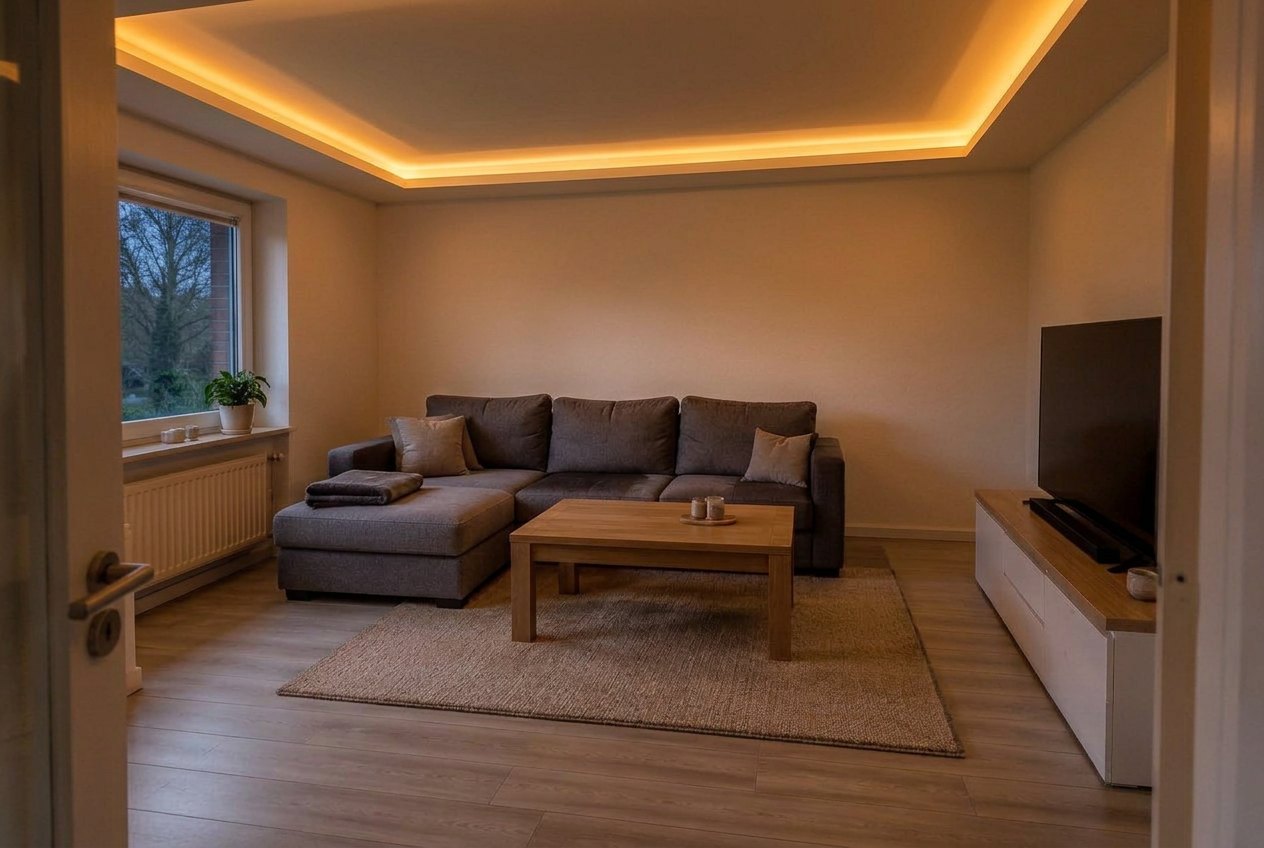
A real result from the GenRoom Studio: one Lighting edit for the cove, one Evening light edit to switch it on. The furniture, floor, window and door are from the original photo.
AI lighting design for a room works like this: you upload a photo of the room as it is, ask for the lights you are considering (spotlights instead of the ceiling dome, a pendant over the table, an LED strip in a tray ceiling, a floor lamp you found online), and then switch the same picture to evening so you can see the room with those lights on. In the GenRoom Studio, that's the Lighting quick action, the Select area brush, the Warm lighting task inside a design, and Evening light. Each edit takes about 20–40 seconds and costs 2 credits. A free account starts with 6 credits.
Lighting is one of the things people most often ask an AI to change in their own photos. Between March and October 2026, 2,311 people asked GenRoom for a lighting change in their own words. Below are the Studio paths for each kind of request, real day-and-evening results on three test rooms (a living room with one dated ceiling light, a kitchen with a bare bulb over the table, and a plain bedroom), the mistakes the AI makes with light, and the lighting rules worth checking before you call an electrician.
What Do People Ask For When They Relight a Room?
Mostly hidden light. In the requests we read, LED strips and cove lighting came up more than twice as often as spotlights, chandeliers, pendants, wall lights and lamps put together. Here are typical requests, paraphrased and anonymized:
| What people write | What they want to see | Best Studio tool |
|---|---|---|
| "Install ceiling LED around the perimeter, improve the lighting" | A glowing cove around the ceiling | Lighting quick action, in your own words |
| "A tray ceiling with perimeter cove lighting" | A dropped ceiling edge with a hidden strip | Lighting quick action, then Evening light |
| "LED strip in a suspended ceiling, open kitchen" | Hidden light in a kitchen ceiling | Lighting quick action |
| "Magnetic track spots on the ceiling" | A track system instead of one bulb | Lighting quick action |
| "Add light from pendant lamps" | Pendants over a table or island | Select area brush over the spot + your words |
| "Change the lamp above the sink to one spot or a pendant; trendier lamps over the table" | One fixture swapped in one place | Select area brush, one fixture per edit |
| "Add this designer floor lamp, beige" | A specific product in the room | Use my reference or Insert on the picture |
The pattern: people already know roughly what they want and are unsure how it will look once it's switched on. A daytime picture of a new fixture answers half the question. The evening picture answers the other half.
Which Studio Tool Does What?
GenRoom gives you five ways to change the light in a photo. They differ in how much the AI is allowed to decide.
| Tool | Where to find it | What it changes | Use it when |
|---|---|---|---|
| Lighting quick action | Editor → Quick actions → Light & season | Replaces the lighting; keeps furniture and finishes | You know the fixture type (spots, cove, track, table lamps) |
| Select area brush | Editor, top-left of the photo | Only the area you paint | You know exactly where the fixture goes (over the table, above the sink) |
| Evening light | Quick actions → Light & season → "1 more"; in a design: Time of day & season | Turns the photo into evening with the lamps on | You want to see the lights working |
| Warm lighting task | Design → Ready tasks → Lighting | A lighting scheme as part of a design run | You want the AI to propose the scheme |
| Use my reference / Insert on the picture | The photo button in the prompt bar | Adds a specific product from your photo | You have a lamp in mind and a picture of it |
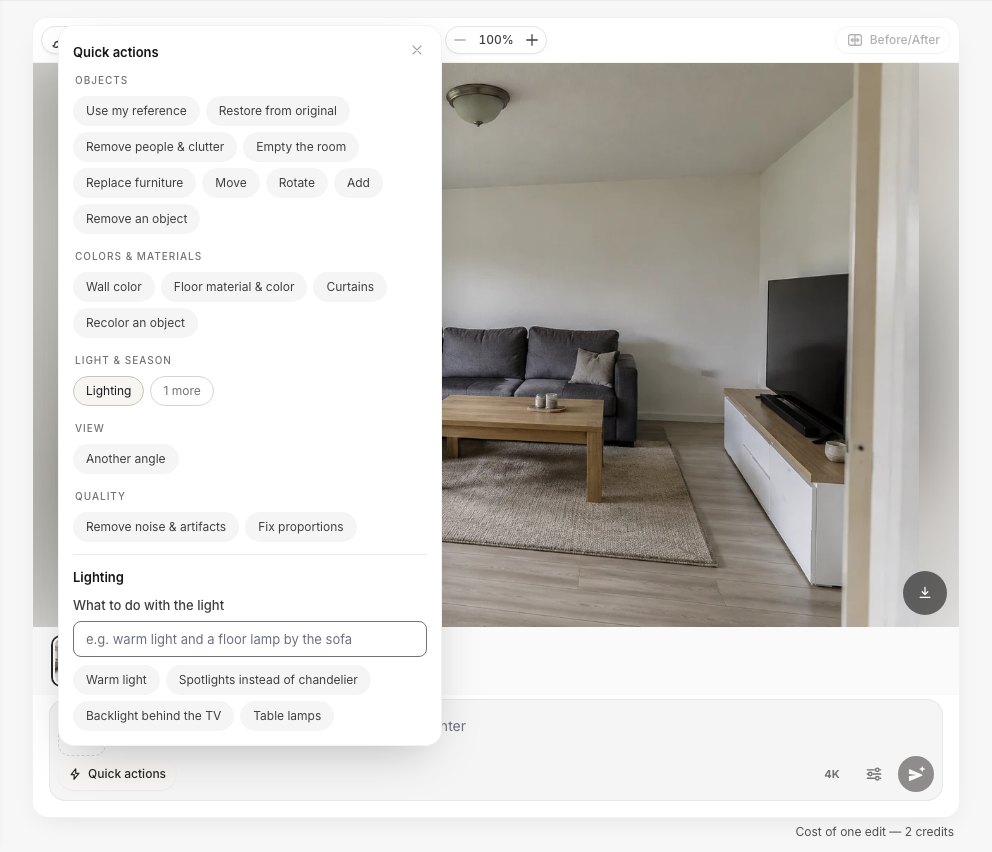 Quick actions → Lighting. Tap a ready choice, or type your own, such as "warm light and a floor lamp by the sofa".
How to Replace a Dated Ceiling Light, Step by Step
Our first test photo is a typical rented living room: one frosted-glass dome in the middle of a flat ceiling, a grey corner sofa and a TV unit. Here is the path we used.
- Upload the photo in the Studio and open it in the editor.
- Open Quick actions → Lighting and tap Spotlights instead of chandelier. Press Apply. The result came back in 23 seconds.
- Open Quick actions again, tap "1 more" under Light & season, then Evening light. Apply. This switches the new lights on and darkens the window.
- Compare with the Before/After switch, or go back a version in the strip under the photo.
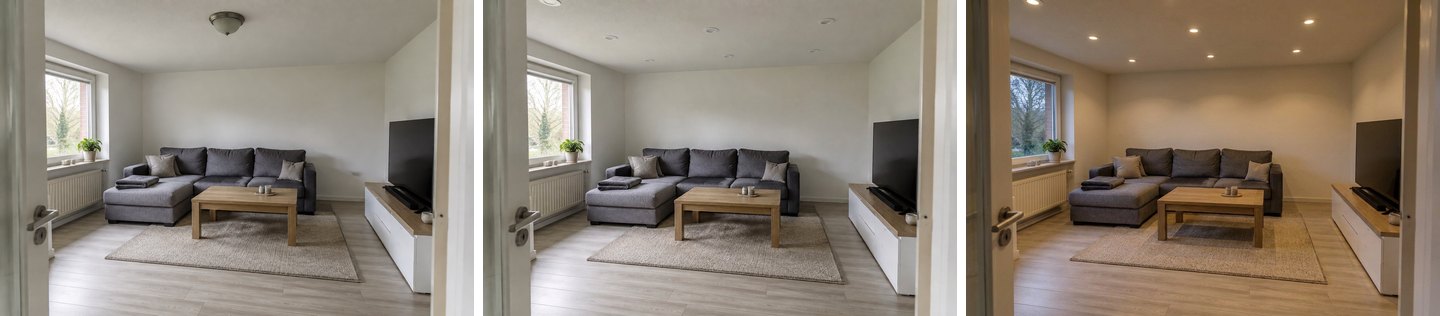 Left: the original. Middle: Spotlights instead of chandelier. Right: Evening light on top of it. The sofa, rug, TV unit and window stay the same.
The daytime result alone is not very useful: six small white circles on a ceiling tell you little. The evening version shows what you would actually live with: warm pools on the back wall and a brighter, more even ceiling than the single dome gave.
Warm or neutral white? Try both on the same picture
People search for "kelvin AI lighting" because the color of the light changes a room as much as the fixture does. You can test it. On the evening version we asked the Lighting action for "cool neutral white 4000 K light from the same spotlights, no other changes".
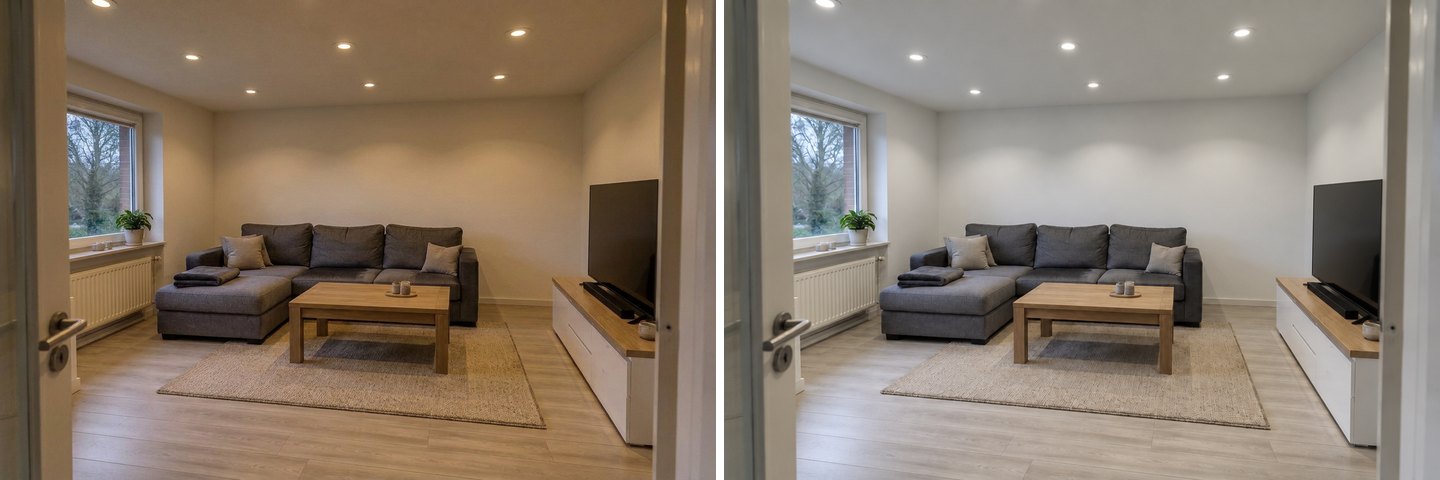 Left: the warm default of Evening light. Right: "neutral white 4000 K" on the same spotlights. Treat the colors as a direction, not a measured Kelvin value.
The difference matches what lighting standards say. ENERGY STAR's light bulb purchasing guide describes soft and warm white (up to about 3000 K) as ideal for most indoor applications, and neutral or cool white (about 3500–4100 K) as good for kitchens and work spaces. In a living room, the warm version usually wins.
How to Preview LED Strips and Cove Lighting
Ask for it in your own words. In Quick actions → Lighting, ignore the ready choices and type what you want into the field. We typed "a tray ceiling with warm LED cove lighting around the perimeter", the most common kind of request people send us.
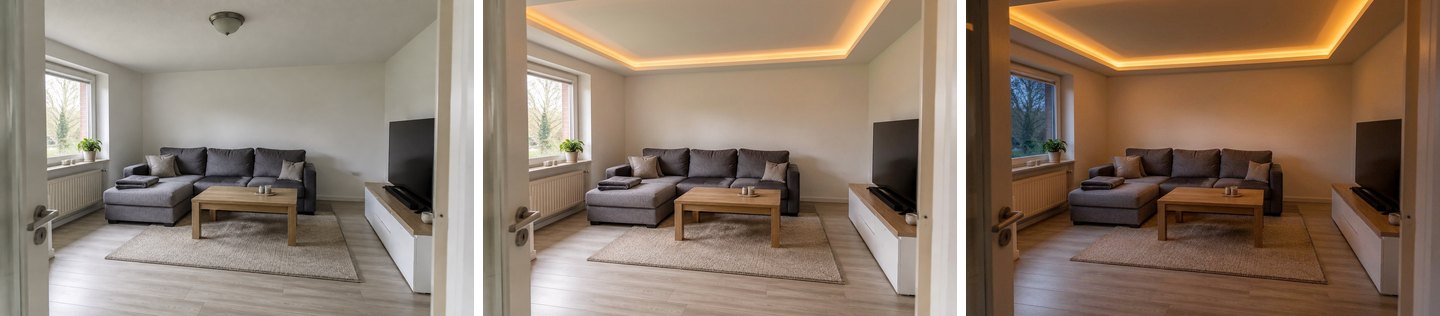 Left: the original. Middle: the Lighting action with a tray ceiling and LED cove. Right: Evening light. The dome is gone and the room keeps its furniture.
This is where the evening view earns its place. In daylight the strip looks like a thin yellow line. In the evening it becomes the main light of the room, and you can judge whether that indirect glow is enough on its own (here it isn't quite: the sofa end of the room needs a lamp).
One thing the picture does not tell you: the AI built a tray ceiling that did not exist. In a real room that's drywall work, a lower ceiling around the edges, and a driver for the strip hidden somewhere. The image shows the effect, not the construction. If you'd rather not lower the ceiling, ask for "an LED strip in a slim aluminum profile along the top of the walls" and compare.
How to Put a Pendant Exactly Over the Table
Use the brush when position matters. A pendant only works if it hangs over the table, and a typed request like "add pendants" leaves the AI to choose where. So in the kitchen test, we painted the area around the bare bulb first.
- Click Select area at the top left of the photo and choose the Lasso.
- Draw around the place where the light should hang. "Area selected" appears in the prompt bar.
- Type what you want. We wrote: "Replace the bare bulb with two matching matte black dome pendant lights hanging side by side over the dining table, about 75 cm above the tabletop."
- Press Apply, then run Evening light on the result.
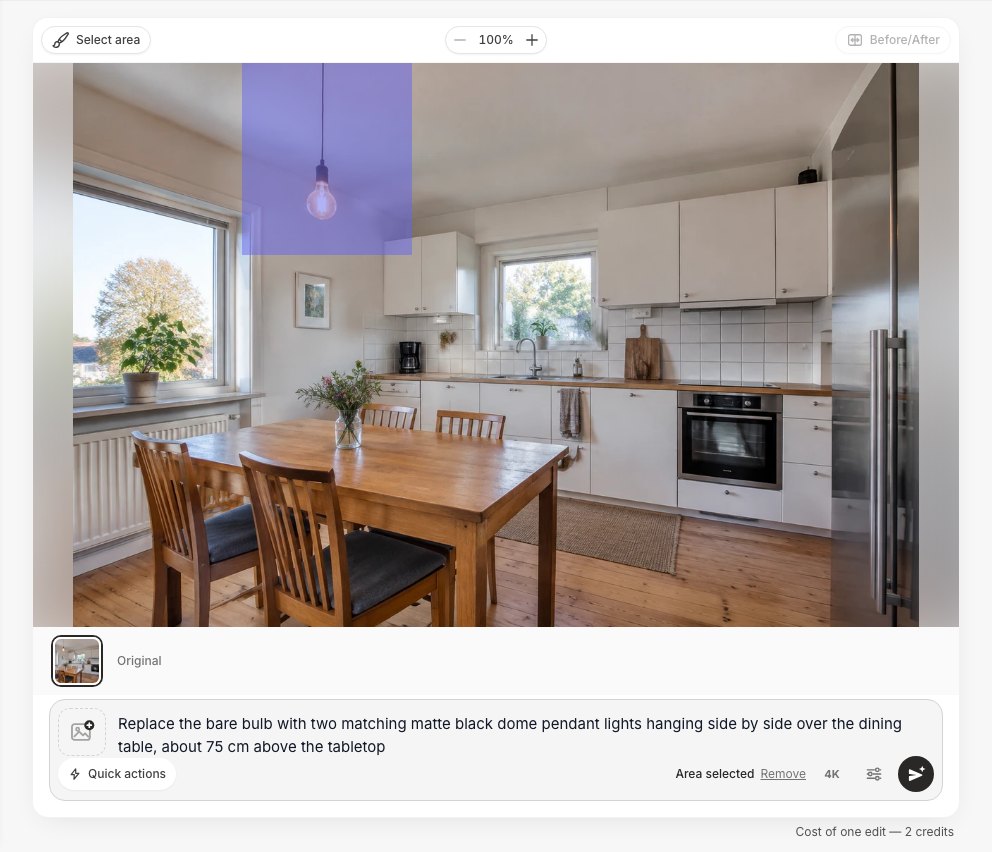 Select area → Lasso around the bulb, then describe the new fixture. The edit stays near the area you painted.
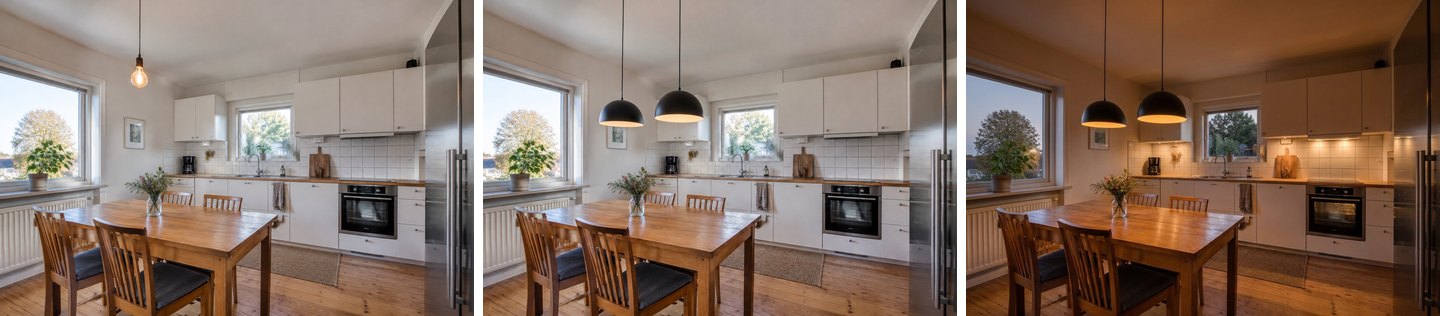 Left: the original bare bulb. Middle: two pendants, from the brush edit (32 seconds). Right: Evening light. Note the under-cabinet strip that appeared in the evening version. We never asked for it.
The pendants hang over the table and the rest of the kitchen is unchanged. The "75 cm" in the request, though, is a wish, not a measurement: an image model can't measure height in your room. Check the real height with the rule in the table further down.
Track lights instead of one bulb
For track or magnetic track systems, the plain Lighting action is enough, because a track runs along the ceiling anyway. We typed "magnetic track spotlights on the ceiling instead of the bulb".
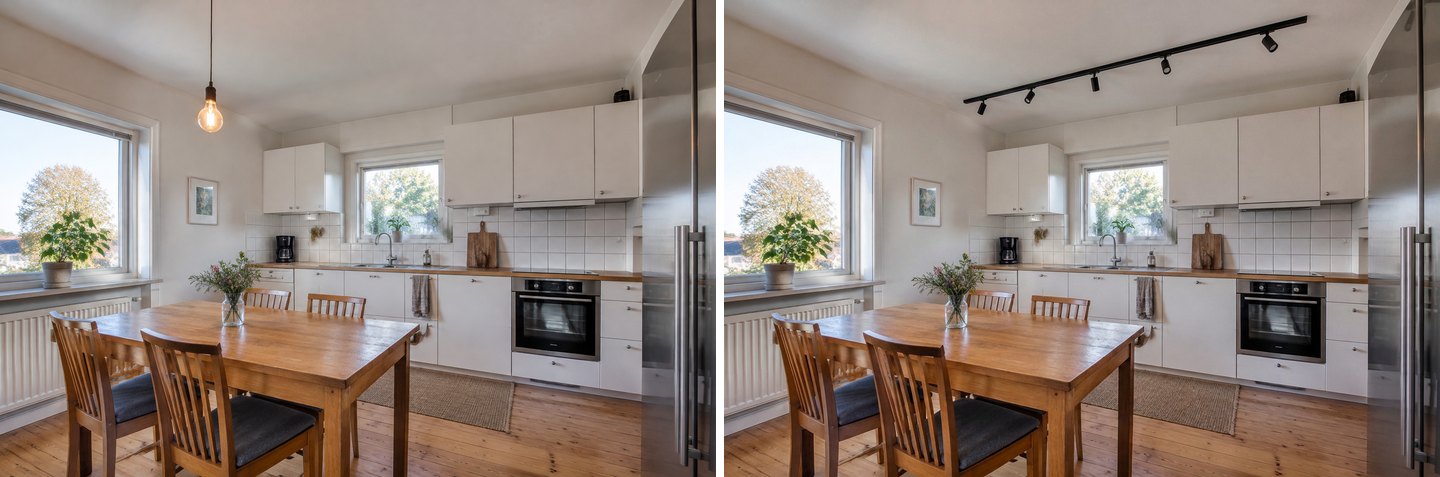 A black track with six heads replaced the bulb. It runs over the kitchen run, not over the table. If you want light on both, say so, or draw the track's position with the brush.
How to Add Lamps, Including a Lamp You Want to Buy
Lamps are the cheapest change on this list: no electrician, and they can move. In the bedroom test, Quick actions → Lighting → Table lamps put a matching pair of ceramic lamps with linen shades on the two nightstands. Evening light then switched them on.
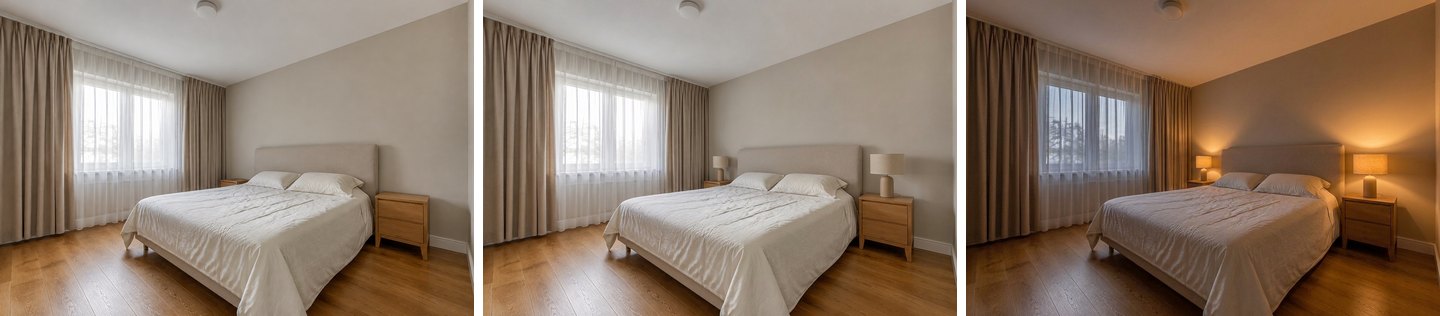 Left: the original. Middle: the Table lamps choice. Right: Evening light. The ceiling fixture stays on in the evening version, as it would in real life if you left it on.
Try the exact lamp with "Use my reference"
If you already have a lamp in mind, show it to the AI. Save the product photo, then in the editor:
- Click the photo button in the prompt bar and choose Add as a reference.
- Open Quick actions → Use my reference and describe what to take and where: "the floor lamp from my photo, standing in the corner between the sofa and the window."
- Apply.
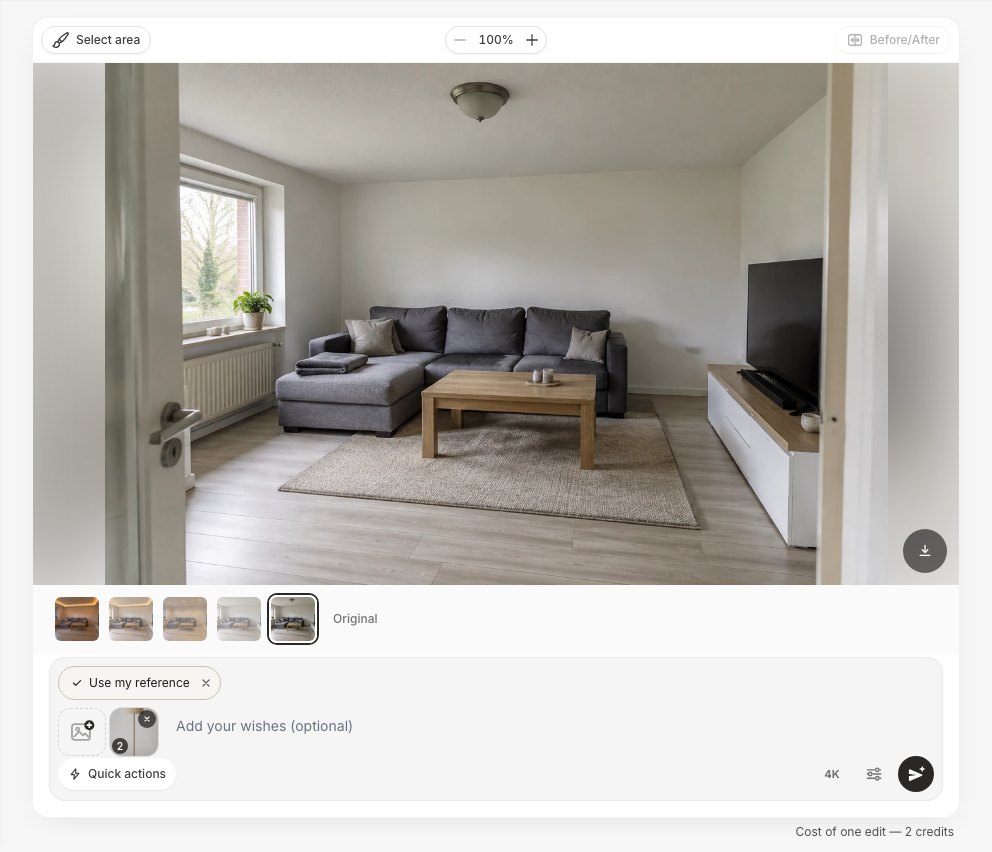 Use my reference with one lamp photo attached. On the Pro plan you can attach up to 5 of your own photos per design; other plans take one at a time.
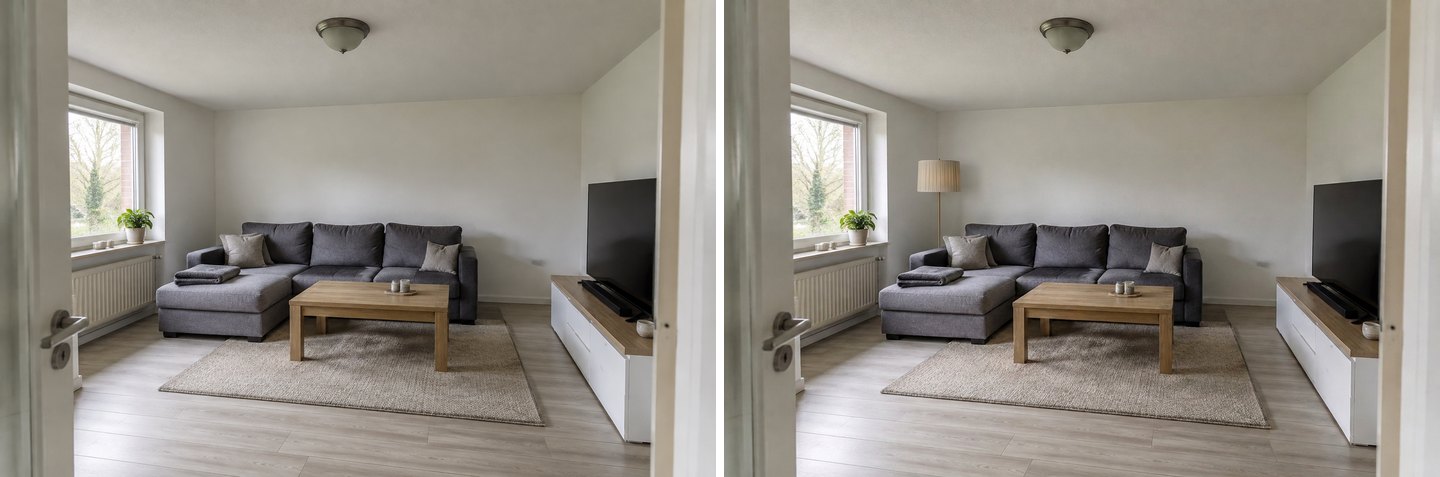 The lamp from our product photo: pleated beige shade, thin brass stem. The sofa hides its stone base. Nothing else in the room changed, including the dome light.
Or place it yourself with "Insert on the picture"
Insert on the picture is the other item in the same photo menu. It cuts the lamp out of its background automatically, drops it on your photo, and lets you drag and resize it. Then you type how it should fit in ("make the inserted floor lamp stand naturally on the floor in the corner, with a correct shadow") and press Apply.
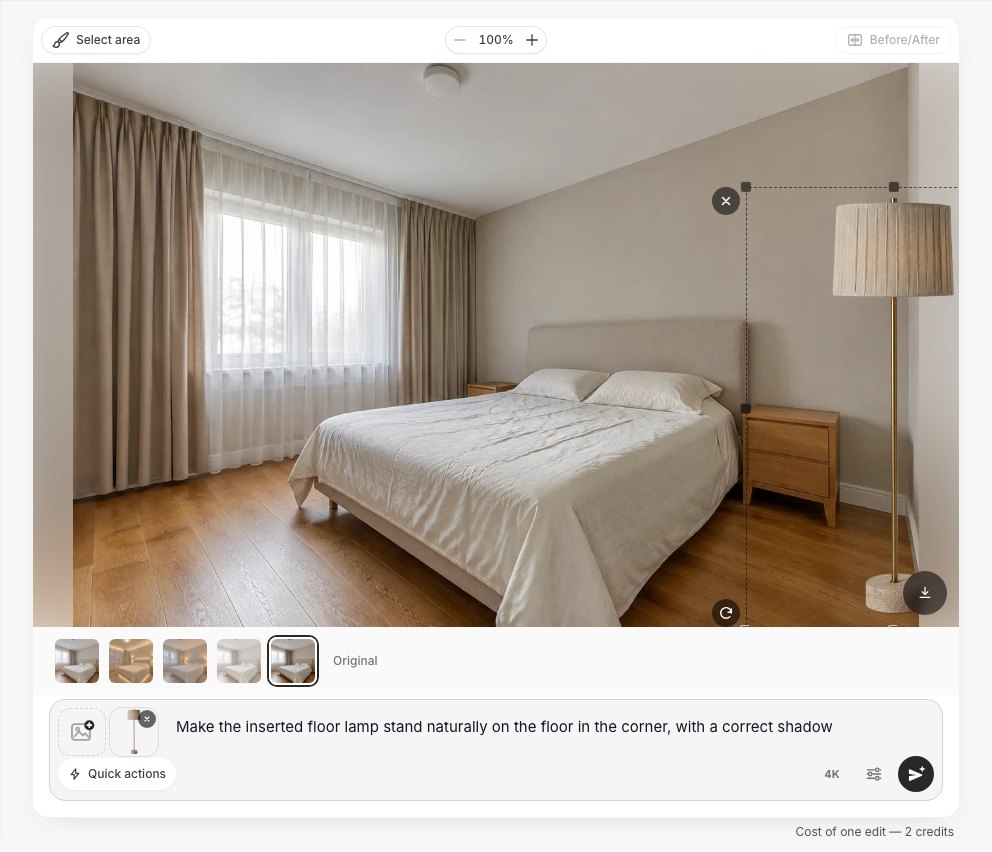 Insert on the picture: the cut-out lamp, dragged to the corner. The dashed frame has handles for resizing.
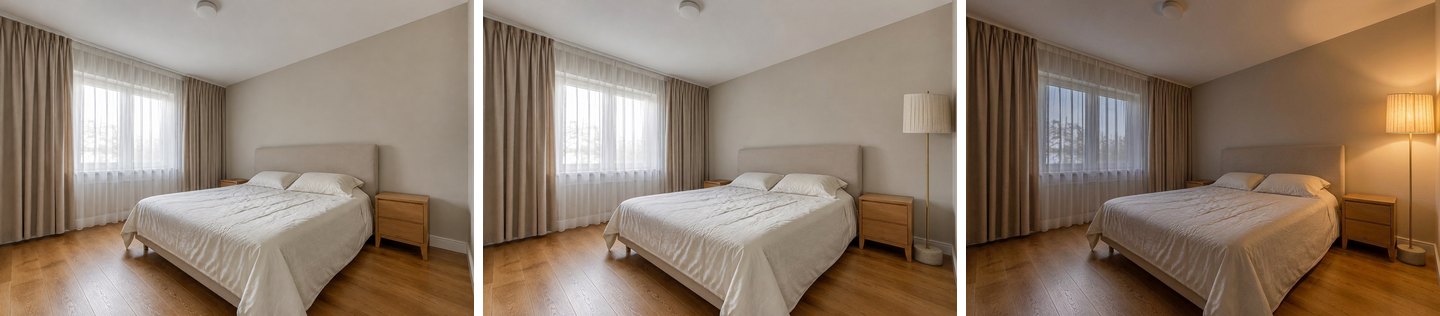 Left: the original. Middle: the inserted lamp, blended in with a shadow. Right: Evening light switches the lamp on and leaves the ceiling light off.
Use the reference when you care about the look of the lamp and are happy for the AI to pick the spot. Use Insert when the spot matters, for example a reading corner. For more on placing products in your room, see our guide to visualizing furniture in your room.
Can the AI Propose a Whole Lighting Scheme?
Yes, through a design. Open the photo on the Design screen, expand Ready tasks → Lighting, tick Warm lighting and open its choices: Soft layered, Spotlights, Statement pendant or TV backlight. Add Evening light from Time of day & season in the same run, and the first picture comes back already lit.
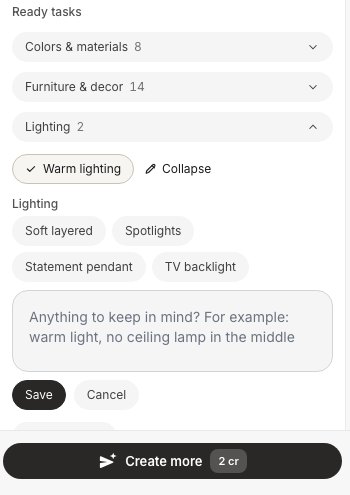 Design → Ready tasks → Lighting → Warm lighting. The field below the choices takes wishes such as "no ceiling lamp in the middle".
In the kitchen, Statement pendant + Evening light gave us a woven rattan dome over the table in one run:
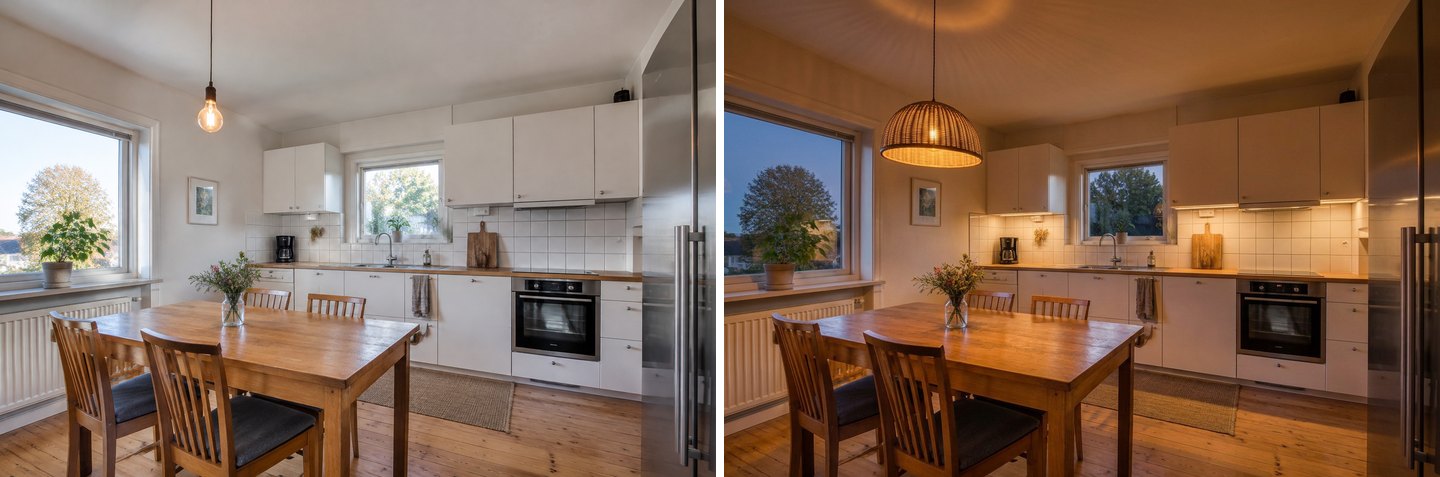 Statement pendant plus Evening light, one run. The pendant is a good match for the wooden table. The under-cabinet lights are again the AI's own idea.
In the bedroom, Soft layered + Evening light showed the main weakness of letting the AI decide:
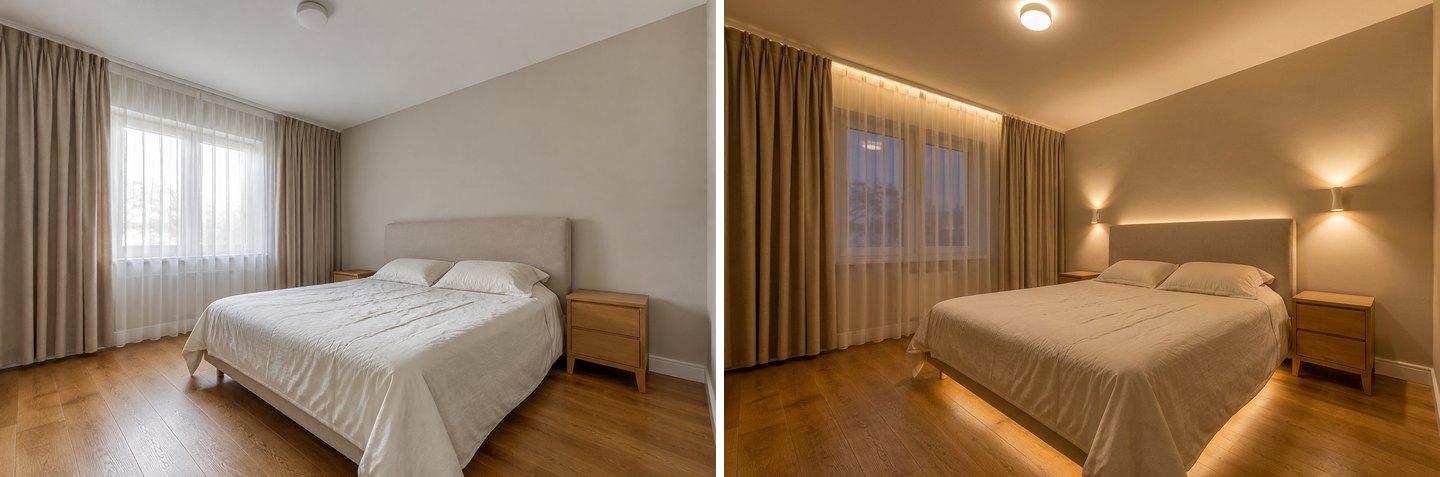 "Soft layered" gave five kinds of light at once: wall sconces, a strip behind the headboard, a strip under the bed, a curtain cove and a new ceiling light. Nice in a picture, a lot of wiring in real life.
Treat a result like this as a menu. Pick the two or three ideas you like (the sconces and the headboard strip, say), restore the original, and ask for only those.
Create interior design with AI
Upload a photo of your room and get a professional design in 30 seconds. First generation is free.
Why Look at the Room in the Evening at All?
Because that's when lighting matters, and daylight hides every lighting problem. To show this, we ran Evening light on the untouched living room photo, with nothing but the original dome.
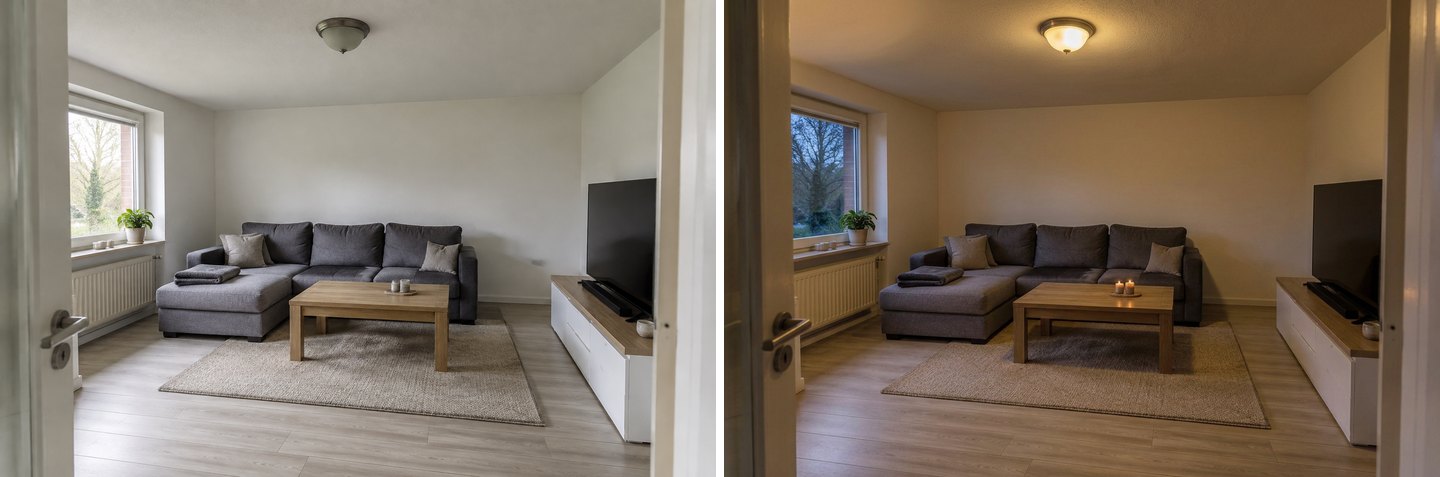 Evening light on the original photo: the dome is the only fixture, so the AI turned it on (and lit the two candles on the table). Compare this with the spotlights and the cove above.
Evening light doesn't add fixtures. It switches on the ones in the photo, which makes it an honest "before" for a lighting plan. In reality a single dome usually leaves the corners darker than in this picture, which is part of why lighting guides recommend layers.
Which Lighting Rules Should You Check the Picture Against?
The AI shows you the mood. These numbers tell you whether it will work. Check every result against them before you buy or wire anything.
| Rule | Typical number | Source |
|---|---|---|
| Plan three layers of light | Ambient (overall), task (bright light where you work or read), accent (focused light on points of interest) | Philips residential lighting plan |
| Color temperature for living spaces | Soft or warm white, up to about 3000 K; neutral or cool white (about 3500–4100 K) for kitchens and work spaces | ENERGY STAR bulb guide |
| Brightness is in lumens, not watts | About 800 lumens equals an old 60 W bulb; 1,100 equals 75 W | ENERGY STAR bulb guide |
| How much light a room needs | Living or dining room about 108–215 lux (lumens per m²); bedroom and general kitchen about 215–538 lux; kitchen worktops about 538–1,076 lux | IES levels as listed by Super Bright LEDs |
| Pendant or chandelier over a dining table | Bottom about 30–34 in (76–86 cm) above the table with an 8 ft ceiling; about 3 in higher for each extra foot of ceiling | Lighting New York |
| Recessed spots | Ceiling spots about 60 cm from the wall; ambient spots about 1 m apart | Philips residential lighting plan |
| Wall lights | About 180–190 cm from the floor, depending on ceiling height | Philips residential lighting plan |
A quick worked example: say a living room like our test one is about 4 × 5 m, so 20 m². At the low end of the range (108 lux) that's about 2,200 lumens in total, or around three 800-lumen bulbs. At the high end (215 lux) it's about 4,300 lumens. A single dome with one or two bulbs falls short of both, which is exactly what the evening picture showed. The lux figure is light reaching the surface, so in a real room with dark finishes you need a bit more from the fixtures.
What Does the AI Get Wrong About Lighting?
We ran 17 lighting generations for this article. These are the problems we saw, and how to work around them.
- It adds accent lights you didn't ask for. Evening light is told to switch on "the lamps and accent lights". In both kitchen runs it invented an LED strip under the wall cabinets. If you don't want it, add a second edit: "remove the lights under the cabinets", or use Quick actions → Restore from original on that area.
- "Soft layered" means too many fixtures. Five kinds of light in one bedroom looks expensive and calm, and needs five sets of wiring. Ask for the layers you can actually install.
- Numbers are wishes. "75 cm above the table" or "4000 K" steer the picture in the right direction, but nothing is measured. Use the table above for real heights and color temperatures.
- It builds things that need construction. A cove request produced a tray ceiling. That is real building work, and the picture won't tell you about ceiling height, the driver or the cost.
- Light can be too even, or come from nowhere. Rendered rooms often look evenly lit. If a wall glows and you can't point to the fixture lighting it, don't count on that light. The AI also lit candles that were unlit in the photo.
- Placement follows your words only so far. The track lights went over the kitchen run, not the table, because we didn't say where. The brush fixes this.
- It is not a lighting calculation. No lux plot, no beam angles, no circuit plan. Use it to decide what you like, then give the picture to an electrician or lighting designer.
For outdoor fixtures (path lights, wall lanterns and facade lighting), the tools and the pitfalls are different. See our guide to AI outdoor lighting design.
How to Write Lighting Requests That Work
Short, specific requests get the best results. What worked in our tests:
- One fixture type per edit. "Spotlights instead of the ceiling light", then a second edit for "a floor lamp by the sofa". Combined requests drift.
- Name the place. "Over the dining table", "behind the TV", "on both nightstands". If the place matters, paint it with Select area.
- Name the number. "Two pendants side by side", "one floor lamp".
- Say warm or neutral. "Warm white" or "neutral white 4000 K". Without it, the Warm lighting task and Evening light both lean warm.
- Switch to evening last. Plan the fixtures in daylight, where the shapes are clear, and then run Evening light to judge the effect.
- Fix, don't restart. If the AI added something extra, remove it in the next edit or restore that area from the original.
Lighting rarely changes alone. If you're also repainting, see how paint colors look on your room photo. In the kitchen, lighting goes well with a fresh look without a full remodel. For lamps as part of the styling, read our AI room decorator guide.
What Does It Cost?
Each lighting edit, design run or Evening light result costs 2 credits. A free account comes with 6 credits and no card required, enough for one fixture change, its evening version and one more try. Free results carry a watermark. Paid packs start at $9.99 for 36 credits (about 18 edits), with no subscription; see pricing. If a generation fails, the credits come back automatically.
All the tests for this article (17 generations across three rooms, including one we didn't publish) cost 34 credits.
FAQ
Can AI design the lighting for my room from a photo?
Yes, as a visualization. Upload a photo to an AI room tool such as GenRoom, ask for the fixtures you're considering (spotlights, a pendant, LED cove lighting, lamps), and switch the result to evening to see them lit. It shows the look and the mood. It doesn't calculate lux or plan circuits.
Is there a free AI lighting visualizer for my room?
GenRoom gives 6 free credits when you create an account, with no card. That's three lighting edits, for example a new fixture, its evening version and one variation. Free results carry a watermark.
How do I see my room at night with the lights on?
In the GenRoom editor, open Quick actions, tap "1 more" under Light & season and choose Evening light. It turns the photo into evening and switches on the lamps and fixtures in the picture. In a design, add Evening light from Time of day & season.
Can I try a specific lamp I want to buy?
Yes. Save the product photo, click the photo button in the prompt bar, and either choose Add as a reference with Quick actions → Use my reference, or choose Insert on the picture to place the cut-out lamp yourself and then describe how it should fit.
What color temperature is best for a living room?
Warm white, about 2700–3000 K. ENERGY STAR describes soft and warm white as ideal for most indoor use and suggests neutral or cool white for kitchens and work spaces. You can compare warm and neutral light on the same photo with the Lighting action.
How high should a pendant hang above a dining table?
With an 8 ft (2.4 m) ceiling, the bottom of the pendant typically sits about 30–34 in (76–86 cm) above the table, and about 3 in higher for each extra foot of ceiling. The AI can't measure this in your photo, so check it with a tape measure.
How many lumens does a room need?
Multiply the floor area by the target light level. IES levels put a living room at roughly 108–215 lux (lumens per square meter), so a 20 m² room needs about 2,200–4,300 lumens in total, spread across several fixtures. Kitchen worktops need much more.
The Bottom Line
AI lighting design is best at the question people actually have: "what will this look like when it's on?" Upload the room as it is, change one fixture at a time with the Lighting action or the brush, try the exact lamp you want with a reference photo, then switch to evening and look at the corners. Expect the AI to add an extra strip or two and to ignore your measurements, so fix the extras in the next edit and check heights, Kelvin and lumens against the rules above. Upload your room in the Studio and see it lit tonight, before you buy a single bulb.