How to Update a Kitchen Without Remodeling: AI Before & After
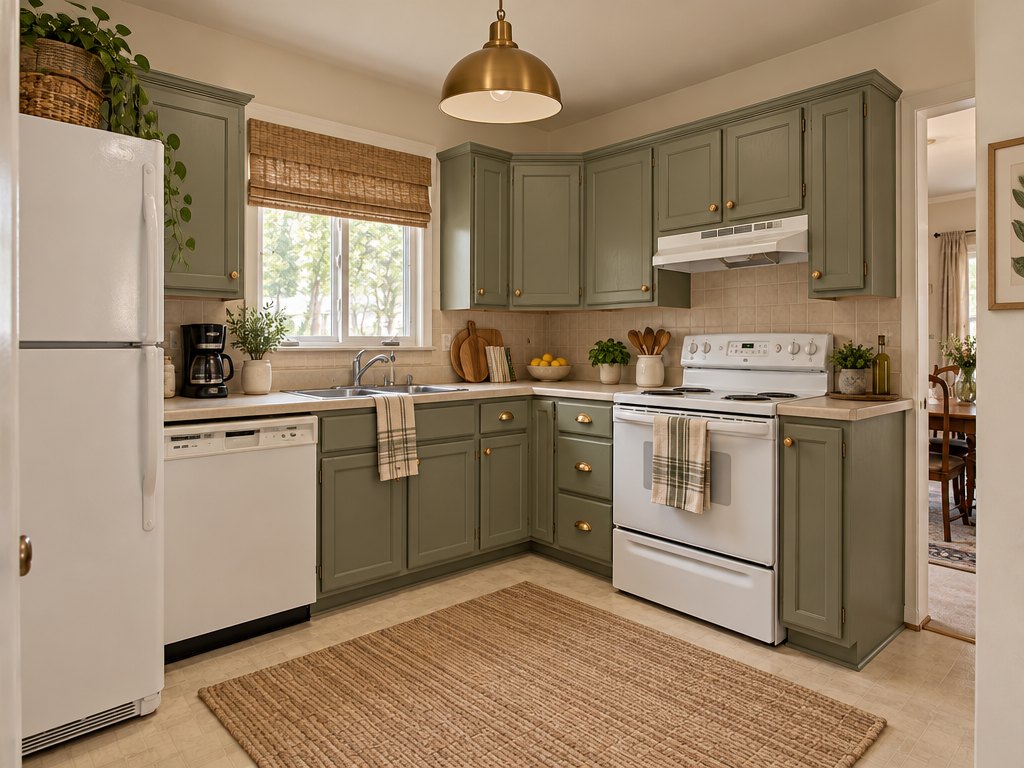
A real result from the GenRoom Studio, "Refresh, no renovation" mode. The fridge, range, dishwasher, sink, window and floor are the ones from the original photo.
To update a kitchen without remodeling, keep everything that is expensive to move — the cabinet boxes, the counters, the appliances, the plumbing and the layout — and change only what you can paint, swap or stick on: cabinet color, hardware, the backsplash, lighting, window treatments and a few accessories. The fastest way to decide which of those moves is worth your money is to try them on a photo of your own kitchen first.
That is exactly what the GenRoom Studio is for. Upload one photo of your kitchen, pick Refresh, no renovation for an all-in-one makeover, or use single edits such as Recolor an object for the cabinets, Lighting, Floor material & color or a brush selection for the backsplash. Each design or edit costs 2 credits and comes back in about 20–35 seconds, with the same camera angle and the same room.
This guide is built on what people really ask for. Between March and October 2026, 991 GenRoom users described this exact job in their own words: not "design me a new kitchen", but "make this kitchen look better without touching the cabinets". Below you will find their typical requests, what each refresh move costs in real life, the exact Studio path, real before/after results from two kitchens we shot for this article, and the places where the AI still gets it wrong.
What Do People Ask For When They Want a Kitchen Refresh?
Most refresh requests mix two things: what must stay, and what may change. Here are typical ones, paraphrased and anonymized, with the tool that handles each best:
| What people write | What they really want | Best Studio tool |
|---|---|---|
| "Give this kitchen a new face, but rent-friendly — don't change the furniture" | Only removable updates | Refresh, no renovation + a sentence on what stays |
| "Keep the kitchen itself, the table and the fridge; change the wallpaper color" | Walls only, everything else untouched | Wall color quick action |
| "Warm beige cabinets and a black square pendant" | Paint the cabinets, swap one light | Recolor an object, then Lighting |
| "Terracotta walls, some art, a new backsplash" | A few surface changes | Wall color, Add, brush selection on the backsplash |
| "Other lamps and a bit more color" | Lighting and accents | Lighting, then Add |
| "Modernize and declutter, a growing tray for greens, warm tones" | A tidy, warmer version of the same kitchen | Refresh, no renovation |
Two patterns stand out. First, people almost always say what must stay — the fridge, the cabinets, the table — because they are not planning a renovation. Second, they ask for small, specific things: jars for salt and sugar, a utensil holder, a plant tray. A good refresh preview has to respect the first and deliver the second.
Refresh vs Remodel: What Does Each Move Cost?
A refresh is a different budget class from a remodel. According to HomeAdvisor's kitchen remodel cost guide (updated June 2026), a kitchen remodel costs $26,990 on average, with most projects between $14,591 and $41,617. Every refresh move below costs a fraction of that:
| Refresh move | Typical cost (US) | Source |
|---|---|---|
| Painting kitchen cabinets (by a pro) | $400–$1,300 total, $6–$14 per sq ft | HomeAdvisor, cabinet refinishing |
| Professional cabinet refinishing (all methods) | $1,992–$4,495, average $3,117 | HomeAdvisor, cabinet refinishing |
| Cabinet refacing (new doors and veneer, boxes stay) | $4,234–$10,226, average $7,230 | HomeAdvisor, cabinet refacing |
| Tile backsplash, professionally installed | $480–$1,500, average $1,000 ($15–$40 per sq ft) | HomeAdvisor, backsplash installation |
| Under-cabinet lighting, professionally installed | $230–$300, average $265 | HomeAdvisor, under-cabinet lighting |
| Peel-and-stick backsplash (DIY) | around $30 | Kitchen Cabinet Kings renter guide |
| New cabinet hardware (DIY) | from about $2 per piece | Kitchen Cabinet Kings renter guide |
| Plug-in or battery under-cabinet lights (DIY) | $20–$40 | Kitchen Cabinet Kings renter guide |
The point of the table is not the exact number for your city. It is the order of magnitude: painting the cabinets and swapping the hardware costs a few hundred to a couple of thousand dollars, while new cabinets are the single biggest line in a remodel. That is why it pays to see a refresh on your own photo before deciding you "need" a new kitchen.
Which GenRoom Tool Should You Use for a Kitchen Refresh?
Answer first: use Refresh, no renovation when you want an overall makeover with nothing built-in replaced, Kitchen remodel → Refresh fronts & counters when you are open to new doors and counters on the same boxes, and single quick actions in the AI editor when you want to test one change at a time.
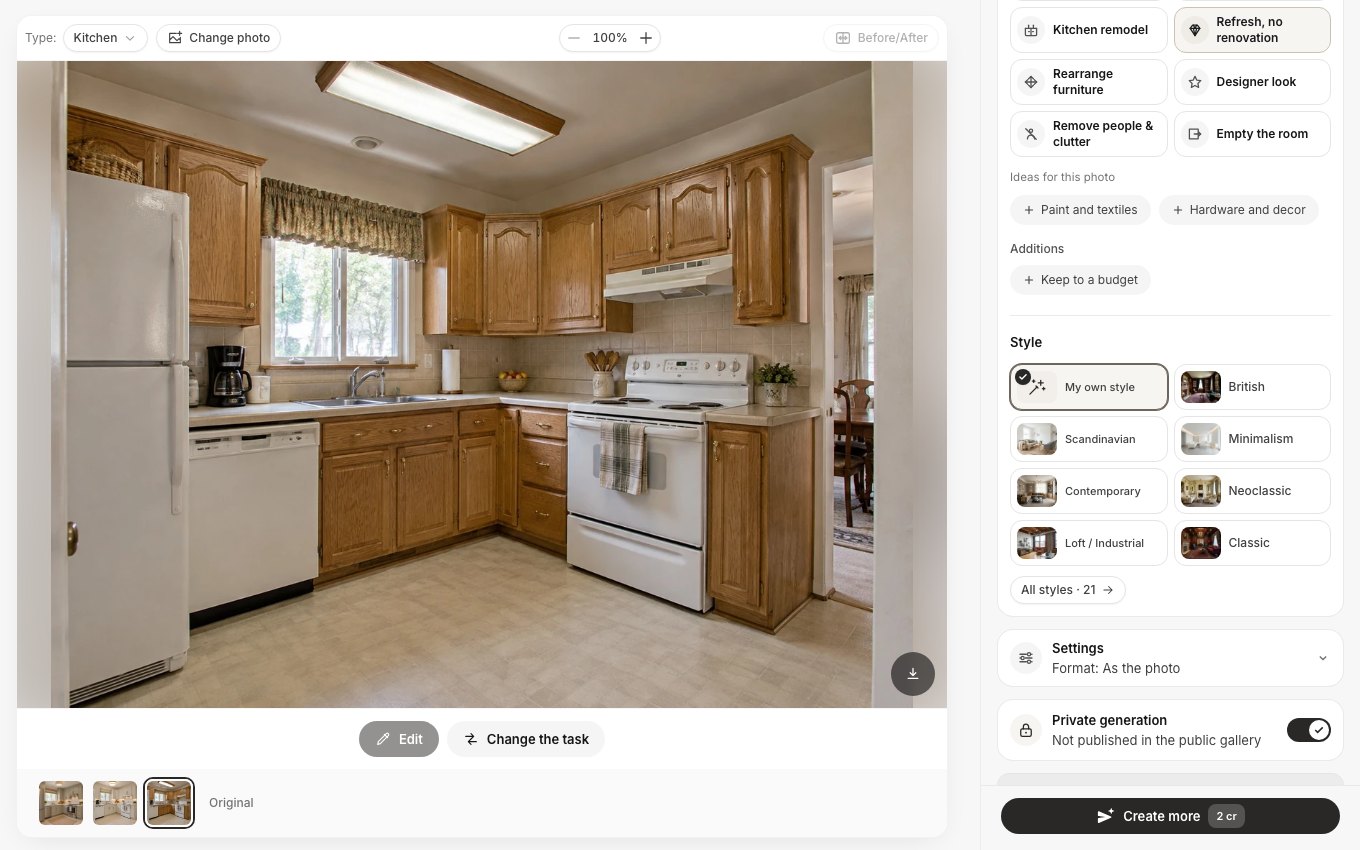 The Studio after upload. The kitchen was recognized automatically; for this photo the mode suggested two ideas, "Paint and textiles" and "Hardware and decor".
Refresh, no renovation
This mode is described in the Studio as making the room look more expensive without renovation: paint, textiles, lighting, mirrors, plants and a smarter layout, while floors, ceiling and built-ins stay. In a kitchen, that means repainted cabinet fronts, a new light fixture, window treatments, a rug and accessories — and the same appliances, counters and floor. Under it you get photo-specific ideas and an optional Keep to a budget addition, which asks the AI to start with the changes that give the biggest effect for the least money.
Kitchen remodel and its three variants
The Kitchen remodel mode has three variants, and the difference between them is exactly the difference between a refresh and a renovation:
- Refresh fronts & counters (the default) — new cabinet fronts, countertops, backsplash, handles and lighting, keeping the cabinet boxes, their sizes and layout, and the positions of the appliances and the sink.
- New kitchen, same walls — a new kitchen designed within the existing walls, windows and doors: new cabinets, counters, backsplash, appliances, hardware and lighting.
- Kitchen from scratch — a kitchen planned from zero for the room, with a work triangle between sink, cooktop and refrigerator. You can type the room size in the optional Kitchen size field.
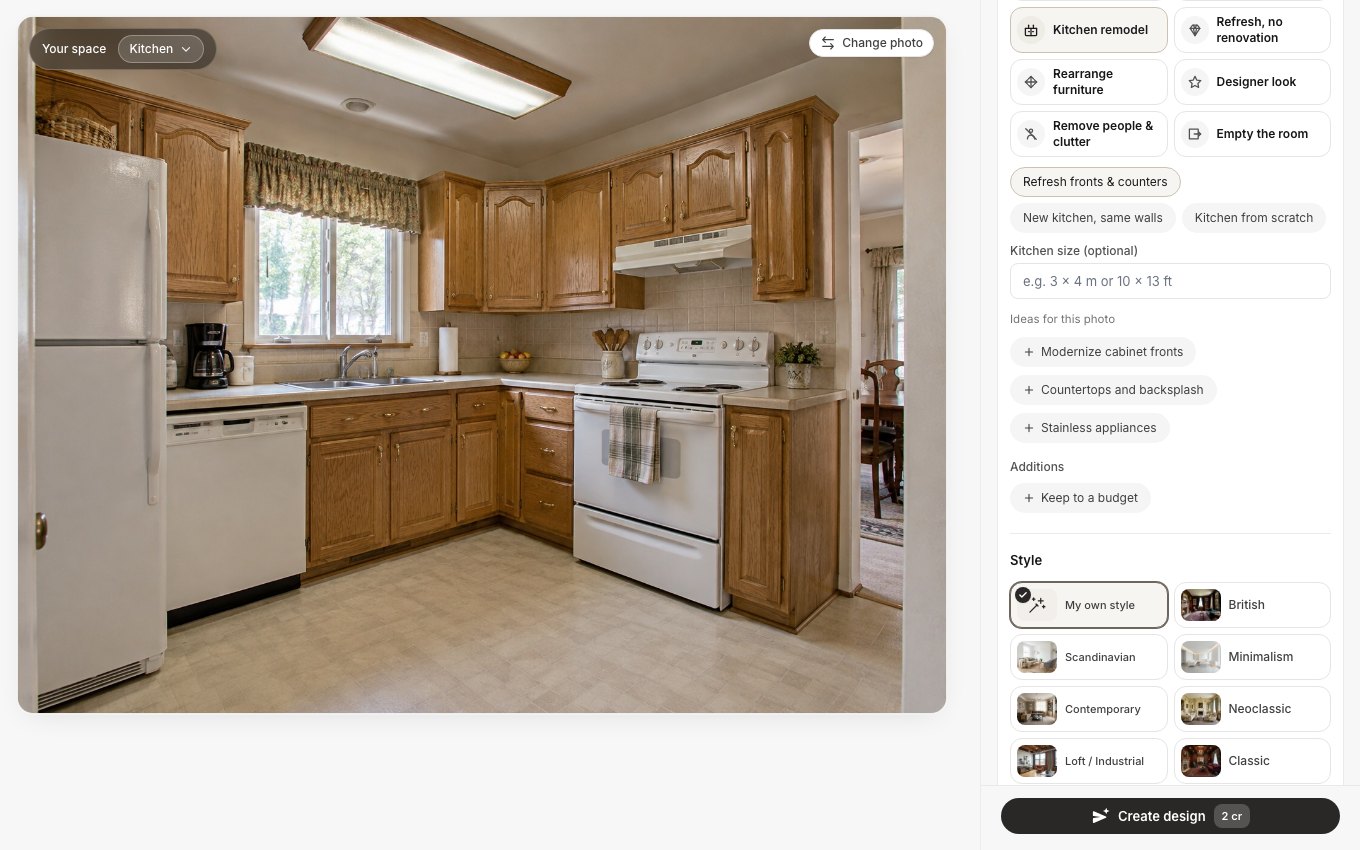 Kitchen remodel mode with its three variants. The ideas under them ("Modernize cabinet fronts", "Countertops and backsplash", "Stainless appliances") are generated for each photo.
We ran all three on the same dated oak kitchen, in the same Contemporary style, to show what each keeps:
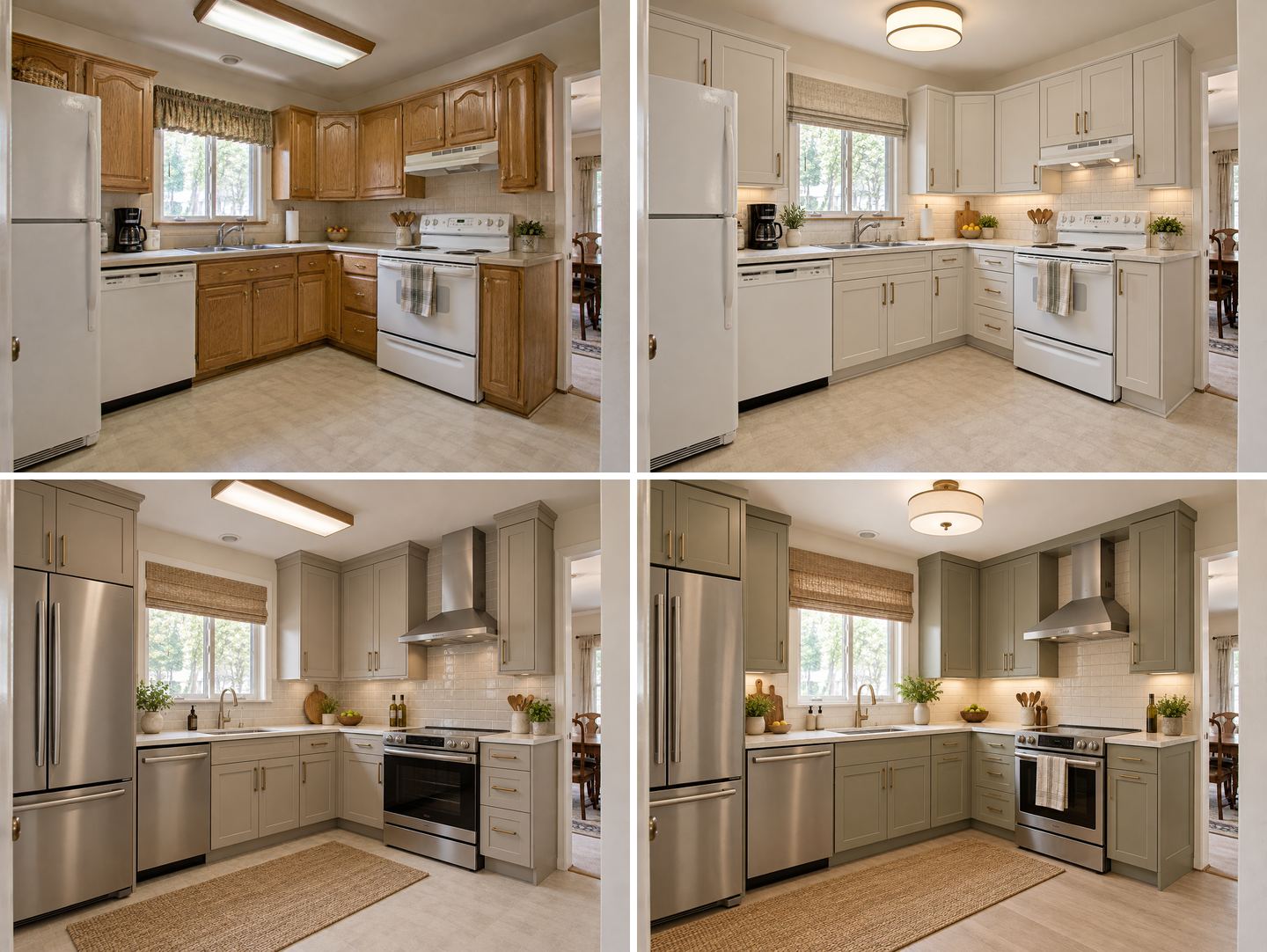 Top left: the original. Top right: Refresh fronts & counters. Bottom left: New kitchen, same walls. Bottom right: Kitchen from scratch. All three are unedited Studio results in the Contemporary style.
Look at the appliances, the floor and the cabinet over the fridge. Refresh fronts & counters kept the white fridge, range and dishwasher, the vinyl floor and every cabinet box in place; only the doors, handles, backsplash, lighting and the window shade changed. New kitchen, same walls brought stainless appliances, a chimney hood and new cabinets. Kitchen from scratch went further and also replaced the floor and the ceiling light. If your budget has no line for appliances, the first variant is the only honest preview.
Quick actions in the AI editor
For one change at a time, open the photo in the AI editor and use Quick actions. For a kitchen refresh, four of them do most of the work: Recolor an object (cabinets, with a ready chip "Kitchen cabinets to white"), Wall color, Lighting and Floor material & color. Add Add for accessories and shelves, Replace furniture for hardware, and Select area when you want to change one surface, such as the backsplash, and nothing else.
Case 1: How to Refresh a Dated Oak Kitchen Step by Step
Our first test kitchen is a very common sight in listings: honey oak raised-panel cabinets, almond laminate counters, beige square tiles, white appliances, a fluorescent box on the ceiling and a fabric valance. Nothing is broken; it just looks 30 years old.
Step 1: Take a usable photo
Shoot in daylight from the doorway or a corner, at standing eye level, with as much of the cabinetry in frame as possible. Include the appliances you plan to keep — the AI keeps what it can see, and it cannot keep what is outside the frame. Clear the counters if you want the result to read as "tidy"; leave them as they are if you want an honest preview.
Step 2: Run "Refresh, no renovation"
In the Studio, choose Design from a photo, upload, and pick Refresh, no renovation. We left the style on My own style and wrote no wishes, to see what the mode does on its own.
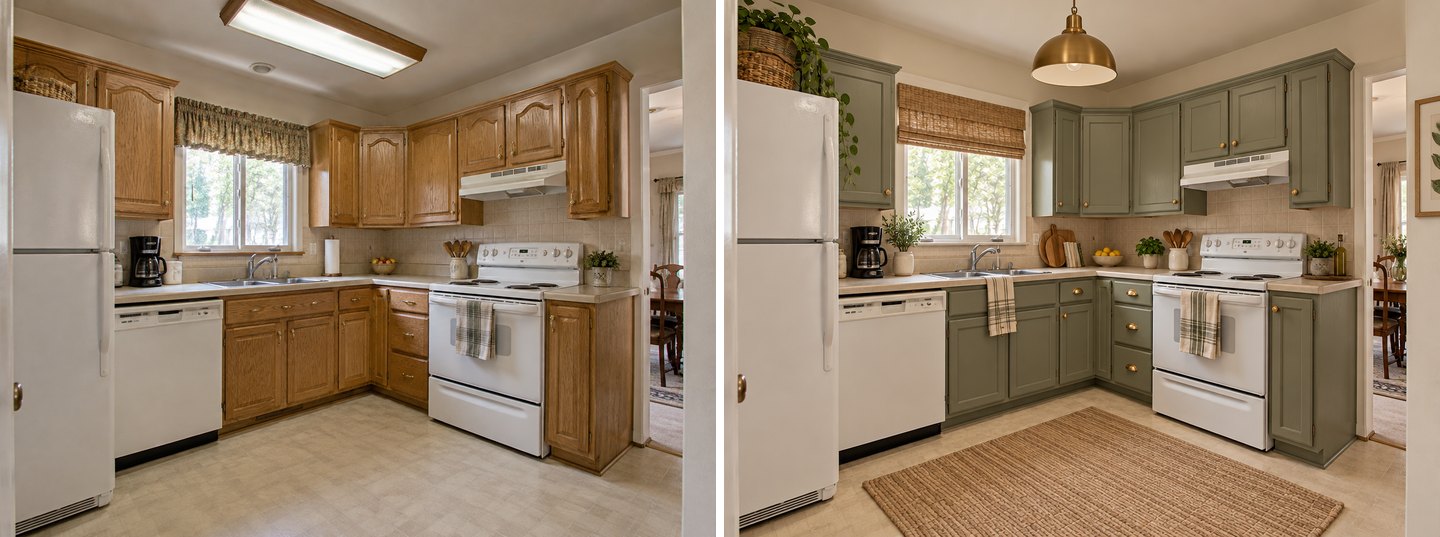 Left: the original photo. Right: "Refresh, no renovation", unedited. Same appliances, counters, sink, window, floor and camera.
The result is a realistic weekend-and-a-few-paint-cans plan: sage green cabinet fronts, a brass pendant instead of the fluorescent box, a woven shade instead of the valance, a jute rug, plants and a couple of wooden boards. The fridge, range, dishwasher, counters, tile, sink and floor are the originals. One honest note: the fronts came out with a simpler, flatter panel than the original cathedral arches — real paint would keep your arches, so judge the color, not the door profile.
Step 3: Test just the cabinet paint
If you want to know whether paint alone is enough, test it alone. Open the photo in the AI editor, choose Quick actions → Recolor an object, and type what to recolor and the color. We wrote: all the oak cabinet doors, drawer fronts and cabinet frames to soft sage green paint, keep the same raised-panel doors.
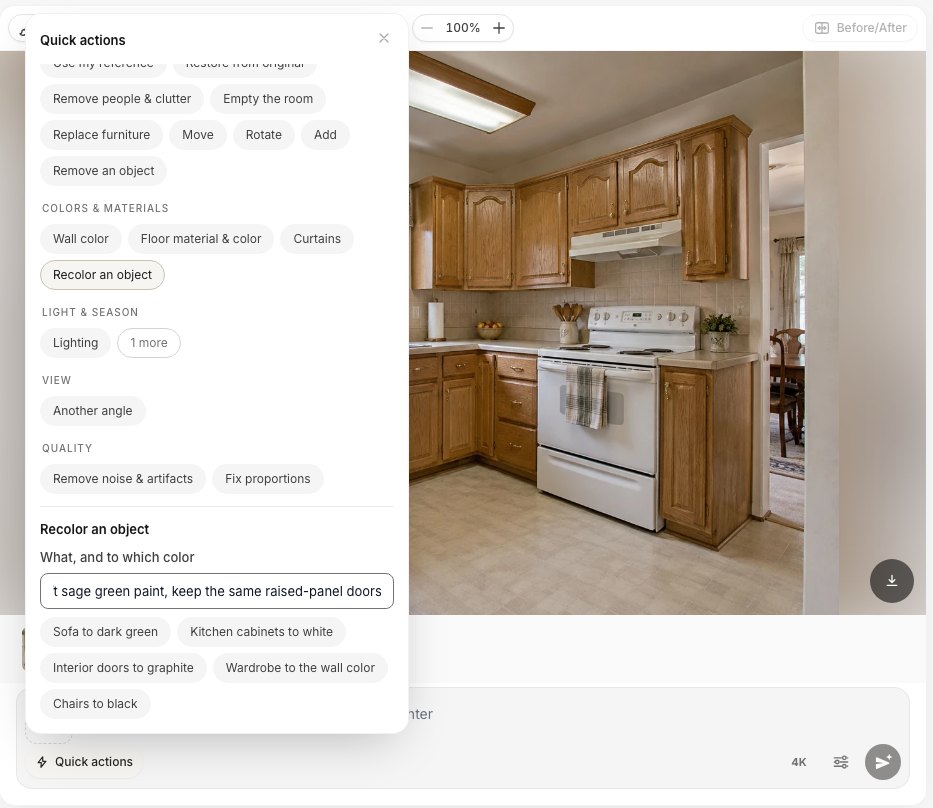 Quick actions → Recolor an object. Type your own request or start from a chip such as "Kitchen cabinets to white".
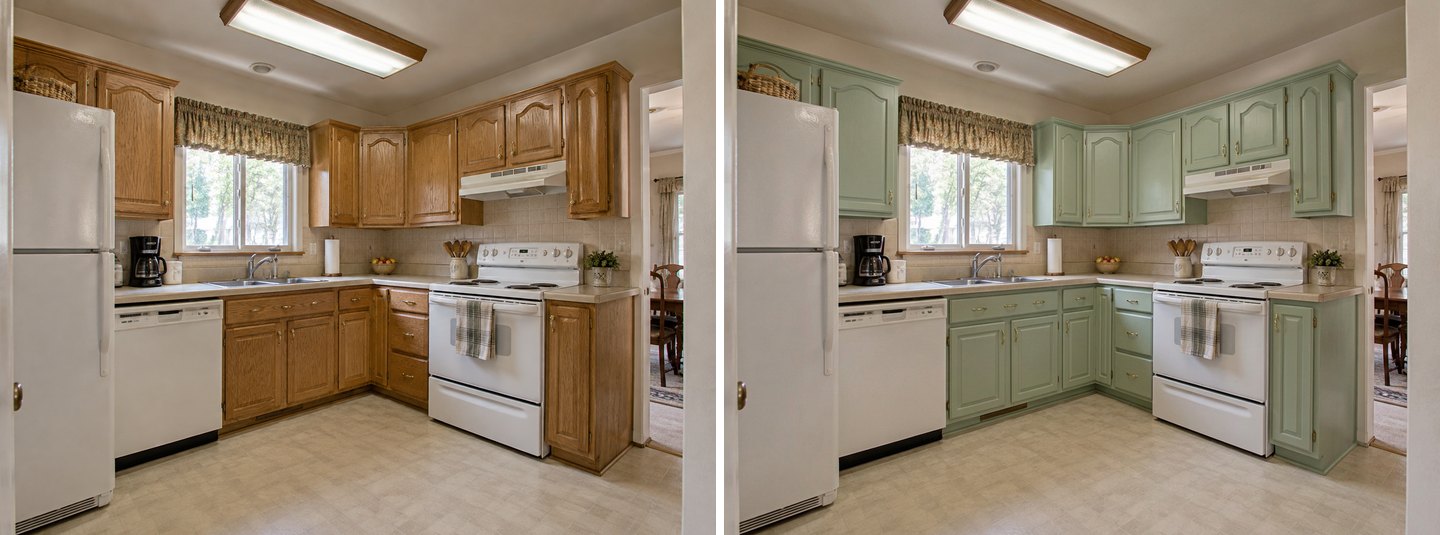 Recolor an object, unedited. Only the cabinet color changed: the arched raised-panel doors, knobs, counters, tile, valance and fluorescent light are untouched.
This is the most useful image in the whole test. The door profile is kept exactly, so you see what your cabinets would look like painted — the job HomeAdvisor prices at $400–$1,300 for a professional. If you like it, you have your answer; if the old tile and the fluorescent box now look worse next to the fresh paint, that tells you what to test next. For more color ideas and paint codes, see our AI cabinet color visualizer guide.
Step 4: Lighting and floor, one at a time
Next, we went back to the original photo and tested two more moves separately, so each result shows one change only.
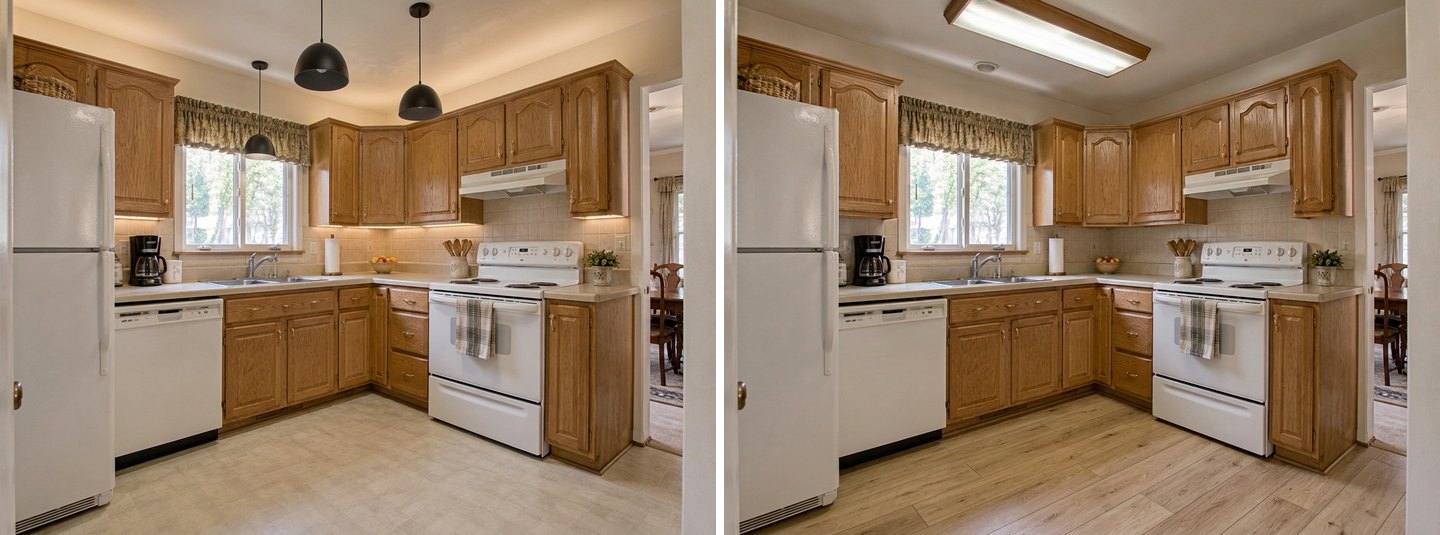 Left: Lighting quick action, black dome pendants and warm under-cabinet strips. Right: Floor material & color, light oak luxury vinyl plank. Both made from the original photo, not from each other.
The lighting edit replaced the fluorescent box and added warm strips under the uppers — the cheapest way to make counters look cleaner at night. We asked for two pendants and got three, so count the fixtures before you buy anything. The floor edit is clean: only the floor changed, down to the shadow under the dishwasher.
Why branch from the original: every edit is made from the photo you select, so start each new test from the original instead of stacking ten edits on top of each other. Long chains of edits gradually soften details; separate branches stay sharp and are easy to compare.
Case 2: A Renter-Friendly Kitchen Refresh
Our second kitchen is the opposite problem: a clean, white, characterless rental galley — flat white doors, speckled gray laminate, plain white tiles, a single flush-mount light. Here you usually cannot paint the cabinets, replace the counter or touch the tile, and anything you change has to come off when you move out.
Start with a sentence about what stays
For a rental, the most important words in your request are the ones about what must not change. We chose Refresh, no renovation and wrote in the request field: Renter-friendly: I can't paint or replace anything. Keep the white cabinets, the countertop, the backsplash tiles and the floor exactly as they are. Change only removable things: a plug-in pendant or lamp, under-cabinet lights, cabinet handles, a runner rug, a curtain, art, plants and a few nice jars and utensils.
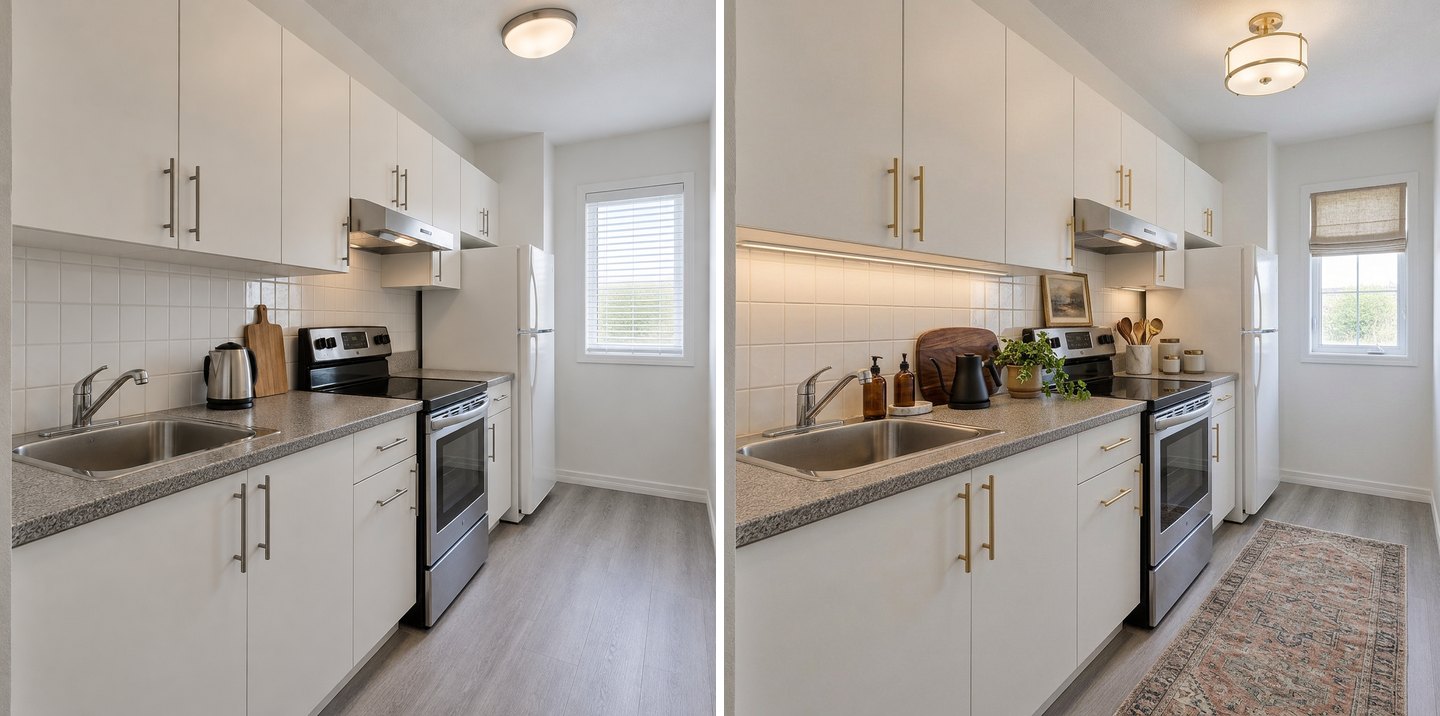 Left: the original rental. Right: "Refresh, no renovation" with the renter-friendly request. Cabinets, counter, tile, floor, stove and fridge are the originals.
The AI respected every "keep": the white slab doors, the laminate, the tile and the vinyl floor are untouched. What changed is all removable — brass pulls, a warm strip under the uppers, a roman shade, a vintage runner, a small framed print, plants, a bottle-and-board vignette by the sink. One item to check with your landlord: the AI also swapped the ceiling fixture, which is hardwired; keep the original and put it back when you leave, or use a plug-in pendant instead.
Four renter moves, each tested on its own
To see which single move makes the biggest difference, we ran four separate edits on the original photo:
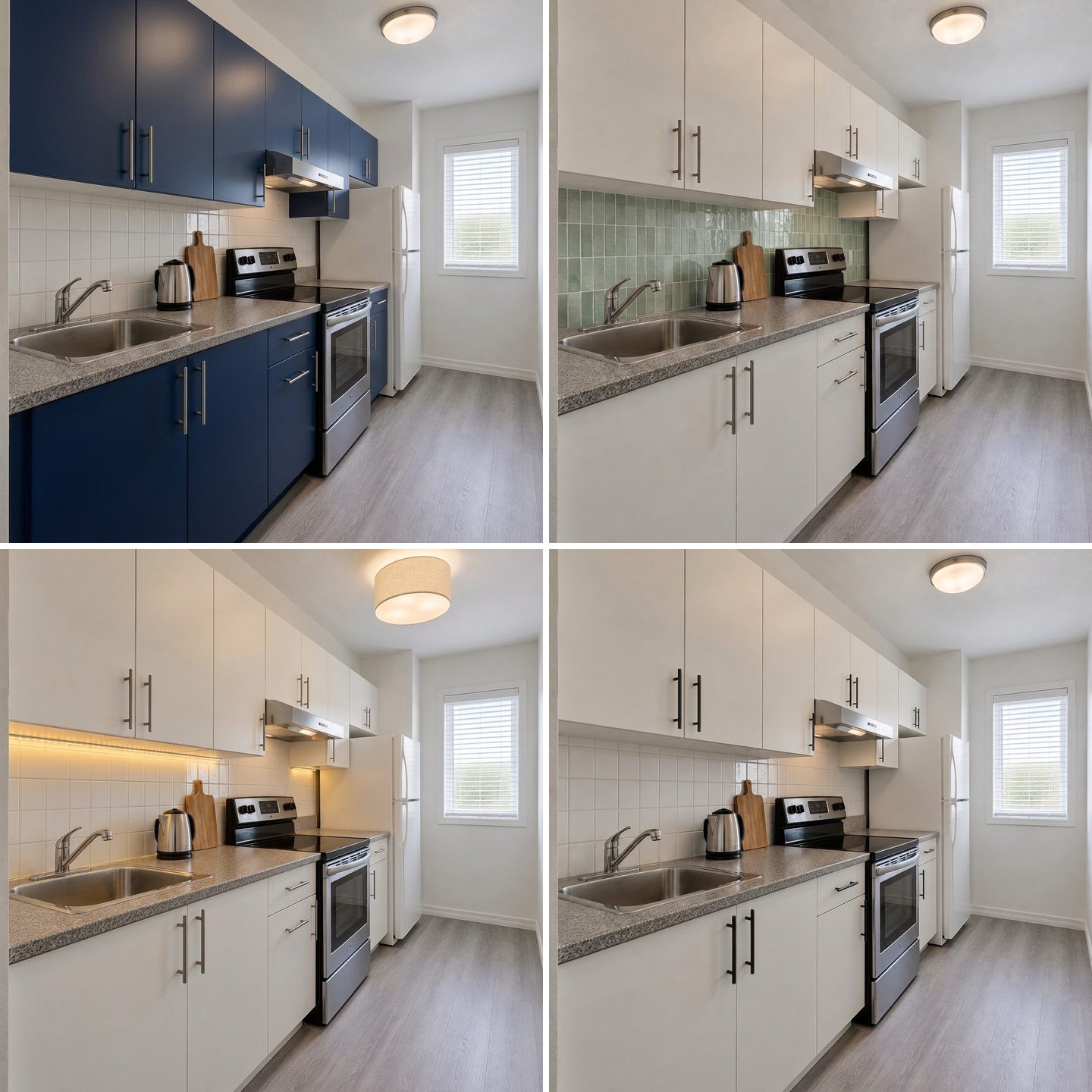 Top left: Recolor an object, navy fronts (think vinyl wrap or paint with the landlord's OK). Top right: brush selection, peel-and-stick backsplash. Bottom left: Lighting. Bottom right: Replace furniture, black handles. Each made from the original.
- Cabinet color — Recolor an object, the cabinet doors and drawer fronts to deep navy blue, keep the same flat slab doors and the same handles. The doors stayed flat, the handles stayed steel. For renters, this is the preview for removable cabinet wrap.
- Backsplash — a brush selection over the tiles, see below.
- Lighting — warm LED strip lights under the upper cabinets and a linen drum shade instead of the flush ceiling light. Battery or plug-in strips need no electrician.
- Hardware — Replace furniture, the cabinet handles with slim matte black bar pulls, same positions. Subtle in a thumbnail, obvious in person; keep the original handles in a labeled bag.
Change only the backsplash with a brush
Peel-and-stick tile is the classic renter upgrade, and it is exactly the case where you want the AI to touch one surface only. In the AI editor, click Select area, outline the tiled wall between the counter and the upper cabinets, press Done — keep the selection, and describe the new surface.
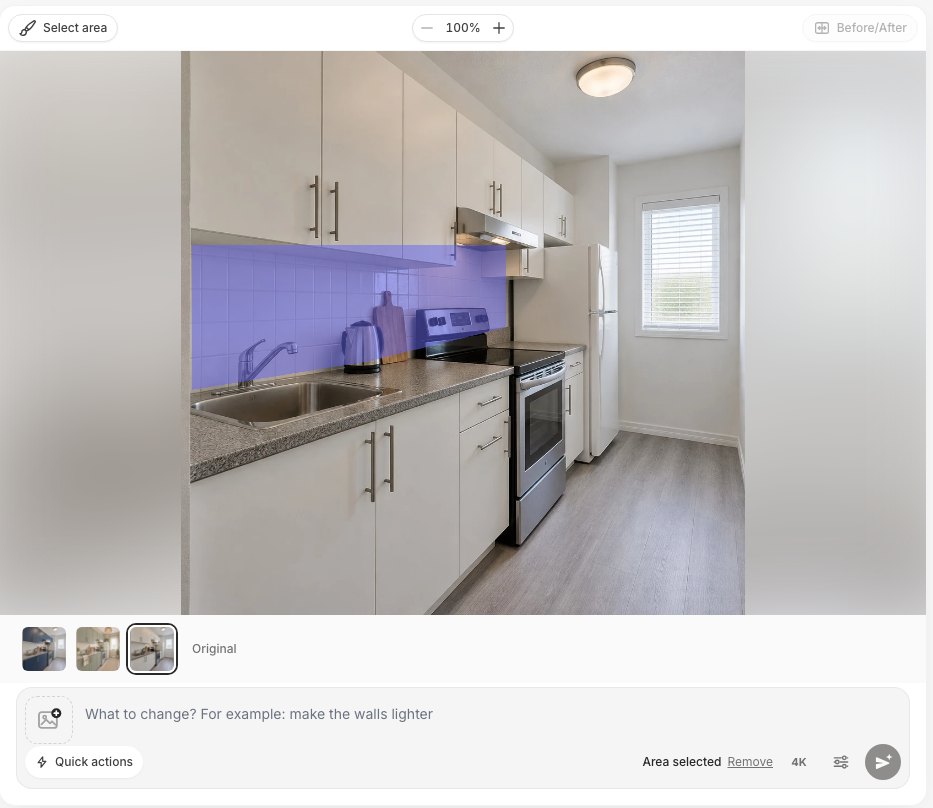 Select area: the purple region is the only part the edit may change. "Area selected" appears next to the Apply button.
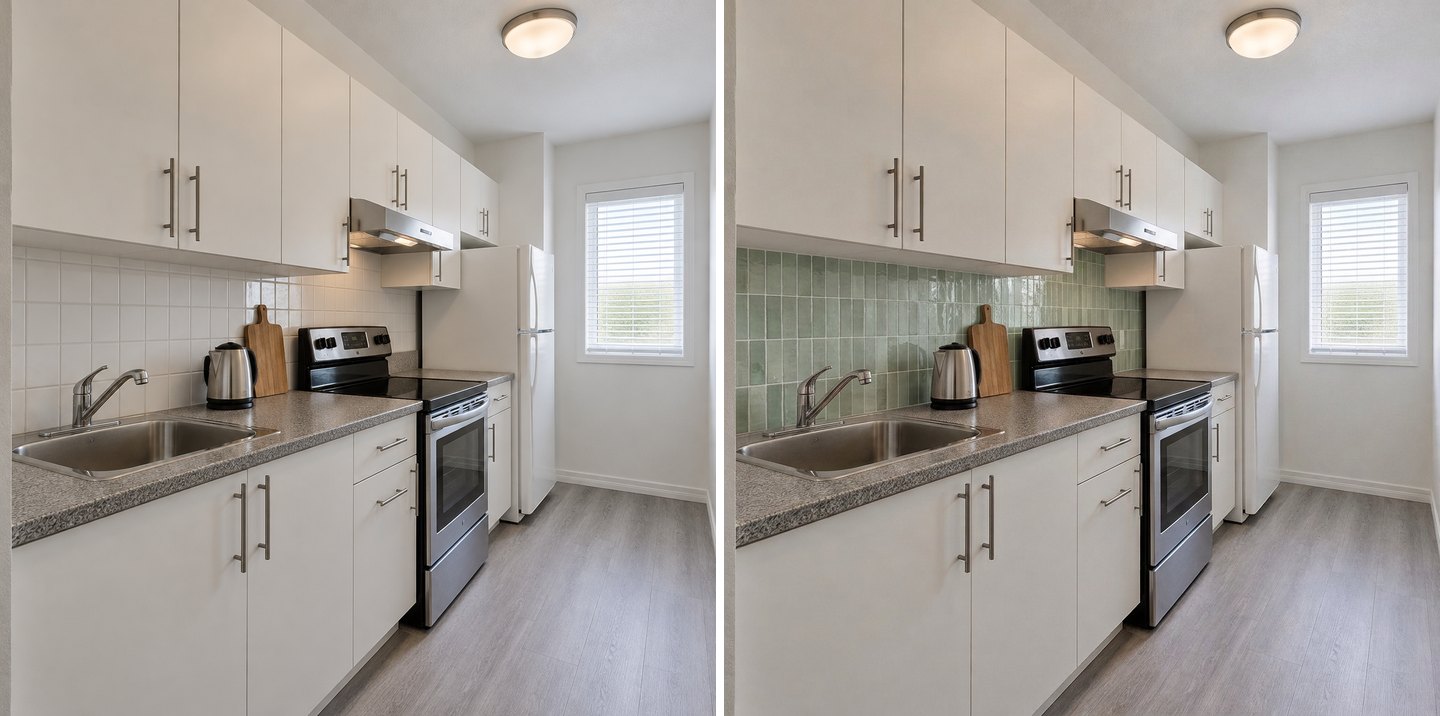 Brush selection + "peel-and-stick tiles in a glossy sage-green zellige look, small vertical rectangles". The kettle and cutting board inside the selection were kept.
Our selection crossed the kettle and the cutting board, and the AI still kept both in place — a nice surprise. The cabinets, counter, range and floor did not change. If you want to compare tile patterns (subway, zellige, herringbone, slab), our backsplash visualizer guide goes through them one by one.
What counts as removable?
| Move | Usually renter-safe? | Preview in GenRoom with |
|---|---|---|
| Peel-and-stick backsplash over existing tile | Usually, if it comes off cleanly — test a hidden spot | Select area + a sentence |
| Swapping handles and knobs | Yes, if you keep the originals | Replace furniture |
| Plug-in or battery under-cabinet lights | Yes | Lighting |
| Plug-in pendant, lamp, shade | Yes | Lighting |
| Rug, curtains or shade, art, plants, jars | Yes | Add, Curtains |
| Cabinet wrap (vinyl) | Often, check the lease | Recolor an object |
| Painting cabinets or walls | Only with the landlord's written OK | Recolor an object, Wall color |
Your lease decides, not this table. The preview just helps you show the landlord exactly what you plan to do.
Refresh Fronts & Counters vs From Scratch: What Does a Refresh Keep?
A refresh keeps the four things that make a remodel expensive: the cabinet boxes, the plumbing (sink position), the appliance positions and the floor plan. In the comparison above, the refresh result even kept the 1990s white appliances — because that is what you would actually have the day after a refresh.
That matters when you compare quotes. A refresh plan that shows stainless appliances is not a refresh anymore: it quietly adds several thousand dollars. If the preview looks great only because the AI replaced the fridge, use Restore from original or say keep the white fridge, range and dishwasher and run it again. A refresh that looks good with your appliances is a plan; one that needs new appliances is a remodel in disguise. For a full renovation, our AI kitchen remodel guide covers layouts, islands and clearances.
Create interior design with AI
Upload a photo of your room and get a professional design in 30 seconds. First generation is free.
How to Write a Refresh Request the AI Follows
The AI does what you describe, so the wording decides how much of your kitchen survives:
- Say what stays first. "Keep the cabinets, the counter and the fridge" before "add warm light". It is the single most effective sentence in our tests.
- One change per edit. Cabinet color, then lighting, then the backsplash — each from the original. You will see which move does the work.
- Name the surface, not the vibe. "The cabinet doors and drawer fronts" works better than "the kitchen".
- Give a real color. "Soft sage green", "deep navy", a paint brand shade or a RAL code beats "something warmer". The Colors library in the editor has Palette, RAL, NCS and HEX. Our paint color guide shows how codes are handled.
- Say "keep the shape" when you mean paint. Without it, a cabinet recolor can turn into new doors.
- Use the brush for one surface. Backsplash, one wall, the area above the cabinets.
Check the Result With the Before/After Slider
Every result opens with a Before/After button. Drag the handle across cabinets, counters and appliances: if something you wanted to keep has changed, you will see it in a second.
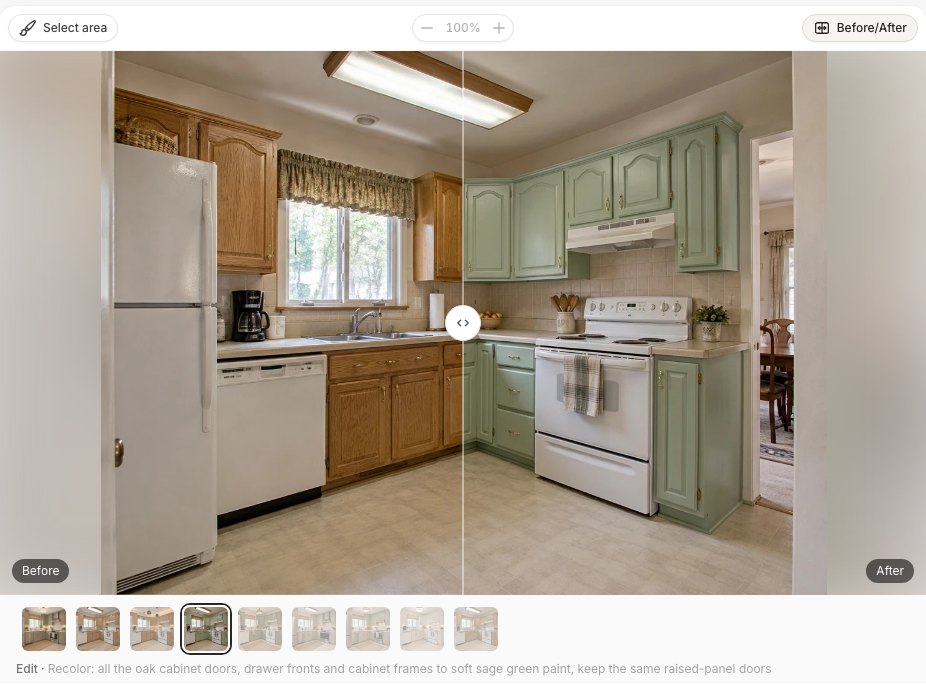 The Before/After slider on the sage cabinet edit. The edit label under the thumbnails repeats exactly what was asked.
What AI Kitchen Refresh Previews Still Get Wrong
We kept every result in this article unedited, including the imperfect ones. Here is what to watch for:
- Design modes can change the door profile. "Refresh, no renovation" painted our oak fronts but simplified the arched panels. On the rental, the same mode turned flat slab doors into shaker doors — something paint cannot do.
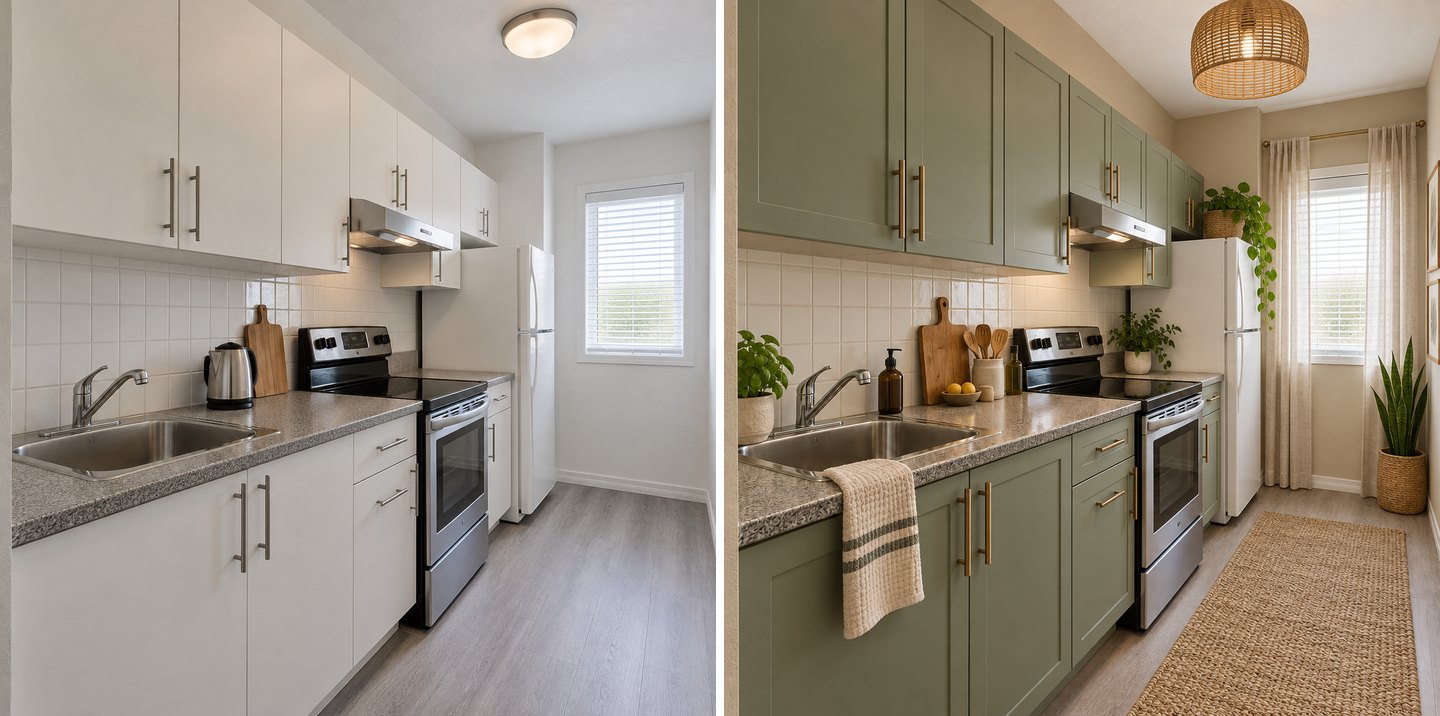 "Refresh, no renovation" with no extra words: a lovely result, but the flat slab doors became shaker doors. When you only plan to paint, use Recolor an object and say "keep the same doors".
- Counts drift. We asked for two pendants and got three. Read the result like a shopping list before you buy.
- Hardwired fixtures get swapped too. A "renter" request still produced a new ceiling fixture. The AI does not know your lease.
- Colors shift with the light in your photo. A warm evening photo makes every color warmer. Compare paint chips on the wall before you buy a gallon.
- "New kitchen, same walls" and "from scratch" can look alike in a small L-shaped kitchen, because there is only one sensible layout. The difference shows in larger rooms.
- No measurements, no shopping list. The AI shows a look, not cabinet dimensions or product links. Measure before you order hardware or peel-and-stick tiles.
How Much Does It Cost to Preview a Kitchen Refresh?
A design or an edit costs 2 credits. A free account comes with 6 credits (results carry a watermark), enough for three tests — for example, cabinet color, lighting and backsplash. Paid packs are one-time, not a subscription: Start is $9.99 for 36 credits, Basic $19.99 for 100 and Pro $39.99 for 300; purchased credits are valid for 180 days, and if a generation fails, the credits come back automatically. Everything in this article — the modes, quick actions, brush selection and the before/after slider — is available on every plan. See pricing for details.
All the tests behind this article — 15 designs and edits on two photos, including the ones we did not use — cost 30 credits.
FAQ
What is the cheapest way to update a kitchen?
Usually paint, hardware and light. Painting existing cabinets professionally costs about $400–$1,300 according to HomeAdvisor, new hardware starts around $2 per piece, and plug-in under-cabinet lights cost $20–$40. Preview each move on your own photo first and spend only on the one that changes the look the most.
How can I update my kitchen without replacing the cabinets?
Keep the boxes and change the surfaces: paint or wrap the doors, swap the handles, add a new backsplash and better lighting. Refacing (new doors and veneer on the same boxes) is the bigger step. In GenRoom, Recolor an object previews paint, and Kitchen remodel → Refresh fronts & counters previews new fronts on the same boxes.
How do I make a rental kitchen look nicer?
Stick to removable changes: peel-and-stick backsplash, new handles (keep the old ones), plug-in or battery lights, a runner rug, a shade or curtain, art, plants and matching jars. Write "keep the cabinets, counter and floor" in your AI request, so the preview shows only what you are allowed to change.
Can AI decorate my kitchen from a photo?
Yes. Upload a photo to the GenRoom Studio and choose a mode such as Refresh, no renovation, or use single edits in the AI editor. The AI keeps the camera angle and the room, and changes what you describe. A result takes about 20–35 seconds.
Will the AI change my appliances or layout?
Not if you choose a refresh tool and say what stays. Refresh, no renovation and Refresh fronts & counters kept our appliances and layout; New kitchen, same walls and Kitchen from scratch replaced the appliances by design. Always check the result with the Before/After slider.
Is $10,000 enough for a kitchen update?
For a refresh, usually yes; for a full remodel, usually not. HomeAdvisor's 2026 data puts the average remodel at $26,990, while professional cabinet refinishing averages $3,117 and a tiled backsplash about $1,000. Local prices vary, so get quotes for the moves your preview proves worth doing.
The Bottom Line
You can update a kitchen without remodeling by keeping the boxes, plumbing and appliances and changing only paint, hardware, backsplash, lighting and textiles. Before you spend, test each move on a photo of your own kitchen: paint alone, light alone, the backsplash alone, then everything together. In our two kitchens, the cabinet color did the most work in the dated oak kitchen, and removable light, hardware and textiles were enough to give the rental a new face. Upload your kitchen to the Studio and find out which move matters in yours.