AI Pond Design: Garden Pond & Water Feature Ideas From a Photo
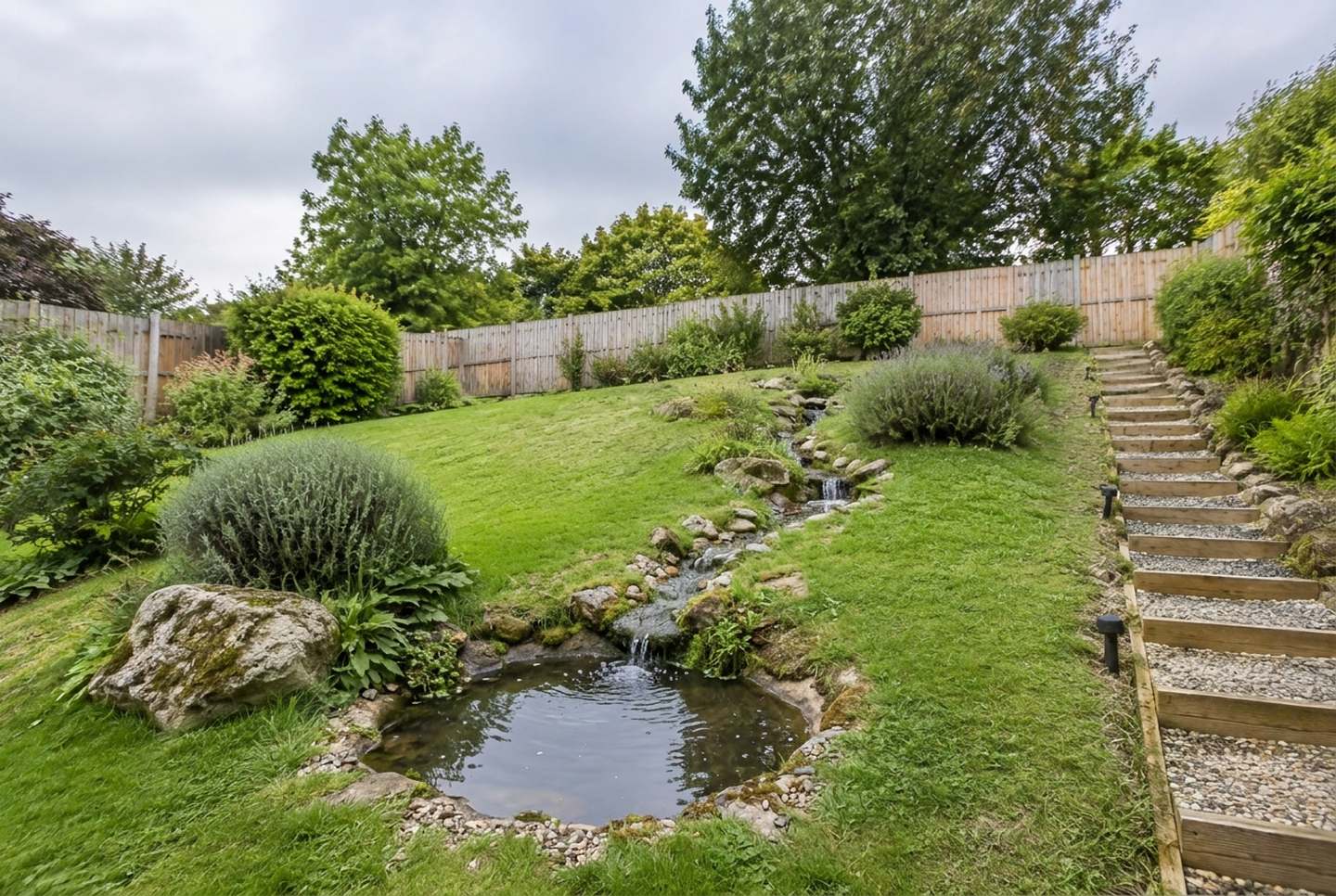
A real GenRoom result: the "Pond or fountain" task with "Small stream" picked and one sentence added. The slope, rock, lavender, steps and fence are from the original photo.
AI pond design lets you see a garden pond, a fountain or a small stream in your own yard before anyone picks up a spade. You upload one photo of the garden, pick a water feature and say where it goes. About 30 seconds later you get the same view with the water added. The lawn, fence, trees, steps and house stay as they were.
People ask for this more often than you might think. Between March and mid-October 2026, 266 people described a pond, fountain or water feature to the GenRoom Studio in their own words. Below are the exact steps we used and eleven real results from three ordinary gardens. We also cover the safety facts a picture cannot show, and the places where the AI got it wrong.
What Do People Actually Ask For?
Most requests are about one of three things: a pond with stones and plants, a fountain that makes a sound, or water that moves down a slope. Here is how people phrased it, translated where needed, shortened and anonymised:
- "A pond inside the outline I drew, with a waterfall on the right, lined with natural stone."
- "A small stone trough fountain coming out of the wall, with only one spout. Keep everything else the same."
- "A natural pond on the flat area, edged with large and smaller stones, one big stone in the middle."
- "Cancel the waterfall, make a curved stream and a new slope with a rock formation."
- "A round basin in front of the small back door, with a bench around it."
- "A decorative pond with LED lighting, white stones and colourful flowers."
- "Plants for the pond, and move the pond further to the left."
- "A mini fish pond against the back wall, a gravel path, a table and chairs."
- "What can I use instead of a fountain?"
Two things stand out. First, people usually know where the water should go: in the far corner, against a wall, in front of a door, inside an outline. Second, many already have a garden they like and only want to add one feature. That is exactly what the Studio's ready task is built for: it adds water and leaves the rest of the garden alone.
Which Water Feature Suits Your Yard?
Choose by the space you have, how much sun it gets, and whether you can run power to it. A fountain or a bubbling rock fits a patio of a few square metres. A pond with planted edges needs open ground and sun. A stream needs a slope or has to be built up. This table sums up the options we tested:
| Water feature | Best spot | Needs a pump and power? | Open water? | Good for wildlife? |
|---|---|---|---|---|
| Natural pond with stones and plants | Open, mostly sunny lawn | Optional | Yes | Yes, with a shallow edge |
| Wildlife pond (no fish, a pebble "beach") | Sunny corner away from paths | No | Yes | Yes, that is the point |
| Tiered fountain | Centre of a lawn or a formal patio | Yes | Yes, in the basin | Little |
| Bubbling rock or urn (pondless) | Small patio, near a seat | Yes | No, the water drains into a hidden reservoir | Little |
| Wall fountain into a trough | Courtyard or a boundary wall | Yes | A small trough | Little |
| Small stream with cascades | A natural slope | Yes, to lift water back up | Yes | Some |
The "needs a pump" column matters more than it looks. Any moving water needs a pump, and the pump needs power. The RHS says that if electricity is needed for a pump or filter, it "must be installed by a qualified electrician" (RHS, making a new pond). A still wildlife pond, by contrast, does not need a filter at all (RHS, wildlife ponds).
How Do You Add a Pond or Fountain to a Garden Photo?
Open the Studio, upload a photo of the garden, open "Outdoor living" under Ready tasks and tick "Pond or fountain". Then pick the type and the spot, and press "Create design". Here is the full path we used for every result in this article:
- Take the photo from where you usually stand, such as the back door, the terrace or the top of the steps. Shoot at eye level in daylight and keep the whole area you want to change in the frame.
- Upload it in the Studio. Check the "Your space" switch above the photo. It should say Yard. If a garden photo opens as Facade, switch it to Yard, or the garden tasks will not show.
- Open "Ready tasks" → "Outdoor living" and tick "Pond or fountain". On its own, it adds a small natural pond with stones and plants in the open part of the plot.
- Click "Refine" next to it to choose the Water feature (Natural pond, Fountain or Small stream) and Where (In the open area, Near the house, In the far corner).
- Add one sentence in the note field if you want something specific, such as "a wall fountain with one spout into a stone trough". Press Save.
- Press "Create design". One design costs 2 credits. In our tests the result took 22–40 seconds from click to picture.
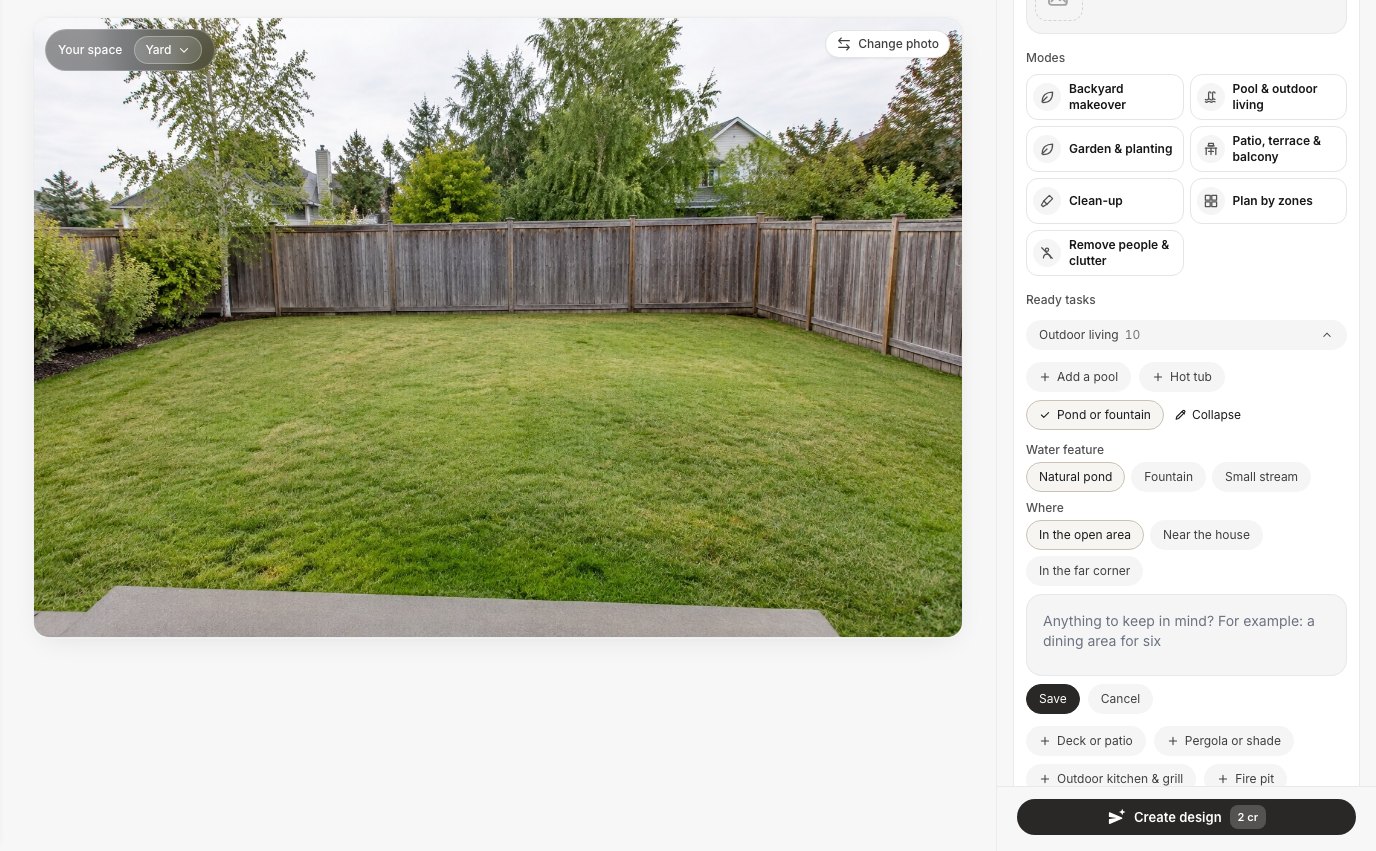 The "Pond or fountain" task with its Refine panel open: the type and the spot are two clicks, the note field takes anything else.
We checked the prompt the Studio actually sent for these settings. The chips turn into a plain instruction, "Add a small natural pond with stones and plants in the open part of the plot", and your note is added after it word for word. The instruction also tells the model to keep the camera, the light and everything outside the task as in the photo. That is why the fence boards and the neighbours' roofs match in every pair below.
Four Water Features on the Same Lawn
Here is one plain backyard with four different water features, each a separate result from the same photo. No style was picked and nothing else was asked for. Top left: "Natural pond" with no note. Top right: "Fountain" with no note. Bottom left: "Fountain" with the note "a pondless bubbling rock, one tall drilled stone column over a bed of river pebbles, no open water". Bottom right: "Natural pond" with a wildlife note.
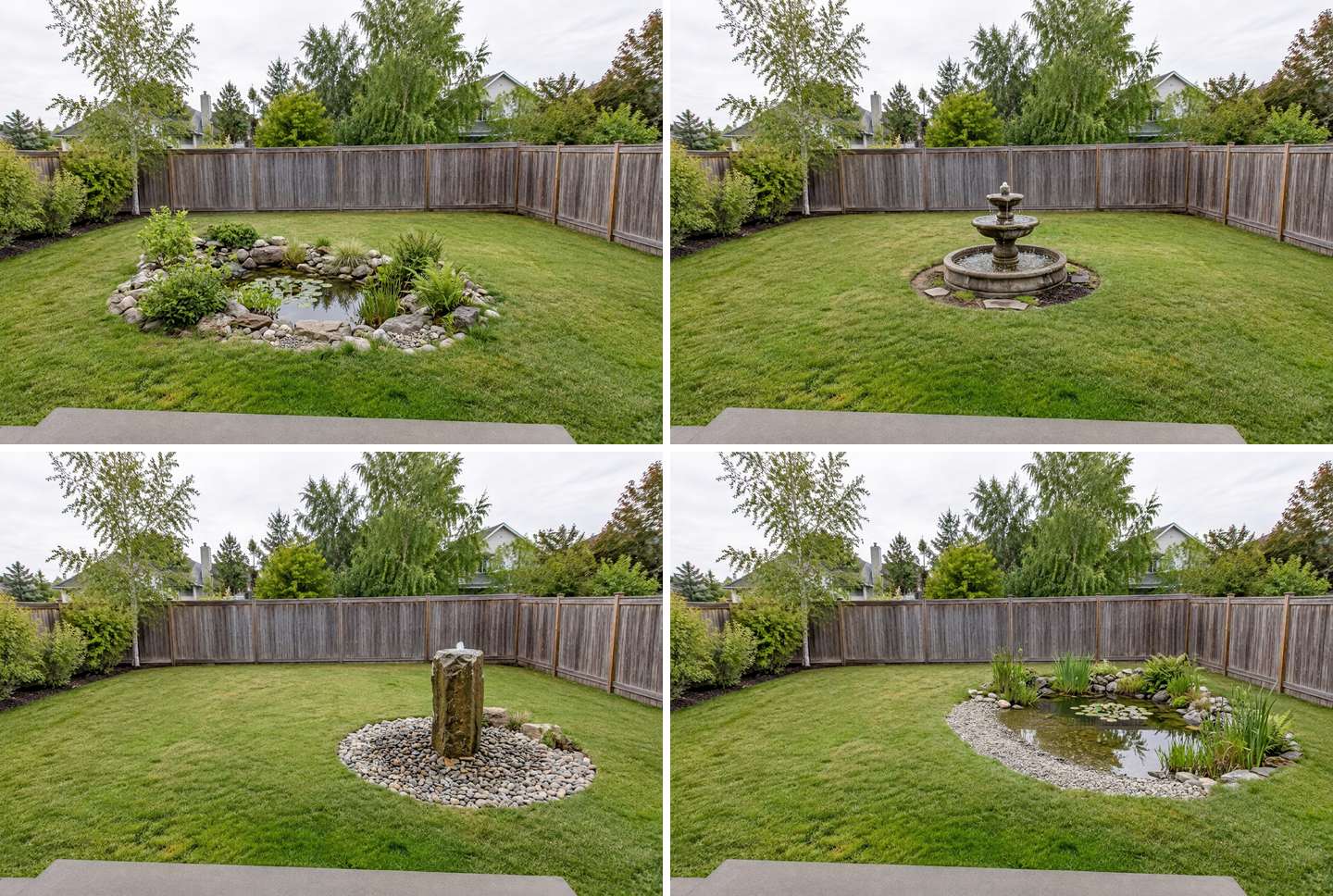 Four GenRoom results from one photo of a plain lawn. Every one kept the fence, the birch, the shrubs and the step in the foreground.
Seeing them side by side answers the question that photos from other people's gardens cannot. In this yard, the tiered fountain looks like it belongs to a different house. The bubbling column is the quietest option visually. The ponds change the whole garden. That is the decision people struggle with, and it takes four tries, or eight credits.
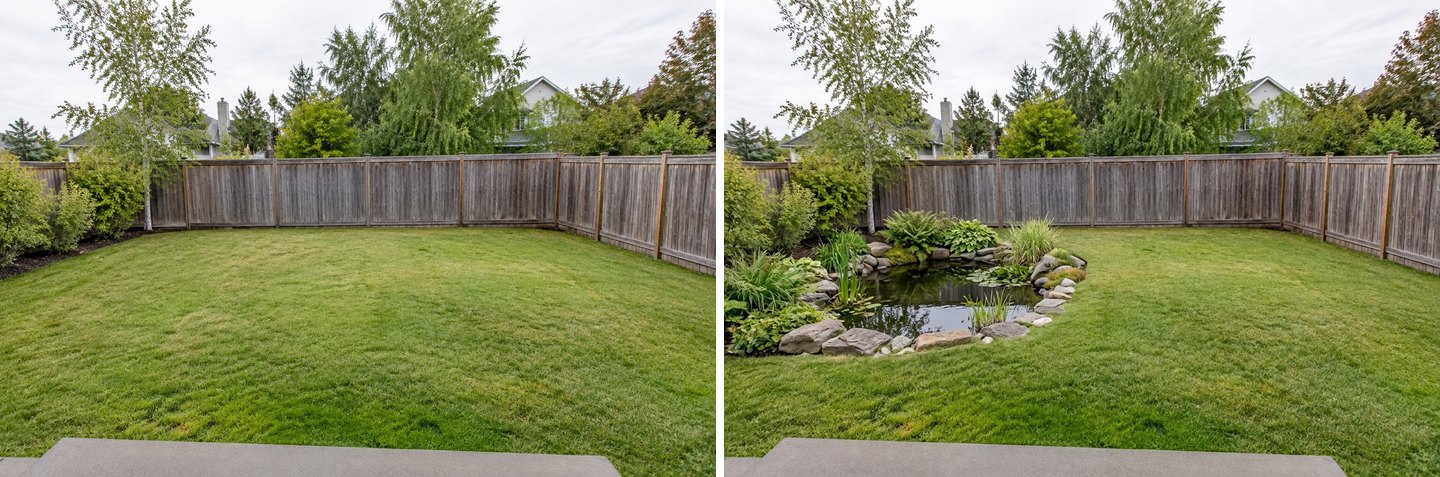
This is the "before and after" for the first one, the plain natural pond with no note at all:
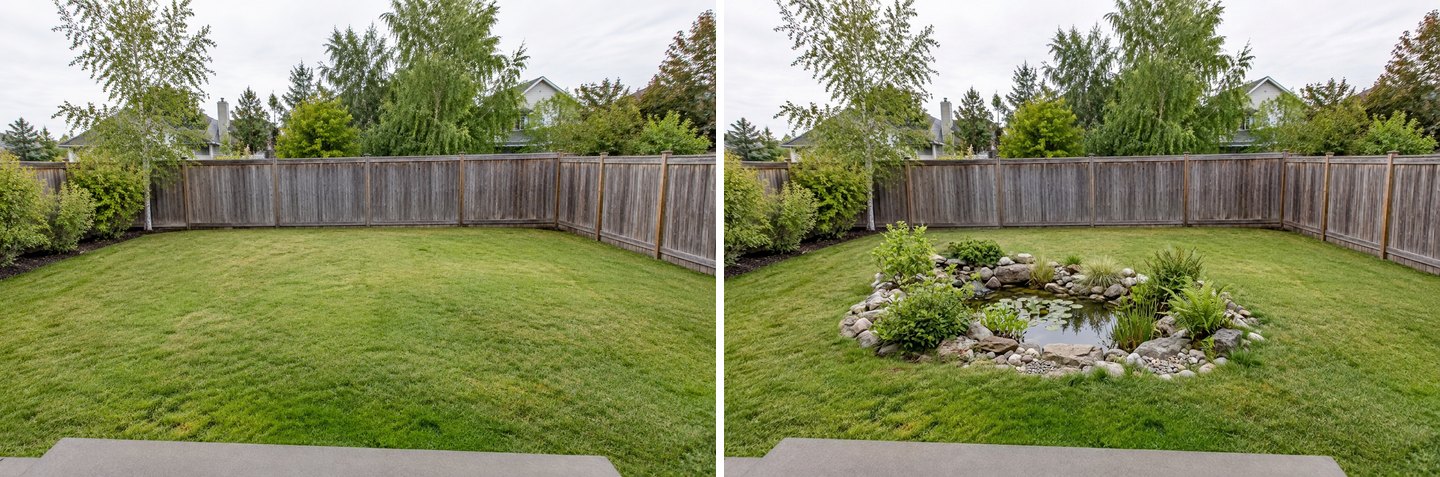 Before → "Pond or fountain" with "Natural pond" and "In the open area". Model run: about 22 seconds.
A Wildlife Pond, Described in One Sentence
For a wildlife pond, the note did most of the work. We wrote: "a wildlife pond: one long shallow pebble beach on the near side, native marginal plants and water lilies, no fish, no fountain". The result put a gravel slope on the near side and taller plants at the back, and it added no fountain.
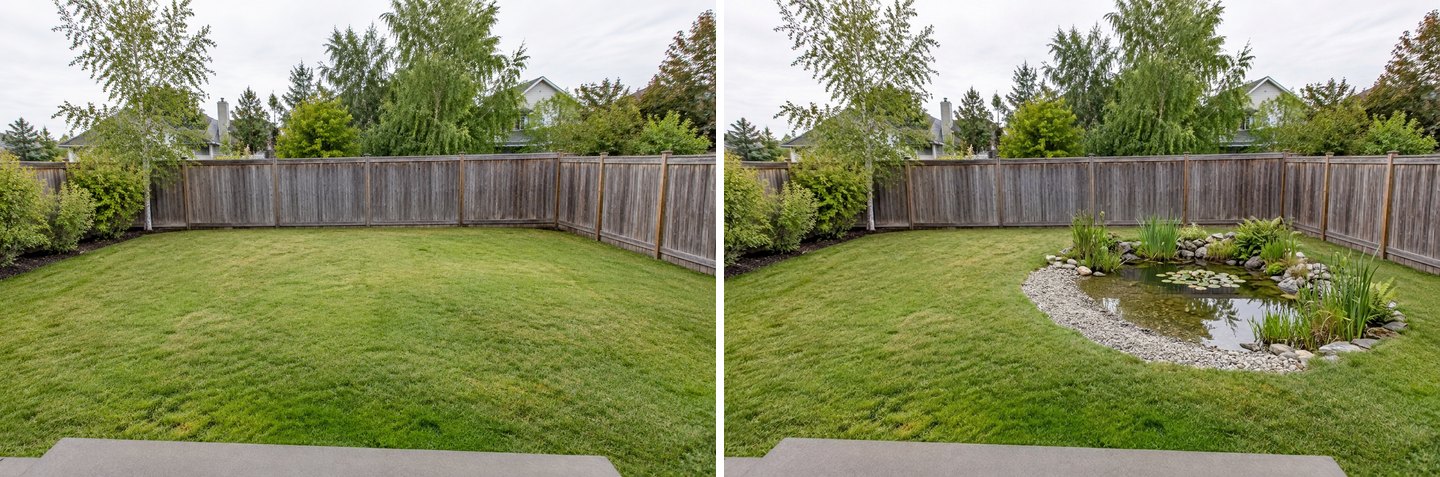 Before → "Natural pond" plus a one-sentence wildlife note. The beach on the near side is what the RHS recommends for wildlife access.
That sentence was not random. The RHS advises that "at least one side of the pond should have a long, shallow slope" so animals can get in and out, ideally with gravel or flat stones where birds can drink. It suggests a depth that varies from about 20 to 60 cm and leaving fish out, because fish are top predators that reduce the variety of wildlife (RHS, wildlife ponds). The picture cannot show depth. Treat it as the look, and the RHS page as the plan.
Small Patio Garden: A Wall Fountain Instead of a Pond
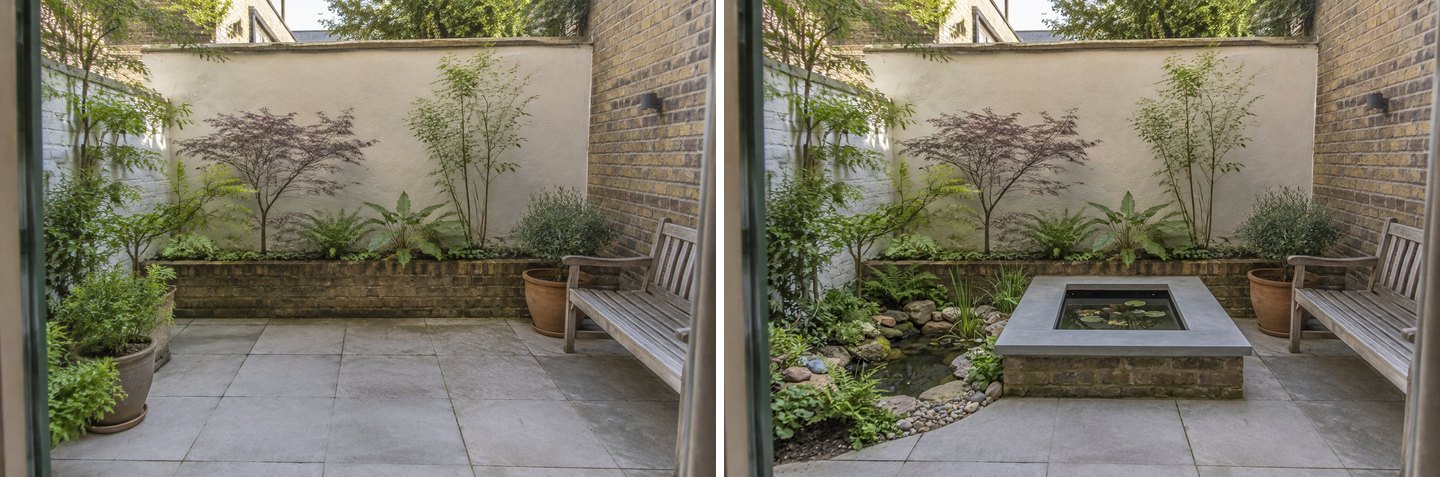
In a small paved courtyard, the wall is often the best place for water. It takes no floor space, and you hear it from the house. We used one of the real requests almost word for word: a single spout from the rendered back wall into a narrow stone trough in front of the raised bed.
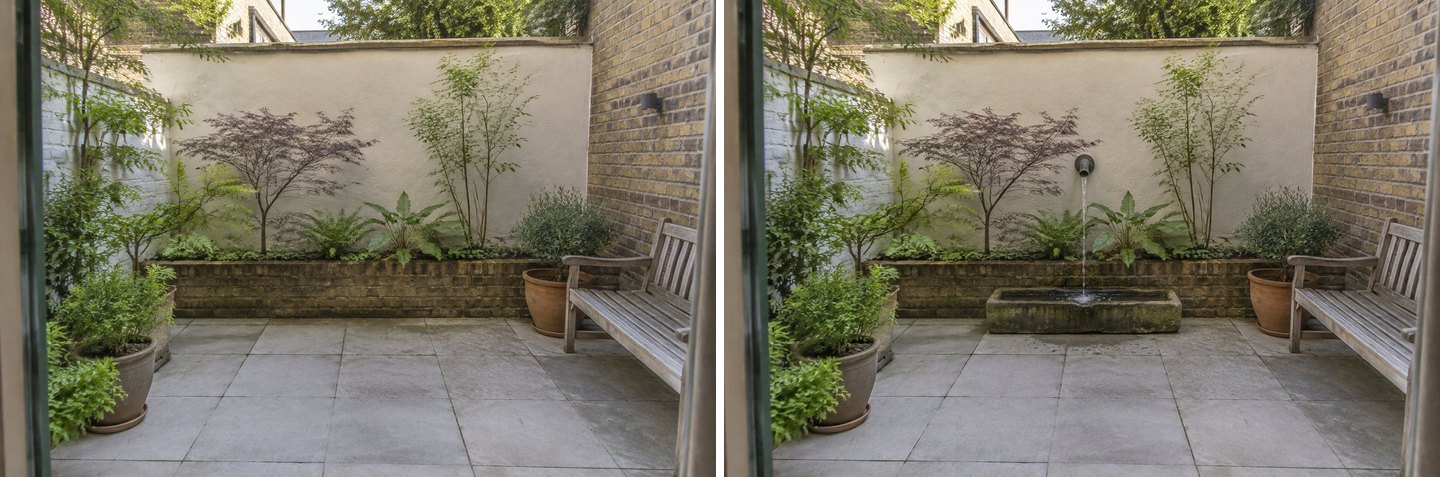 Before → "Fountain" plus the note about one spout and a trough. The maple, ferns, pots, bench and paving did not move.
This is the kind of feature that is hard to imagine from a catalogue photo, because so much depends on scale. Is a 1-metre trough too big for this bed? Does a single spout look lost on a 5-metre wall? Ten seconds of looking at your own photo answers both questions. For more ideas in tight spaces, see the AI patio design page.
Sloped Garden: Let the Water Follow the Slope
On a slope, a stream with small cascades usually looks more natural than a flat pond. We picked "Small stream" and added: "the stream runs down the slope between the rocks with small cascades and ends in a little pond at the bottom". The model ran the water between the existing shrubs and ended it in a small pond near the big rock.
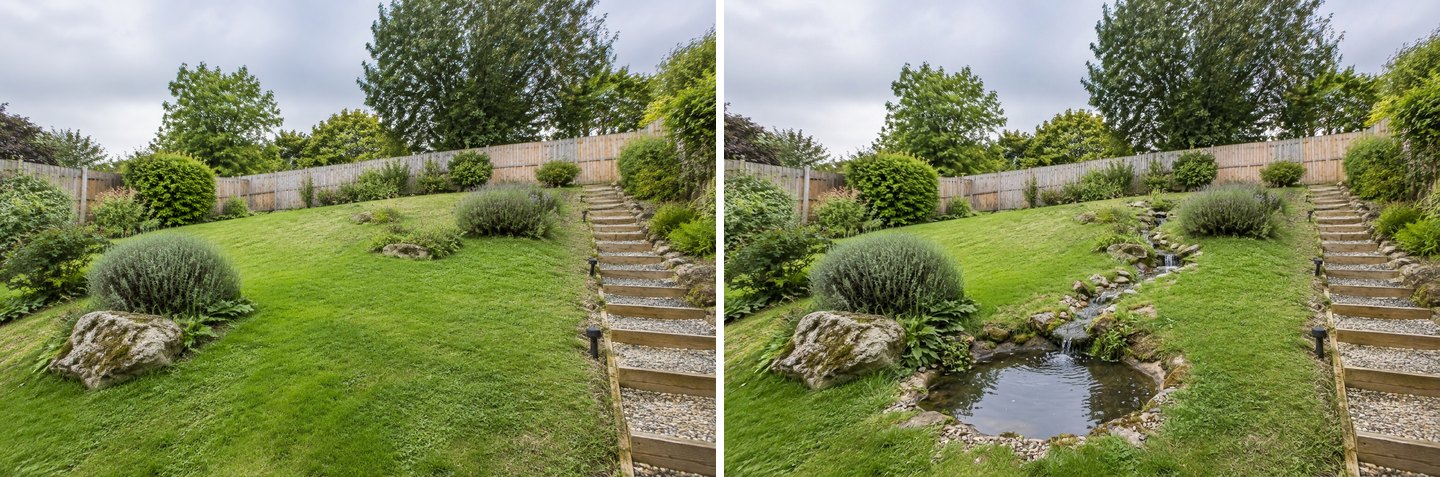 Before → "Small stream" plus a one-sentence note. The rock, lavender, steps and fence stayed in place.
We also tried a plain "Natural pond" on the same slope with no note. The result looks tidy, but it is the finished look only. A level pond on a slope means digging into the high side and building up the low side, and the picture shows neither. That is fine for choosing a look. It is not a plan for the groundworks.
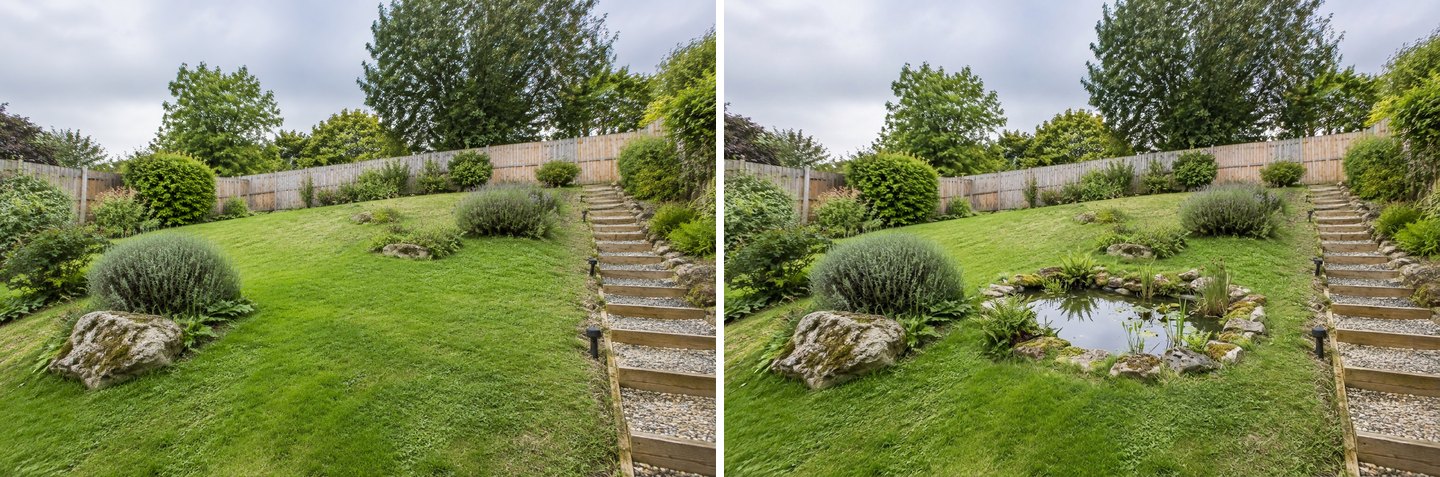 Before → "Natural pond" on a slope. A useful picture of the look; the earthworks behind it are not shown.
Create facade design with AI
Upload a photo of your home and get a new facade in the chosen style in 30 seconds. First generation is free.
Put It Exactly Where You Want: Select the Area
If the spot matters, draw it. Open the photo in the editor and click "Select area". Outline the place with the lasso, type what should be there, and apply. The edit changes only the selected area. This is how you match requests like "inside the outline I drew" or "in front of the small back door".
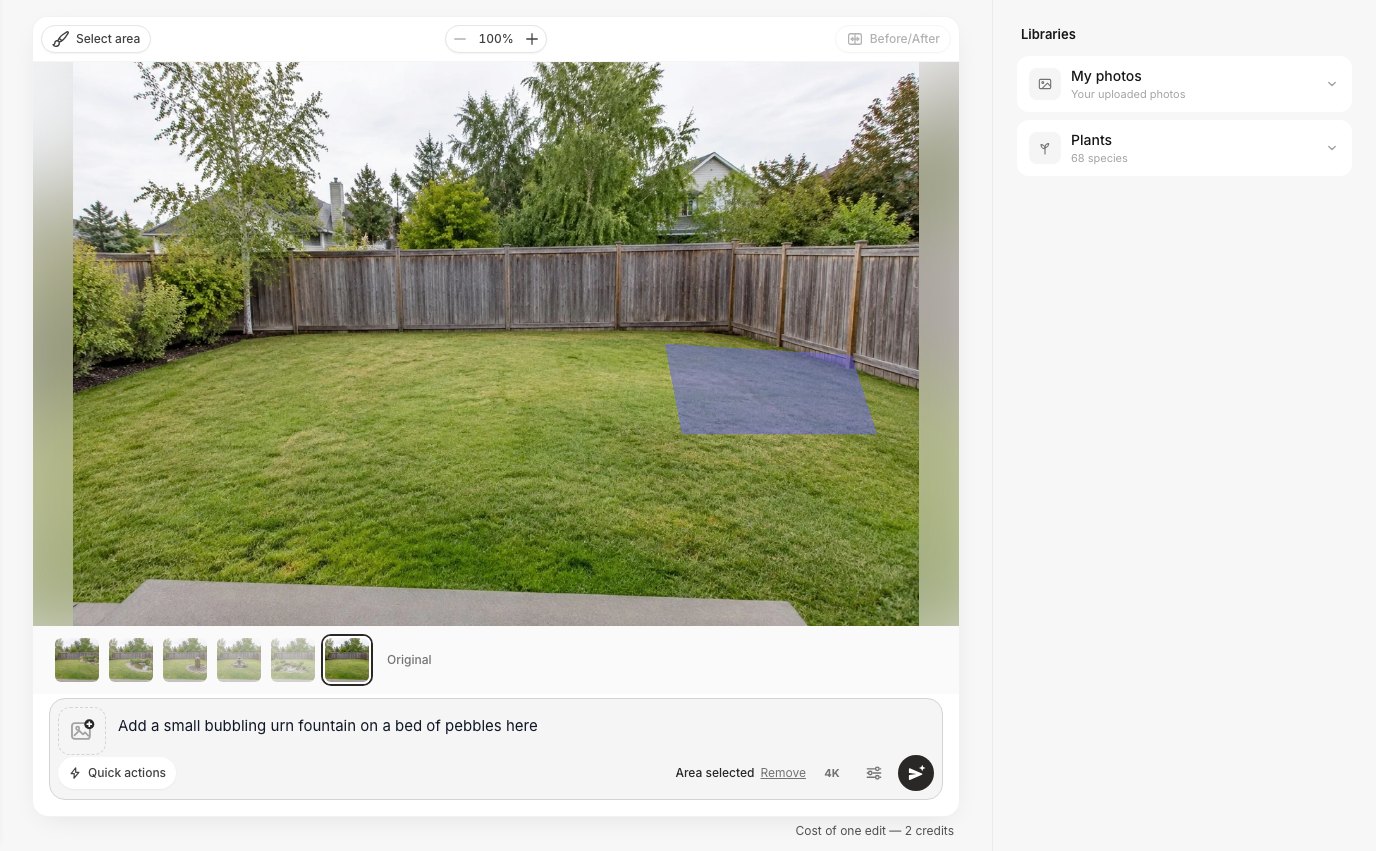 The editor with an area selected in the far right corner and a one-line request.
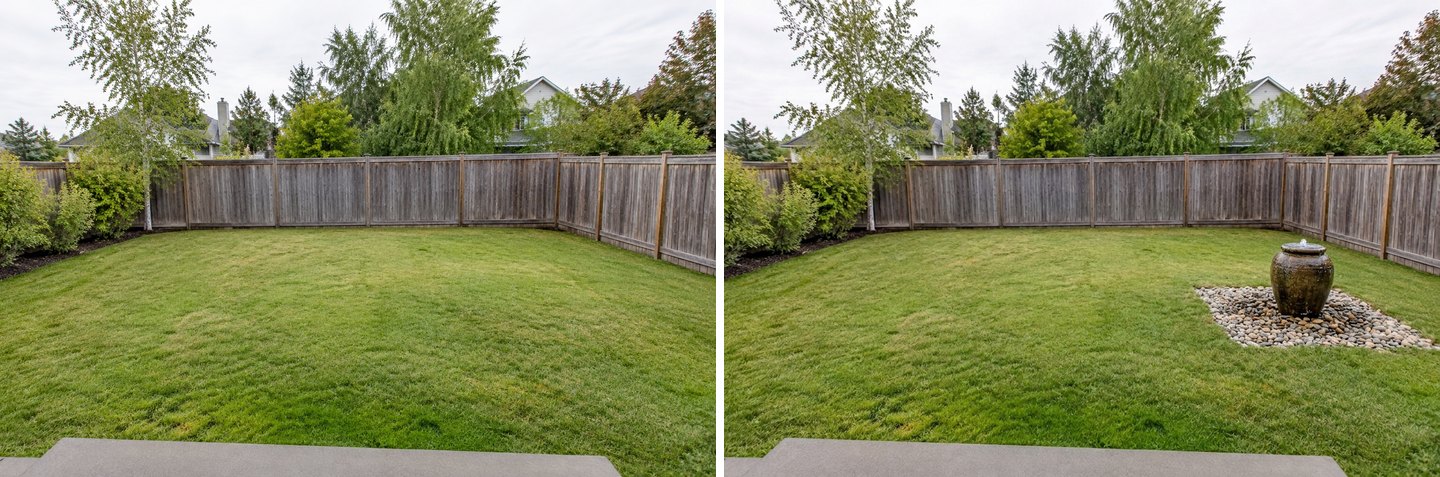 Before → a selected-area edit: a bubbling urn on pebbles exactly where we drew. Everything outside the selection is the original photo.
A selected-area edit is also the cleanest way to answer "what can I use instead of a fountain?". Select the same spot several times and try a bubbling urn, a stone column, a bird bath or a planted container. Each try costs 2 credits, and the rest of the garden does not change between tries. Edits with words and with the selection tool are in every plan, including Free.
Plant the Edges With the Plant Library
The editor has a Plants library with 68 species, and you can use any of them as a reference. Click a plant, choose "As a reference", and describe where it goes. We picked the library's iris and wrote "Plant clumps of this iris along the edge of the pond" on the natural-pond result from above.
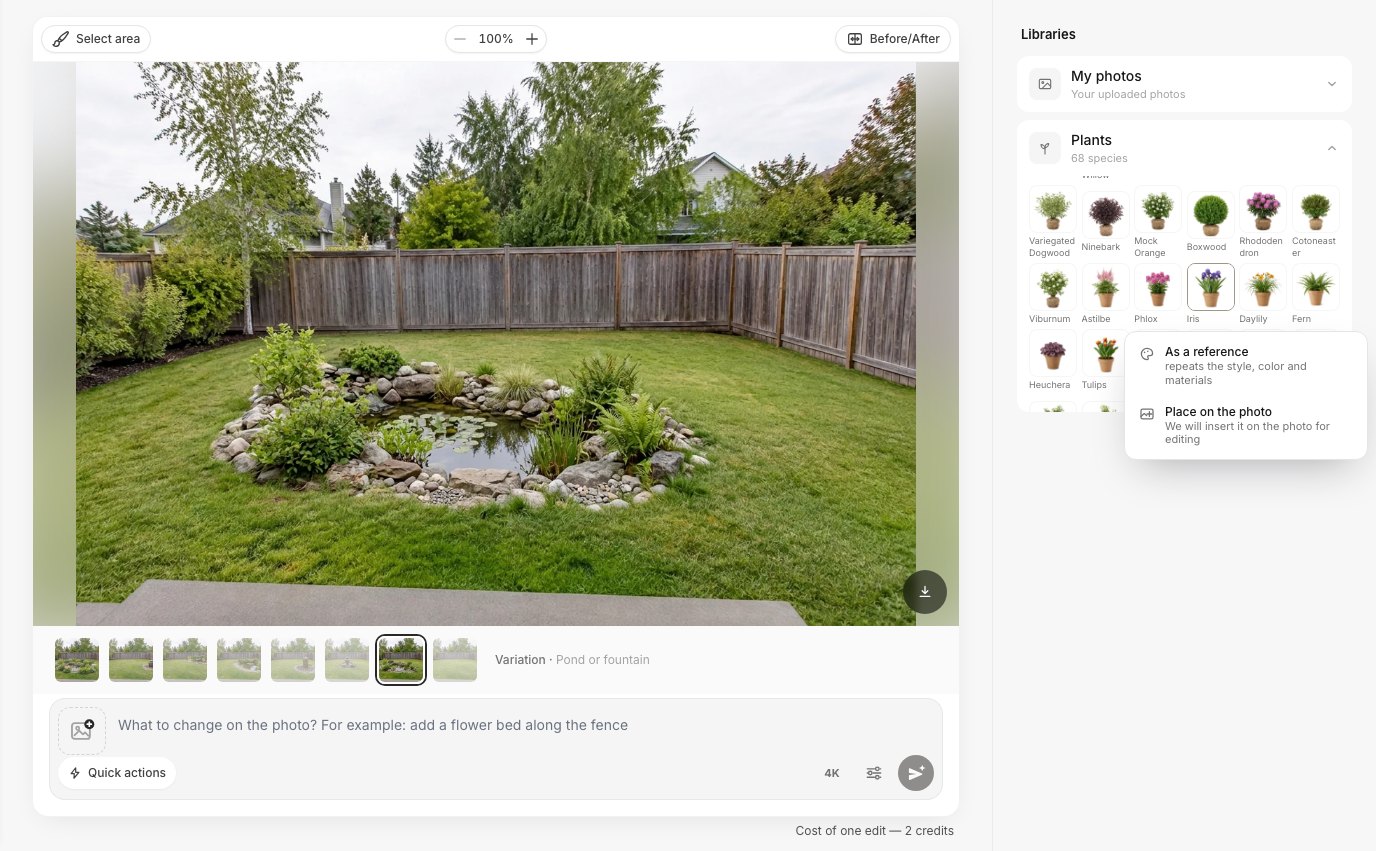 Picking Iris from the Plants library. "As a reference" passes the plant picture to the edit together with your sentence.
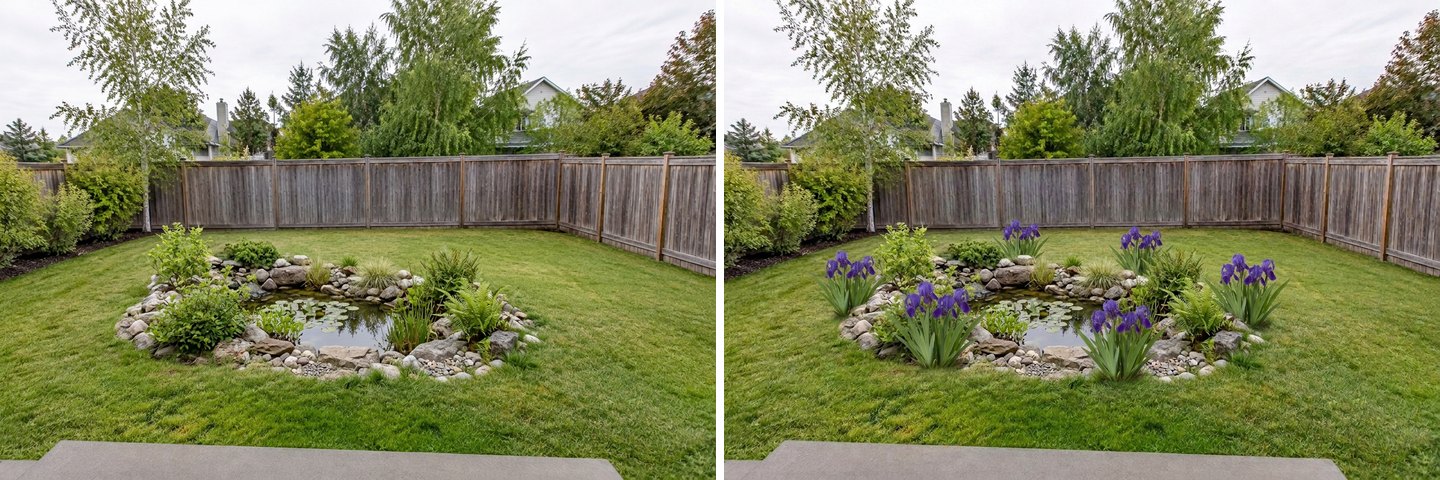 Pond result → the iris added as a reference. The irises came out large, and some sit in the lawn rather than at the water's edge.
Two cautions here. The library's iris is a garden iris, and the edit placed some clumps in the grass instead of at the water's edge. Not every iris grows in wet soil, so check the variety at the garden centre before you buy. The library is great for the look. It does not know which plants are marginals. For choosing plants by climate, see our AI garden planner guide.
Where Does the AI Get It Wrong?
The pictures look convincing, which is exactly why you should know where they mislead. Here is what went wrong or stayed hidden in our 13 test runs:
1. A chip and a note that disagree give you both. We left "Natural pond" picked and wrote a note asking for "a small raised rectangular formal pond". The result had both: a raised pond in the middle and a rocky natural pond on the left. It also removed two pots that were not part of the task. If your note describes a different type, change the chip to match it.
 A mixed request: "Natural pond" chip plus a "formal raised pond" note produced two ponds, and the pots on the left were gone.
2. The AI never warns you about a bad spot. We asked for a pond "right under the birch tree, in its shade", and it built one: clean water, no leaves, no comment. The RHS advises that at least half of a pond should be in full sun, and that heavy leaf fall should be netted out before it sinks (RHS, making a new pond; RHS, wildlife ponds). On an overcast photo you cannot judge sun at all, so watch the spot on a sunny day.
 A pond under the birch, exactly as asked. The picture shows clean water; the real thing would catch the tree's leaves every autumn.
3. Pumps, cables and filters are invisible. Every fountain, bubbler and stream above runs on a pump that the picture does not show. In real life you need power at that spot, a filter or a reservoir, and somewhere to hide the pipe. That is a job for a qualified electrician, not a render.
4. Sizes are not measured. One person asked for "a pond 13 × 1 metres". The Studio can follow a rough size in words, but it does not measure the photo. Use the picture to choose the shape and position, then mark the outline on the ground with a hose before you dig.
5. Plants arrive fully grown, and water is always clear. Ponds take a season or two to fill in, and real water is rarely as clear as in the render. Treat the result as the garden in its second summer.
6. Small extras can appear. In our tests the main garden stayed put, but the stream run replaced one small rock in the middle of the slope, and the mixed-request run removed pots. Always compare with the original using Before/After in the editor before you decide.
Before You Dig: Safety and Practical Checks
A picture helps you choose. It does not make water safe around small children. These points come from RoSPA, the RHS and the US CDC. They apply whatever the render shows.
- Ponds and young children. RoSPA says garden ponds are involved in one in four (26%) of all child drownings in the home. If young children live in or visit the garden, it suggests a fence at least 1.1 m high with locked gates, a rigid metal grille over the water (not chicken wire), or filling the pond in for now, for example turning it into a flower bed or a sandpit (RoSPA, pond safety).
- Supervision. The CDC notes that more children aged 1–4 die from drowning than from any other cause, and asks for close and constant supervision near water (CDC, drowning prevention).
- A pondless option. If the main wish is the sound of water, a bubbling rock or urn over pebbles has no open water. It is a practical alternative for families with toddlers.
- Depth. The RHS says all ponds should be at least 38 cm deep so they do not overheat in summer, and ideally 75 cm or more for the widest range of plants (RHS, making a new pond).
- Power. Pumps and filters need electricity installed by a qualified electrician (same RHS page).
- Wildlife. Top up a wildlife pond with rainwater where you can, and choose a pump with wildlife protection so tadpoles are not sucked in (RHS, wildlife ponds).
- Local rules. Fencing rules for water in a garden differ from place to place. Check with your local council or building department before you build.
Notes That Worked: Copy and Adapt
Pick the chip first, then add one short sentence. These are the notes we typed in the Refine field. Each result above came from one try.
| Water feature chip | Note we typed | What it gave |
|---|---|---|
| Natural pond | (none) | Round pond with stones, ferns and lilies |
| Natural pond | a wildlife pond: one long shallow pebble beach on the near side, native marginal plants and water lilies, no fish, no fountain | Pond with a gravel beach and tall plants at the back |
| Fountain | (none) | Three-tier stone fountain in a round basin |
| Fountain | a pondless bubbling rock: one tall drilled stone column with water bubbling from the top over a bed of river pebbles, no open water | Stone column on a circle of pebbles |
| Fountain | a wall fountain: a single spout coming out of the back wall into a narrow stone trough | One spout into a long trough |
| Small stream | the stream runs down the slope between the rocks with small cascades and ends in a little pond at the bottom | Rocky stream with cascades and a small pond |
We did not test pond lighting in this run. If you want it, as one of the requests above did, our outdoor lighting guide covers garden lights. If the garden needs tidying before any water goes in, start with the overgrown yard clean-up or a lawn refresh, then add the pond to that result.
FAQ
Can AI design a garden pond from a photo of my yard?
Yes. In GenRoom you upload the photo, tick "Pond or fountain" under "Outdoor living", pick Natural pond, Fountain or Small stream and a spot, and get the same view with water added in about 30 seconds. The fence, trees and house stay as in the photo. It is a visual, not a construction drawing.
Is there a free AI pond design tool?
A free GenRoom account (no card) gives 6 credits. One design costs 2 credits, so you can try three ideas, such as a pond, a fountain and a stream. Free results carry a watermark. Packs without a watermark start at $9.99 for 36 credits, one-time and not a subscription. See pricing.
What water feature works in a small garden?
Our tests suggest a wall fountain into a trough or a bubbling rock or urn over pebbles. Both take little floor space, and the bubbler has no open water. Try both on your own photo. The difference in scale is obvious in seconds.
How deep should a garden pond be?
The RHS recommends at least 38 cm for every pond so it does not overheat, and ideally 75 cm or more for the widest range of plants. For a wildlife pond it suggests a depth that varies from about 20 to 60 cm, with one long shallow slope.
Are garden ponds safe with young children?
Not without protection. RoSPA links garden ponds to one in four child drownings in the home and suggests a fence of at least 1.1 m with locked gates, a rigid metal grille, or filling the pond in while children are small. A pondless bubbler is a lower-risk way to get the sound of water.
Can the AI make the pond an exact size?
No. You can describe a rough size, but the Studio does not measure your photo. Use the result to settle the shape and position, then mark the real outline on the ground before digging. If you want a swimming pool rather than a pond, see the AI pool design page.
The Bottom Line
AI pond design is the quickest way to answer "pond, fountain or stream, and where?" for your own garden, not someone else's. In our tests the "Pond or fountain" task gave believable results in 22–40 seconds and left the rest of the yard alone. A selected-area edit put a fountain exactly where we drew it.
What it will not do is choose the sunny spot, plan the groundworks, size the pump or make water safe for toddlers. Use it to pick the look. Then check the spot on a sunny day and use the RHS and RoSPA advice for the build. Upload a photo of your garden and try three ideas on the free credits, or browse more garden design ideas and our backyard design guide.