AI Lawn Replacement: Green Lawn or Xeriscape From a Yard Photo
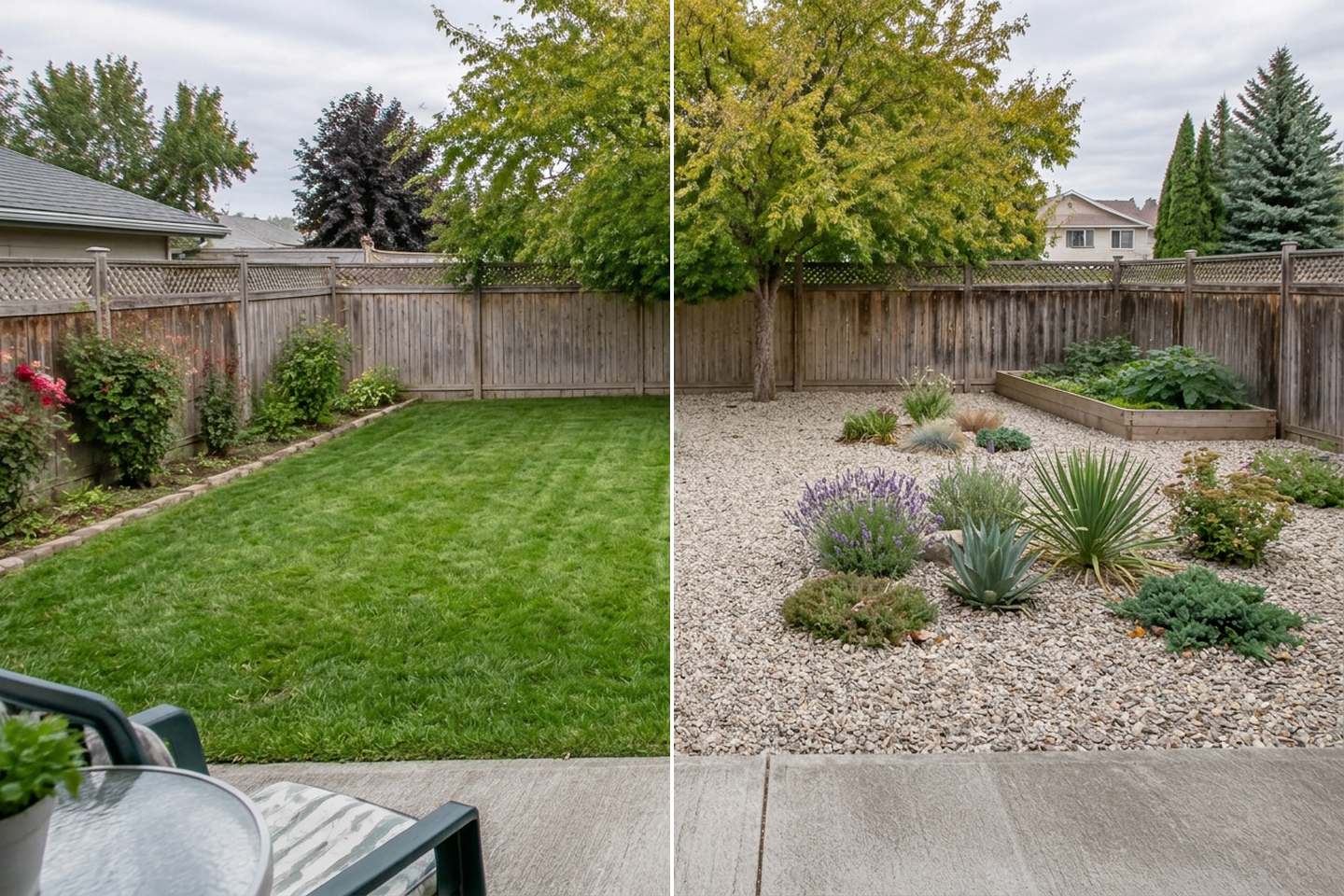
Two real GenRoom results from one photo of a patchy backyard. Left: the "Neat lawn" task. Right: "Native, drought-tolerant plants" with a one-line wish for gravel. The fence, tree, vegetable bed and patio are from the original photo.
AI lawn replacement lets you see your own yard with a different ground cover before you spend a weekend or a budget on it. Upload one photo, and in about 30 seconds you get the same view with an even green lawn, gravel and drought-tolerant plants, bark mulch beds, or artificial turf. You can also convert just one part of the yard with a brush. The rest of the photo stays as it was: house, fence, trees and paths.
This is not a niche wish. Between March and mid-October 2026, 735 people asked the GenRoom Studio for exactly this in their own words: fix a tired lawn, or get rid of it. Below are the exact steps we used, nine real results from two ordinary yards, and the facts on water and heat that the pictures do not show. We also list what the AI got wrong.
What Do People Actually Ask For?
Most lawn requests fall into three groups: make the grass green, replace the grass with something easier, or mix the two. Here is how people phrased it to GenRoom, lightly edited and anonymised:
- "Turn this selected area into a lawn."
- "Replace the grass and the bare ground with an even green lawn, but keep the flower beds and the vegetable garden."
- "Remove the concrete and replace it with lawn."
- "Remove the long path and put grass there instead."
- "Change the grass to black bark and use drought-resistant plants."
- "A simple garden with one or two small trees, as much lawn as possible."
- "It is 4 × 4 m, grass won't grow here, and the budget is low."
- "Lawn, palm trees and hedges."
The first four are about a better lawn. The fifth and seventh are about no lawn. The last two are a mix: some lawn, some planting. On Google the same split shows up as searches like "ai grass replacement" (mostly real-estate tools that make grass greener) and "ai xeriscape design" or "low-maintenance landscape from a picture" (people who want to get rid of the grass).
The point of trying it on a photo first is simple. A lawn, a gravel garden and a turf yard look very different on your house, with your fence and your trees. A photo of someone else's xeriscape in Arizona tells you little about a narrow backyard under a maple.
Lawn, Xeriscape or Artificial Turf: What Changes Besides the Look?
A rendering shows the look; water use, surface heat and upkeep decide whether you will still like it in August. Here is what reputable sources say:
| Living lawn | Xeriscape (dense planting, mulch or gravel) | Artificial turf | |
|---|---|---|---|
| Water | The thirstiest option in most climates. The EPA says U.S. homes use nearly 8 billion gallons of water a day outdoors, mainly on landscape irrigation | A water-smart landscape with very dense plantings uses less than half as much water as a lawn (Southern Nevada Water Authority) | No watering to grow, though some owners hose it down to cool it |
| Surface heat in summer | Stays coolest: about 39 °C (102 °F) on the hottest days in a University of Florida study | Can run up to 30 °C (54 °F) warmer than living grass; rock- and mulch-heavy designs were the hottest | Up to 79 °C (174 °F) on the hottest days, hot enough to burn skin |
| Upkeep | Mowing, feeding, watering, patching | Weeding and occasional pruning; new plants need regular watering until they settle in | Brushing, rinsing, clearing leaves |
| Use | Best for kids, dogs and ball games | Paths and stepping stones; not for running on | Play surface, but hot in full sun |
Sources: EPA WaterSense, Southern Nevada Water Authority, UF/IFAS, 2025.
Two things stand out. First, the plants, not the gravel, do the cooling. The same UF/IFAS research found that xeriscapes made mostly of rock or mulch were much hotter than those with more plant cover. Second, the EPA notes that the average U.S. household uses more water outdoors than for showering and washing clothes combined. If water is your reason, the lawn is the place to start.
That is why the most useful AI test is often not "lawn or no lawn" but "how much lawn": keep a patch where people play, and plant the rest densely. We show that below.
How to Do AI Lawn Replacement on Your Own Yard Photo
Upload a photo, make sure the Studio reads it as a Yard, pick a lawn task or a planting mode, and press "Create design". Each run costs 2 credits and took 22–40 seconds in our tests.
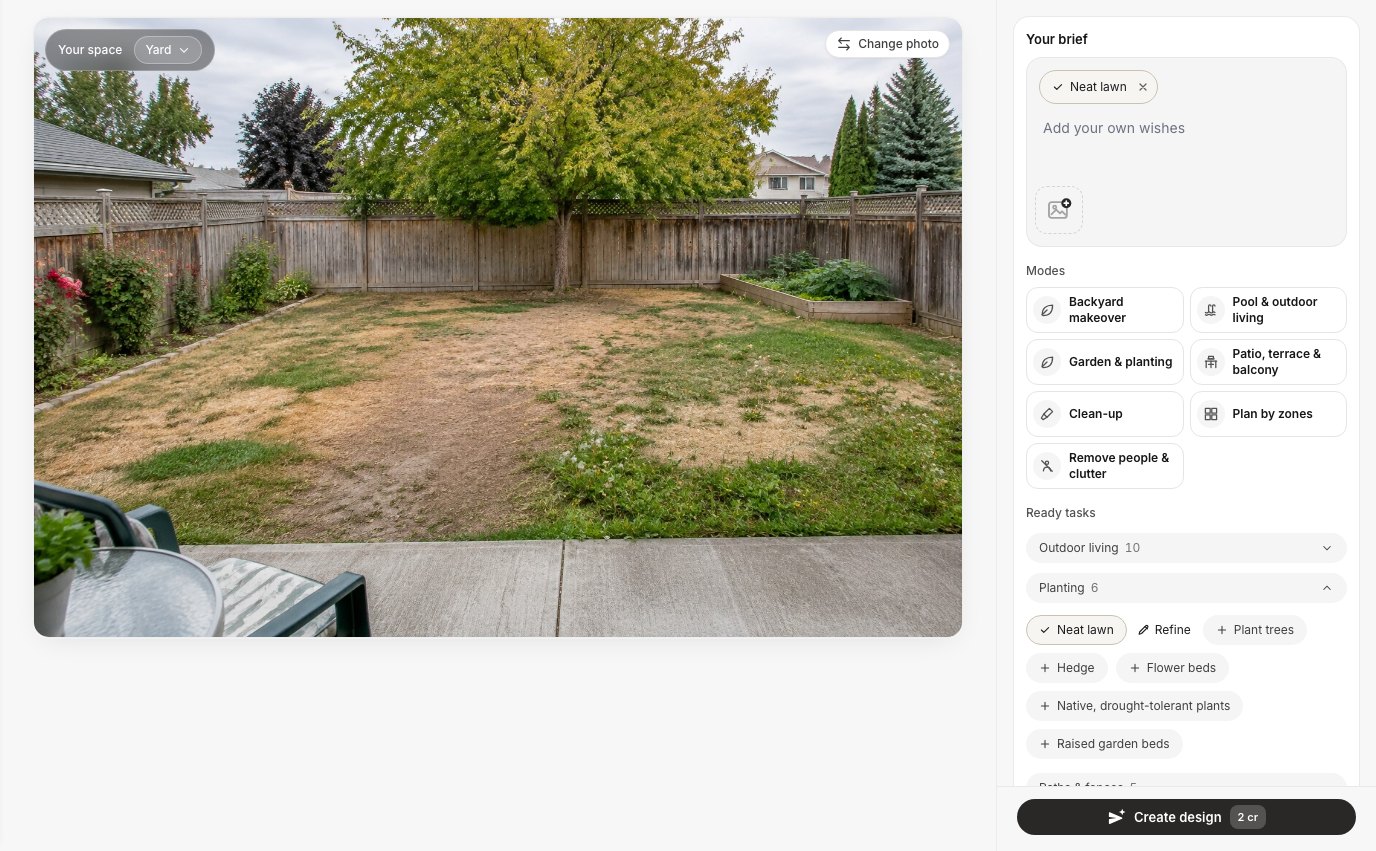 The design screen. "Your space" is set to Yard; the Planting group holds "Neat lawn", "Native, drought-tolerant plants", trees, hedges, flower beds and raised beds.
- Take the photo from where you usually look at the yard: the back door, the sidewalk, an upstairs window. Shoot in daylight and keep the whole lawn area in the frame.
- Upload it in the Studio and check the "Your space" chip in the top-left corner of the photo. Our front-yard photo opened as Facade because the house filled half the frame. Switching it to Yard brought up the lawn and planting tasks.
- Pick what you want:
- Green lawn: Ready tasks → Planting → Neat lawn, or the Clean-up mode if you only want the yard tidied.
- Replace the lawn: Planting → Native, drought-tolerant plants, or the Garden & planting mode with a climate (As in the photo, Temperate, Mediterranean, Desert, Tropical, or your own words such as "hot and dry").
- Change only part of it: open the editor, tap Select area, paint over that part and describe the change.
- Add a wish in plain words if you need something specific: "light gravel, no grass at all", "keep the vegetable bed", "lawn only in the middle".
- Compare with the original using Before/After, and make a second variant from the original rather than from the last result.
One thing to watch: the brief keeps the tasks you picked earlier in the same session. Our second run stacked "Neat lawn" and "Native, drought-tolerant plants" together because we had not removed the first chip. The result was a green lawn with a drought-tolerant border. That is a good combination if you want it, but remove the × chips you no longer need before each new run.
Example 1: A Patchy Backyard Turned Into a Green Lawn
The "Neat lawn" task replaced the bare soil, the yellow patches and the weeds with an even lawn, and kept everything else in place. This is the most common request we see, and the result was clean on the first try.
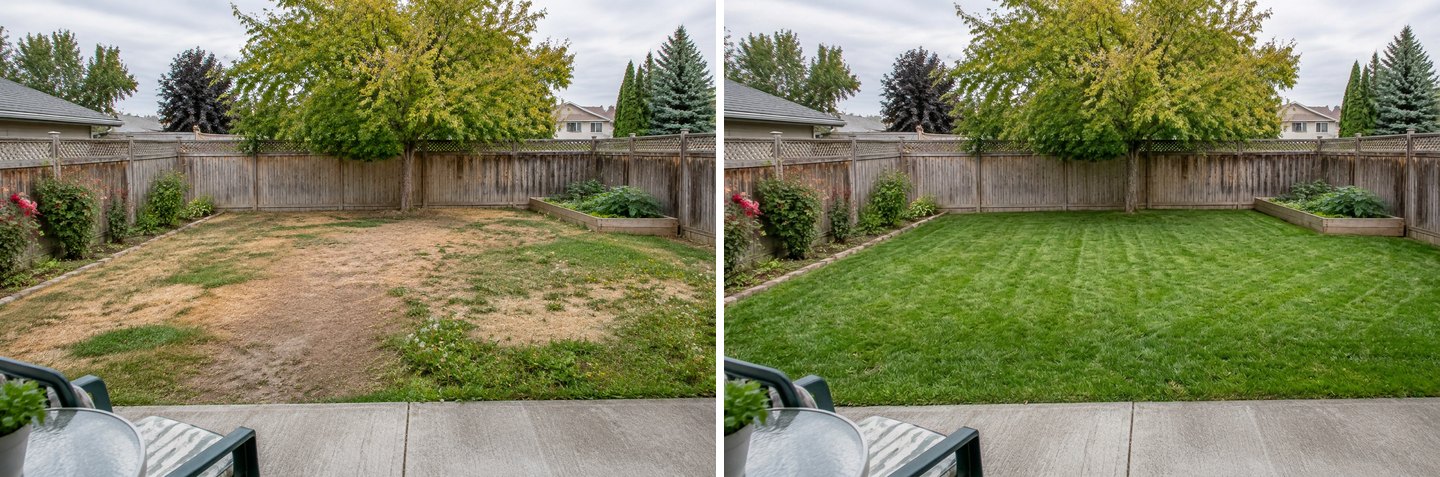 Before and after the "Neat lawn" task. The task prompt asks for an even, dense lawn while keeping the paths and buildings.
What stayed: the rose bed along the left fence, the raised vegetable bed, the maple, the fence boards, the patio slab and even the chair in the corner. What changed: the ground. The AI also added mowing stripes. That makes it look like fresh turf in its first week, which is a little too perfect (more on that in the limits section).
If your lawn is not dead but just neglected, try the Clean-up mode instead. It is meant to "tidy the plot without redesigning it": mow, prune, mulch the beds, clear clutter and weeds.
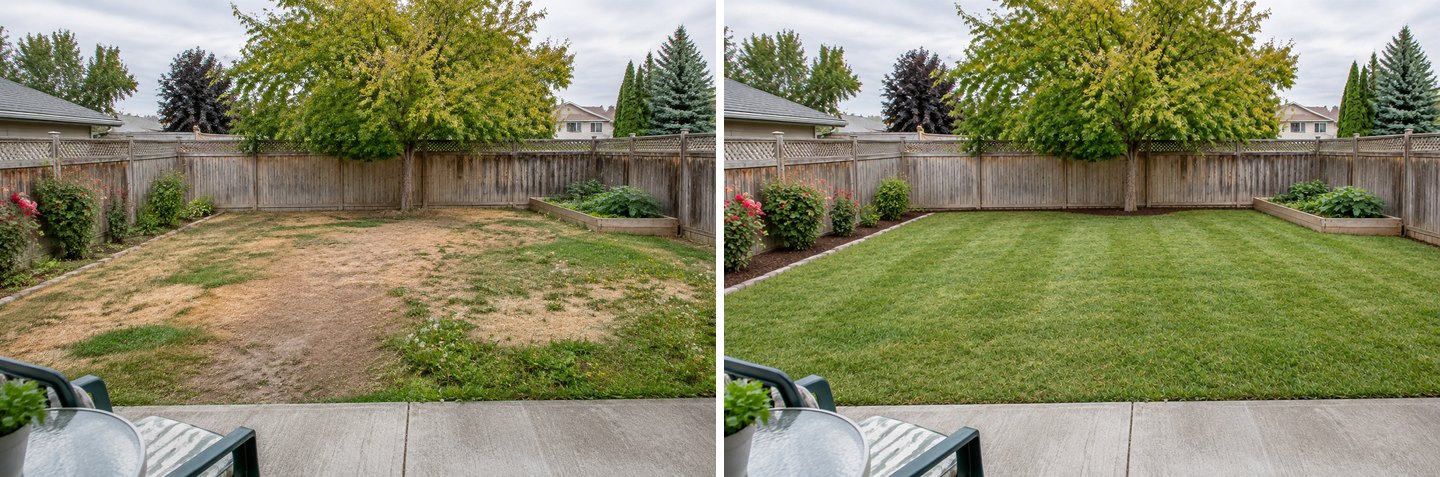 The Clean-up mode on the same photo. It also turned the bare patches green and mulched the left bed, but it removed a few of the smaller shrubs there.
On a yard this bare, Clean-up and Neat lawn gave nearly the same picture. On a yard that is only overgrown, Clean-up is the better pick because it does not set out to change the ground cover. For a guide to removing mess from yard photos (bins, toys, hoses), see our AI room cleaner guide.
Example 2: The Same Backyard With No Grass at All
"Native, drought-tolerant plants" on its own replaced the lawn with planted beds of bark mulch, gravel paths and boulders. That is the "black bark and drought-resistant plants" request almost word for word, from a single click.
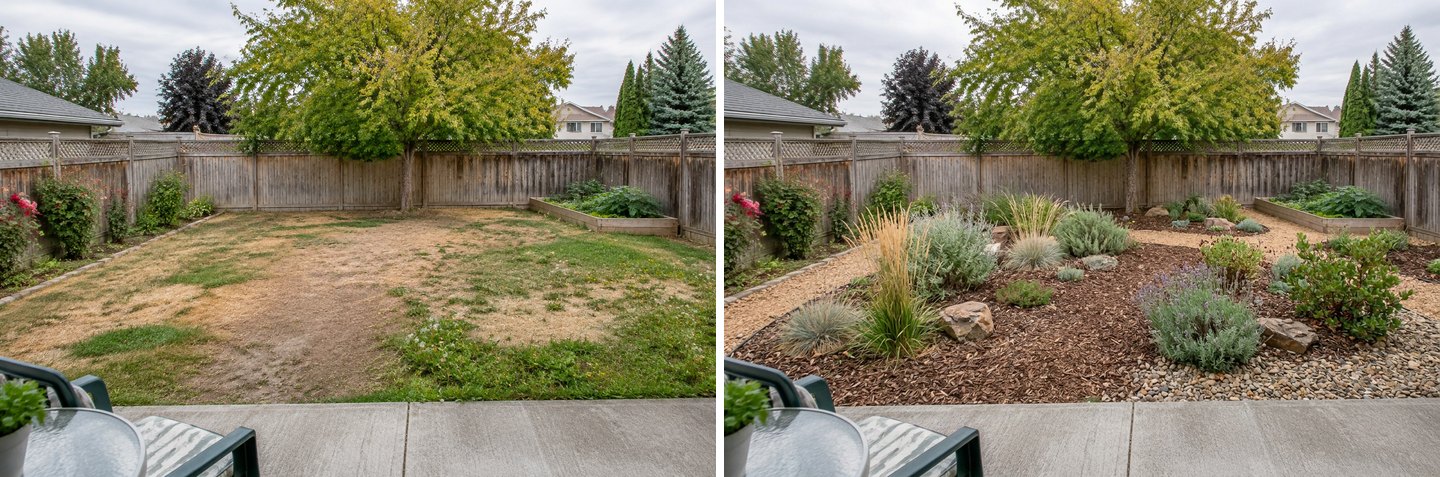 "Native, drought-tolerant plants" without any extra wish. The task asks for native, drought-tolerant plants suited to the local climate, with gravel or mulch between them.
The vegetable bed, the roses and the patio stayed. The planting is in loose groups with paths between them, so you can still walk to the back fence. In our view this was the most "real" of all the results: it looks like something a homeowner could build in a season.
Then we ran the same task with one line of text: "Replace the whole lawn with light gravel and clusters of drought-tolerant plants, no grass at all. Keep the vegetable bed, the tree, the patio and the fence."
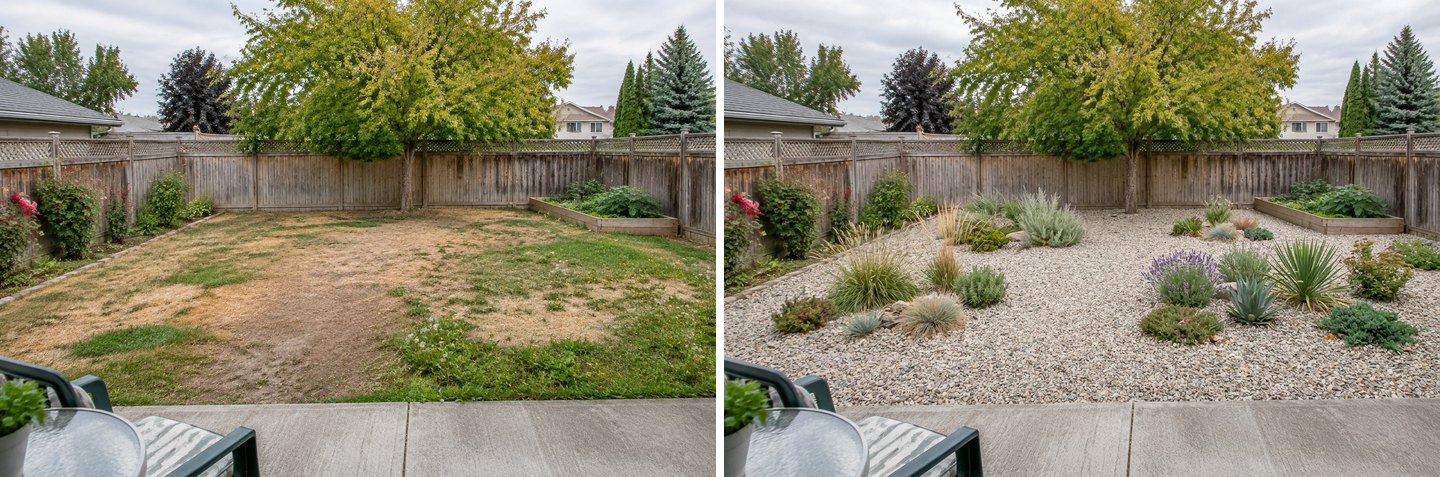 The same task plus a one-line wish for gravel. Everything named in the wish was kept.
This version is the classic "xeriscape" picture, and it shows the trap the UF/IFAS researchers warned about. Most of the yard is bare stone with plants dotted around. In a hot summer that stone holds heat. If you like this look, ask for "dense planting, gravel only on the paths" and compare the two.
A word on the plants: this yard has a maple and spruces, so it is a cool, temperate garden. The AI put agave and yucca in it. Some yuccas cope with frost and many agaves do not. The picture tells you about layout and mood, not about which species will survive in your yard. For that, see our guide to choosing plants for your climate zone.
Example 3: A Dead Front Yard in a Dry Climate
For a front yard of dead grass and cracked concrete, the "Garden & planting" mode with the Desert climate produced a full, layered xeriscape. This is the mode to use when you want a planting plan rather than one ground cover.
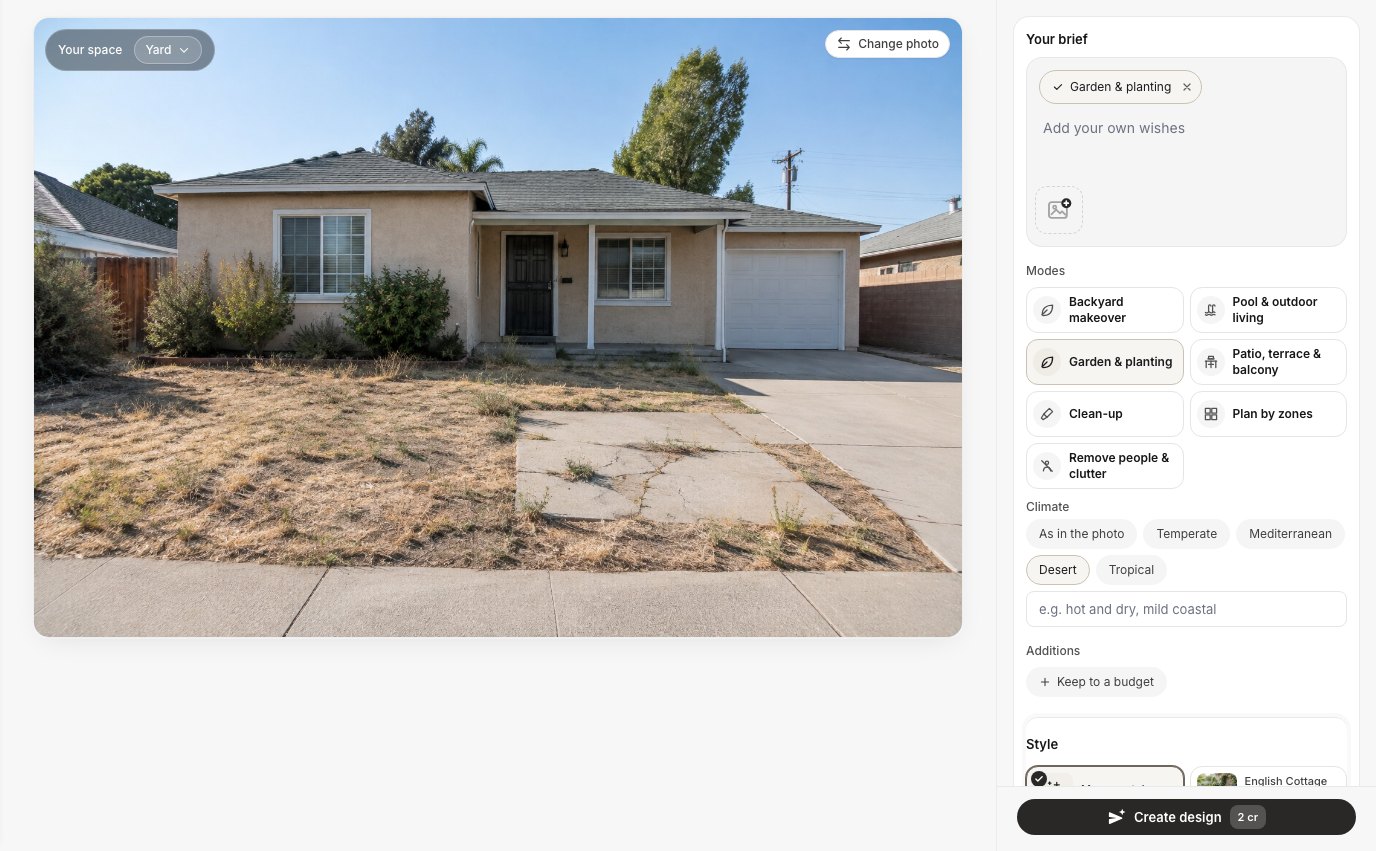 The Garden & planting mode with its Climate row. You can also type your own climate, for example "hot and dry" or "mild coastal".
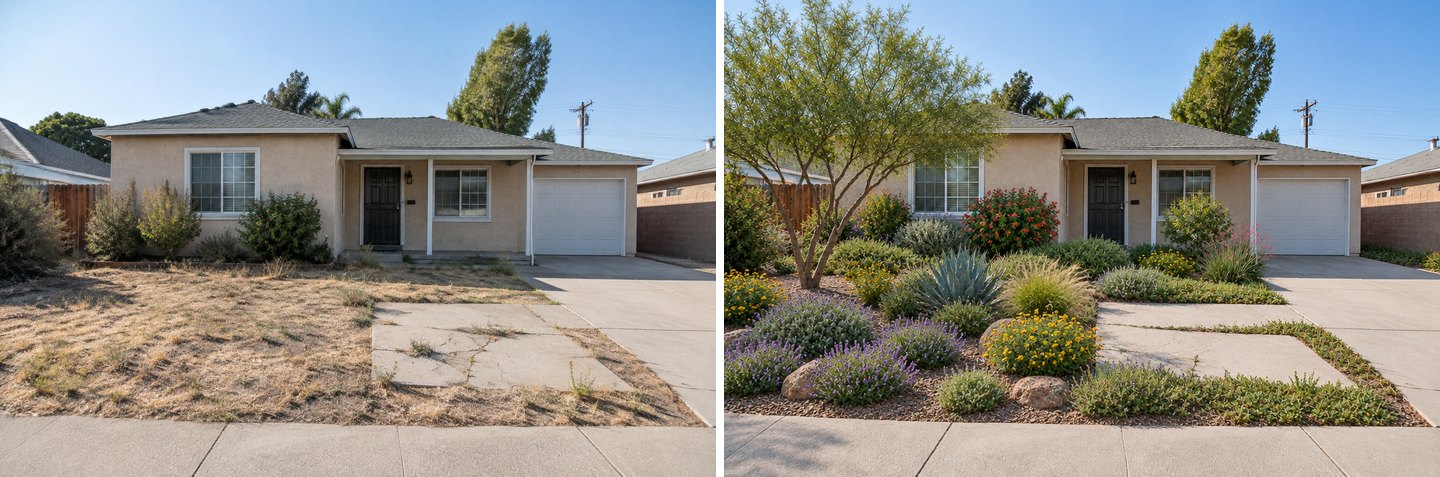 Garden & planting, climate: Desert. The house, garage door, driveway and sidewalk stayed; the planting is all new.
The house, roofline, garage door and driveway are untouched. The concrete slab was kept as a paved spot, and the AI framed it with a low green border. The AI also added a multi-stemmed tree in the left corner. That is a nice idea, but a young tree from a nursery will take years to look like that.
In the editor's Quick actions there is also "Identify plants" (2 credits). It labels every notable plant on the image with its name; in our test it gave both common and Latin names. On this design it named a desert willow, Texas sage, agave, catmint, blackfoot daisy and others, which gives you a shopping list to discuss with a local nursery. It also labelled Lantana camara, which the IUCN lists among the world's 100 worst invasive species. So check every name against your local native and invasive plant lists before you buy anything.
Create facade design with AI
Upload a photo of your home and get a new facade in the chosen style in 30 seconds. First generation is free.
Example 4: Real Lawn or Artificial Turf on the Same Photo
On a photo, a fresh lawn and artificial turf look almost the same, and that is exactly why the choice should not be made on looks. We ran the editor's "Lawn" quick action on the front yard, then a text edit asking for artificial turf, both from the original photo.
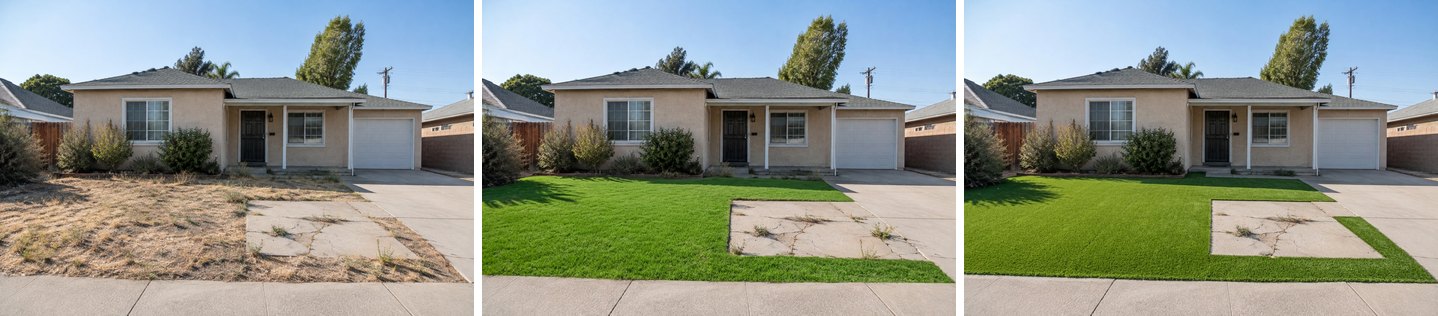 Left: the original. Middle: the "Lawn" quick action. Right: a text edit, "Replace the dead grass with artificial turf…". The turf version is flatter and more even; at this size the difference is small.
The turf is a touch flatter and more uniform, with sharper edges. On a listing photo, few people would spot the difference. Underfoot, there is a big one: the UF/IFAS study measured up to 79 °C (174 °F) on synthetic surfaces against about 39 °C on living grass. In a sunny front yard like this one, that matters for kids and dogs.
Two more honest notes from this test. The "Lawn" action left the cracked slab alone, as designed: its prompt keeps paths, beds and buildings. In the turf version the slab came out slightly smaller and more rectangular than in the original. That is a small change, but it is a change.
How to Convert Only Part of the Yard With a Brush
Select the area with the brush or lasso, write what should go there, and the AI changes only the selection. This is how you answer the "how much lawn?" question, and how you fix one problem spot without redesigning the rest.
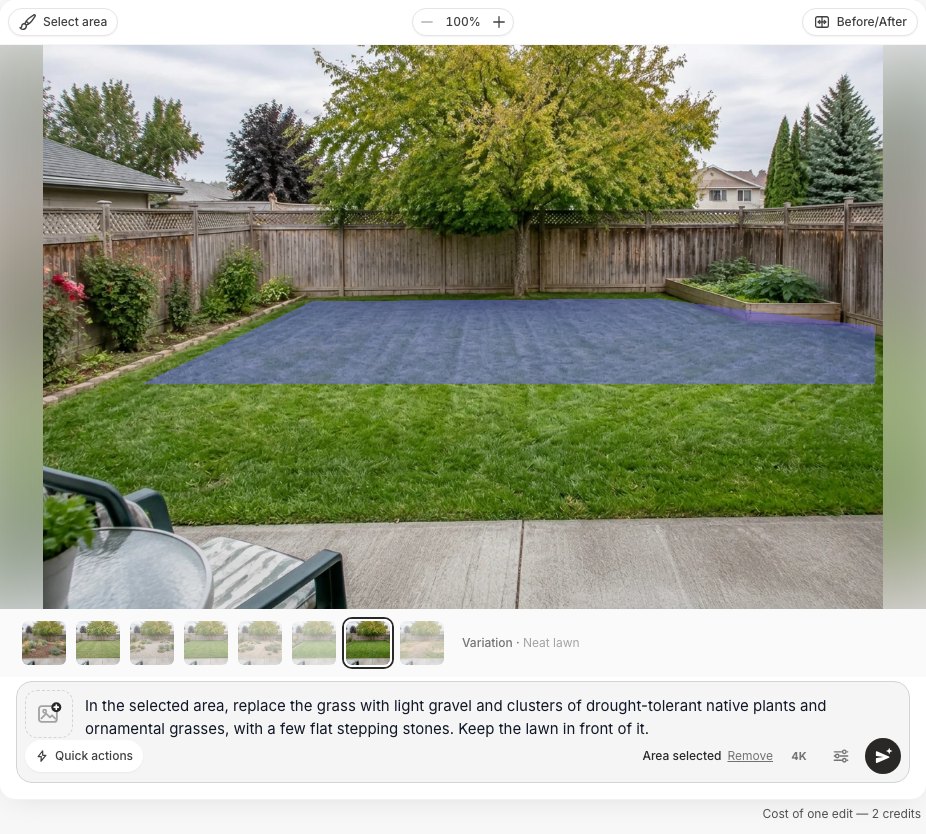 "Select area" in the editor: the blue area is the selection, and "Area selected" confirms the change will stay inside it.
We took the green-lawn result from Example 1, selected the back third of the lawn and asked for gravel, native plants and stepping stones there.
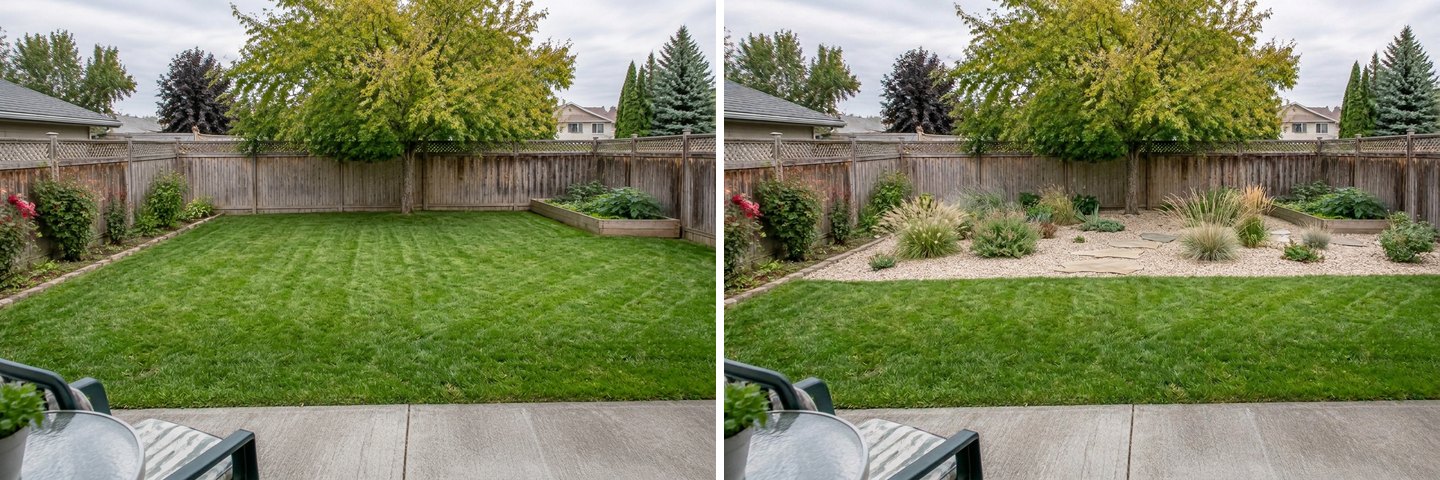 A partial conversion: the play lawn stays near the house, and the shady back strip under the tree becomes a planted gravel bed.
This is the version we would build. The lawn stays where people sit and play, and the strip under the tree turns into planting. Grass struggles there anyway, which was the "grass won't grow here" request from our list.
The same tool handles concrete. On the front yard we selected the cracked slab and wrote "Remove the cracked concrete slab and replace it with the same green lawn as around it. Keep the driveway and the sidewalk."
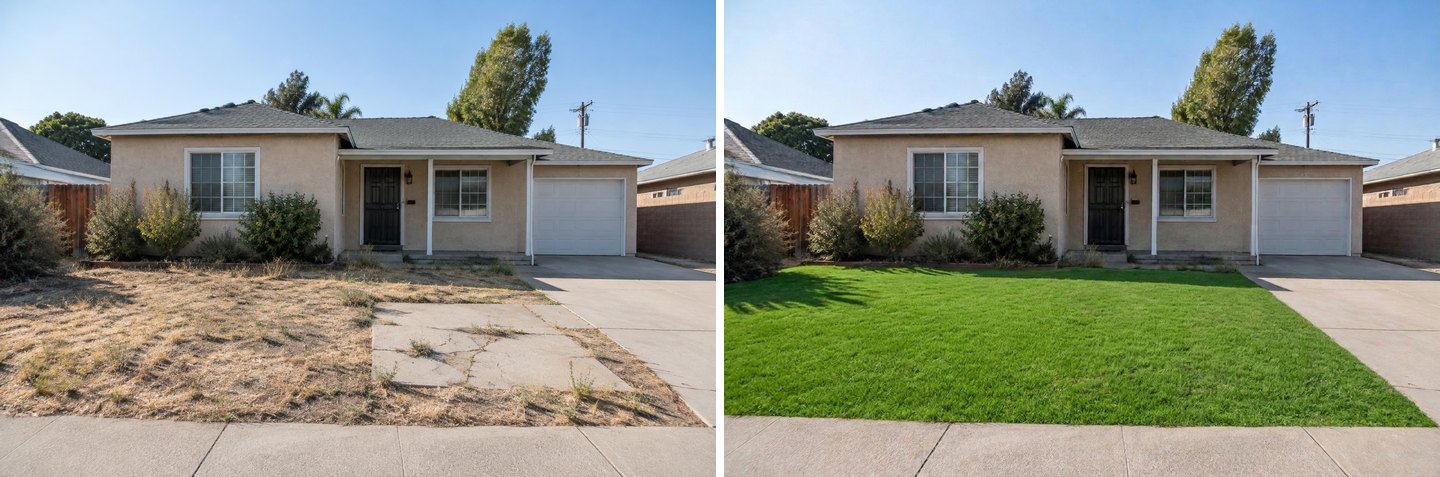 Two steps: the "Lawn" quick action first, then a brush selection over the slab. The driveway and sidewalk edges stayed straight.
On a phone the same tools are under Select and the lightning-bolt Quick actions button. "Lawn" sits in the Colors & materials group, next to "Paths".
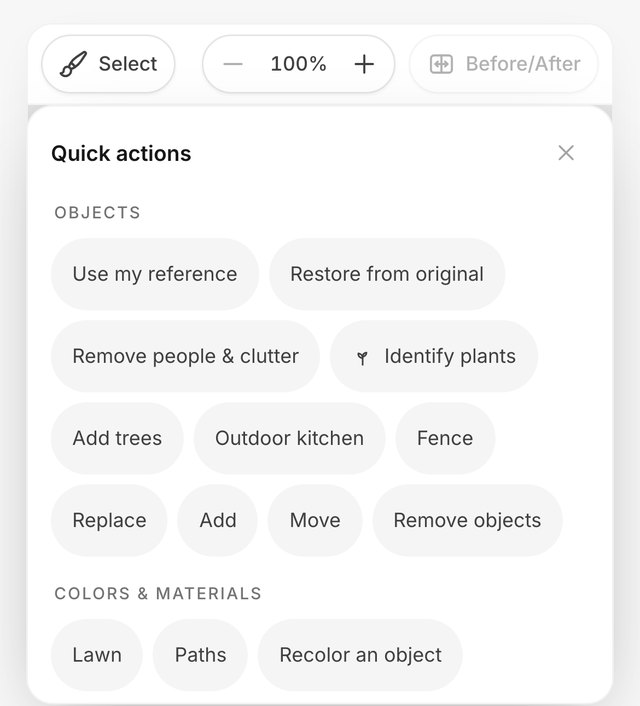 Quick actions for a yard photo on an iPhone. "Lawn" replaces grass and bare ground with an even green lawn and keeps beds, paths, trees and buildings.
Wishes That Work for Lawn Requests
Short, concrete wishes that say what to keep work better than long descriptions. These are rewritten from real requests:
| You want | Where | Write |
|---|---|---|
| Green lawn, keep the beds | Neat lawn task or "Lawn" quick action | (nothing extra; both already keep beds and paths) |
| No grass at all | Native, drought-tolerant plants | "Replace the whole lawn with gravel and dense drought-tolerant planting, no grass at all. Keep [the vegetable bed]." |
| Bark instead of gravel | Native, drought-tolerant plants | "Dark bark mulch between the plants, no gravel." |
| Lawn only where you play | Brush on the rest | "Replace the grass in the selected area with low native plants and mulch." |
| Shady spot where grass dies | Brush on the spot | "Shade-tolerant ground cover and ferns instead of grass." |
| Concrete or a path to lawn | Brush on the concrete | "Replace the concrete with the same lawn as around it." |
| A small garden, mostly lawn | Garden & planting + wish | "One or two small trees, a hedge along the fence, the rest lawn." |
| Lower cost | Any task + Keep to a budget | Add the Keep to a budget option before you create |
If the climate matters (and for planting it always does), say it: "hot and dry", "mild coastal", "cold winters, -20 °C". The editor also has a Plants library in its side panel, so you can browse species instead of guessing their names.
What the AI Gets Wrong About Lawns
The AI is good at layout and mood, and weak at the things that only show up after a season. Here is what we saw across these runs:
- The lawn is too perfect. Every green-lawn result came back as fresh sod with mowing stripes, even in a front yard baking in the sun. A real lawn in that yard, without heavy watering, will look patchier.
- Plants are not checked against your climate. The temperate backyard got agave and yucca, and the plant labels included an invasive species. Use the pictures for layout and verify the species locally.
- Everything is shown at mature size. The new tree in the desert front yard looks ten years old. Ask a nursery how long each plant takes to fill in.
- Gravel looks clean in a picture. In real life, bare stone collects leaves and heats up, and weeds come through over time. Dense planting is cooler, and the AI does not warn you about this.
- Small things change. Clean-up thinned a bed of shrubs; the turf edit resized the concrete slab. Compare every result with Before/After.
- The brief stacks. Tasks from your previous run stay selected until you remove them.
- Front yards may open as "Facade". Switch "Your space" to Yard to get the lawn tasks.
If you plan to use a "fixed lawn" photo to sell or rent a home, say in the listing that the lawn is a digital rendering. Our AI room cleaner guide covers the disclosure rules in more detail.
Before You Rip Out the Lawn
Use the AI pictures to decide on the layout, then check money, rules and plants locally. A short checklist:
- Ask your water utility about turf-removal rebates before you start. Some dry-region utilities pay per square foot of grass removed; the Southern Nevada Water Authority, for example, pays single-family homes $5 per square foot for the first 10,000 square feet converted to desert landscaping.
- Decide how much lawn you really use. Keep it where children or a dog play, and convert the edges, the shady spots and the strip by the street.
- Plan for more plants, less bare stone. It is cooler and closer to how real gardens fill in.
- Take the plant list to a local nursery and ask about frost, sun, mature size and watering in the first year.
- Make two or three variants from the original photo: full lawn, half-and-half, no lawn. Look at them side by side for a day before deciding.
For a full redesign of the yard (patio, zones, lighting), see AI backyard design from a photo. For the street side, see front yard curb appeal on a budget. Small plots are covered in small backyard ideas with AI, and the overview of landscape design with AI lists every yard mode.
FAQ
Can AI replace the grass in a photo of my yard?
Yes. Upload the photo in GenRoom, make sure the space is set to Yard, and use the "Neat lawn" task or the "Lawn" quick action for a green lawn, or "Native, drought-tolerant plants" to replace the grass with planting. The house, fence, paths and trees stay. Each run is 2 credits and took 22–40 seconds in our tests.
Is there a free AI tool to visualize xeriscaping?
GenRoom gives 6 free credits when you create a free account (no card), enough for three designs or edits. Free results carry a watermark. Paid packs start at $9.99 for 36 credits, with no subscription. See pricing.
What is the cheapest thing to replace grass with?
There is no single answer, because material and labour prices vary a lot by region, and an AI picture cannot price your yard. Wood mulch and gravel are the usual budget choices. Turf-removal rebates can change the sums, so check with your water utility first. Use the AI to compare looks, then get local quotes for the one you like.
Is artificial turf better than xeriscape?
It depends on how you use the space. Turf gives an even, green play surface without mowing, but it can reach 79 °C (174 °F) in full summer sun. A xeriscape with dense planting uses less than half the water of a lawn and stays cooler than bare gravel, but you cannot play ball on it. Many yards end up with a small living lawn plus planting.
Can I convert only part of my lawn with AI?
Yes. In the GenRoom editor, tap "Select area", paint over the part you want to change, and describe it, for example "gravel and native plants in the selected area, keep the lawn in front". Only the selection changes.
Will the AI pick plants that grow in my climate?
Not reliably. The Garden & planting mode takes a climate (Temperate, Mediterranean, Desert, Tropical, or your own words), and the "Native, drought-tolerant plants" task asks for local plants. Still, our temperate test yard got agave and yucca. Treat the result as a layout idea and confirm the species with a local nursery.
The Bottom Line
AI lawn replacement is the fastest way to answer "lawn, no lawn or some lawn?" on your own yard instead of someone else's. In our tests GenRoom kept the house, fence, trees and beds in place and changed only the ground: a tidy green lawn in one click, bark or gravel with drought-tolerant plants in another, and a half-and-half yard with the brush.
Use the pictures for the layout, and check the parts a picture cannot show: water, heat and which plants will actually grow where you live. Upload your yard photo in the Studio and make three variants from the same original. Usually one of them is clearly the yard you want.