AI Room Design Free: 9 Tools With Real Free Tiers (November 2026)

Try it yourself: Redesign any room with AI — free →. Upload a photo, pick a style, get a photorealistic result in about 30 seconds.
You can design a room with AI for free in November 2026, but "free" means very different things. Some tools give 3 designs a day with ads, some give 3 designs in total, some need an account, and some say "free" on the homepage but have no free tier at all. This guide shows exactly what each one gives you for $0.
Our pick for most people is GenRoom: 6 free credits (3 designs) with no card, the same AI as paid plans, and free editing with words or a brush — so you can fix a result instead of starting over. If you want new free designs every day, DecorAI and RoomsGPT reset daily.
We checked every free tier below on each tool's official website on 13 November 2026: how many free designs you get, whether you must sign up or enter a card, and whether results carry a watermark.
The Free Tier Reality Check
| Tool | Free designs | Sign-up? | Card? | Watermark? | Resets? |
|---|---|---|---|---|---|
| GenRoom | 3 (6 credits) | Free account | No | Small mark, removed after any purchase | No |
| DecorAI | 3 a day, each after a video ad | No | No | Yes | Daily |
| RoomsGPT | 3 a day as guest, 4 with account | No | No | Yes, small | Daily |
| Havenly AI | Free tool | Not stated | No | Not stated | No subscription |
| ReimagineHome | 5 | Not stated | No | Not stated | No |
| Homestyler | Unlimited 1K 3D renders + 3 AI credits/mo | Not stated | No | Yes (removal is paid) | Monthly |
| Spacely AI | 40 trial credits (≈20 renders) | Yes | No | No ("watermark free") | No |
| Remodel AI | 3 in total | Not stated | Not stated | Yes (no-watermark is paid) | No |
| Styly | 3 images | No | No | Not stated | No |
Barely free: RoomGPT gives 1 generation after Google sign-in. Decoratly gives 1 free design (or one round of 6 looks). InstantInterior AI gives 1 free render.
Not free, despite the search results: Interior AI has no free tier — designs start after payment. Canva's AI Interior Styler needs credits on any plan, as Canva's own FAQ says.
What "Free" Should Mean in an AI Room Designer
A good free tier lets you answer one real question about your room — "will dark green walls work here?" — before you pay anything. That needs three things:
- Your own photo, not a sample room.
- Enough designs to compare — at least 2–3 styles or colors.
- A way to fix a result. If the AI moves your window or adds a strange chair, a free edit saves a whole new generation.
Daily resets are great for browsing ideas. A larger one-time allowance with editing is better for deciding on an actual renovation.
1. GenRoom — Best Free AI Room Design Tool Overall
Free tier: 6 credits on sign-up (a design or an edit costs 2 credits, so 3 actions), no card. Free results carry a small genroom.io mark, which disappears from new and existing designs after any purchase.
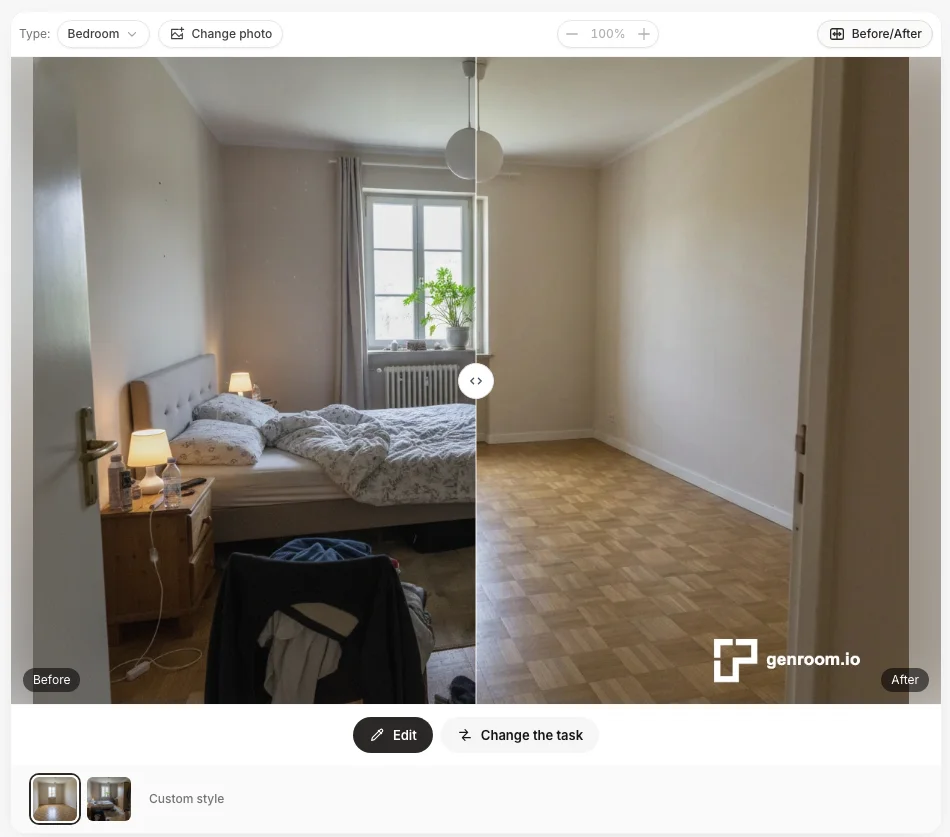 Real GenRoom result on a free account: "Empty the room" removes the bed, clothes and clutter and keeps the parquet, door and window. Note the small genroom.io mark on free results.
GenRoom works with your real photo of an interior, a house facade or a yard. You choose what to do — redesign in a style, furnish an empty room, refresh without renovation, rearrange furniture, remove clutter — and the AI changes only that, keeping walls, windows and proportions.
What free users get that most free tiers don't:
- The same AI as paid plans — no "lite" model for free accounts.
- Editing with words and a brush — type "make the sofa green" or brush over an area and describe the change.
- Interiors, facades and yards — 24 ready-made modes and 60+ styles.
- Before/after slider on every result.
- Your own reference photo — free accounts can add one (paid plans up to 5).
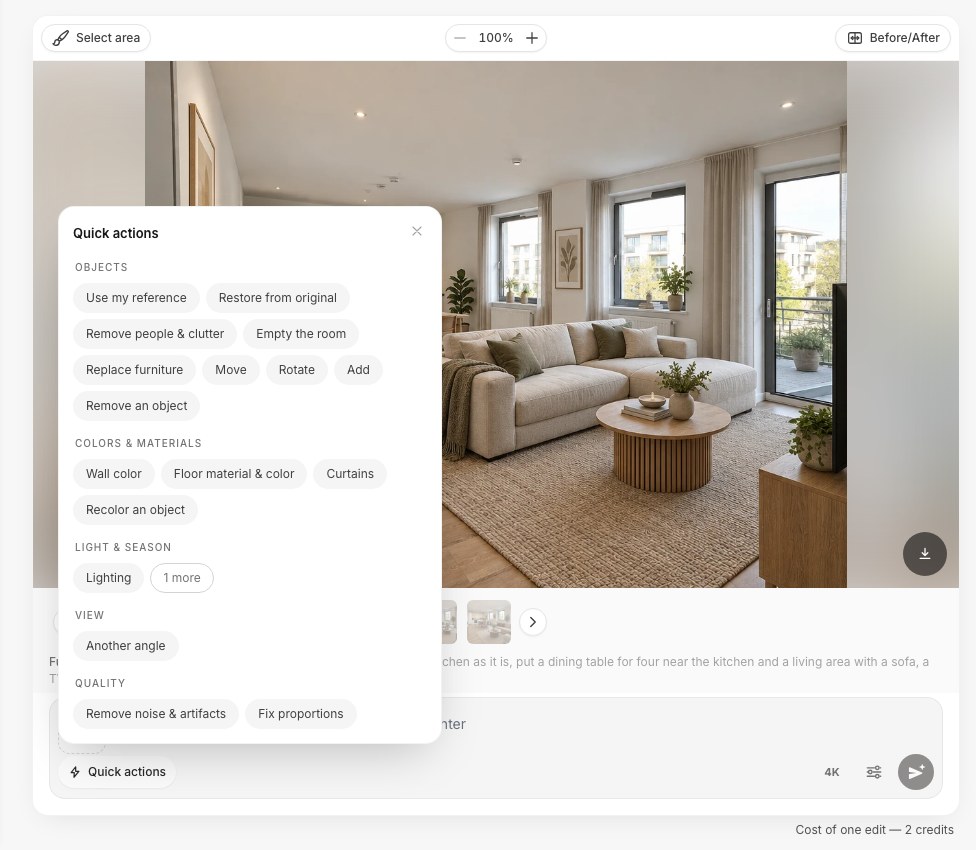 Quick actions in the GenRoom editor work on free credits too.
When you need more: one-time packs, no subscription — Start $9.99 (36 credits), Basic $19.99 (100 credits, free 4K) and Pro $39.99 (300 credits). Unused credits are refundable within 14 days. See pricing.
Limitations: 3 free designs is enough to test your room, not to plan a whole home. There are no daily free resets, and GenRoom does not link to furniture stores.
2. DecorAI — Most Free Designs per Day (With Ads)
Free tier: 3 designs a day, each unlocked by watching a video ad. No account needed. Free results are watermarked.
DecorAI runs on iOS, Android and the web, in 33 languages, with 60+ styles and 16 tools — exterior, garden, virtual staging, brush editing and importing your own furniture. That is a lot of features for an app you can use without signing up.
Limitations: every free design costs you an ad, and Pro pricing is shown only inside the app. More in GenRoom vs DecorAI.
Best for: browsing ideas on your phone every day.
3. RoomsGPT — Best No-Sign-Up Option in a Browser
Free tier: 3 designs a day as a guest, 4 with a free account (plus 20 bonus credits). No sign-up needed. Results carry a small watermark, and the site shows ads.
RoomsGPT covers interiors, virtual staging, exteriors and gardens, and has an Android app. You can open the site, upload a photo and get a result in a minute — the lowest-friction start on this list.
Paid: Plus from $4.99/month or $39/year (200 credits a month) — the cheapest paid plan we found, but it is a subscription.
Best for: trying AI room design right now without creating an account.
4. Havenly AI — Best Free Tool for Decorating With Real Products
Free tier: the AI tool is free, with no subscription, on the web and iOS.
Havenly's AI redesigns your room photo and lets you swap pieces for real items from Havenly's furniture marketplace. If you need a person, Havenly's human designers start at $199 per room online.
Limitations: made for decorating and shopping, not for renovation questions like new floors, walls or a facade.
Best for: furnishing a room with products you can actually order.
5. ReimagineHome — Most Free Designs Without a Card
Free tier: 5 free designs, no card.
ReimagineHome redesigns rooms, exteriors and landscaping. On paid plans it links items in the design to real products. Paid plans start at $19/month (30 credits); shoppable products need Pro at $36/month.
Best for: testing 5 ideas, then furnishing with shoppable results.
6. Homestyler — Best Free 3D Room Planner
Free tier: the Basic plan includes unlimited 1K renders and 3 AI credits a month. Watermark removal starts with Pro+ (from $6.80/month).
Homestyler is a different kind of tool: you draw a room in 3D, place furniture models and render it. AI Stager and AI Decor add AI features on top. iOS and Android apps are available.
Best for: planning a room that doesn't exist yet — no photo needed.
Create interior design with AI
Upload a photo of your room and get a professional design in 30 seconds. First generation is free.
7. Spacely AI — Best Free Trial for Professionals
Free tier: 40 trial credits after sign-up (about 20 renders), watermark-free.
Spacely AI includes Auto Furnish, Point and Edit, landscape design, 4K output and plugins for SketchUp and Revit. Paid plans start at $20/month billed yearly or $25 monthly.
Best for: architects and studio designers testing an AI workflow.
8. Remodel AI — Short Free Trial, Good Mobile App
Free tier: 3 designs in total; watermark-free downloads are a paid feature.
Remodel AI has web, iOS and Android apps with 30+ styles, staging, exteriors, gardens, floors and paint. Pro is $29/month or $349/year.
Best for: a quick test before a mobile-first subscription.
9. ChatGPT — Free, but Not a Room Designer
Free tier: the free plan includes "limited image creation" with uploads; OpenAI does not publish an exact daily count.
You can upload a room photo and ask ChatGPT for a redesign. It is useful for ideas and for writing a brief for a designer. But it has no interior modes and no before/after view, and you must tell it in words what must not change — the window, the radiator, your sofa.
Best for: brainstorming. For decisions about your real room, use a dedicated tool.
Example: What 3 Free Designs Can Answer
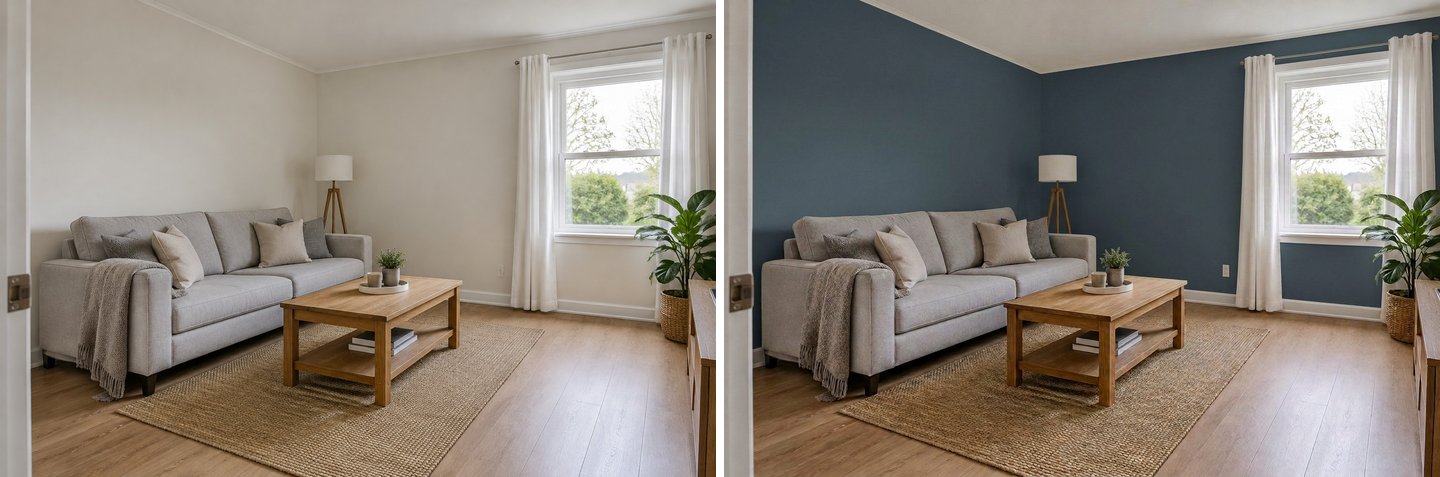 One free edit in GenRoom: the same living room with navy walls. Furniture, window and camera stay the same, so the comparison is honest.
Three free designs are enough for one clear decision if you plan them:
- Design 1 — the direction: full makeover in the style you like most.
- Design 2 — the alternative: a second style, or "refresh, no renovation" if budget is tight.
- Edit — the detail: change one thing on the winner, like wall color or flooring.
Want to see your empty room furnished first? See how to furnish an empty room with AI. Need to clear old furniture out of the photo? See AI furniture removal.
Which Free Tool for Which Task?
| Task | Best free option | Why |
|---|---|---|
| Restyle a living room or bedroom from a photo | GenRoom | Keeps your layout; free edits fix details |
| Furnish an empty room | GenRoom or ReimagineHome | Dedicated "furnish" modes; 3–5 free designs |
| Remove old furniture or clutter from a photo | GenRoom | "Empty the room" and "Remove people & clutter" modes |
| New ideas every day on a phone | DecorAI | 3 designs a day after a short ad |
| Quick try with no account | RoomsGPT | 3 guest designs a day |
| Decorate with products you can buy | Havenly AI | Free, links to real items |
| Facade or front yard | GenRoom, DecorAI, RoomsGPT | All three cover exteriors |
| Plan a new layout in 3D | Homestyler | Free 3D planner and 1K renders |
If your question is about a real room you will renovate, start with the tool that keeps the room as it is. If you just want inspiration, a daily-reset tool gives more pictures for $0.
Is it safe to upload photos of my home?
Each service has its own policy, so read it before uploading. On GenRoom, designs on free and Basic accounts can appear in the public gallery; Pro adds private designs that stay out of it. Avoid photos with people, documents or house numbers visible, whatever tool you use.
How to Get the Most From Free AI Room Design
Take one good photo
Shoot in daylight from a corner of the room, phone held level and at chest height, so the AI sees two walls, the floor and the window. A good photo gives better results than any style choice.
Say what must stay
Write it in the request: "keep the window, radiator and my grey sofa". Good tools keep your room by default, but naming what matters helps every tool.
Don't spend free designs on tiny changes
Use free generations for big questions (style, layout, colors). If the tool has editing, use edits for small fixes instead of regenerating.
Compare the same photo in two tools
If two tools look good, run the same photo in both. It costs nothing on free tiers and shows which AI understands your room better.
Check the watermark and resolution before you share
Most free results are watermarked or reduced in size. That is fine for deciding; for a contractor or a listing you may need a paid export.
When Is It Worth Paying?
Free tiers are for testing. Pay when you are planning a real project: several rooms, a facade, or many edits. Compare total cost, not monthly price:
| Option | What you pay | You get | Renews? |
|---|---|---|---|
| GenRoom Start | $9.99 once | 36 credits (≈ 18 designs and edits), no watermark | No |
| RoomsGPT Plus | $4.99/month | 200 credits a month | Yes |
| ReimagineHome Essential | $19/month | 30 credits | Yes |
| Remodel AI Pro | $29/month | Pro features | Yes |
For one renovation, a one-time pack is the simplest. For steady daily use, a cheap monthly plan can be fine — just remember to cancel.
FAQ
Is there a completely free AI room designer?
Havenly AI's tool is free with no subscription, and DecorAI and RoomsGPT give a few free designs every day. Most others give a one-time free allowance: GenRoom 3 designs, ReimagineHome 5, Remodel AI 3. Completely unlimited free photo redesign with no ads or watermark does not exist today.
What is the best free AI room design tool from a photo?
GenRoom, if you want to decide on a real renovation: it works from your photo, keeps the layout, and lets free users edit results with words or a brush. DecorAI and RoomsGPT are better if you just want a few new ideas every day.
Can I use AI room design without signing up?
Yes. RoomsGPT, DecorAI and Styly work without an account. GenRoom needs a free account (email or Google, no card) so your designs and credits are saved.
Is Interior AI free?
No. As of November 2026, Interior AI has no free tier; plans start at $29/month billed yearly or $49 monthly.
Is Canva's AI interior design free?
No. Canva's own FAQ says its AI Interior Styler is not free to use: you need credits to generate redesigns or virtual staging, on any plan.
Do free AI room design tools add a watermark?
Most do: GenRoom (a small genroom.io mark), DecorAI, RoomsGPT, Remodel AI and Homestyler's free plan. Spacely AI's trial is watermark-free. On GenRoom, the mark disappears from all your designs after any purchase.
Can free AI tools design a whole house?
Rarely within the free allowance. GenRoom can design every room from a floor plan and also facades and yards, but a whole house takes more than 3 free designs. Use the free credits to choose the style, then buy a pack. See AI design from a floor plan.
The Bottom Line
The best free AI room design tool depends on what you need from "free". For deciding on a real change to your room, GenRoom gives 3 free designs with full-quality AI and free editing, no card. For a few new ideas every day, DecorAI (with ads) and RoomsGPT (no sign-up) reset daily. Skip tools that call themselves free but start with a paywall.
For a full comparison of paid plans, see the best AI interior design generators.
Start your free room redesign at genroom.io — 3 free designs, no card, results in about 30 seconds.
Updated 13 November 2026. Free tiers and prices were checked on each tool's official website on that date; they change often, so check before you rely on them.