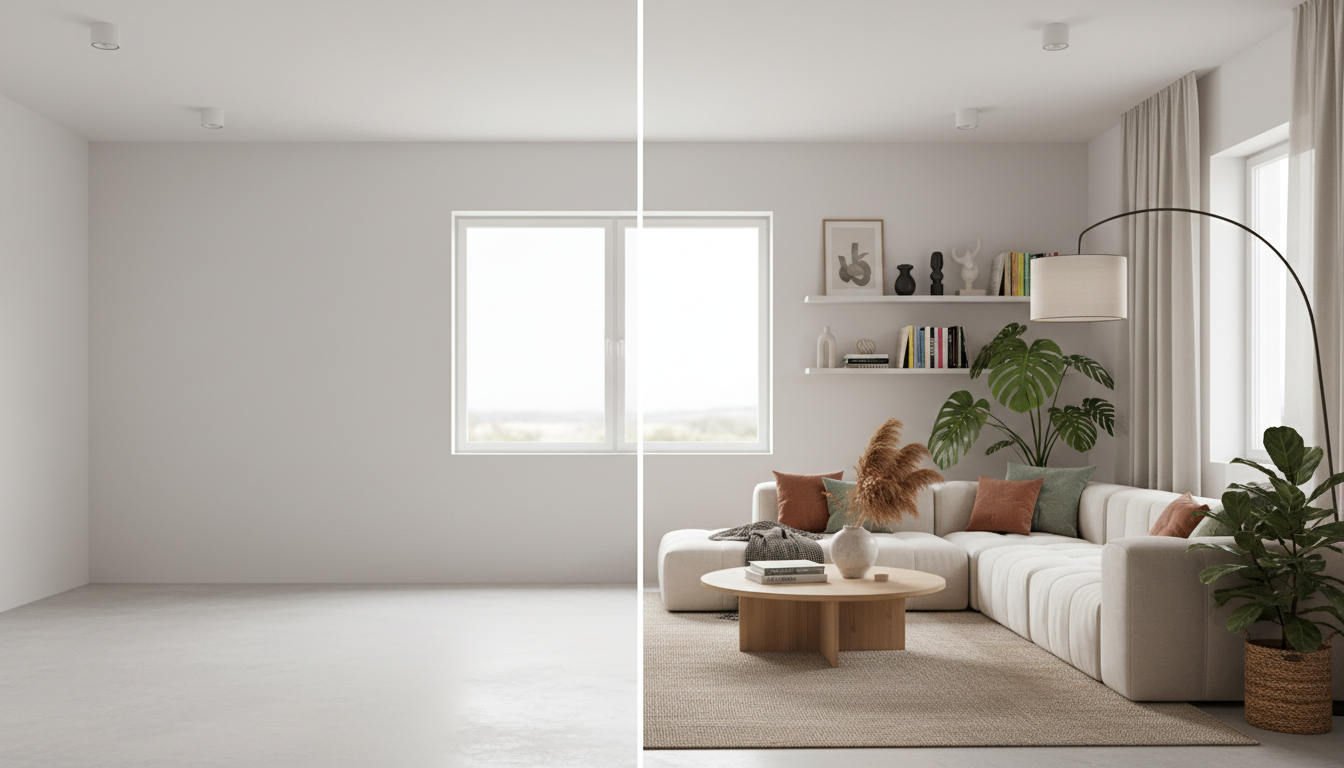
An AI render is a powerful starting point, but it is just that — a starting point. Here is how to bridge the gap between a beautiful AI image and a completed renovation.
The most effective use of an AI render is as a communication tool. Show it to:
- Contractors. "I want my kitchen to look like this." A render eliminates the ambiguity of verbal descriptions. The contractor can see the cabinet style, countertop material, backsplash pattern, and lighting design you want.
- Designers. If you hire a professional designer for execution, the AI render gives them a clear starting point. They can refine the concept, source specific products, and create a realistic budget.
- Partners and family. Making design decisions together is hard when each person has a different mental image. An AI render gets everyone looking at the same thing.
Look at your AI render and identify the specific elements you want to replicate:
- Wall color. Match the render to paint swatches. Most hardware stores can color-match from a photo.
- Flooring. Identify the material (hardwood, tile, concrete) and general tone (light oak, dark walnut, gray stone).
- Furniture. Note the style, scale, and material of key pieces. Use these as search parameters on furniture websites.
- Lighting. Note fixture styles (pendant, recessed, sconce) and color temperature (warm, neutral, cool).
- Textiles. Curtain style, rug pattern, throw pillow colors.
Take your render and product list to 2-3 contractors for estimates. Having a clear visual reference dramatically improves the accuracy of contractor quotes — they can see exactly what you want instead of guessing.
AI renders do not come with price tags. The Modern kitchen the AI generated might cost $15,000 or $50,000 depending on material quality and your local labor market. Get real quotes before committing emotionally to a specific render.
Once you have contractor estimates and know your budget, plan the renovation in phases if needed:
Phase 1: Highest impact, lowest cost. Paint, lighting, textiles (curtains, rugs, throw pillows). These changes are inexpensive, reversible, and can dramatically shift the feel of a room. Compare your AI render to what you can achieve with just these changes — you might be surprised how close you can get.
Phase 2: Furniture. Key pieces that define the style — sofa, dining table, bed frame, accent chairs. If budget is tight, replace the single largest piece first (usually the sofa) and let the rest follow over time.
Phase 3: Permanent changes. Flooring, cabinets, countertops, tile work. These are the expensive, permanent changes that require contractors. Save these for when you are certain about the direction — which is exactly what AI visualization helps you confirm before spending.
Phase 4: Structural. Wall removal, room additions, window changes. The most expensive and disruptive. Only pursue after phases 1-3 have confirmed that the style direction is right for your home and lifestyle.
AI tools are most valuable in the planning phase before any money is spent. Use them to confirm your direction, align stakeholders, and communicate clearly with contractors. The $0-10 you spend on AI visualization can save thousands in renovation mistakes.
Being honest about limitations helps you use AI tools more effectively.
Building codes and permits. AI has no knowledge of your local building codes, zoning laws, or permit requirements. Any structural change (moving walls, adding windows, extending the footprint) needs professional verification before execution.
Exact dimensions. AI works from 2D photos and does not produce dimensionally accurate output. Furniture in the render is approximately the right scale, but you cannot order a sofa based on the pixel dimensions in an AI image.
Structural assessment. AI cannot tell you whether a wall is load-bearing, whether your floor can support heavy stone tile, or whether your roof structure can handle solar panels. These questions require an in-person professional assessment.
Plumbing and electrical. Moving a sink, adding an outlet, or relocating a light fixture requires knowledge of your home's infrastructure that AI simply does not have.
Material-specific accuracy. AI can show you that marble countertops would look beautiful in your kitchen. It cannot tell you which specific marble (Calacatta vs. Carrara vs. Statuario), at what thickness, with which edge profile, from which supplier, at what cost.
Cost estimation. An AI render shows you what a renovation would look like, not what it would cost. Costs vary enormously by location, material grade, and contractor pricing.
Existing fixture integration. If you want to keep your existing hardwood floors but change everything else, AI tools typically cannot accommodate that request. Most tools transform the entire room. Some advanced tools (like Spacely AI) offer element-level control, but the results are less reliable than full-room transforms.
Multi-room coordination. AI tools process one room at a time. They do not ensure that your living room, kitchen, and bedroom designs are stylistically coherent as a set. You need to manage cross-room consistency yourself — try the same style across all rooms and compare the results as a collection.
Understanding these limitations does not diminish the value of AI design tools. It helps you use them for what they excel at (fast, cheap, realistic style exploration) and know when to bring in professionals (execution, engineering, product specification).
| Scenario | Best Choice | Why |
|---|
| Exploring style options early on | AI tool | Try 10 styles in 10 minutes at near-zero cost |
| Visualizing a single room change | AI tool | Instant result, no appointment needed |
| Full home renovation planning | Designer + AI | AI for initial direction, designer for execution |
| Structural changes (walls, additions) | Designer/architect | AI cannot assess structural feasibility |
| Material and product selection | Designer | Designers have supplier relationships and material expertise |
| Budget planning and management | Designer | AI cannot estimate costs or manage budgets |
| Quick check: "Would this style work?" | AI tool | 30-second answer vs. waiting for a consultation |
| Real estate staging | AI tool | Faster and 90% cheaper than physical staging |
| Commercial space design | Designer | Complex requirements beyond AI capabilities |
| Color palette exploration | AI tool | See colors on your actual walls instantly |
The smartest approach: Use AI tools for the exploration and direction-setting phase ($0-10). Once you know what you want, bring a professional designer in for the execution phase. You will save the designer time (and therefore money) by arriving with a clear visual direction instead of vague ideas.
Real numbers make this concrete. A typical interior designer charges $150-300/hour. If you arrive at a consultation saying "I want something modern but warm," the designer spends 3-5 hours developing concepts and mood boards before you see anything — that is $450-1,500 before a single design decision is made. If you arrive with three AI renders saying "I love this direction — can you refine it and help me execute?", you skip the exploration phase entirely. The designer can immediately focus on material selection, product sourcing, and project management. You save hours of billable time and get to the actionable phase faster.
Most AI design tools offer free tiers. GenRoom provides 3 free generations. Paid plans range from $9.90/month (GenRoom) to $29/month (Interior AI, HomeDesigns.ai). For occasional use, the free tier is often sufficient. For a renovation project involving multiple rooms and many style iterations, a paid plan at $9.90/month is vastly cheaper than any alternative.
No. The entire point of AI design tools is that they require zero design knowledge. You upload a photo, pick a style from a visual menu, and the AI handles everything. The output is a finished, styled room — not a wireframe or mood board that requires interpretation.
Yes. AI tools are designed to work with rooms in their current state — furnished, cluttered, messy. The AI removes or replaces existing furniture and decor with the new style. You do not need to empty the room first.
Modern AI design tools produce highly photorealistic output. The style, colors, materials, and furniture are accurately represented. Room geometry (ceiling height, window positions, wall angles) is preserved. The main accuracy gap is dimensional: furniture sizes are approximate, not exact. Use AI output for style direction, not furniture ordering.
Yes. GenRoom supports exterior facade design and yard/landscape design in addition to interiors. Upload a photo of the front of your house and see it in 30+ exterior styles. This is particularly valuable for exterior renovations where mistakes are expensive and permanent.
With GenRoom, about 30 seconds from upload to finished render. Slower tools take 60-90 seconds. Either way, you can visualize a room in multiple styles within 5-10 minutes — compared to days or weeks for traditional design visualization methods.
Absolutely. AI design is useful for renters in two ways: (1) exploring non-permanent changes like furniture, rugs, curtains, and decor that transform a space without modifying the structure, and (2) having a productive conversation with a landlord about permitted modifications by showing them exactly what you have in mind.
Living rooms and kitchens produce the most dramatic and reliable results. Bedrooms and bathrooms also work well. Very small rooms (closets, small half-baths) can produce less reliable results because the AI has limited spatial context to work with.
No. AI renders show potential design changes, not actual conditions. They should not be used for insurance claims, property appraisals, or legal documentation. These contexts require actual photographs of real conditions.
Most AI design tools let you download renders as standard image files (JPG or PNG). You can share these via email, text message, social media, or any image-sharing method. Some tools also generate shareable links. GenRoom renders download at full resolution with no watermark, even on the free tier.
The best way to understand what AI home design can do for your space is to try it. Upload a photo of any room — the one you are sitting in right now works perfectly — and see it transformed.
Try GenRoom free — 3 designs, no credit card →
You might be surprised by what you find. Many of our users discover that the style they were certain about is not actually their favorite once they see it on their real room — and that a style they would never have considered becomes the clear winner. That is the value of AI design: risk-free exploration of possibilities that used to require real money and real commitment to discover.
A year ago, visualizing your home in a new style required professional help or pure imagination. Today, it takes 30 seconds and costs nothing. The technology will only get better from here — but the tools available right now are already good enough to make meaningful renovation decisions with confidence. The sooner you try it, the sooner you move from wondering what your home could look like to knowing.