TV Wall Design With AI: Try a Media Wall on Your Own Photo
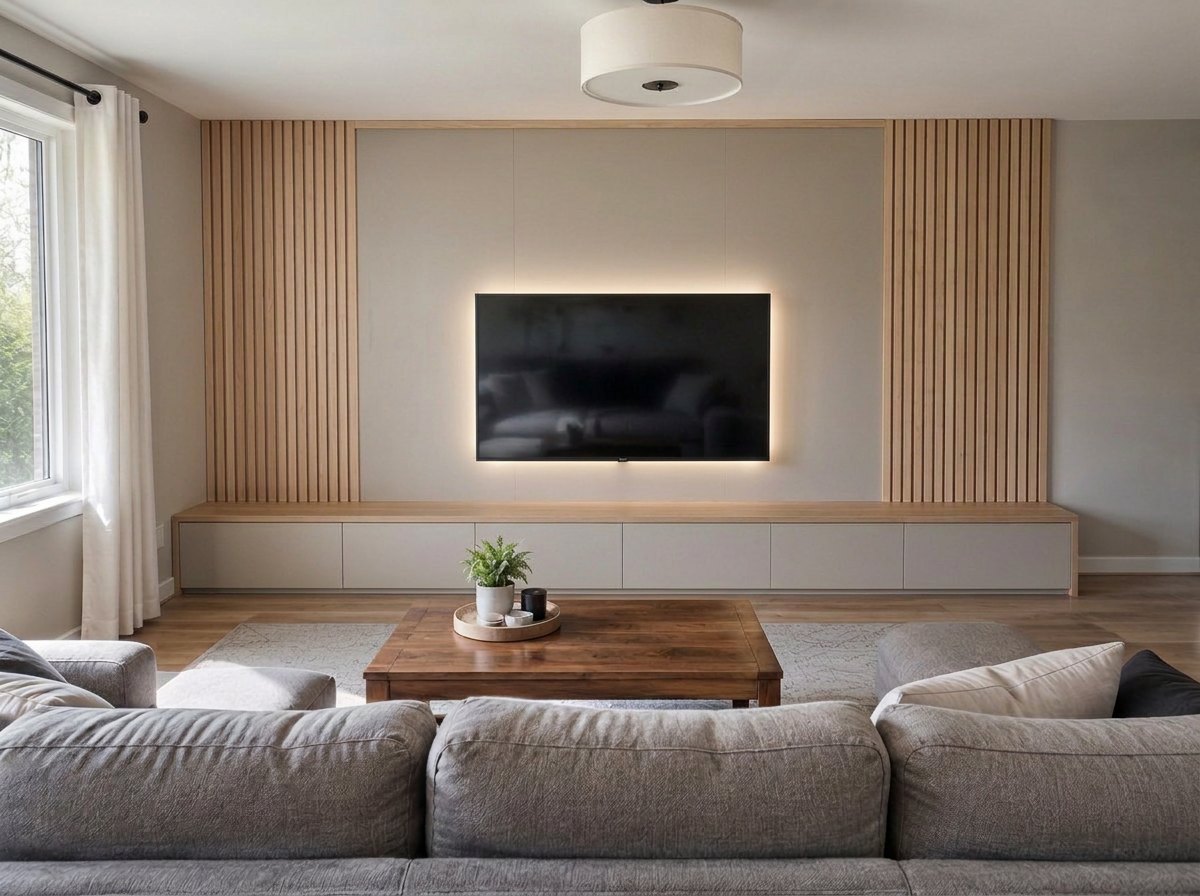
A real result from the GenRoom Studio: the ready task "TV wall", then one edit, "Backlight behind the TV". The sofa, coffee table, rug and window are from the original photo.
TV wall design with AI works best on a photo of your own living room. In the GenRoom Studio you upload the photo, open Furniture & decor → TV wall, choose the wall, and about half a minute later you see the same room with a wall-mounted TV, a low media console and a panel behind it. To put the TV at an exact height, paint that spot with the brush. To swap only the old TV stand, use Replace furniture. Each result costs 2 credits, and a free account starts with 6.
This is one of the most common things people bring to GenRoom. Between March and October 2026, 1,915 people asked for a TV zone in their own words. They rarely want a new room. They want one wall fixed: "my TV sits on an old cabinet, make it a proper TV wall", "I'm buying a 50-inch TV, use the rest of this wall", "my sofa is a black leather sectional, I need something simple and classy opposite it".
Below you'll find the Studio path for each kind of request, real before-and-after results on three test rooms (a living room with a TV on an old stand, a living room with a fireplace, and a small apartment wall between a door and a radiator), the places where the AI got it wrong, and the numbers for screen size, viewing distance and mounting height that no image model checks for you.
What Do People Mean When They Ask for a TV Wall?
Usually one wall and three or four pieces: the TV, something under it, something behind it and sometimes storage around it. Here are typical requests from GenRoom users, paraphrased and anonymized:
| What people write | What they actually want | Best Studio tool |
|---|---|---|
| "Media wall on the left and comfy seating" | A designed TV wall plus the room around it | TV wall task, plus your words in the brief |
| "Make the cabinet under the TV wood" | Same layout, a different media unit | AI editor: brush the cabinet → Replace furniture |
| "Add a 55-inch TV and a divider" | A TV at a specific size, plus zoning | Brush the spot → Add, then check the size yourself |
| "My sofa is a black leather L-sectional; I need a simple, classy TV wall" | A wall that suits the furniture they keep | TV wall task + "keep the sofa" in your notes |
| "Wall-mounted TV, a cabinet, a PS5 and speakers, modern" | A full media setup | TV wall task + list of devices in your notes |
| "Reorganize the wall left of the fireplace with a wall TV, bookcase and pictures" | Fireplace and TV on one side of the room | TV wall task on "A free wall" + your words |
| "I'm buying a 50-inch TV. Use the remaining space of this wall" | Storage around a TV of known size | TV wall or Built-in storage → Around the TV |
| "Japanese-style TV wall" | A style, not a layout change | TV wall task + the style in your words |
We also counted what people mention when they write in their own words (about 1,500 requests in many languages, rough keyword count): about a third mention the cabinet, console or unit under the TV, 13% want shelves or a bookcase, 11% ask for wall panels or slats, about 8% have a fireplace on the same wall, 8% give room measurements, and 7% name a screen size in inches.
That last number matters. People who name a size care about it, and as you'll see below, the AI does not measure.
Which Studio Tool Should You Use for a TV Wall?
Use the TV wall ready task for a whole new media wall, and the AI editor when you want to change one thing. Here is the full set:
| Tool | Where to find it | What it does | Use it when |
|---|---|---|---|
| TV wall (ready task) | Design → Furniture & decor | Creates a TV wall on the wall you choose: a TV, a low media console under it and a panel behind it in the room's colors | You want a complete media wall |
| Built-in storage → Around the TV | Design → Furniture & decor | Floor-to-ceiling built-in cabinets that frame the TV, in the color of the walls | You need storage more than decoration |
| Add with the brush | AI editor → Select area → Quick actions | Puts a new object (a TV, shelves, a speaker) only inside the area you painted | The exact position or height matters |
| Replace furniture with the brush | AI editor → Select area → Quick actions | Swaps the object you painted for the one you describe | Only the TV stand has to go |
| Move → TV opposite the sofa | AI editor → Quick actions | Moves the TV to the wall facing the sofa | The TV is on the wrong wall |
| Lighting → Backlight behind the TV | AI editor → Quick actions | Adds an LED glow behind the screen | The wall is done and you want the evening look |
| Your own words | The brief or the editor prompt | Anything the tools above don't cover | Specific materials, devices or styles |
The TV wall task appears for living rooms, bedrooms, kids' rooms, home offices, studios, libraries, basements and attics. If you don't see it, check the room type (step 2 below).
How to Design a TV Wall From a Photo, Step by Step
Step 1: Photograph the wall from the sofa
Stand or sit where you watch TV and take the photo straight at the wall. Get the whole wall in, plus a bit of floor, ceiling and the nearest window or door. The AI keeps what it sees, so a door or a radiator at the edge of the frame is protected only if it is in the frame. Daylight and a level phone help more than a wide-angle lens.
Step 2: Upload it and check the room type
Upload the photo in the Studio. Above the picture you'll see Type with the detected room. Our living room with a TV was read correctly as "Living Room". Our fireplace photo, which had no TV and no sofa in the middle, was read as a generic "Interior", and the TV wall task was missing from the list. Switching Type to Living Room brought it back.
Step 3: Open Furniture & decor and pick TV wall
On the Design screen, open Ready tasks → Furniture & decor and tick TV wall. Then choose Which wall:
- A free wall: the AI picks a wall without furniture against it.
- Back wall: the wall facing the camera.
- Opposite the sofa: the wall the sofa looks at.
Under the choices there's a box called "Anything to keep in mind?". Use it for the things the AI must not touch or must include: "keep the black leather sofa", "a PS5 and two speakers", "no tall cabinets", "keep the door and radiator free".
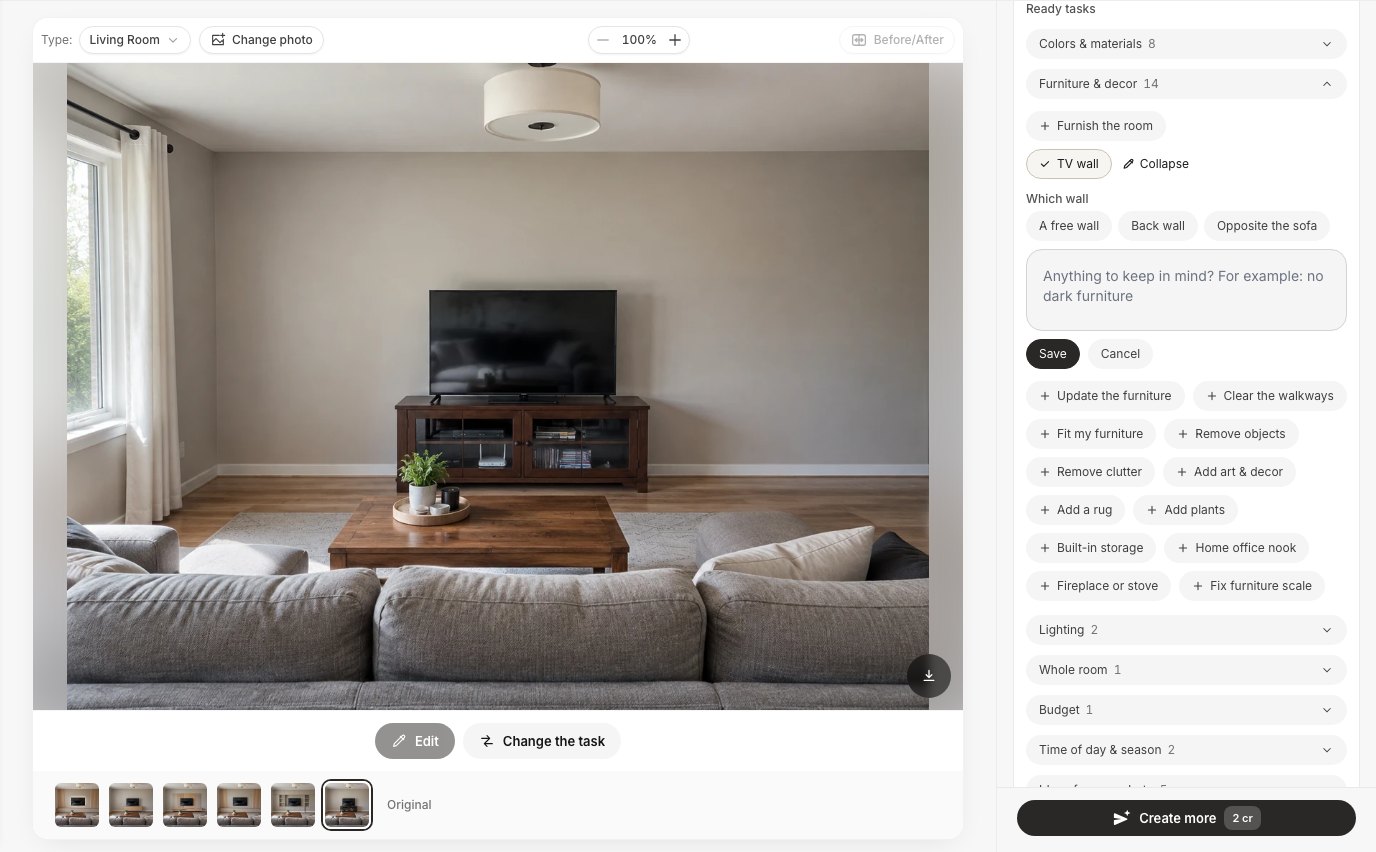 The TV wall task with its three wall choices and a notes box. The Type selector above the photo sets the room type.
Step 4: Create the design and compare
Press Create design (2 credits). Our ten test results took 22 to 56 seconds each from the click. Use Before/After to compare, and run a second task or style on the same photo if the first idea isn't right. Every version stays in the strip under the picture.
Example 1: From an Old TV Stand to a Slatted Media Wall
The first test room is the most common case: a 55-inch TV standing on a bulky dark wooden cabinet with glass doors, cables and a router on the shelf, and an empty wall around it. We ticked TV wall → Opposite the sofa and added nothing else.
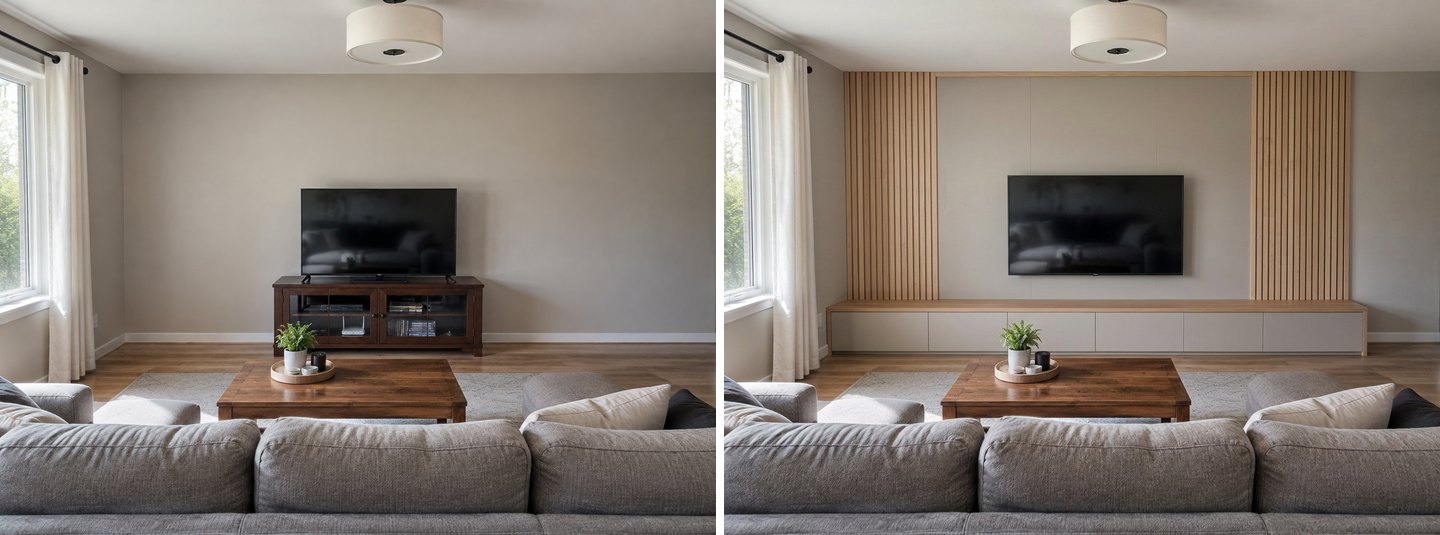 Left: the original. Right: one TV wall task. The old cabinet is gone; the room around it is the same.
The AI removed the old cabinet, mounted the TV on the wall, ran a low two-tone console across most of the wall and framed the TV with two oak slat panels. The sofa, coffee table, rug, window, curtains and ceiling lamp stayed as they were. This is the "simple, classy" version people ask for: one material, one color, nothing on the floor that needs dusting.
We then tried two other directions on the same photo.
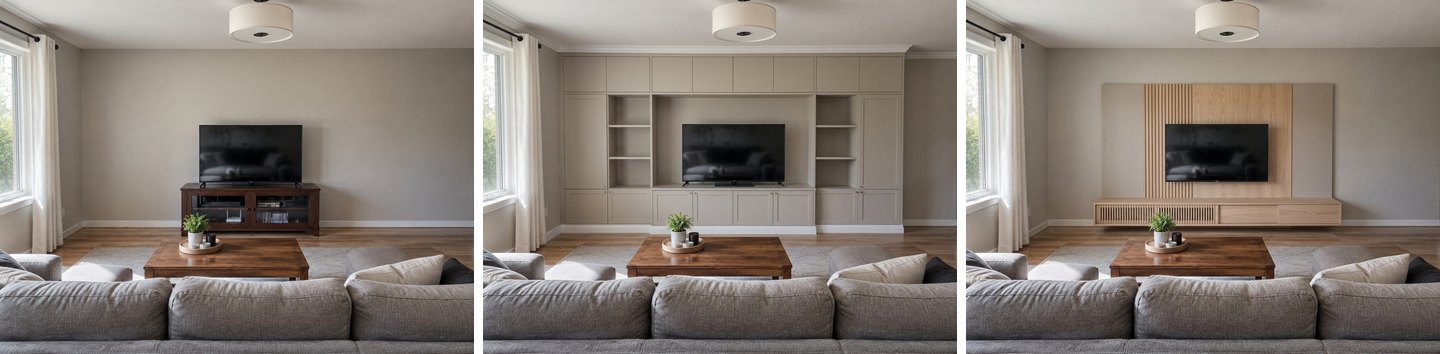 Left: the original. Middle: Built-in storage → Around the TV. Right: TV wall + "Japanese-style TV wall: light wood, low floating console, no clutter".
Around the TV turned the wall into floor-to-ceiling built-ins in the wall color, with open shelves on both sides and the TV in a recessed niche. That is the version for people who need storage first; our guide to AI storage ideas covers built-ins in more depth. The Japanese-style request kept the wall almost empty: a floating console with a slatted front and one oak panel behind the TV. Same photo, same sofa, three very different walls, 6 credits in total.
Example 2: Replace Only the TV Stand
Sometimes the wall is fine and only the furniture is wrong. One of the most frequent requests is simply "make the cabinet under the TV wood". For that, don't redesign the room. Open the photo in the AI editor, click Select area, paint over the old cabinet, then choose Quick actions → Replace furniture and type what you want instead.
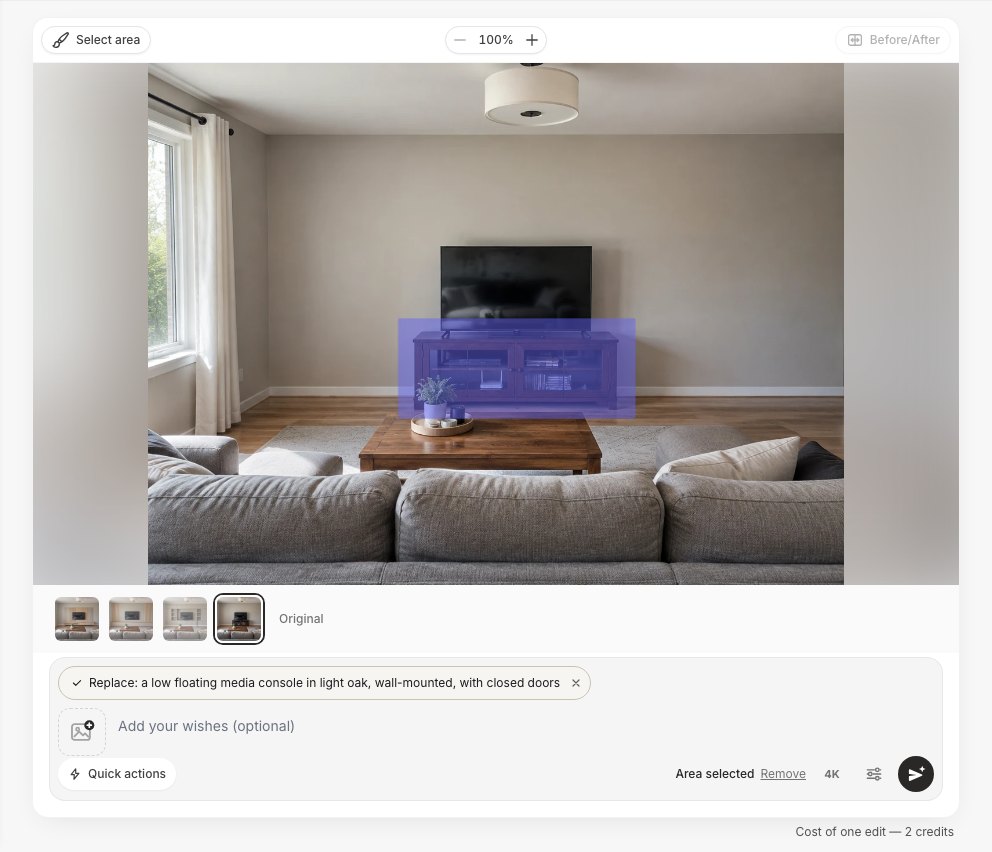 Paint over what has to go, then describe the replacement. Only the painted area changes.
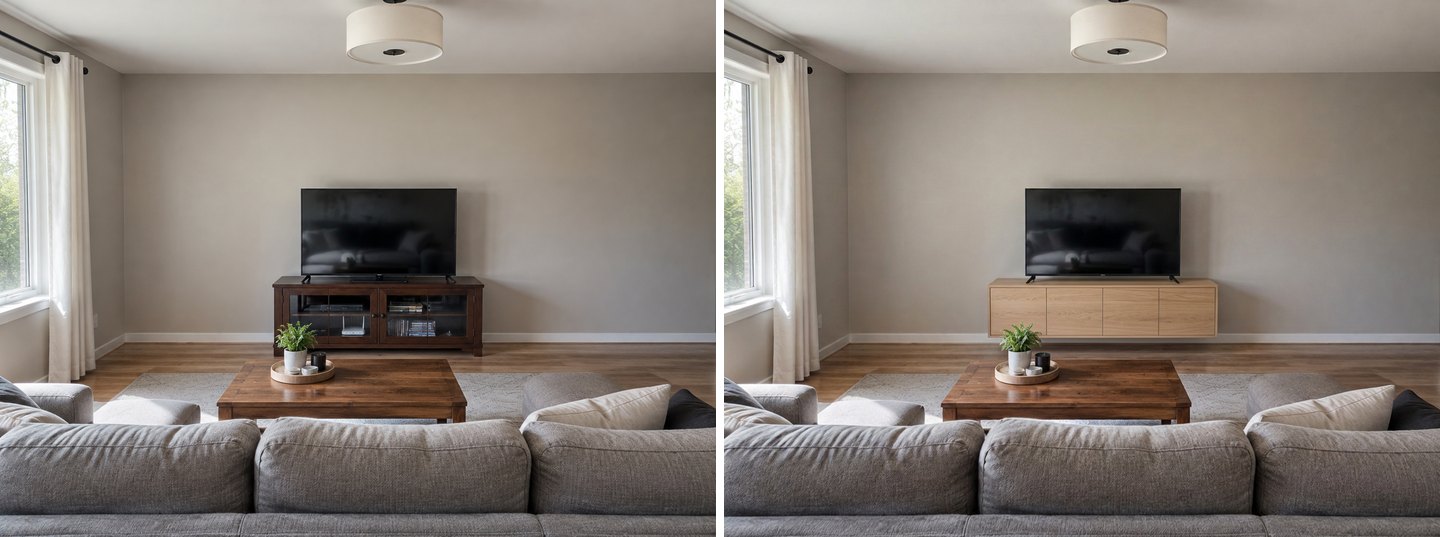 Left: the original. Right: Replace furniture with "a low floating media console in light oak, wall-mounted, with closed doors".
The old cabinet became a floating oak console with closed doors, and the clutter on the shelf disappeared with it. The TV stayed where it was, still on its feet, because it was outside the painted area. If you also want the TV on the wall, paint both and say so. The same trick works for any single piece: a sideboard, a speaker, a bookcase. To try a specific product from a shop, see how to visualize furniture in your room.
Example 3: A TV Wall Next to a Fireplace
A fireplace and a TV on the same side of the room is a classic problem: two focal points fighting for one wall. One user asked to "reorganize the wall left of the fireplace with a wall TV, a bookcase and pictures". We gave our fireplace room almost the same words, with TV wall → A free wall and "keep the fireplace as it is".
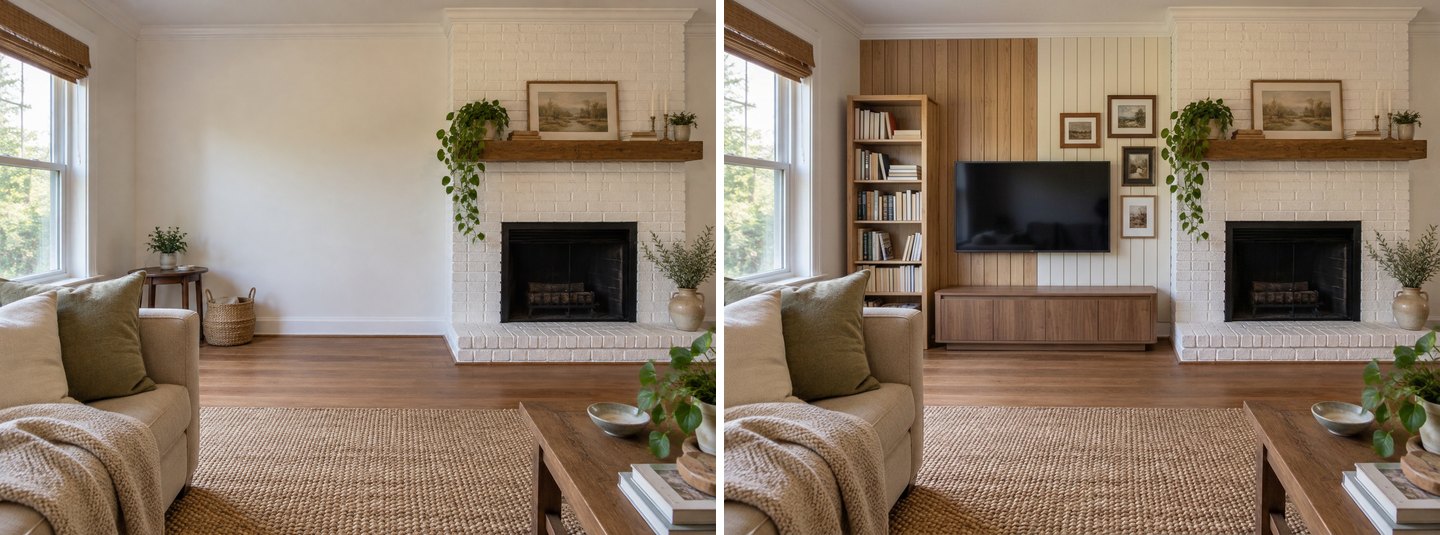 Left: the original. Right: TV wall on "A free wall" with the user's own request. The fireplace and mantel are untouched.
The AI put the TV at a sensible height on the side wall, added a low walnut console, a narrow bookcase and a small gallery of pictures, and left the fireplace, mantel, painting and plants alone. It also did two things we didn't ask for: it clad the wall in wood and white vertical boards, and it removed the side table and basket. If you want a plain painted wall, write "keep the wall white" in the notes box. If you'd rather start with a single accent finish behind the TV, see our accent wall guide.
How to Put the TV Exactly Where You Want It
Paint the spot with the brush. Text alone lets the AI choose the height, and it doesn't always choose well.
On the same fireplace photo we ran two edits. For the first, we used Select area and painted a rectangle on the empty wall, roughly the shape of a 55-inch screen and below the height of the mantel shelf, then chose Quick actions → Add with "a 55-inch wall-mounted TV".
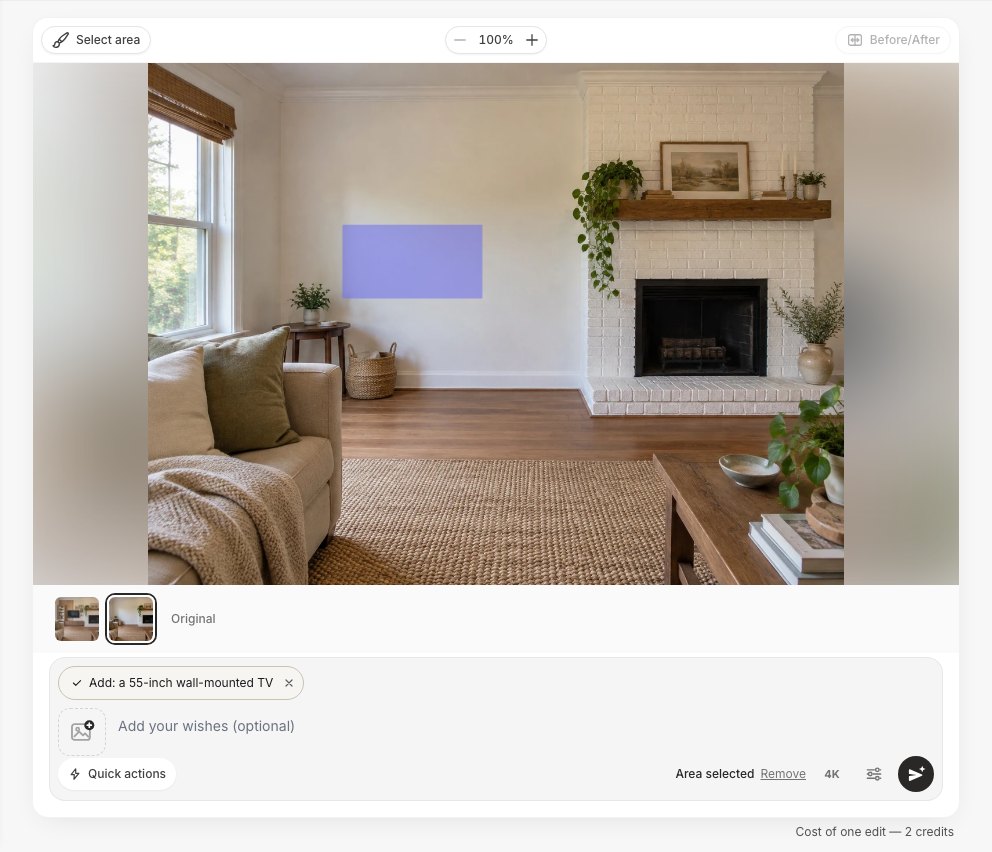 Draw the TV where you want it, at the size you want it. The AI fills exactly that area.
For the second, we typed only "Add a wall-mounted TV above the fireplace".
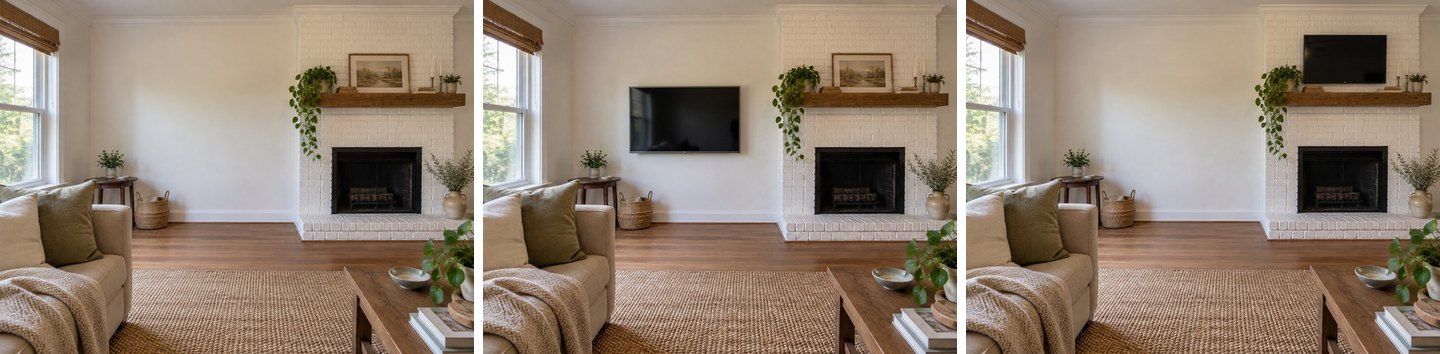 Left: the original. Middle: the brush and Add, TV exactly where it was painted. Right: text only, "above the fireplace". The TV ended up just under the ceiling, and the painting on the mantel disappeared.
The brush result changed nothing but the painted rectangle. The text-only result put a small TV almost at the ceiling and removed the painting on the mantel to make room. Both pictures look plausible at a glance, which is the trap: an AI image never feels neck strain. Before you trust any height, check it against the numbers further down.
Create interior design with AI
Upload a photo of your room and get a professional design in 30 seconds. First generation is free.
Example 4: A Small Wall Between a Door and a Radiator
Small apartments have the hardest TV walls: 2.5 meters of wall, a door on one side, a window and radiator on the other. Our test photo had a 40-inch TV on a white cube shelf with cables underneath. We used a real request almost word for word: TV wall → Back wall plus "I am buying a 50-inch TV. Use the rest of this wall for storage, keep the door and the radiator free."
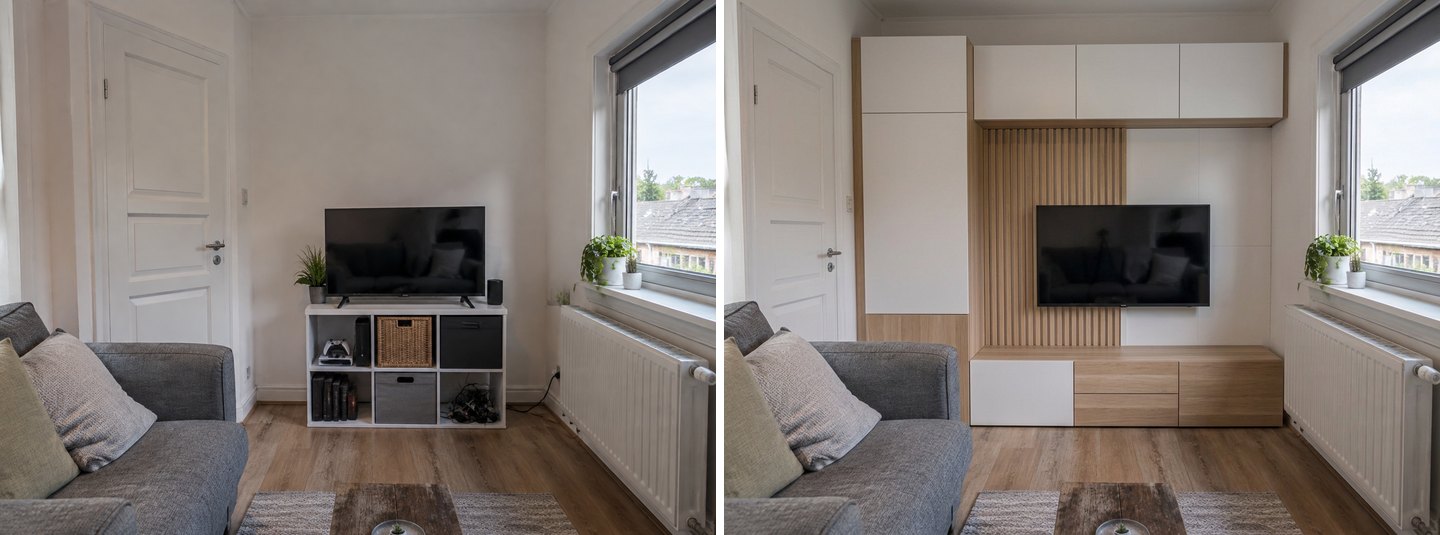 Left: the original. Right: TV wall + "50-inch TV, use the rest of the wall, keep the door and radiator free". It looks right, but laid over the original, the door has moved to the left to make room for the tall cabinet.
At first glance this is exactly what was asked for: storage on every free part of the wall, the door and radiator clear. But when we laid the result over the original photo, the door had shifted to the left, and the tall cabinet stood partly where the door frame really is. The AI found wall that doesn't exist. And the TV? It is the same width as the original 40-inch set, despite "50-inch" in the request.
Then we ran the same wall with a different brief, "Scandinavian living room with a light wood TV console, minimal, no tall cabinets", which is close to a search people make in several languages.
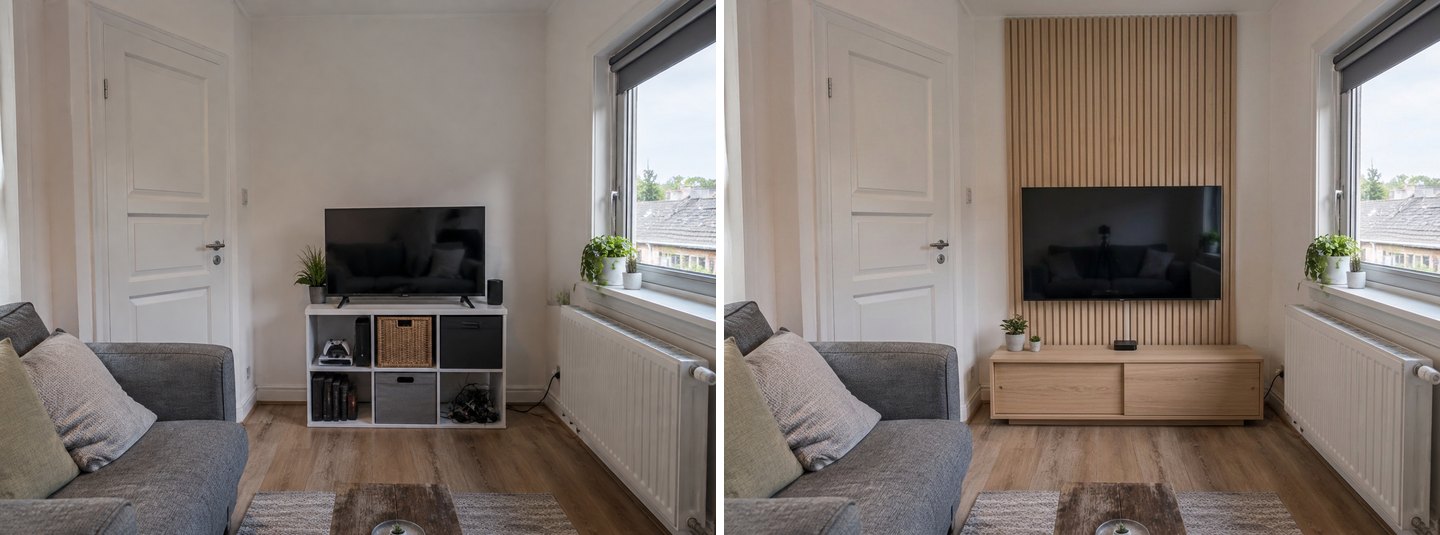 Left: the original. Right: TV wall + "Scandinavian, light wood TV console, minimal, no tall cabinets". The room geometry held this time, but the TV came out about a quarter wider, although we never mentioned a size.
This time the door, window and radiator stayed in their real places, and the wall got a calm floor-to-ceiling oak slat panel and a low console. But the TV came out about 25% wider than the original, roughly a 50-inch screen. So in our two runs, asking for a 50-inch TV changed nothing, and not asking produced one. Treat the TV in any AI picture as a placeholder, and check the size with tape.
How to Add a Backlight Behind the TV
Once the wall is right, open the result in the AI editor and choose Quick actions → Lighting → Backlight behind the TV. No brush is needed.
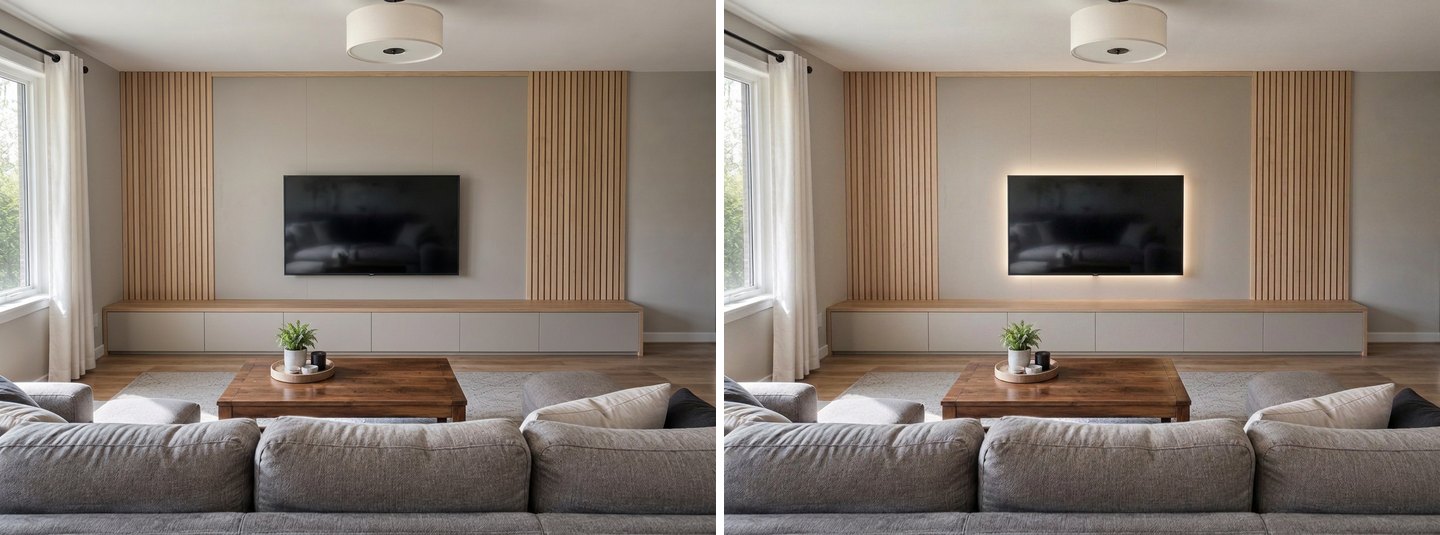 Left: the TV wall from Example 1. Right: Lighting → Backlight behind the TV. Only the light changed.
The edit added a warm glow around the screen and left the slats, console and room untouched. This is the cheapest upgrade in real life too: an LED strip on the back of the TV costs far less than any panel. For ceiling lights, lamps and evening versions of the whole room, see our guide to AI lighting design for a room.
Where the AI Gets TV Walls Wrong
Four things went wrong often enough in our tests that you should check every result for them.
It doesn't know your TV's size
An image model draws a believable TV, not a 50-inch one. In Example 4 the requested size had no effect, and an unrequested run grew the screen by a quarter. The same applies to consoles: the AI makes them look right, not 160 cm wide. If the size matters, paint the area at the right proportions and measure the wall yourself.
It doesn't check the mounting height
Text such as "above the fireplace" produced a TV just under the ceiling. The brush avoids this, because you choose the height. The task results in our tests were sensible, but "sensible" in a photo is not the same as comfortable for your neck.
It doesn't check glare from windows
All our test walls were perpendicular to the windows, because we chose them that way. The TV wall task builds on the wall you pick, and with A free wall the AI picks one for you. It won't warn you if that wall faces a large window. If your only free wall is opposite a window, see the glare advice below before you build.
It can add, remove or move things you didn't mention
Our fireplace design removed a side table and a basket and clad the wall in boards. The text-only fireplace edit removed a painting. The small-wall design moved a door. Name what must stay in the notes box, compare with Before/After, and use Restore from original in the editor's Quick actions to bring back anything that disappeared. If you need to move the sofa so it faces the new wall, our furniture rearranging guide shows how.
TV Size, Viewing Distance and Mounting Height: The Numbers to Check
These are the checks no AI image does for you. Measure from the front of the sofa to the wall, then use this table from RTINGS' size-to-distance guide:
| Screen size | Mixed use (screen fills 30° of your view) | Cinema (fills 40°) | Screen width × height (16:9) |
|---|---|---|---|
| 43" | 5'10" (1.78 m) | 4'4" (1.31 m) | 95 × 53 cm |
| 50" | 6'9" (2.07 m) | 5'0" (1.52 m) | 111 × 62 cm |
| 55" | 7'5" (2.27 m) | 5'6" (1.67 m) | 122 × 68 cm |
| 65" | 8'10" (2.69 m) | 6'6" (1.98 m) | 144 × 81 cm |
| 75" | 10'2" (3.10 m) | 7'6" (2.28 m) | 166 × 93 cm |
| 85" | 11'6" (3.51 m) | 8'6" (2.59 m) | 188 × 106 cm |
The 30° figure is the minimum the Society of Motion Picture and Television Engineers (SMPTE) recommends for mixed use, as RTINGS explains; 40° is more immersive, and RTINGS calls it "generally the safest way to go". The last column is plain geometry: a 16:9 screen is about 0.87 × its diagonal wide and 0.49 × its diagonal tall.
Mounting height. Bob Vila's mounting guide puts the center of the screen about 42 inches (107 cm) from the floor in most living rooms, with a 4 to 6 inch (10–15 cm) gap between the TV and the furniture below it. Combine that with the table and you get the console height that works: a 55-inch TV centered at 107 cm has its bottom edge at about 73 cm, so the console top should sit at roughly 58–63 cm or lower. For a 65-inch screen, the bottom edge is at about 67 cm and the console should be no taller than about 52–57 cm. Low, floating consoles like the ones in our examples fit easily.
Above a fireplace. The same guide advises at least 6 to 12 inches (15–30 cm) between the top of the mantel and the bottom of the TV, and warns that mounting a TV above a fireplace may void its warranty. In most rooms that puts the screen well above the 42-inch rule, which is why so many fireplace-and-TV walls end up side by side, as in Example 3.
Glare. RTINGS' guide to reflections advises avoiding a TV placed directly opposite bright light sources, and What Hi-Fi recommends a wall perpendicular to the window instead. If you can't avoid the window wall, plan blinds or curtains in the same design.
Test it with tape. RTINGS also suggests outlining the TV on the wall with painter's tape before you buy. Do it at the height you chose in the AI picture and sit on the sofa for a minute. It's the cheapest check there is.
Tips for Better AI TV Wall Results
- Shoot from the sofa, straight at the wall. The AI keeps the camera, so the picture shows what you'll actually see.
- Choose the wall yourself. "Opposite the sofa" or "Back wall" is more predictable than "A free wall".
- List what stays. "Keep the black leather sectional, the door and the radiator" in the notes box.
- List what goes on the wall. TV, console, PS5, speakers, books: the AI includes what you name.
- Name one or two materials. "Oak slats", "matte black panel", "walnut console". Vague words get generic results.
- Paint the TV area when height or position matters. It is the only way to control where the screen goes.
- Run two or three versions. Our four versions of one wall (three designs and one edit) cost 8 credits and gave four different answers.
- Measure and tape before you buy. Use the table above, not the picture, for size and height.
How Much Does It Cost?
Every design and every edit costs 2 credits. A free account comes with 6 credits (no card), enough for three tries; results on the free plan carry a watermark. Paid packs are one-time purchases, not subscriptions: Start is $9.99 for 36 credits, Basic $19.99 for 100 and Pro $39.99 for 300. Purchased credits are valid for 180 days, and if a generation fails, the credits return automatically. Everything in this article, from the TV wall task to the brush and Lighting, works on every plan. Our whole test (ten results across three rooms) used 20 credits. For more ideas for the rest of the room, see our living room design page.
FAQ
Can I take a picture of my wall and have AI design a TV wall?
Yes. Upload the photo in the GenRoom Studio, open Furniture & decor → TV wall and choose the wall: a free wall, the back wall or the wall opposite the sofa. You get the same room with a wall-mounted TV, a low console and a panel behind it, usually in under a minute. Add your own notes for materials, devices or things to keep.
How do I make a TV wall design?
Start with the viewing distance and the TV size, then the height, then the look. Measure from the sofa, pick the screen size from the distance table above, put the center of the screen around 42 inches (107 cm) from the floor, and choose a console low enough to leave a 4 to 6 inch gap under the TV. Then try finishes such as slats, built-ins or a plain panel on a photo before you build.
How high should a TV be mounted above a media console?
A common guideline is a gap of about 4 to 6 inches (10–15 cm) between the console and the bottom of the TV, with the center of the screen near 42 inches (107 cm) from the floor. For a 55-inch TV, that means a console top no higher than about 58–63 cm. The AI will not calculate this for you, so check it with a tape measure.
What size TV should I get for my viewing distance?
Use the distance from your eyes to the screen. RTINGS lists a 55-inch TV at about 7'5" (2.27 m) for mixed use and 5'6" (1.67 m) for a cinema feel; a 65-inch at 8'10" (2.69 m) and 6'6" (1.98 m). Between those two columns is the comfortable range. AI pictures don't help here: in our tests the AI changed the TV size on its own.
Can I put the TV above the fireplace?
You can, but it usually ends up high. Guidance asks for at least 6 to 12 inches between the mantel and the TV, and mounting above a fireplace may void the TV's warranty. In our test, the text request "above the fireplace" put the TV just under the ceiling. A TV on the wall beside the fireplace, at eye level, is often the more comfortable option.
What can I use instead of a classic TV unit in a minimalist living room?
A floating console, a wall-mounted TV with one slim shelf, or flush built-ins in the wall color. In our tests the Japanese-style and Scandinavian requests produced floating light-wood consoles with a single slat panel, and Replace furniture swapped a bulky cabinet for a floating oak unit without touching the rest of the room.
Is there a free AI tool for TV wall design?
GenRoom gives 6 free credits when you create an account, without a card. That's three TV wall designs or edits. Free results carry a watermark; paid packs start at $9.99 for 36 credits.
The Bottom Line
The fastest way to decide on a TV wall is to see it on your own wall. In the Studio, the TV wall task shows a complete media wall in about half a minute, Built-in storage → Around the TV adds cabinets, the brush puts the TV exactly where you want it, and Replace furniture swaps only the old stand. Then do what no picture can: measure the viewing distance, pick the screen size, check the height and the window. Upload a photo of your living room and try three walls before you drill a single hole.