Aging in Place Home Modifications: See Them on Your Photo
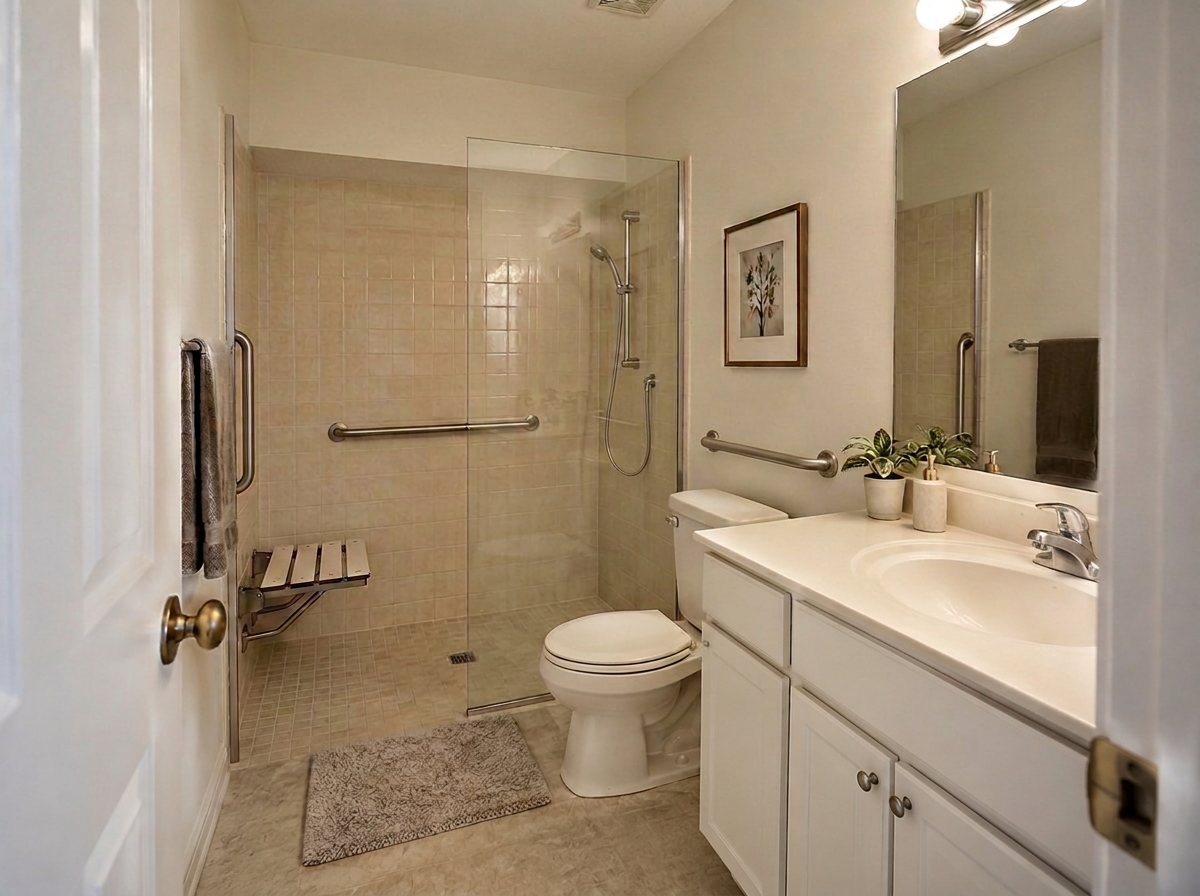
A real GenRoom Studio result on an ordinary 1990s bathroom: walk-in shower, two grab bars, a fold-down seat and a hand-held shower, plus a grab bar by the toilet added with a second edit. The vanity, mirror, door and floor are from the original photo.
Aging in place home modifications are the changes that let an older parent, or anyone who uses a walker or a wheelchair, keep living safely in their own home: a walk-in shower with grab bars and a seat, clear paths without loose rugs, lever handles, brighter light at night and a step-free way in. With an AI visualizer you can see those changes on photos of the actual rooms before anyone drills a hole.
That is what we tested in the GenRoom Studio. You upload a photo of a room or the front of the house, pick a ready task (for example Walk-in shower) or describe the change in words, and get a photorealistic version of the same room in about 35 to 40 seconds. For exact spots, such as one grab bar next to the toilet, the AI editor lets you outline an area and describe what goes there. Each design or edit costs 2 credits.
This guide starts from real requests. Between March and October 2026, 46 GenRoom users described this exact job in their own words: a bathroom for elderly parents, grab bars moved from one wall to another, a wheelchair ramp instead of brick steps. Below are those requests, the Studio path, real results from four rooms we shot for this article, the safety numbers from US sources (ADA Standards, CDC, AARP, NIA), and an honest list of what the AI got wrong.
What Do Families Actually Ask For?
Most requests come from a son or daughter planning for a parent, and they are specific. People want one problem solved without losing the room they know. These are typical requests from our data, anonymized, translated where needed and paraphrased:
| What people wrote (paraphrased) | What they need | Best Studio tool |
|---|---|---|
| "A mobility bathroom for my elderly parents with a walk-in shower" | No tub to step over, support to hold | Walk-in shower task + a note |
| "Two grab bars in an L shape inside the shower, close to the seat" | Bars at an exact place | Select area + text in the editor |
| "Move the vertical grab bar to the right of the faucet, in chrome" | Fine-tuning a previous result | Select area + text, one change per edit |
| "Remove the brick steps and make a concrete wheelchair ramp with safety handles, about 2.5 ft up" | A step-free entrance | Your own words (free text) |
| "Replace the first steps with a ramp that goes around to the back of the house" | A ramp where there is room for it | Your own words, then Select area |
| "A kitchen for a wheelchair user: a sink you can roll under, the oven at about one meter, high cabinets with pull-down handles" | A reachable kitchen | Your own words |
| "I want furniture suitable for someone with reduced mobility" | Clear space to move | Clear the walkways + Remove clutter |
Two patterns stand out. First, people edit grab bars again and again: one user moved the same vertical bar three times, edit by edit. Second, ramps are the hardest request, because a ramp is a matter of length and slope, and a photo cannot tell the AI how high the porch really is. We come back to both below.
Which Changes Matter Most, Room by Room?
Start with falls. According to the CDC, more than one out of four older people falls each year, and older adult falls lead to about 4.5 million emergency department visits a year. The CDC's home checklist, Check for Safety, says many falls come from hazards that are "easy to overlook but easy to fix".
The table sums up what the CDC STEADI checklist, the AARP HomeFit Guide and the National Institute on Aging recommend, and whether an AI picture helps with it.
| Room | Change | Where it comes from | Does a photo preview help? |
|---|---|---|---|
| Bathroom | Grab bars next to and inside the tub or shower and next to the toilet | CDC Check for Safety | Yes: where they go and how they look |
| Bathroom | Non-slip mat or strips in the tub or shower | CDC Check for Safety | Barely: it is a small purchase |
| Bathroom | Walk-in shower instead of stepping over a tub, a seat, a hand-held shower | AARP HomeFit (comfort-height toilet, lever faucets, grab bars) | Yes: the biggest visual change |
| Bedroom | Lamp close to the bed, a night-light on the path to the bathroom | CDC Check for Safety | Yes: the room at night |
| All rooms | No throw rugs (or rugs with double-sided tape or a non-slip backing), nothing on the floor, cords along the wall | CDC Check for Safety | Yes: shows how open the room becomes |
| Hallways | At least 36 inches of passing space, light at both ends | AARP HomeFit | Partly: the AI does not measure |
| Kitchen | Things used often on lower shelves, a step stool with a bar to hold, never a chair | CDC Check for Safety | Partly |
| Doors | Lever-style handles, at least 32 inches of clear width | AARP HomeFit | Lever: hardly needed. Width: no |
| Entrance | At least one zero-step entrance, or a ramp | AARP HomeFit | Yes, with a big warning about slope |
The National Institute on Aging's guide Preventing Falls at Home: Room by Room covers the same ground and points families to local home modification programs through the Eldercare Locator.
Which GenRoom Tool Fits Each Change?
Use a ready task when the change is a standard one, add a note to steer it, and switch to the AI editor with Select area when an item must go to one exact spot. Your own words work for everything else.
| Tool | Where | Use it for |
|---|---|---|
| Walk-in shower (ready task) | Design screen → Ready tasks → Bathroom | Replacing the tub with a curbless walk-in shower in the same place |
| Refine (note on a task) | The pencil next to a selected task | "Grab bars, a fold-down seat, a hand-held shower" |
| Remove clutter, Remove objects, Clear the walkways | Ready tasks → Furniture & decor | Rugs, boxes, cords and furniture in the way |
| Warm lighting, Evening light | Ready tasks → Lighting, Time of day & season | Lamps, sconces, night-lights; seeing the room after dark |
| Your own wishes (free text) | The box at the top of the design panel | Kitchens, ramps, anything without a ready task |
| Select area + text | AI editor, top left | One grab bar by the toilet, a handrail on one wall |
| Entrance, gate & driveway (mode) | Modes, on a photo of the house | A whole new entrance. Not a ramp: see the entrance section |
Bathroom: A Walk-In Shower With Grab Bars and a Seat
The bathroom is where most families start, and where the AI is most useful. Our photo is an ordinary hall bathroom from the 1990s: an alcove tub with almond tiles and a shower curtain, a toilet right next to it, a cultured-marble vanity. It is the bathroom many parents have.
Step 1: Photograph the whole room from the doorway
Stand in the doorway at eye level and get the tub, the toilet and a bit of the floor in one frame. The AI keeps what it can see, so a wide photo also tells you whether the vanity and the toilet survive the change. Leave the curtain as it is: the AI removes it.
Step 2: Pick Walk-in shower and add a note
Open Ready tasks → Bathroom → Walk-in shower, then press Refine next to it and write what the shower needs. Our note: "Make it safe for an older person: a horizontal grab bar on the back wall and a vertical grab bar at the entry, a fold-down shower seat, a hand-held shower on a slide bar, slip-resistant matte floor tiles".
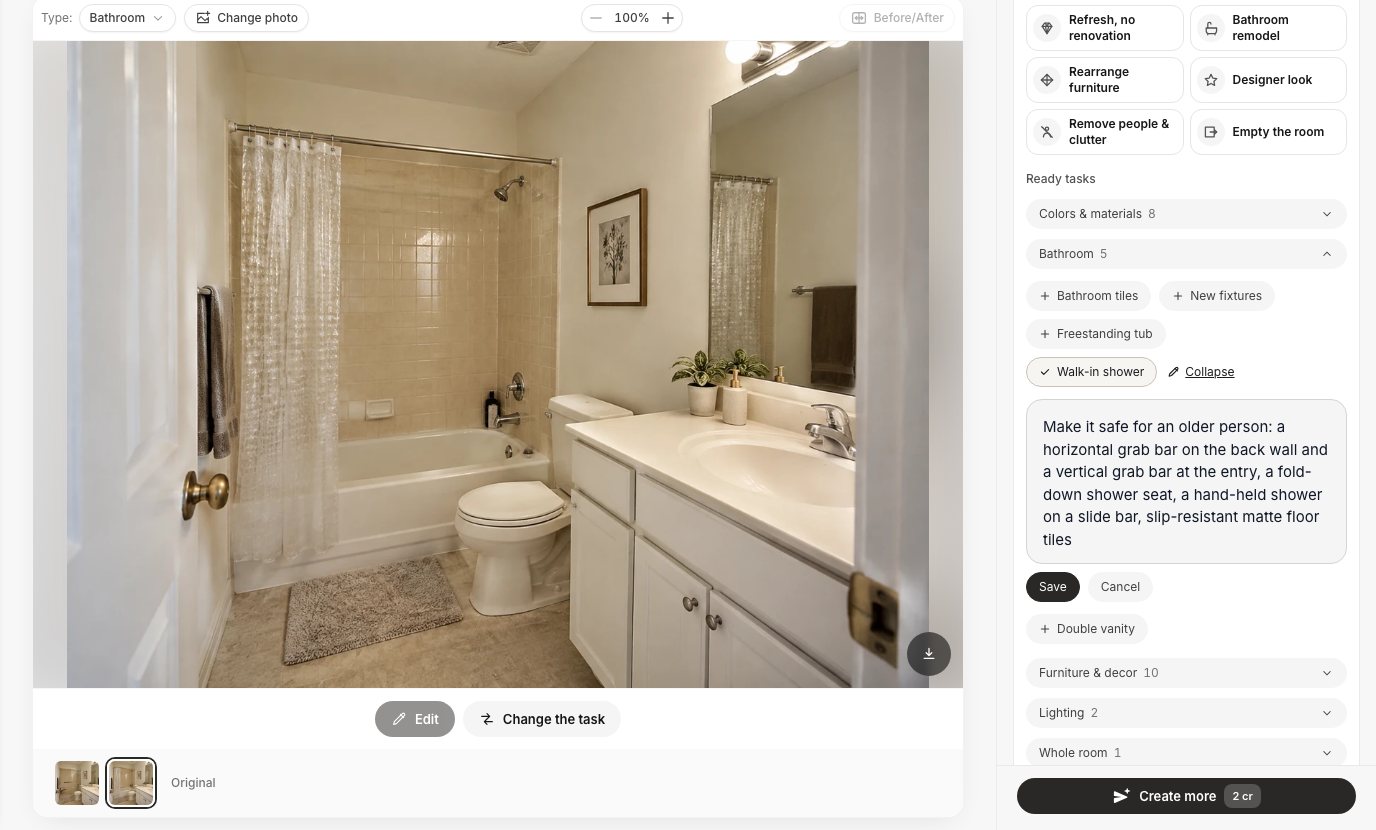 Ready tasks → Bathroom → Walk-in shower, with a note in Refine. Then Create design (2 credits).
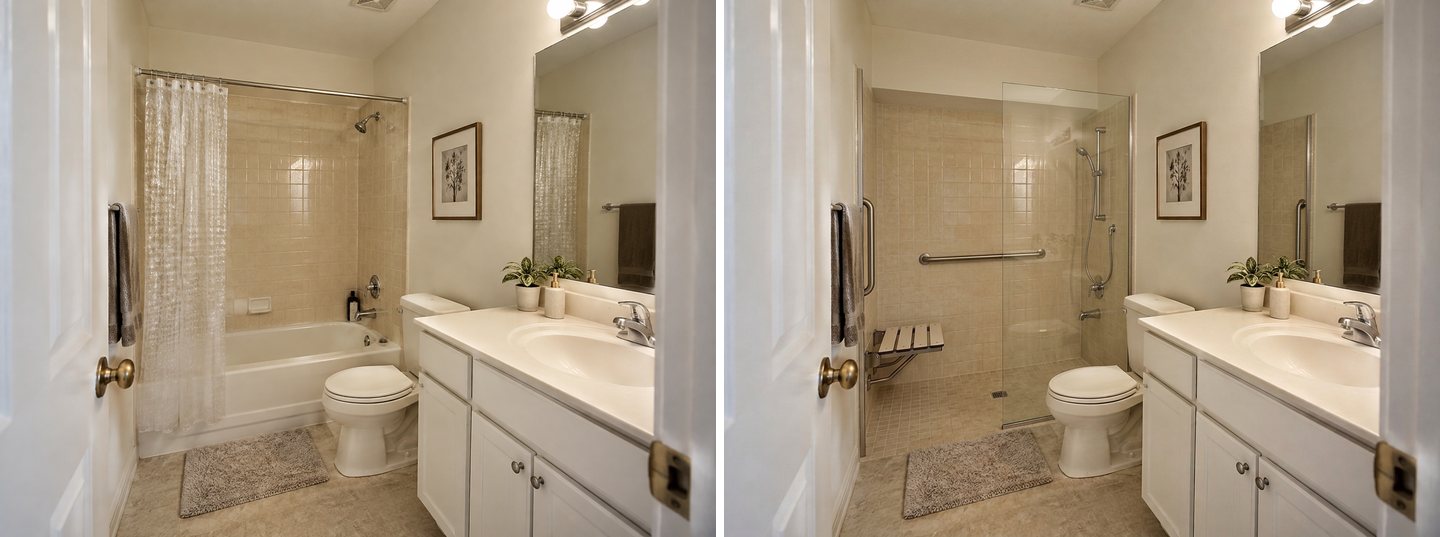 Left: the original. Right: Walk-in shower with our note, one run, about 36 seconds. Every item in the note is there; the tiles, vanity, mirror, toilet and door are the original ones.
Everything in the note appeared: a horizontal bar on the back wall, a vertical bar at the entry, a fold-down seat near the entry, a hand-held shower on a slide bar and a small slip-resistant mosaic on the shower floor. The almond wall tile was kept and carried down to where the tub used to be.
Two things are worth a closer look. The old tub spout stayed on the wall, now pointless above the shower floor. And the bath mat in front of the shower is still there; the CDC suggests non-slip mats, and a loose fluffy one is exactly what a family should replace.
Step 3: Add a grab bar by the toilet with Select area
A grab bar next to the toilet is one of the CDC's first fixes, and it has to go to one exact place, so we used the AI editor. Select area → Lasso around the toilet and the wall behind it, then a request in the text box and Apply.
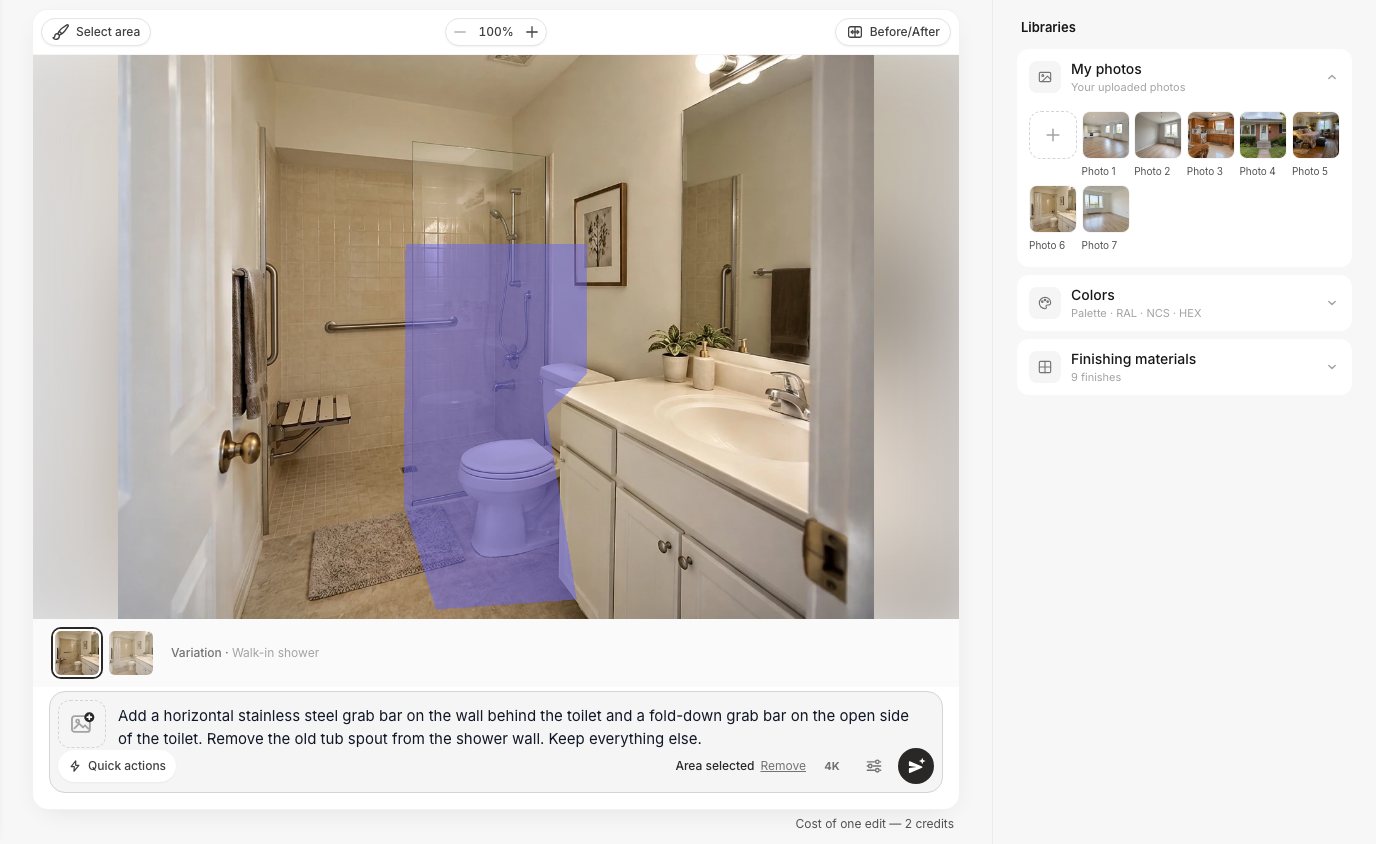 AI editor → Select area → Lasso → "Done, keep the selection". Type the request and press Apply (2 credits).
Our request: "Add a horizontal stainless steel grab bar on the wall behind the toilet and a fold-down grab bar on the open side of the toilet. Remove the old tub spout from the shower wall. Keep everything else."
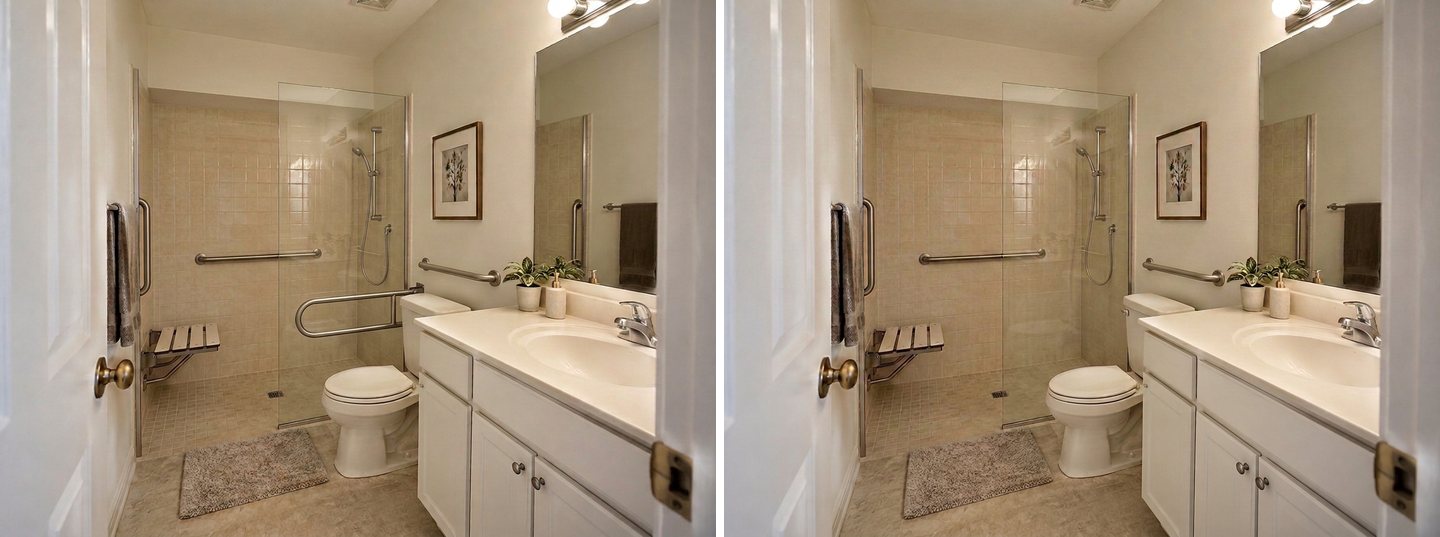 Left: the first edit put the fold-down bar behind the shower glass, where nobody on the toilet could reach it. Right: a second edit with a smaller lasso removed it and kept the rest.
The first edit did two things right: the tub spout is gone, and a horizontal bar appeared on the wall above the toilet. But the fold-down bar landed inside the shower, on the far side of the glass panel. In this bathroom the toilet's open side faces the vanity, so there is no wall there for a bar at all. A real fold-down bar would go on the wall behind the toilet, or the family would choose a toilet safety frame.
We drew a small lasso around the misplaced bar and asked: "Remove the U-shaped grab bar behind the glass inside the shower and restore the tiles there. Keep the horizontal grab bar above the toilet." It took one more run. The lesson is the same as in our tub to shower conversion tests: zoom in on every result, because the AI is good at the look and careless about how a thing is used.
If the bathroom is narrow, read our small bathroom layout guide before you decide where the shower goes: in a tight room, moving the toilet or the vanity often matters more than the shower itself.
Bedroom: Clear Paths, No Loose Rugs, Light at Night
In bedrooms the risk is on the floor. Our photo shows a parent's bedroom as it often is: a small rug with a curled corner at the foot of the bed, a long runner in front of the dresser, a laundry basket and a box on the floor, an ottoman in the way and clothes on the armchair.
We ran three ready tasks together, no style: Remove clutter, Remove objects (What to remove: Rug, with the note "remove all the loose rugs and the runner, leave the bare wood floor") and Clear the walkways (note: "a clear path from the door to both sides of the bed").
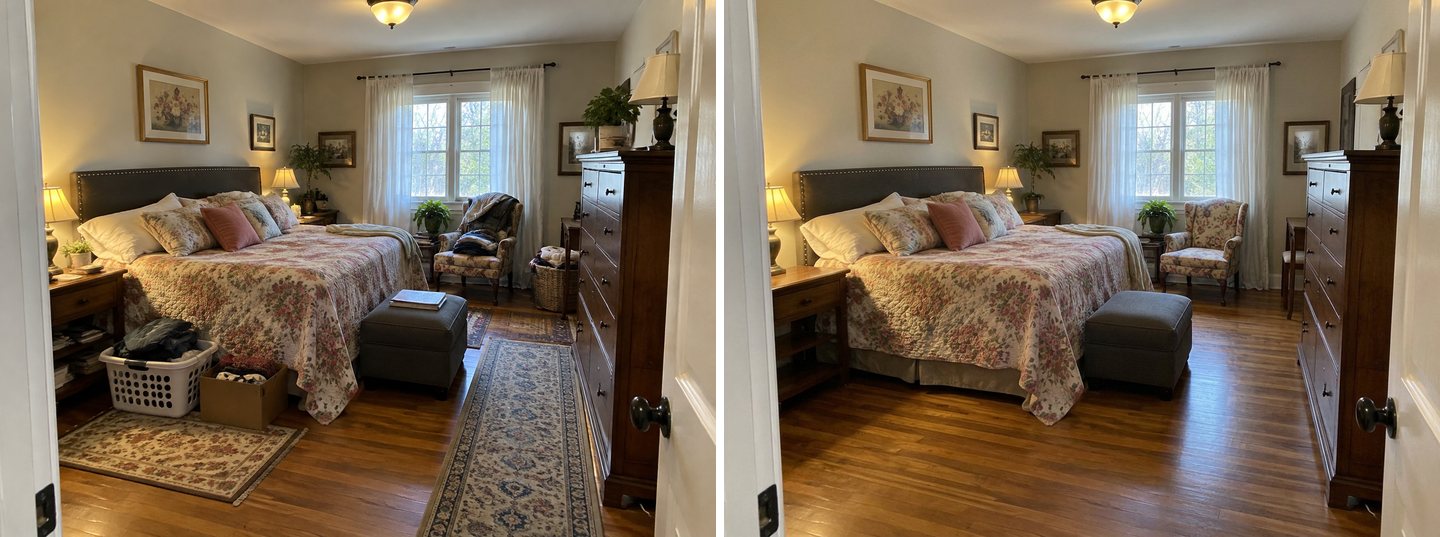 Remove clutter + Remove objects (rugs) + Clear the walkways in one run. The bed, the dresser, the lamps and the pictures stayed where they were.
All three rugs, the basket, the box and the pile of clothes are gone, and the wood floor now runs clear from the door to the bed and the window. The ottoman stayed at the foot of the bed; it is out of the main path, but if a parent uses a walker, it may still be one thing too many. The armchair got a fresh slipcover look, which nobody asked for.
The CDC's bedroom advice is about light: a lamp within reach of the bed and a night-light on the way to the bathroom. So we ran the cleared room again with Evening light and Warm lighting, with a note asking for "small plug-in night-lights low on the walls along the path from the bed to the door, a lamp within reach on each nightstand, an illuminated light switch by the door".
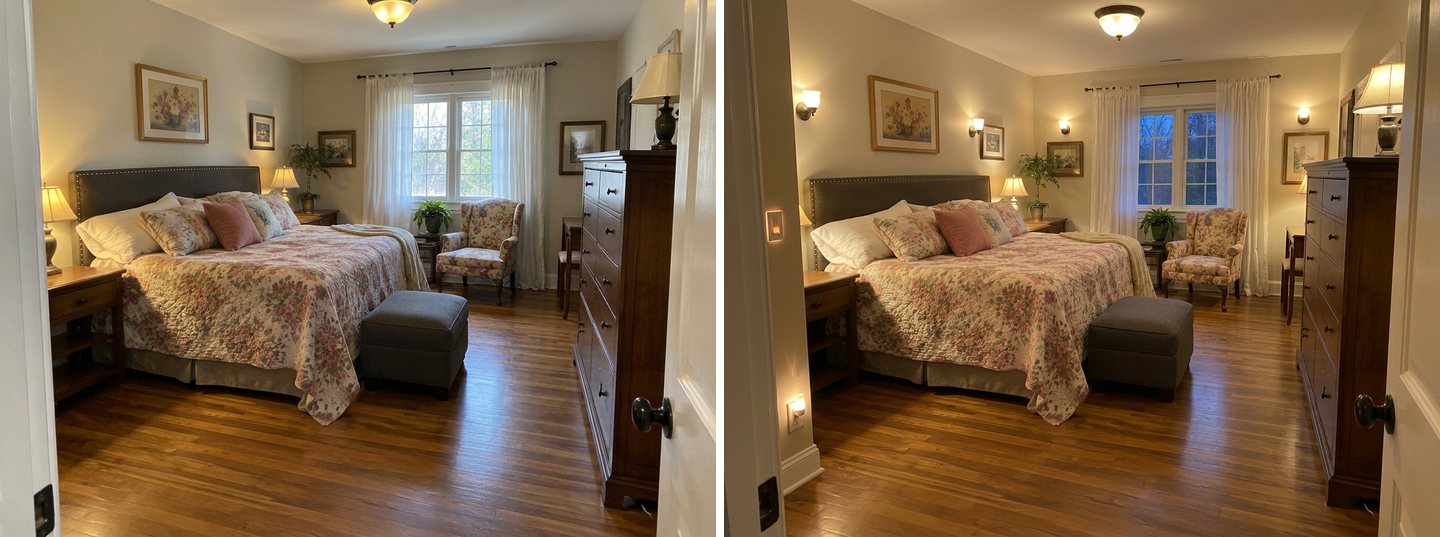 Evening light + Warm lighting with a note. A night-light and a lit switch appeared, but the lamp on the near nightstand disappeared and the camera moved back slightly.
The evening version is useful for one question: is the path visible at night? Here it is, with a low night-light by the bed and a lit switch. But the result also shows the AI's habit of trading one thing for another. The lamp on the near nightstand vanished, even though the note asked for a lamp on each side, and wall sconces appeared that would need wiring. For more on lighting requests, see our AI lighting design guide.
We also tried to swap the round door knob for a lever handle with Select area. Twice the AI redrew the door edge and made the lever far too large. A lever handle is a cheap, standard swap, and AARP notes it is easier to use than a knob, so it is a change you can make without a preview at all.
Kitchen: Easier Handles, Better Light, Nothing to Trip On
The kitchen request in our data was ambitious: a sink to roll under, an oven at about one meter, pull-down upper cabinets. Those are real renovations that need measurements. We tried the smaller changes most families start with, written in the free-text box with no mode:
"Make this kitchen easier and safer for an older parent: replace the small round knobs with long D-shaped pull handles, a single-lever pull-down faucet, bright LED under-cabinet lighting over the countertop, remove the throw rug in front of the sink and the wooden step stool. Keep the oak cabinets, the layout, the appliances and the window."
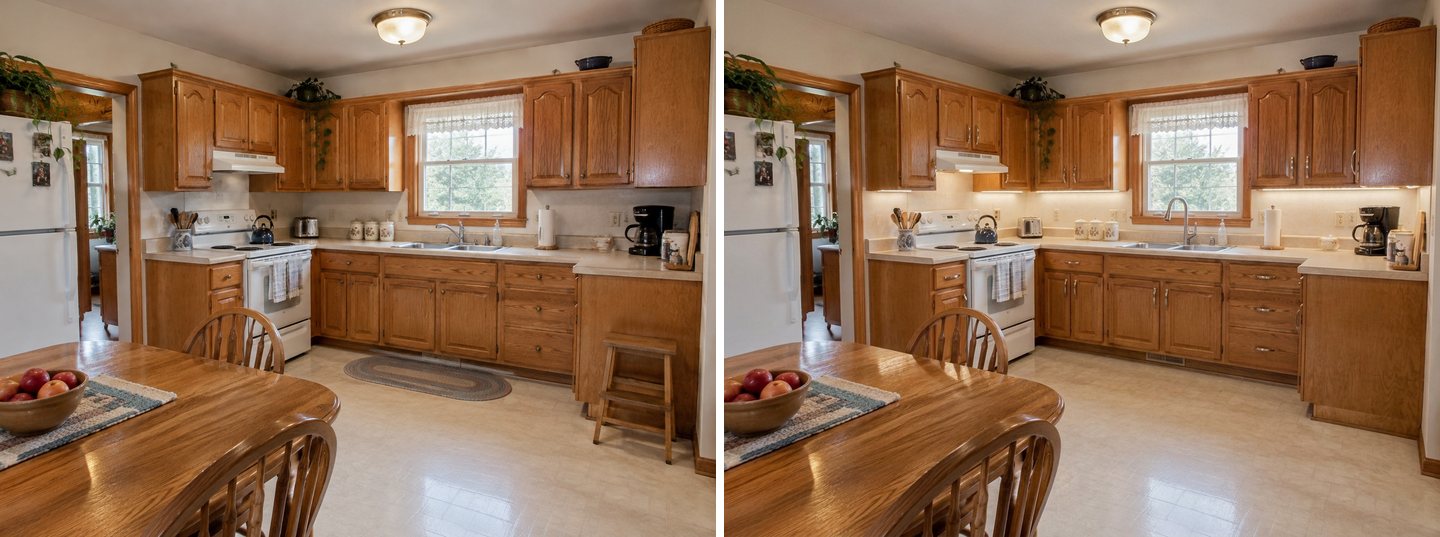 One free-text request, one run. Pulls, faucet, under-cabinet light done; the rug and the step stool are gone; the oak cabinets and the layout are untouched.
This is the cleanest result of the shoot. Every knob became a long pull, the faucet became a single lever, the countertop is evenly lit and the floor in front of the sink is clear. The CDC's advice to keep everyday items on lower shelves is not something a picture shows, but the photo makes the next question obvious: the top shelves of those high upper cabinets are out of reach for many older adults.
The step stool is a judgment call. The CDC does not say "never use one"; it says to use one with a bar to hold on to, and never a chair. If your parent needs to reach high shelves, replace the stool rather than remove it.
Create interior design with AI
Upload a photo of your room and get a professional design in 30 seconds. First generation is free.
Entrance: Can AI Show a Wheelchair Ramp?
Yes, the AI draws a ramp on the photo, and it looks convincing. But it decides the length and the slope by eye, and a ramp that looks fine in a picture can be far too steep to use. This is the section to read carefully.
Our house is a brick ranch with four concrete steps up to the front door and no handrail. The first request went in the free-text box, without a mode: "Add a wheelchair ramp to the front door: a concrete ramp with handrails on both sides that starts at the walkway and rises gently along the front of the house to a level landing at the door. Keep the steps with a new handrail. Keep the house, the windows, the lawn and the shrubs as they are; no fence, no gate."
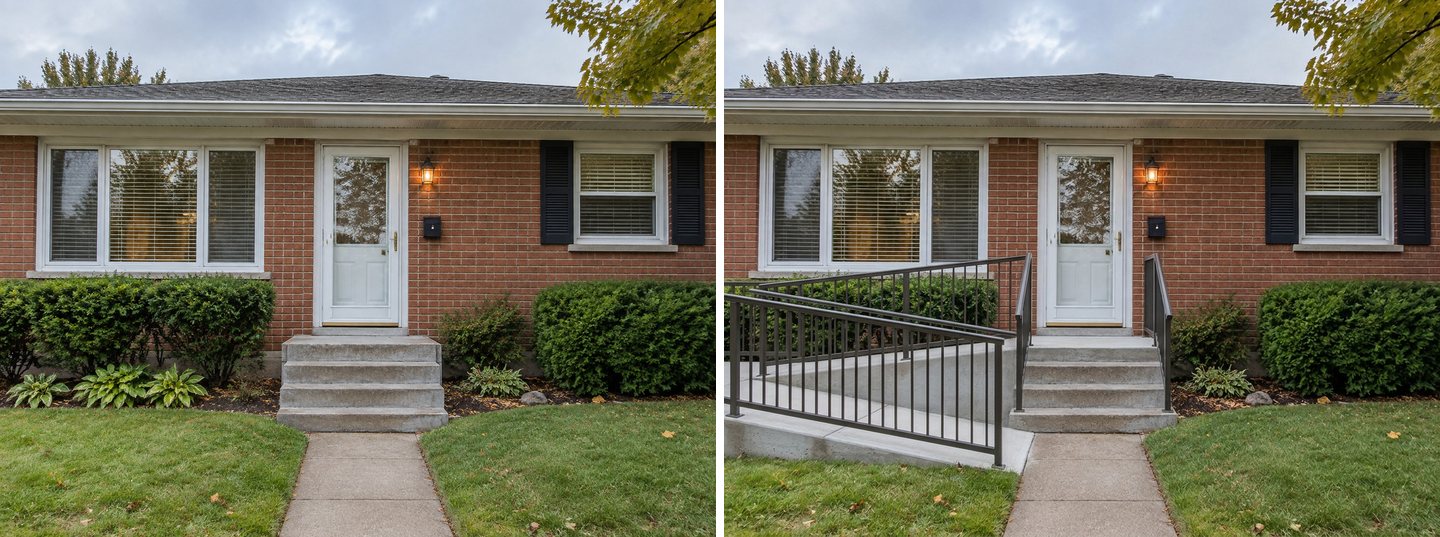 Free text, no mode: a ramp along the front of the house with handrails, and handrails on the steps. It reads well. Now do the math.
The picture is a good start for a family conversation: where the ramp could run, what it does to the front of the house, how much of the planting bed it takes. It is not a design. Four steps at about 7 inches each are roughly 28 inches of rise; measure yours. At the ADA's maximum slope of 1:12, every inch of rise needs 12 inches of ramp, so 28 inches needs about 28 feet of ramp, plus level landings. The visible ramp in our result is closer to 10 or 12 feet, judging by the door. Unless it continues far outside the frame, it is much too steep.
AARP's HomeFit Guide gives the same arithmetic with its own example: a three-step entrance of about 22 inches needs a ramp about 22 feet long. When there is no room for that, ramps are built with switchbacks and landings, or they go to another door: a side door, a back door or a door inside the garage, which also keeps the ramp out of the rain.
Then we tried the mode that sounds right, Entrance, gate & driveway, with the same idea in the note.
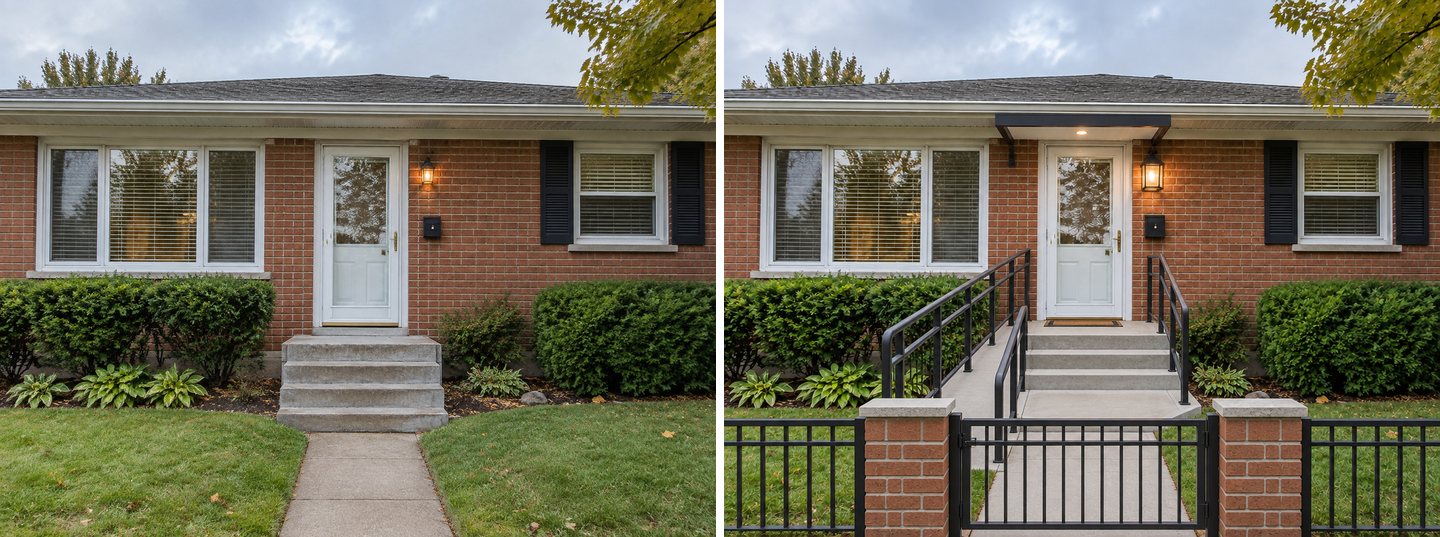 Entrance, gate & driveway mode: a canopy, handrails, a short ramp that would be far too steep, and a fence with a gate across the path that nobody asked for.
The mode did what it is built for: it redesigned the whole entrance, with a canopy over the door, new handrails, a fence and a gate. The ramp is maybe five or six feet long, judging by the door, for the same 28 inches of rise, which no one could push a wheelchair up. And the gate across the walk adds one more thing to open from a wheelchair. For a ramp, use free text; use the mode only when you want a new entrance anyway.
If the house also has stairs inside, our staircase makeover guide shows how to try a second handrail and contrasting treads on a photo. The CDC recommends handrails on both sides of the stairs, as long as the stairs.
Numbers to Check Before You Build
The 2010 ADA Standards for Accessible Design were written for public buildings, not private homes, but they are the most detailed public reference for what an accessible bathroom, door or ramp measures. These are the numbers that matter most, quoted from the ADA Standards. They are US guidelines; local building rules differ, so check with your local building department.
| What | Number | ADA section |
|---|---|---|
| Grab bar height | 33 to 36 in above the floor, to the top of the bar | 609.4 |
| Grab bar diameter | 1¼ to 2 in | 609.2.1 |
| Space between grab bar and wall | 1½ in | 609.3 |
| Strength | Bar, fasteners and wall hold 250 lb applied at any point | 609.8 |
| Toilet seat height | 17 to 19 in to the top of the seat | 604.4 |
| Grab bar beside the toilet | 42 in long minimum, 12 in maximum from the rear wall | 604.5.1 |
| Grab bar behind the toilet | 36 in long minimum | 604.5.2 |
| Transfer shower | 36 by 36 in inside | 608.2.1 |
| Roll-in shower | 30 by 60 in inside minimum, 60 in wide entry | 608.2.2 |
| Shower seat height | 17 to 19 in to the top of the seat | 610.3 |
| Hand-held shower hose | 59 in long minimum | 608.6 |
| Door clear width | 32 in minimum | 404.2.3 |
| Walking route width | 36 in minimum | 403.5.1 |
| Wheelchair turning space | 60 in diameter circle | 304.3.1 |
| Ramp slope | 1:12 maximum | 405.2 |
| Ramp rise per run | 30 in maximum | 405.6 |
| Ramp width | 36 in minimum between handrails | 405.5 |
| Ramp landings | 60 in long minimum, top and bottom | 405.7.3 |
| Ramp handrails | Both sides when the rise is over 6 in | 405.8 |
| Handrail height | 34 to 38 in | 505.4 |
| Handles and controls | One hand, no tight grasping, pinching or twisting | 309.4 |
AARP adds a few home-specific points: a grab bar must be fixed into a stud or proper wall anchors, rated for at least 250 pounds, and suction-cup "grab bars" are not safe substitutes. A towel bar is usually not a grab bar. Light switches are easiest at 36 to 44 inches from the floor.
What Does the AI Get Wrong?
Everything the AI draws is a picture, not a plan. In this shoot it made six kinds of mistakes, and most families would not notice them at first glance:
- It does not measure. No clearances, no door widths, no 60-inch turning circle. A shower can look roomy and be smaller than 36 by 36 inches.
- It does not calculate slope. Both ramps were drawn by eye; one of them would be several times steeper than 1:12.
- It does not know about load. A grab bar on a picture says nothing about what is behind the tile. Real bars need blocking or studs.
- It puts things where they cannot be used. The fold-down bar went behind the shower glass.
- It trades one thing for another. The nightstand lamp vanished when we asked for lamps; the tub spout survived the first run.
- The wrong tool adds things. The entrance mode added a fence and a gate across the path.
The fix is the same in every case: check the result against the table above, change one thing per edit, and use Select area to keep the AI away from the parts that are already right.
How to Write Requests the AI Follows
- Name the wall and the side. "A horizontal grab bar on the back wall of the shower" works; "add grab bars" gives you bars wherever the AI likes.
- Say what to keep. "Keep the vanity, the tiles and the door" protects the parts you are not changing.
- One change per edit in the editor. Our real users moved grab bars one at a time, and that is the right instinct.
- Use a ready task first, then refine. Walk-in shower plus a note did more in one run than a long free-text request would.
- Ask for the boring parts too. "No fence, no gate" saved the second ramp from the mode's extras.
- Look at the result at full size. Spouts, cords and misplaced bars hide in small previews.
Who Should Check the Plan, and What Does It Cost?
The preview is for the family conversation and the first meeting with a professional. An occupational therapist can assess what your parent actually needs, and a Certified Aging-in-Place Specialist (CAPS) or a contractor can say what the walls, plumbing and slope allow. The NIA points families to local home modification programs through the Eldercare Locator (eldercare.acl.gov, 800-677-1116).
The preview itself is cheap. A design or an edit in GenRoom costs 2 credits, and new accounts get 6 free credits with a watermark; the Start pack is $9.99 for 36 credits, with no subscription. This whole article took 10 runs, including the two failed lever attempts. If you want to see the rest of the house too, our guide to removing clutter from room photos shows how far the decluttering tasks go, and the homeowners page lists the other tools.
FAQ
Can I see aging-in-place modifications on a photo of my own home?
Yes. Upload a photo of the room or the entrance to the GenRoom Studio, pick a ready task such as Walk-in shower or describe the change in words, and the AI draws it on your photo in about 35 to 40 seconds. Use Select area in the editor to put a grab bar or a handrail at one exact spot.
What height should grab bars be?
Under the 2010 ADA Standards, horizontal grab bars go 33 to 36 inches above the floor, measured to the top of the bar, with 1½ inches between the bar and the wall, and they must hold 250 pounds. These are US guidelines written for public buildings and a useful reference for homes; local rules may differ.
How long does a wheelchair ramp need to be?
At the ADA maximum slope of 1:12, one foot of ramp for every inch of rise. A 28-inch rise needs about 28 feet of ramp plus level landings at least 60 inches long. A single run can rise no more than 30 inches, and ramps rising more than 6 inches need handrails on both sides.
What are the most common aging in place modifications?
Grab bars by the toilet and in the shower, a walk-in shower instead of a tub, removing throw rugs and clutter, a lamp by the bed and night-lights, handrails on both sides of stairs, lever handles, and a step-free entrance or a ramp. The CDC Check for Safety checklist and the AARP HomeFit Guide cover them room by room.
Does the AI check if my design meets ADA or building codes?
No. The AI makes a realistic picture; it does not measure clearances, door widths, slopes or wall strength. In our tests it drew a ramp far too steep for its height and a grab bar behind shower glass. Check every number with a contractor or an occupational therapist before you build.
Is there a free way to try this?
Yes. A new GenRoom account gets 6 free credits, enough for three designs or edits (results carry a watermark). After that, the Start pack is $9.99 for 36 credits, which covered the whole shoot for this article with room to spare.
The Bottom Line
Aging in place home modifications are easier to agree on when everyone can see them in the real house. In our tests the AI was strongest in the bathroom, the kitchen and the bedroom: a walk-in shower with grab bars and a seat in one run, a kitchen with easier handles and better light, a bedroom with nothing left to trip on. It was weakest where geometry rules: ramps, clearances and where a bar can really be fixed. Use the pictures to decide what you want, then check every number with a professional before anyone builds. Try it on a photo of your own home in the Studio.