Fireplace Makeover Ideas: Try Them on Your Own Photo With AI
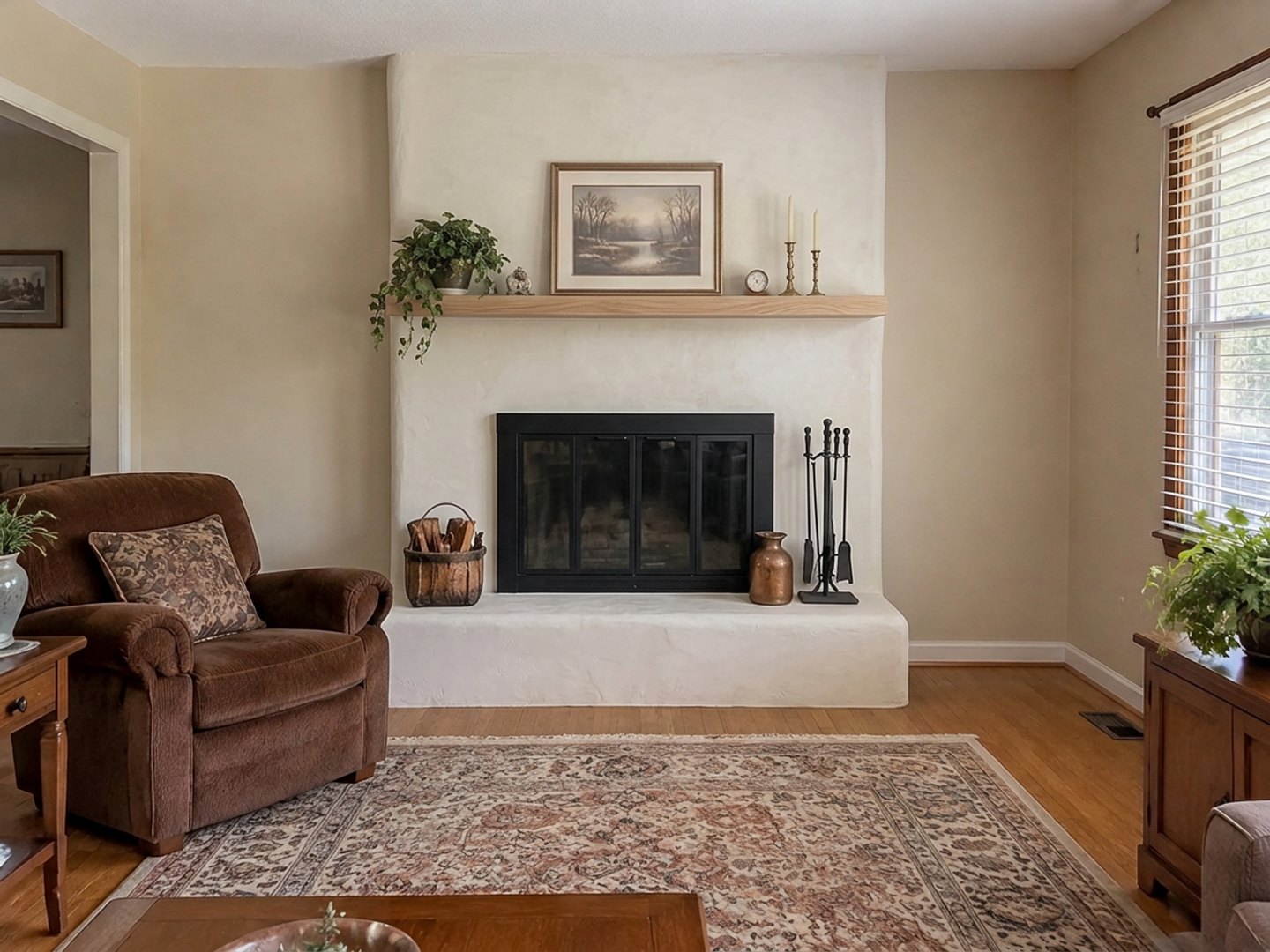
A real result from the GenRoom Studio: a red brick fireplace selected with the brush and described as "warm-white limewash plaster". The armchair, rug and window are from the original photo.
The quickest way to try fireplace makeover ideas is to test them on a photo of your own fireplace before anyone picks up a brush or a tile saw. Take one straight-on photo, upload it, and let AI show your brick or stone as plaster, tile, wood, paint or whitewash. Or add an electric fireplace to a plain wall. Each version takes about half a minute, and the rest of the room stays as it is.
That is what people bring to GenRoom. Between March 2 and October 14, 2026, 567 people asked for a fireplace change in their own words. The requests are very concrete. Make the fireplace a focal point that is "not stone, maybe a wood design or a new cool look". Make the wood "a darker oak". Or the renter's version: "I can't change fixtures, but I want the furniture centered around a fireplace, and I have a mobile one."
Below: the Studio path for each kind of request, real before-and-after results on three test rooms (a 1980s red brick fireplace, a stacked-stone fireplace with a TV above it, and a plain apartment wall), the places where the AI got it wrong, and the safety points no picture can check for you.
What Do People Actually Want From a Fireplace Makeover?
Most people don't want "a new fireplace". They want the one they have to stop looking dated, or a focal point where there is none. We grouped real requests by what they ask the AI to do:
| What people write (paraphrased) | What it really means | Studio path |
|---|---|---|
| "Make it a focal point that is not stone, maybe wood or a new cool look" | Reface the surround, keep the firebox | Select area on the fireplace + your words |
| "I want the wood of the fireplace to be a darker oak" | Change one part (the mantel), keep the rest | Select area on the mantel + your words |
| "Whitewash or paint the brick" | Same shape, lighter color | Ideas for your photo, or Select area + a color |
| "We want a fireplace focal point" (no fireplace yet) | Add a fireplace to a plain wall | Ready task "Fireplace or stove" |
| "A media wall with a fireplace in a natural wood look" | Fireplace and TV as one composition | Select area on the wall + one description |
| "Style the mantel", "add decor on the mantel" | Decor only, no construction | Ideas for your photo, or "Add art & decor" |
| "Renter, can't change fixtures, furniture around a fireplace" | Rearrange around an existing focal point | Mode "Rearrange furniture" |
Other recurring requests: extend the stone up to the ceiling, make a gas insert longer and narrower, remove the mantel and the raised hearth for a sleeker look, put a pellet or wood stove in a corner, and put the TV above the fireplace.
Which Studio Tool Fits Your Fireplace?
Use a ready task or an idea when the change is common, and the brush when you want one exact surface changed. Every design and every edit costs 2 credits; a free account (no card) gets 6 credits.
| Tool | Where | Best for | What it keeps |
|---|---|---|---|
| Ideas for your photo | Design page → Ready tasks | Suggestions written for your room, e.g. "Whitewash the brick", "Update brass screen", "Style the mantelpiece" | Everything except the named change |
| Fireplace or stove | Ready tasks → Furniture & decor | Adding a fireplace: Gas fireplace, Electric fireplace, Wood stove, Classic with mantel; choose the wall | The room, furniture and windows |
| Select area + your words | Editor → Select area | Refacing the surround, changing the mantel, removing the raised hearth | Everything outside your selection |
| Finishing materials | Editor → Libraries | Stone, brick, stucco, wood, porcelain or concrete from a texture tile | Everything outside your selection |
| Colors | Editor → Libraries | Painted brick or a painted surround in a Palette, RAL, NCS or HEX color | Everything outside your selection |
| TV wall | Ready tasks → Furniture & decor | A TV, console and panel when the fireplace is on another wall | The fireplace |
All three of our test photos were detected as "Living Room" straight away. If yours shows up as a generic "Interior", the living-room tasks, including "Fireplace or stove" and "TV wall", are still offered, and you can set the type above the photo yourself.
Example 1: A 1980s Red Brick Fireplace, Four Ways
Our first test room has the classic dated fireplace: floor-to-ceiling red-brown brick, a raised brick hearth, a brass-framed glass door and a heavy dark mantel beam. Exactly the kind of fireplace people describe as "the thing everyone sees first".
The fastest option: an idea written for your photo
After the upload, open Ready tasks → Ideas for your photo. These suggestions come from your own picture, so they differ from room to room. For this fireplace the Studio offered "Update brass screen", "Whitewash the brick", "Modernize armchair", "Paint walls grey", "Add drapes" and "Lighter coffee table". On the stone fireplace in Example 2, the list included "Style the mantelpiece" instead.
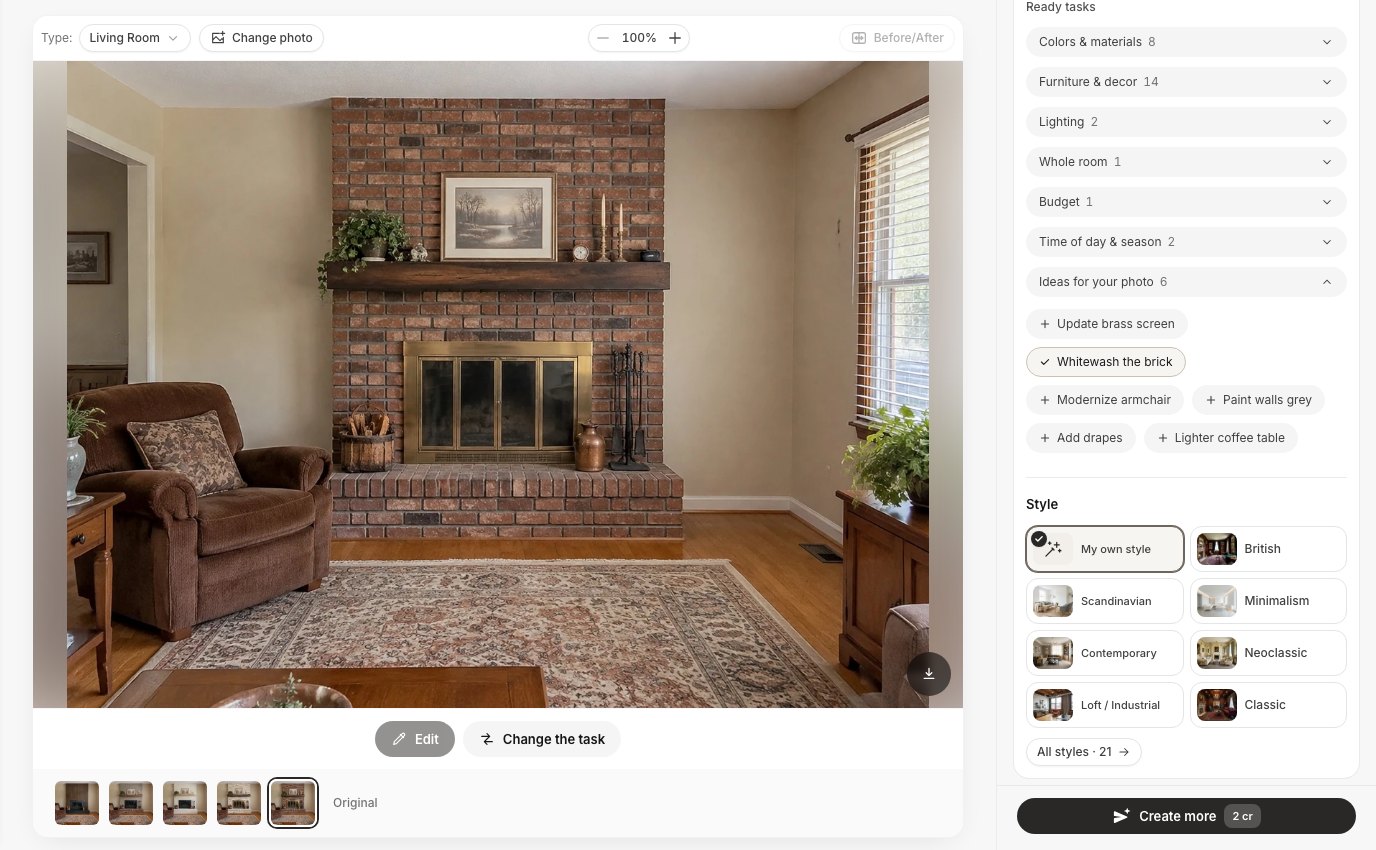 "Ideas for your photo" lists changes the Studio suggests for this specific room. We picked one: "Whitewash the brick".
We picked "Whitewash the brick" and pressed Create design.
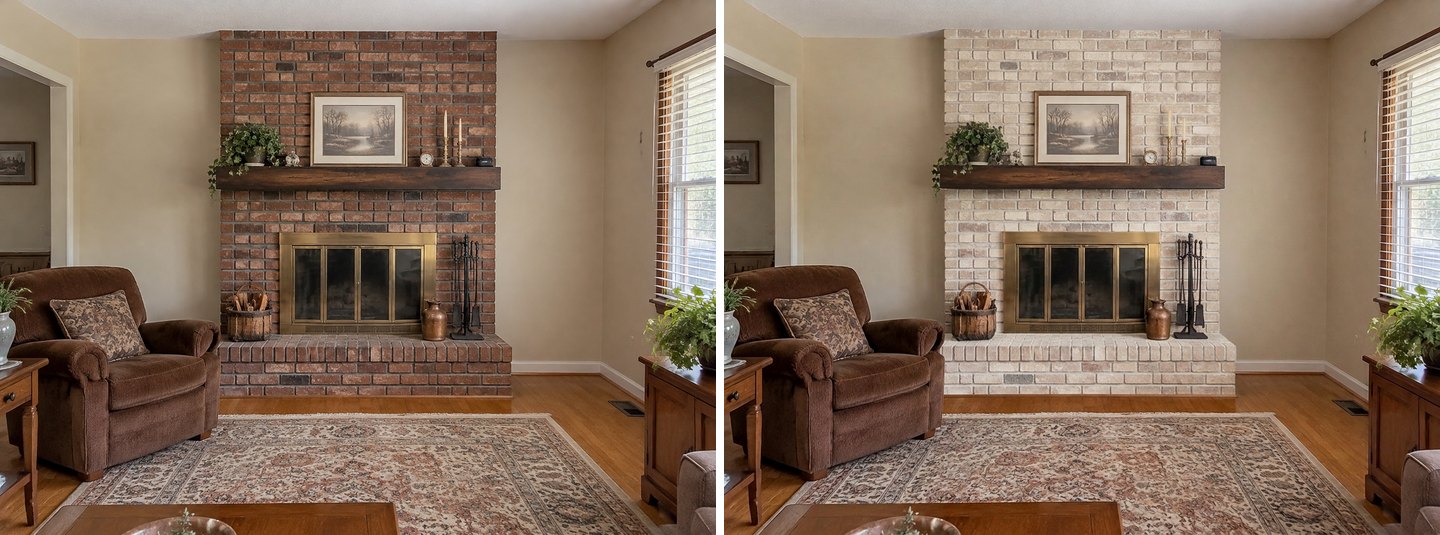 Left: the original. Right: the idea "Whitewash the brick". Only the brick changed; the mantel, brass door and decor are untouched.
Only the brick changed. The texture still shows through, as it should with a whitewash, and the dark mantel now stands out against it. The brass door and the decor were not asked about, so they stayed. That is the cheapest makeover in this guide, and the picture shows it isn't enough on its own here: the brass door is now the most dated thing on the wall. A second idea from the same list, "Update brass screen", is the natural next step.
If you would rather see a solid paint color than a whitewash, select the brick in the editor and pick a shade under Libraries → Colors (Palette, RAL, NCS or HEX). Our guide to trying paint colors on a room photo covers how the color libraries work.
Plaster, tile or wood: select the fireplace and describe it
For a full reface, open the photo in the editor, click Select area, choose Lasso and draw around the fireplace from the ceiling down to the hearth. Then type what the new surround should be and press Apply. Here is the same flow on the stone fireplace from Example 2, with a texture picked from the Finishing materials library:
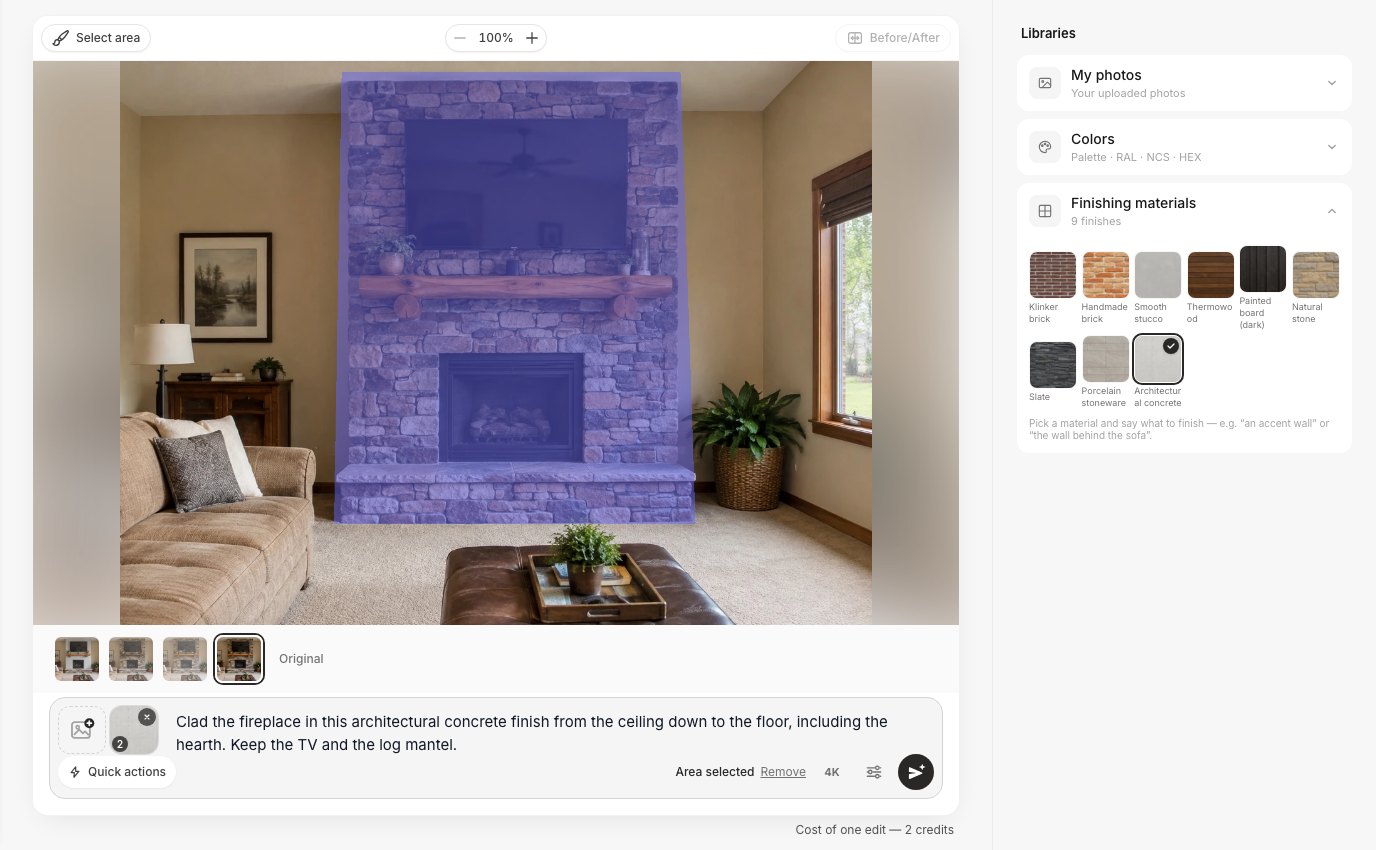 The editor: the fireplace is selected with the lasso, a finish is picked from the library, and one sentence says what to keep. "Area selected" in the prompt bar confirms the selection.
For the brick fireplace we ran three separate edits on the original photo, one sentence each:
- Plaster: "Cover the brick fireplace in smooth warm-white limewash plaster with softly rounded edges, a slim light oak mantel shelf and a matte black fireplace door. Keep the hearth shape."
- Tile: "Replace the brick on the fireplace with large-format matte warm grey porcelain tile from the hearth to the ceiling, a floating walnut mantel shelf and a matte black fireplace door."
- Wood: "Clad the whole fireplace up to the ceiling in vertical dark oak slats, a matte black steel surround around the firebox, no mantel shelf, and a low black stone hearth."
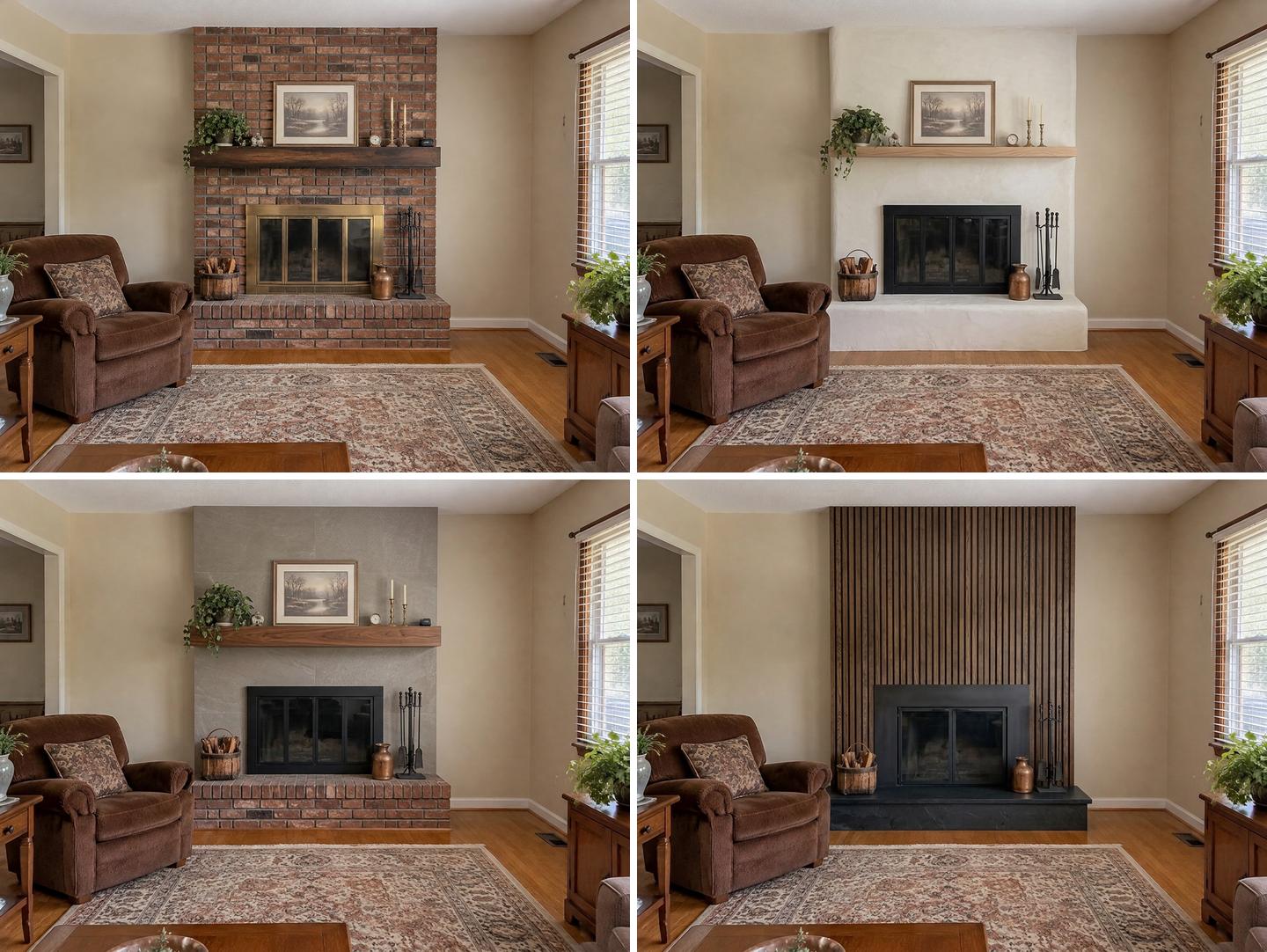 Top left: the original. Top right: plaster. Bottom left: porcelain tile. Bottom right: dark oak slats. The armchair, rug, window, cabinet and camera are the same in all four.
Side by side, the three versions answer questions a mood board can't:
- Plaster made the fireplace part of the wall rather than a separate object, and the room suddenly reads lighter. The AI kept the hearth's shape, as asked, and plastered it too.
- Tile keeps a strong, modern block, but look at the bottom: the raised hearth is still red brick. We wrote "from the hearth to the ceiling", and the AI took that literally. If you want the hearth changed, name it (we did that in the concrete example below).
- Wood slats give the "new cool look" one user asked for, and they turn the fireplace into the darkest, heaviest thing in the room. Because we wrote "no mantel shelf", the painting, plant and candles on the old mantel are gone. That's correct, but it's worth knowing that removing a mantel also removes your styling surface.
Each result took between 20 and 40 seconds. Everything outside the selection matched the original when we laid the images over each other: the armchair, rug, side cabinet and window did not move.
Example 2: A Stone Fireplace With a TV Above It
The second test room has the other very common setup: a stacked fieldstone fireplace up to the ceiling, a chunky honey-colored log mantel, and a 55-inch TV mounted high on the stone. We kept the TV in every version, because that's what most people with this wall actually live with.
"I want the wood to be a darker oak"
This request came almost word for word from a user, and it's the smallest possible makeover: one part, one color. We selected just the log mantel with the lasso and typed "Make the log mantel a darker oak stain, rich dark brown, keep its shape."
Then two bigger edits on the original photo: "Replace the stacked stone on the fireplace with smooth light grey plaster up to the ceiling and a thin black steel frame around the firebox. Keep the TV, the log mantel and the hearth." And the concrete version from the screenshot above, using the Architectural concrete tile from Finishing materials.
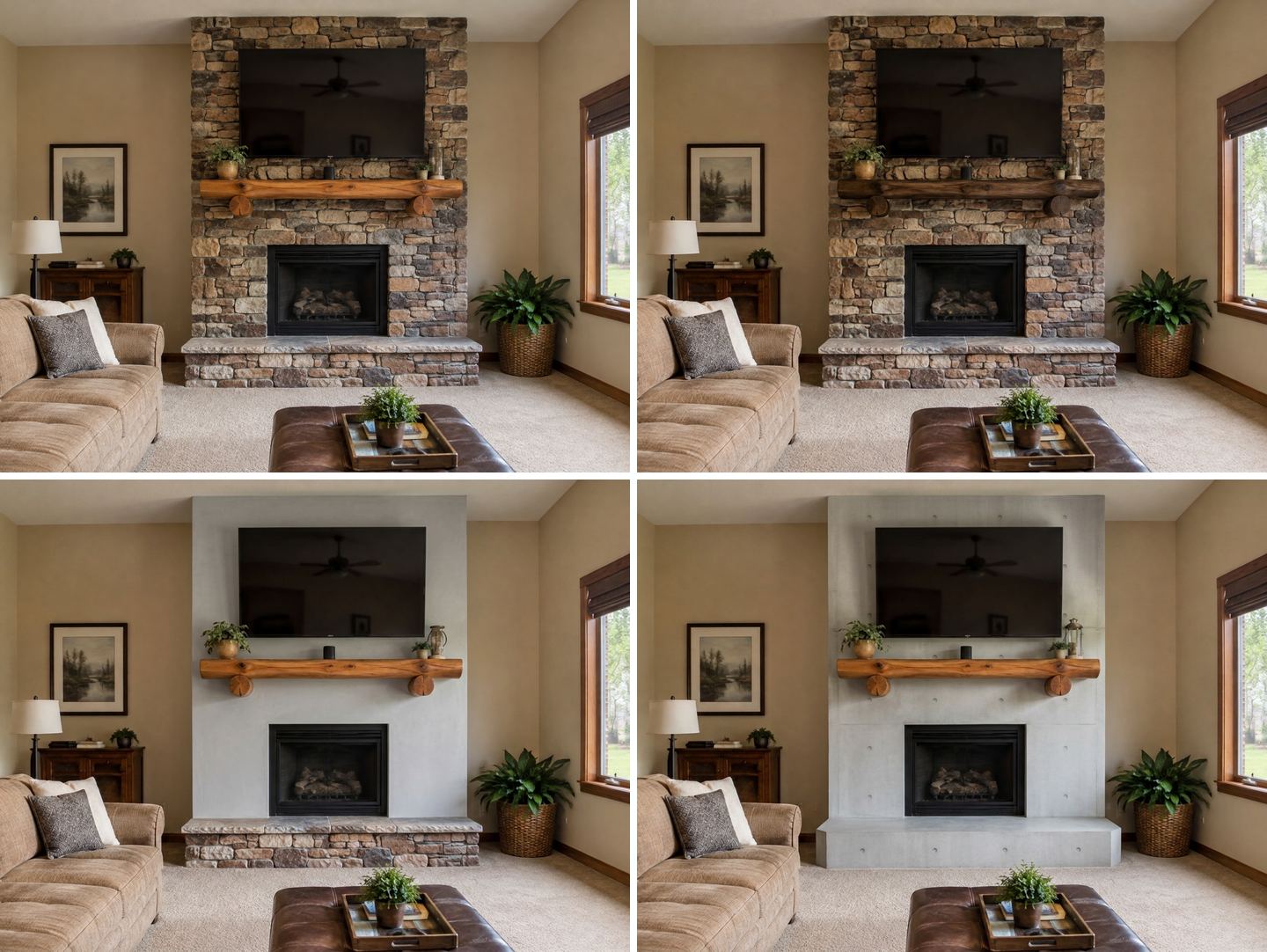 Top left: the original. Top right: only the mantel, darker oak. Bottom left: plaster, mantel and stone hearth kept. Bottom right: architectural concrete from the Finishing materials library, hearth included.
What we learned:
- The dark oak edit changed only the mantel. Same log, same brackets, same objects on top, just a darker stain. When the change is this small, the brush keeps everything else safe.
- Plaster took the stone wall from "lodge" to calm. Once the stone is gone, the honey-colored log mantel becomes the main feature. It's a good test of whether you really want to keep the mantel.
- Concrete with the hearth named got the hearth too. Compare with the tile example above: when we wrote "including the hearth", the AI replaced the raised stone hearth as well. Naming the part is what makes the difference.
- The TV stayed in place in all three. The finish around it changed, the TV did not move, shrink or get replaced.
The Finishing materials library has nine interior finishes, from Klinker brick and Handmade brick to Smooth stucco, Thermowood, Painted board (dark), Natural stone, Slate, Porcelain stoneware and Architectural concrete. Picking a tile adds the texture to your edit as a reference, so you still write one sentence saying which surface it goes on. If you are comparing materials across a whole room, not just the fireplace, see the material swap tool.
Mantel styling without construction
The stone room also got the photo idea "Style the mantelpiece". It added a framed landscape, a small framed photo and three brass candlesticks next to the existing plants and lantern, and changed nothing else.
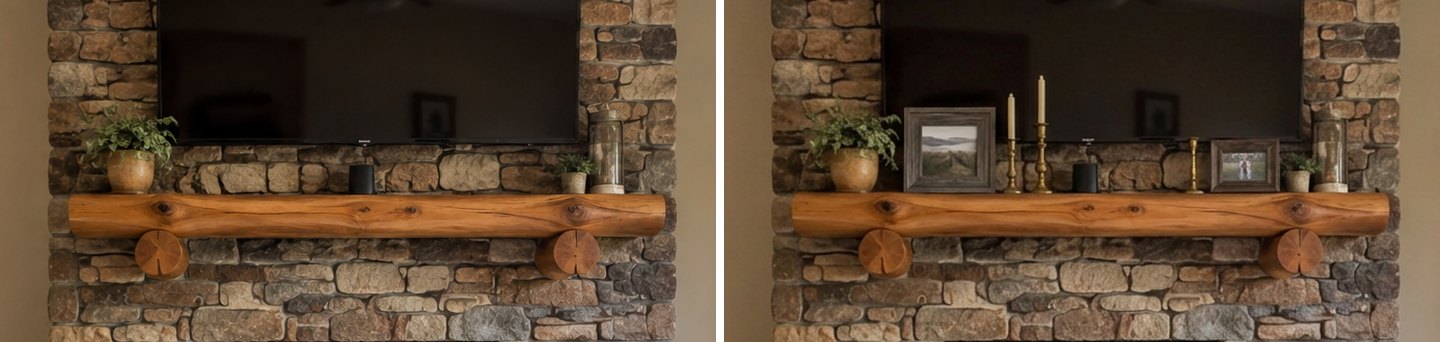 Close-up crop. Left: the original mantel. Right: the idea "Style the mantelpiece". The TV, stone and log stay the same.
The result is modest. Most users who ask for mantel styling want something more specific: "western decor on the mantel", seasonal pieces, a large mirror. For that, the ready task Add art & decor or a one-line edit works better, and our AI room decorator guide shows how to steer it.
Example 3: Adding a Fireplace to a Plain Wall
The third room is an ordinary rental living room: a sofa, a coffee table and a long empty white wall with a floor lamp in the corner. This is the "we want a fireplace focal point" case.
The ready task "Fireplace or stove"
Open Ready tasks → Furniture & decor → Fireplace or stove. You choose the Type (Gas fireplace, Electric fireplace, Wood stove, Classic with mantel) and Which wall (Back wall, Behind the sofa, Behind the bed, TV wall). There is also a notes box for anything to keep in mind.
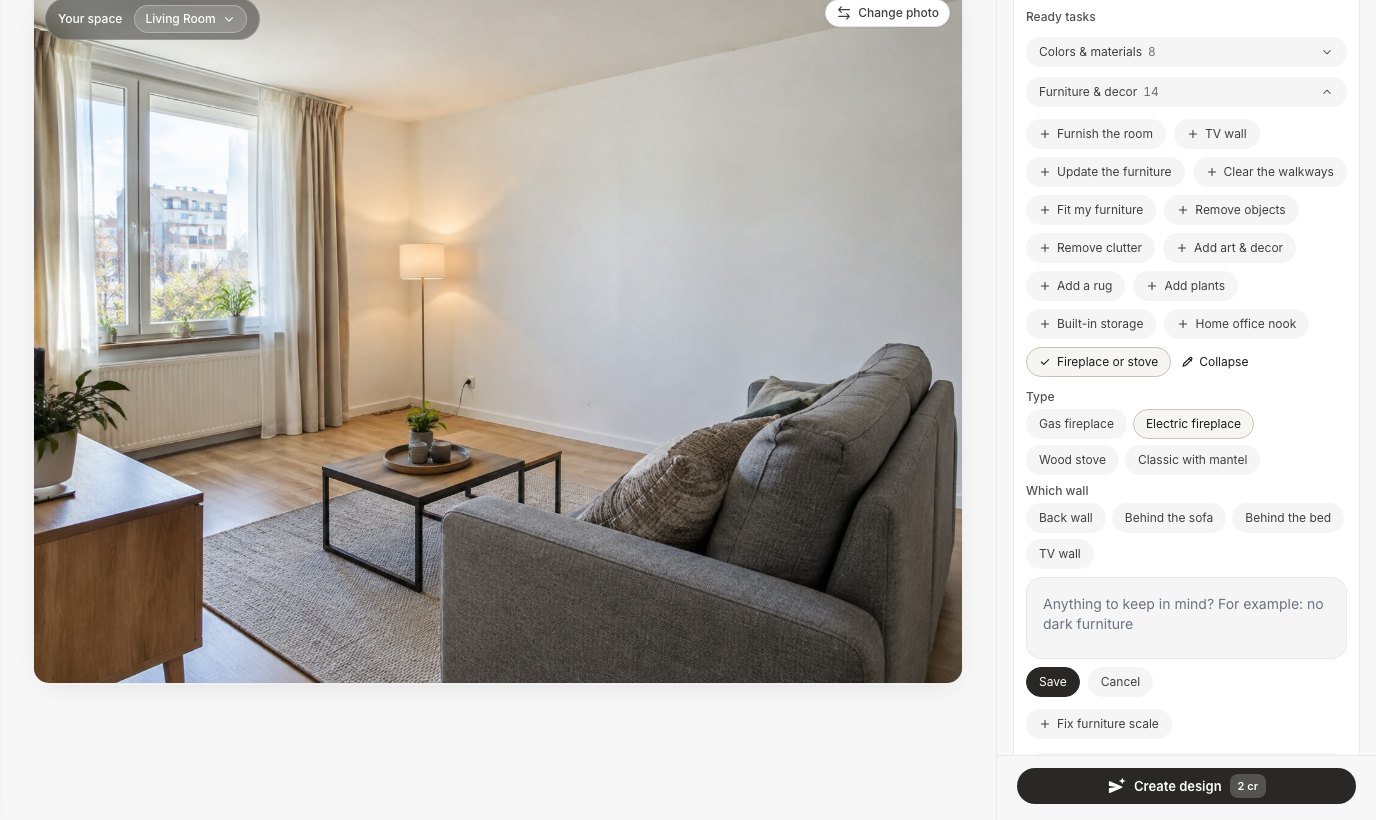 The ready task "Fireplace or stove" with its two choices: the type and the wall. We chose Electric fireplace.
With Electric fireplace selected, the Studio added a slim, wall-mounted linear electric fireplace to the empty wall, at about sofa-back height. The sofa, lamp, window, radiator and even the wall outlet stayed where they were.
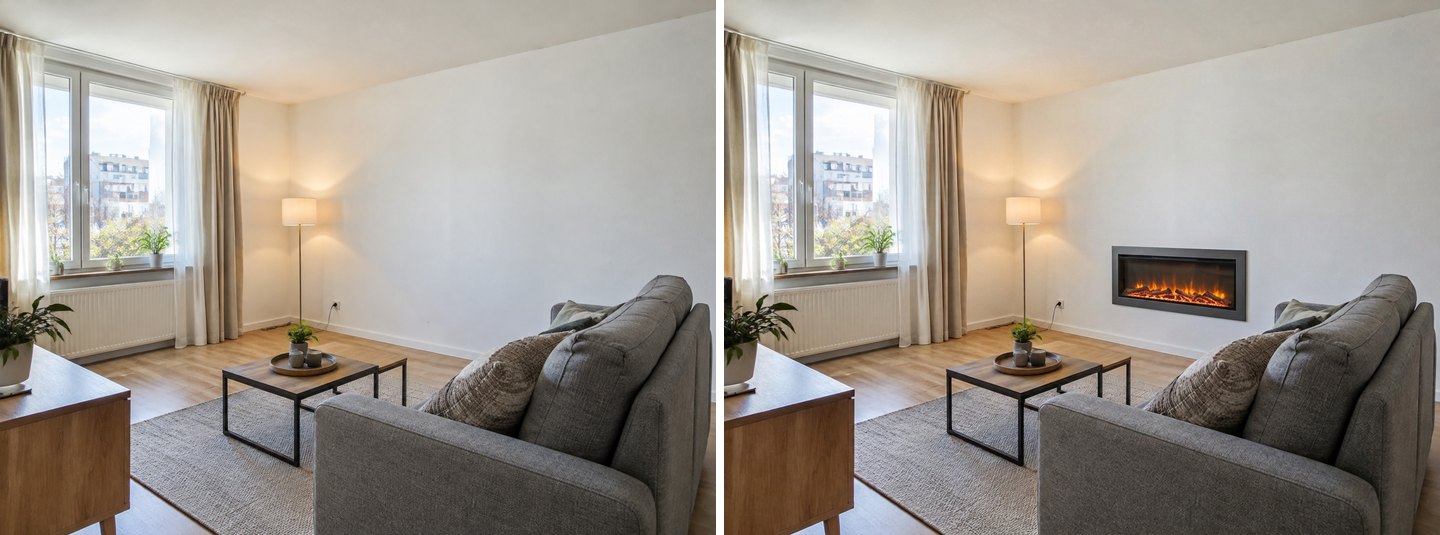 Left: the original. Right: the ready task "Fireplace or stove" with Electric fireplace. Nothing else in the room changed.
It works, and it's honest about what a wall-mounted electric unit looks like on its own: a nice glow, but a fairly small object on a big wall. On its own it is not yet a focal point.
One description for a fireplace media wall
To make it a real focal point, we went to the editor, selected the whole wall with the lasso and described one composition: "Build one media wall here: a shallow plaster chimney breast in the middle of the wall with a wide recessed linear electric fireplace at bench height and a TV recessed above it, with alcove shelves on both sides. Keep the sofa and the floor lamp."
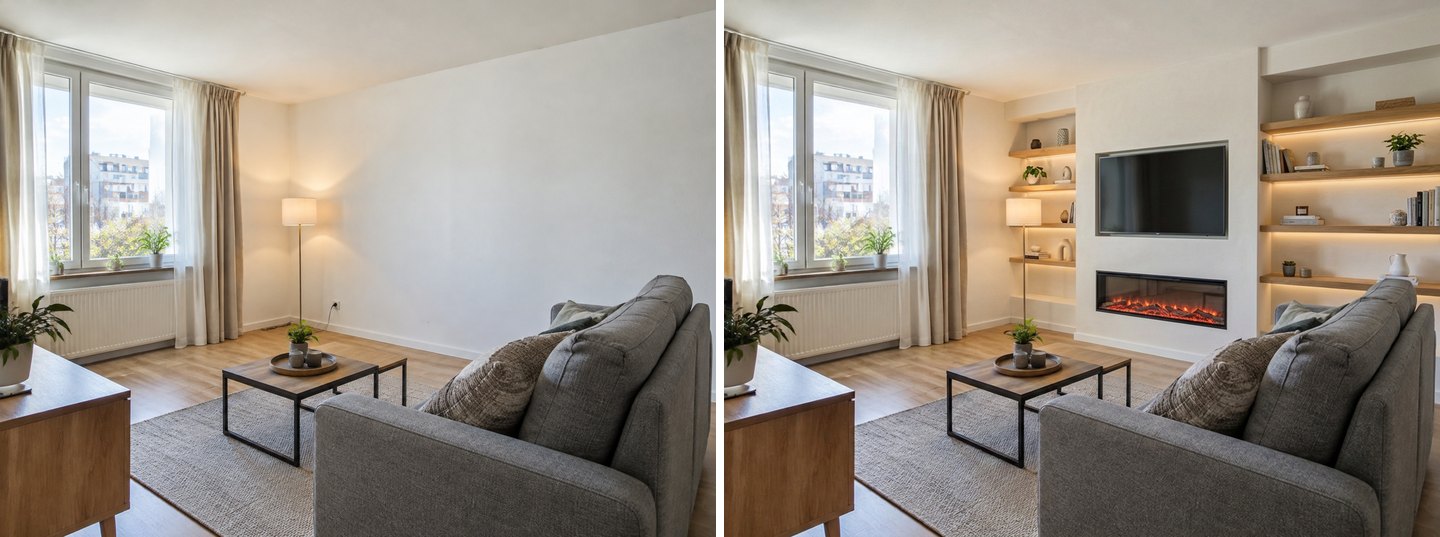 Left: the original. Right: one sentence in the editor with the wall selected. Fireplace, TV and shelves are one built composition.
This is the look people mean when they ask for "a media wall with a fireplace": a false chimney breast built forward from the wall, the fire low, the TV above, shelves in the alcoves. The sofa, coffee table, rug and lamp stayed where they were. For a renter, it doubles as a reality check: this version is construction, while the first one is closer to what a plug-in unit gives you. For the TV side of this wall (screen size, viewing distance and height), use our TV wall design guide.
Create interior design with AI
Upload a photo of your room and get a professional design in 30 seconds. First generation is free.
Fireplace and TV on One Wall: What to Decide First
A fireplace and a TV on the same wall compete for the same spot at eye level. Decide which one gets it before you design, because the AI will happily draw both, and neither the picture nor the AI checks comfort or heat.
- TV above the fireplace: it usually ends up high. Our TV wall guide has the height and gap numbers and shows what happened when we typed only "above the fireplace" (the TV landed just under the ceiling).
- TV beside the fireplace: a side wall or an alcove keeps both at a sensible height. Use the TV wall task on "A free wall" and keep the fireplace wall for the fire.
- A built media wall (Example 3): lets you control the height of both. Recess the fire low and the screen as low as the clearances allow.
Whatever you choose, the clearances that matter come from the fireplace manufacturer's installation manual (how close a mantel or anything combustible can be, and whether a TV above the unit is allowed). The AI doesn't know your model, so read those numbers before you fall in love with a picture.
Electric, Gas or Wood: What the Picture Can't Tell You
An AI image shows how a fireplace looks, not whether it can be installed in your home. The type you pick in the Studio is a visual choice. The real choice depends on your building, your fuel, your budget and your local rules.
| Type | What you see in the Studio | What to check in real life |
|---|---|---|
| Electric fireplace | Slim surround, linear or insert flame | The unit's electrical requirements in its manual; a plug-in or freestanding unit is the usual route for renters |
| Gas fireplace | Clean, minimal surround | A gas supply and venting as the manufacturer specifies, installed by a qualified professional |
| Wood stove | Freestanding stove with a flue pipe | A real chimney or flue route, floor protection and clearances from the stove's manual; local rules |
| Classic with mantel | Traditional opening and mantel | Whether there is a working chimney behind the wall at all |
A few facts from authoritative sources worth knowing before you plan:
- The U.S. Fire Administration advises keeping anything that can burn at least 3 feet from heat sources, including fireplaces and wood stoves, and having heating equipment and chimneys cleaned and inspected every year by a professional (USFA, heating fire safety). Keep that in mind for the rug, the armchair and the decor you style next to the fire.
- Chimneys, fireplaces, vents and solid-fuel appliances are covered by NFPA 211, the standard many local codes refer to (NFPA 211). Your installer and your local building department know which edition and rules apply where you live.
- If you are looking at wood stoves, the EPA notes that new EPA-certified stoves produce no more than 4.5 grams of smoke per hour, against 15 to 30 grams for older uncertified ones. Look for the EPA certification label (EPA Burn Wise).
Where the AI Gets Fireplace Designs Wrong
The AI is good at surfaces and at keeping the rest of the room still. It is not an installer, and two of our tests show where that matters.
Two ready tasks make two separate objects
Before writing the media-wall sentence, we tried the obvious shortcut: the ready tasks Fireplace or stove (Electric) and TV wall together. The Studio did both, but as two separate things: a small electric fireplace on its own to the left, and a TV on a slatted panel with a console to the right. Nothing connects them.
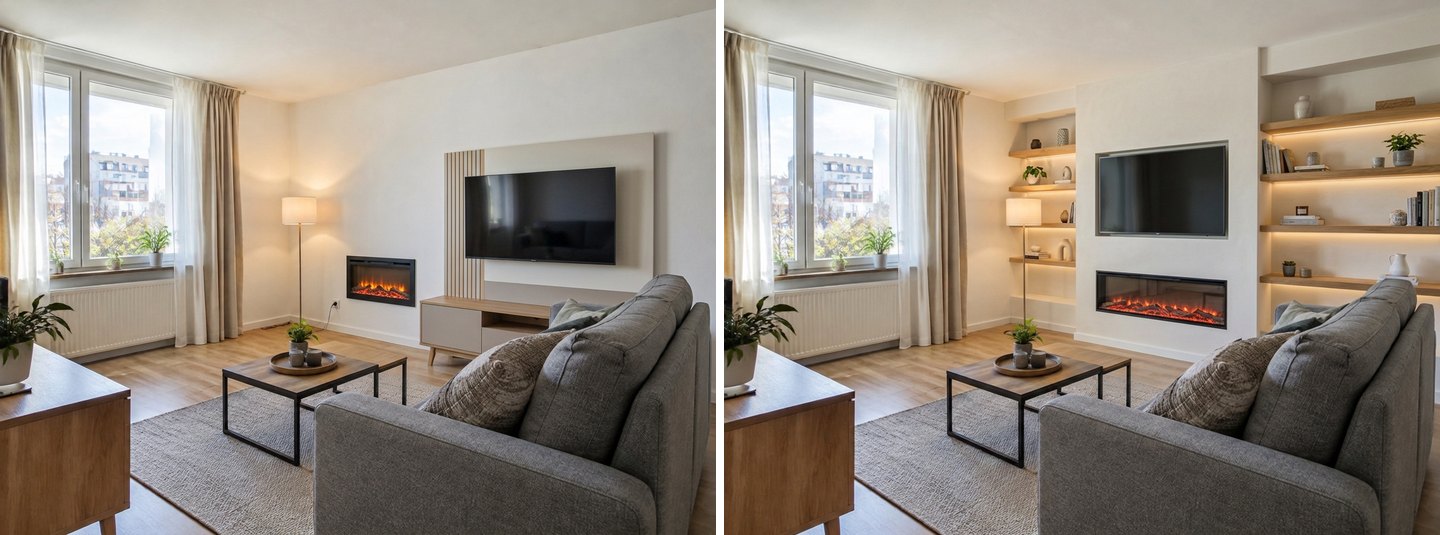 Left: two ready tasks, "Fireplace or stove" + "TV wall", produce two unrelated objects. Right: one description of one composition produces a media wall.
Ready tasks are separate instructions, so the result is two separate objects. When the fireplace and the TV should be one piece of furniture or one built wall, describe that one composition in your own words.
A wood stove where there is no chimney
On the same plain wall we picked Wood stove. The picture is convincing: a black cast-iron stove with a flue pipe that rises and turns into the wall.
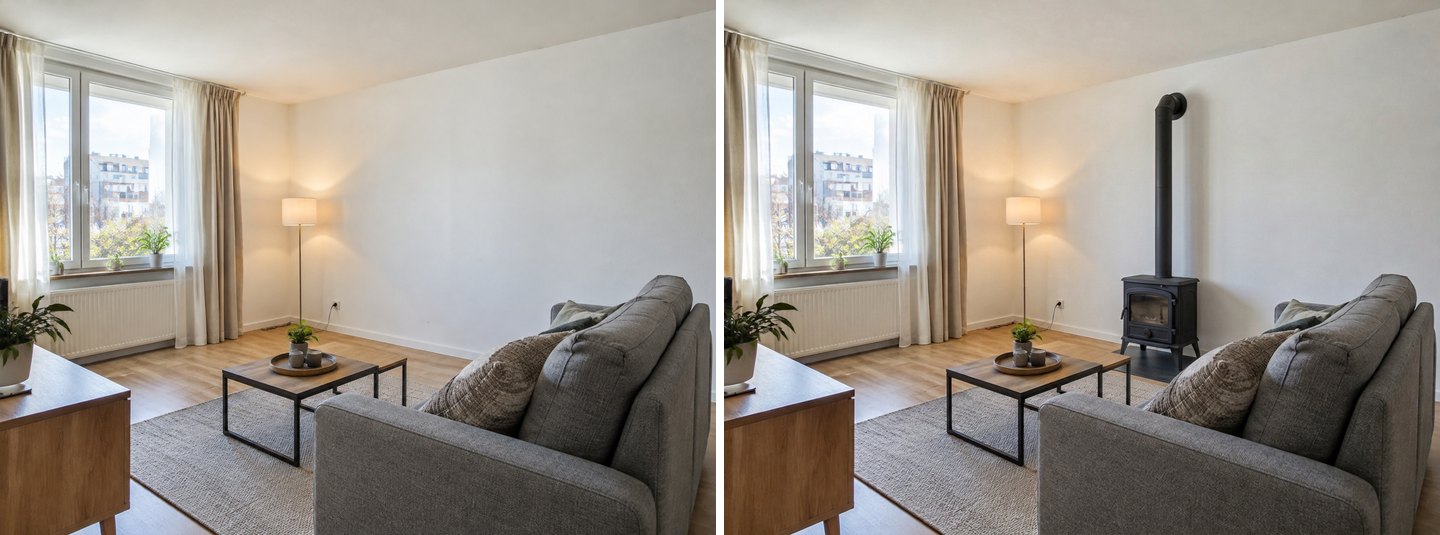 Left: the original. Right: the ready task with Wood stove. It looks plausible, but the stove stands straight on a laminate floor with no hearth pad, and the flue goes into an apartment wall that may have no chimney.
Look closer and the problems are physical, not visual. The stove stands right on the laminate floor with no floor protection, close to the wall and to the end of the sofa, and the flue disappears into a wall of an apartment block. The AI has no idea whether there is a flue behind that wall, and it does not draw clearances. Treat a stove picture as a style test only. Whether you can have one at all is a question for the stove's manual, your building and a qualified installer.
Other things to watch
- Only what you name changes. In the tile version the raised brick hearth stayed brick, because our sentence didn't clearly include it. In the concrete version we wrote "including the hearth" and it changed.
- Removing a mantel removes what's on it. The wood-slat version lost the painting, plant and candles with the shelf.
- Sizes are not to scale. The AI drew a plausible electric fireplace, not a specific 50-inch or 60-inch model. Before you buy, check the real unit's dimensions against the wall.
- A finish in a picture is uniform; a real one may not be. A whitewash or limewash on real brick depends on the brick and the product. Try a small patch before you commit to the whole fireplace.
Tips for Better Fireplace Results
- Shoot the fireplace straight on, from roughly eye level and far enough back to include the hearth, the mantel and the wall up to the ceiling. Straight-on photos give the cleanest edges.
- Start with "Ideas for your photo". It often names the fix you were going to describe ("Whitewash the brick", "Update brass screen") and costs one click to try.
- Select generously with the lasso. Include the whole surround from the ceiling to the hearth if you want a full reface; select only the mantel if only the mantel should change.
- Write one sentence with three parts: the new surface, the parts that change with it (mantel, door, hearth), and what to keep ("Keep the TV and the log mantel").
- Compare versions on the same photo. Run plaster, tile and wood as separate edits from the original, not one on top of another, so every result starts from the same room.
- Use Before/After and Restore from original. If an edit removed something you wanted, Restore brings it back from the original photo.
- Light it last. A fireplace wall looks different in the evening; our AI lighting design guide shows how to add evening light or a warmer glow after the makeover.
- Renter with a portable fireplace? Keep the walls and use the mode Rearrange furniture to put the seating around it; our furniture rearranging guide explains how to tell the AI what must stay.
FAQ
How do I use AI to design a fireplace?
Upload a photo of the room in the GenRoom Studio. To change an existing fireplace, open Ready tasks → Ideas for your photo for suggestions, or open the editor, select the fireplace with Select area and describe the new surround. To add one, use the ready task Fireplace or stove and choose the type and the wall. Each result takes about 20 to 40 seconds.
How do you modernize an existing fireplace?
The common routes are a lighter finish over the brick or stone (whitewash, limewash or paint), a new surface over it (plaster, large-format tile, wood slats, concrete), and updating the parts that date it: the brass door, a heavy mantel beam, a raised hearth. In our tests, plaster and whitewash made the room look lightest, while dark wood turned the fireplace into the heaviest object in the room. Try them on your own photo before choosing.
How much does a fireplace makeover cost?
It depends on the route. Painting or whitewashing existing brick is the smallest job; refacing with tile, plaster or wood involves materials and labor; adding a new gas or wood-burning fireplace involves a supply, venting and an installer. Get local quotes for the version you choose. Trying the versions first in GenRoom costs 2 credits per design or edit, and a free account includes 6 credits.
Can I add a fireplace to a wall that doesn't have one?
In a picture, yes. The ready task Fireplace or stove adds a gas fireplace, electric fireplace, wood stove or classic fireplace with a mantel to the wall you choose. In real life, an electric unit is usually the simplest addition. Gas needs a supply and venting, and a wood stove needs a flue and clearances from its manual. Our wood-stove test shows why the picture can't answer that for you.
Is there a fireplace visualizer where I can upload a photo?
Yes. GenRoom works from your own photo: you upload it once and can try the ideas Studio suggests, the ready task "Fireplace or stove", a brush selection with your own words, and the Finishing materials and Colors libraries. Every result keeps the same camera angle, so you can compare versions side by side with Before/After.
Can I put the TV above the fireplace?
You can design it either way, but check two things first: the fireplace manufacturer's clearances for anything above the unit, and the viewing height. A TV above a fireplace usually ends up high. The numbers and a real test are in our TV wall design guide. A media wall with the fire recessed low, as in Example 3, keeps the screen lower.
Is there a free AI app for fireplace design?
A free GenRoom account (no credit card) gives you 6 credits, enough for three fireplace designs or edits. Free results carry a watermark. Paid credit packs are one-time purchases, not a subscription.
The Bottom Line
A fireplace makeover is one of the easiest projects to try on a photo first. The change is concentrated in one spot, and the difference between whitewash, plaster, tile and wood is obvious once you see them on your own brick or stone. In our tests the Studio changed only what we selected or named and kept the room still. "Ideas for your photo" found the brick and the brass door on its own, and one clear sentence turned a plain wall into a fireplace media wall.
Use the pictures to choose the look. Then take the clearances, the venting and whether you can have a real fire at all to the manufacturer's manual and a qualified installer. Upload your fireplace photo in the Studio and try three versions before you buy anything.