Exterior House Lighting Ideas: See Your Home at Night First
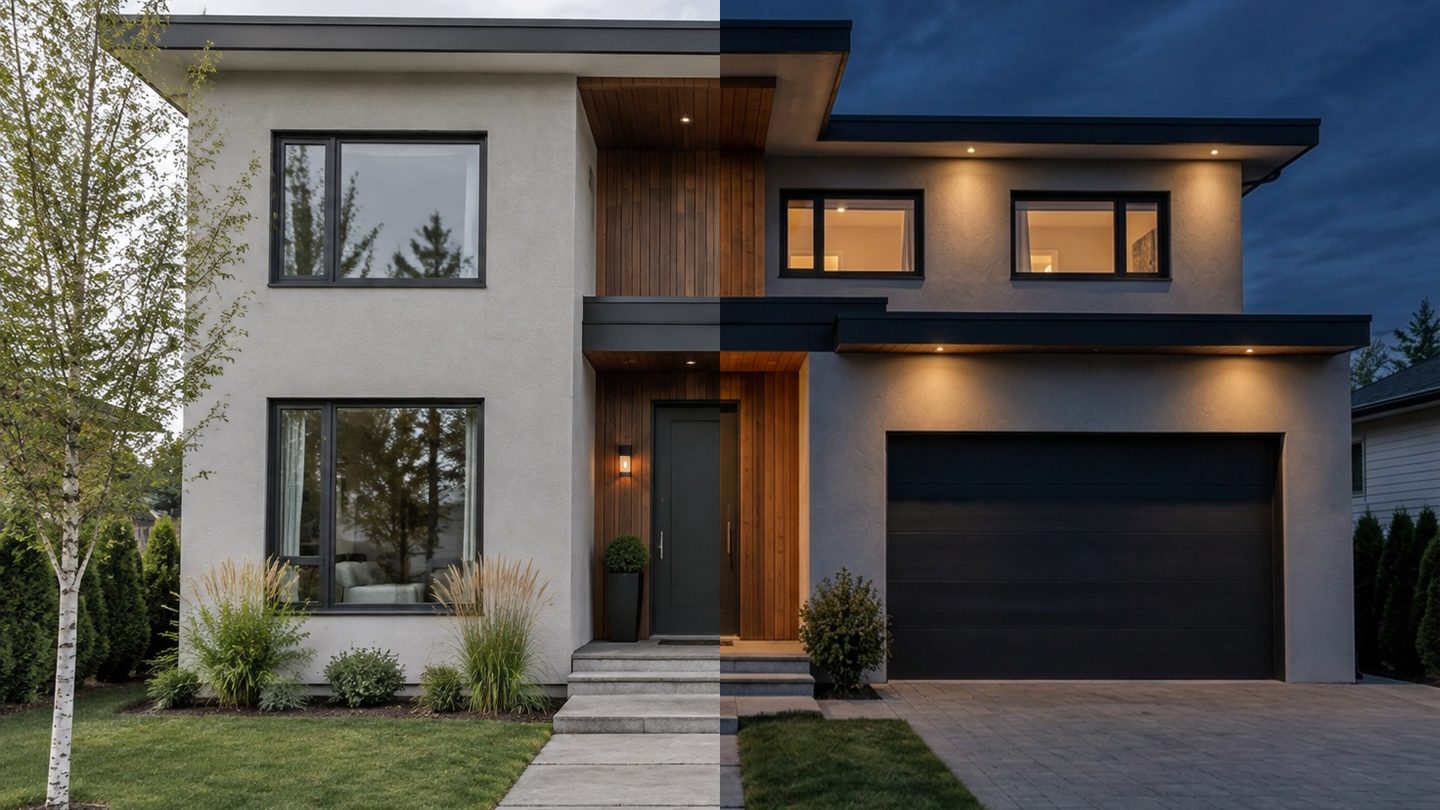
Real GenRoom Studio result: left, the original daytime photo; right, the same photo after the Facade lighting and Night tasks. Same house, same camera.
The fastest way to choose exterior house lighting is to look at your own house at night before you buy anything. Upload a daytime photo of the front of the house, ask for the lighting you have in mind (wall sconces by the door, soffit downlights, uplights on the columns, path lights, string lights along the eaves), and switch the same photo to night. In GenRoom Studio this is two ready tasks, Facade lighting and Night, plus the editor's Light & season quick actions and the Select area brush when you want a light in one exact place. Each run takes about 20–40 seconds and costs 2 credits; a free account starts with 6 credits.
This is one of the most common things people do with photos of their homes. 1,398 people have asked GenRoom to light up a facade, and another 134 asked to see a finished design in the evening or at night with the lights on. Below are the Studio paths for both, real day-to-night results on two houses and one backyard, three different lighting schemes on the same house, the mistakes the AI makes with light, and the lighting rules worth checking before you call an electrician.
If you are planning the garden itself (path spacing, lumens, fixture schedules), our garden lighting planning guide covers the techniques in depth. This article is about the house and what it looks like from the street after dark.
What do people ask for when they light a house?
Mostly two things: "show me my house at night" and "put lights here". In the requests we read, people rarely name a fixture model. They describe a place (the balcony edge, the four columns, the path to the door) and a mood (elegant, warm, not too much). Here are typical requests, paraphrased and anonymised:
| What people write | What they want to see | Best Studio tool |
|---|---|---|
| "Leave the facade as it is, only generate outdoor lighting" | Lighting added, nothing else changed | Facade lighting + Night tasks |
| "Install elevation lights and show me how it looks at night, exterior only" | A night view of the same house | Facade lighting + Night tasks |
| "Put an LED strip along the edge of the balconies" | Light in one specific line | Select area brush + your words |
| "Small lights on the four columns on the left, pointing up and down" | Up/down lights on named elements | Select area brush, or your words after a task |
| "Use this exact photo, don't change anything, just make it night with a lighting plan for the house and yard" | Day photo turned into night | Night (editor quick action or task) |
| "Show this layout at night with ambient and accent lighting" | A finished design shown after dark | Night / Evening quick action on the result |
| "Create a nighttime view with path lights and string lights around the yard" | A lit garden at night | Landscape lighting + Evening, then words |
The pattern is clear: people already know roughly what they want, but they cannot picture it switched on. A daytime render of a new sconce answers half the question. The night version answers the other half.
Which Studio tool does what?
GenRoom has six ways to put light into a photo, and they differ in how much they leave to the AI.
| Tool | Where it is | What it does | Best for |
|---|---|---|---|
| Facade lighting task | Design → Ready tasks → Lighting (Facade) | Adds architectural lighting to the facade and the entrance, keeps the building | A first lighting concept on a day photo |
| Night / Sunset tasks | Design → Ready tasks → Time of day & season | Switches the photo to night (or sunset) with the facade lights and lit windows on | Seeing the scheme after dark |
| Landscape lighting + Evening tasks | Design → Ready tasks (Yard) | Adds path and entrance lights, then sunset light with the path lights on | Gardens and front yards |
| Light & season quick actions | Editor → Quick actions | Facade lighting, Sunny day, Sunset, Night, Winter, Summer, Autumn on any result | Turning a finished design into a night view |
| Select area brush + words | Editor, above the photo | Changes only the painted area | One light in one exact place |
| Evening light | Interior tasks and editor | Lamps and accent lights on, dimmed daylight | The interior counterpart |
Your own words always combine with a picked task. Pick Night, then type "warm minimal, only the two lanterns and low path lights", and the Studio sends both.
How to see your house at night, step by step
The whole flow takes four clicks and one run.
- Upload a daytime photo of the front of the house. Shoot from the street at eye level, whole house in frame, straight verticals. An overcast day is ideal: no hard shadows to fight with.
- Check the space type says Facade. The Studio detects it; you can change it in the Type menu above the photo. A house with a big front yard sometimes lands in Facade too, which is fine for this job.
- Open Ready tasks → Lighting and pick Facade lighting. Then open Time of day & season and pick Night. Add a note in the brief if you have a scheme in mind (see the three schemes below).
- Click Create design. Then compare with the Before/After button above the result.
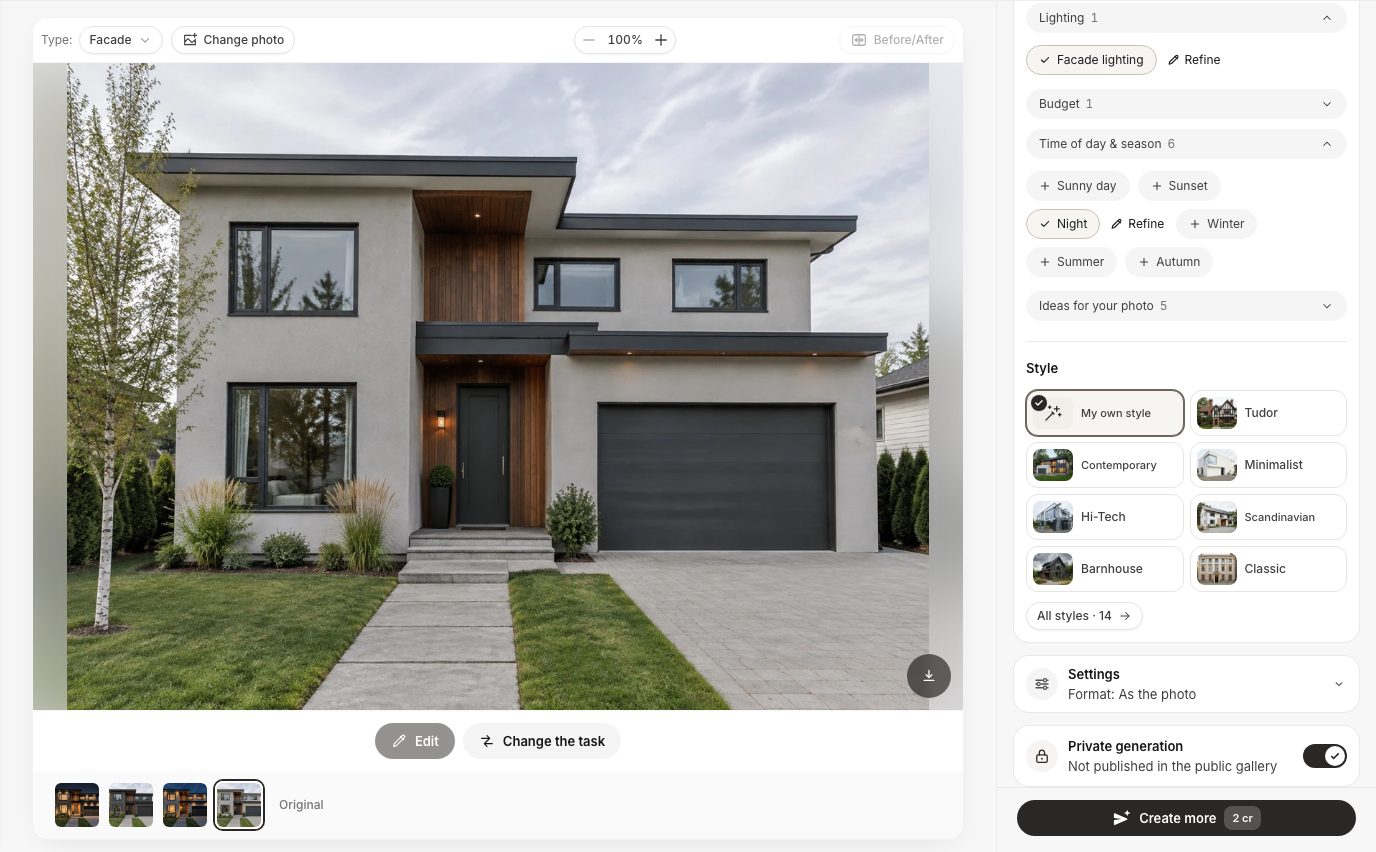 The Studio on desktop: Facade lighting from the Lighting group and Night from Time of day & season, ready to run on the original photo.
One habit worth keeping: clear the brief before each new variant. The Studio carries the last mode, tasks and typed note into the next run of the same work on purpose, so you can iterate. When you want a clean comparison (scheme A versus scheme B), remove the old chips and text first.
Case 1: a modern house, from day to night in one run
We uploaded a plain daytime photo of a two-storey contemporary house: light gray render, a vertical wood panel around the entrance, a flat roof overhang, one small wall light by the door and two tiny soffit spots. Then we ran Facade lighting + Night with no extra words.
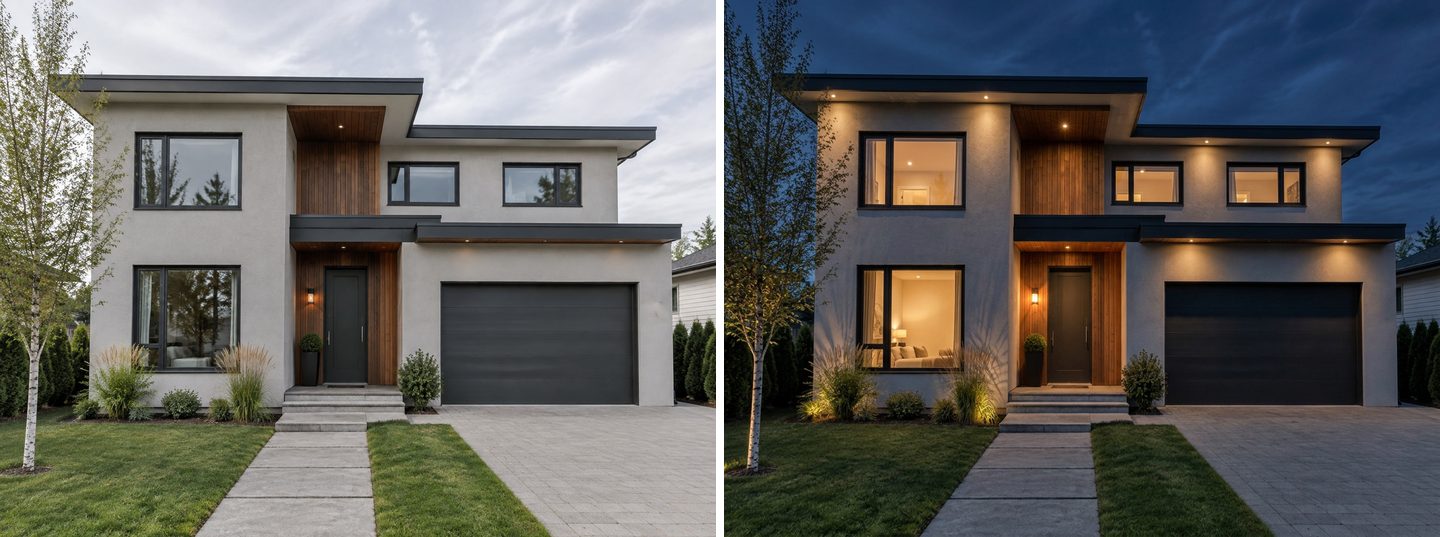 Real GenRoom result, one run of Facade lighting + Night. The house, windows, garage door, path and planting stayed where they were.
What the AI did, in lighting-designer terms:
- Soffit downlights along both roof overhangs and the entrance canopy, each casting a soft cone onto the wall. This is the classic modern-house move, and the render shows how it makes the box shape read at night.
- Uplights in the planting bed, grazing the ornamental grasses next to the windows, and one uplight on the birch tree.
- The existing wall light by the door kept on, with the wood panel warmly lit around it.
- Lit windows on both floors. Useful for mood, but note: the AI invented the rooms behind the glass (there is a bed in what is really the living room).
The verdict is the one people want: the scheme is restrained, warm and believable, and it shows which surfaces deserve light (the wood panel, the overhangs) and which can stay dark (the garage door).
Case 2: one house, three lighting schemes
The real decision is rarely "lights or no lights". It is which scheme. So we took one traditional two-storey colonial house (white clapboard, black shutters, a columned porch, a brick walk and a mature maple) and ran three night versions from the same original photo, each with the Night task and a short note.
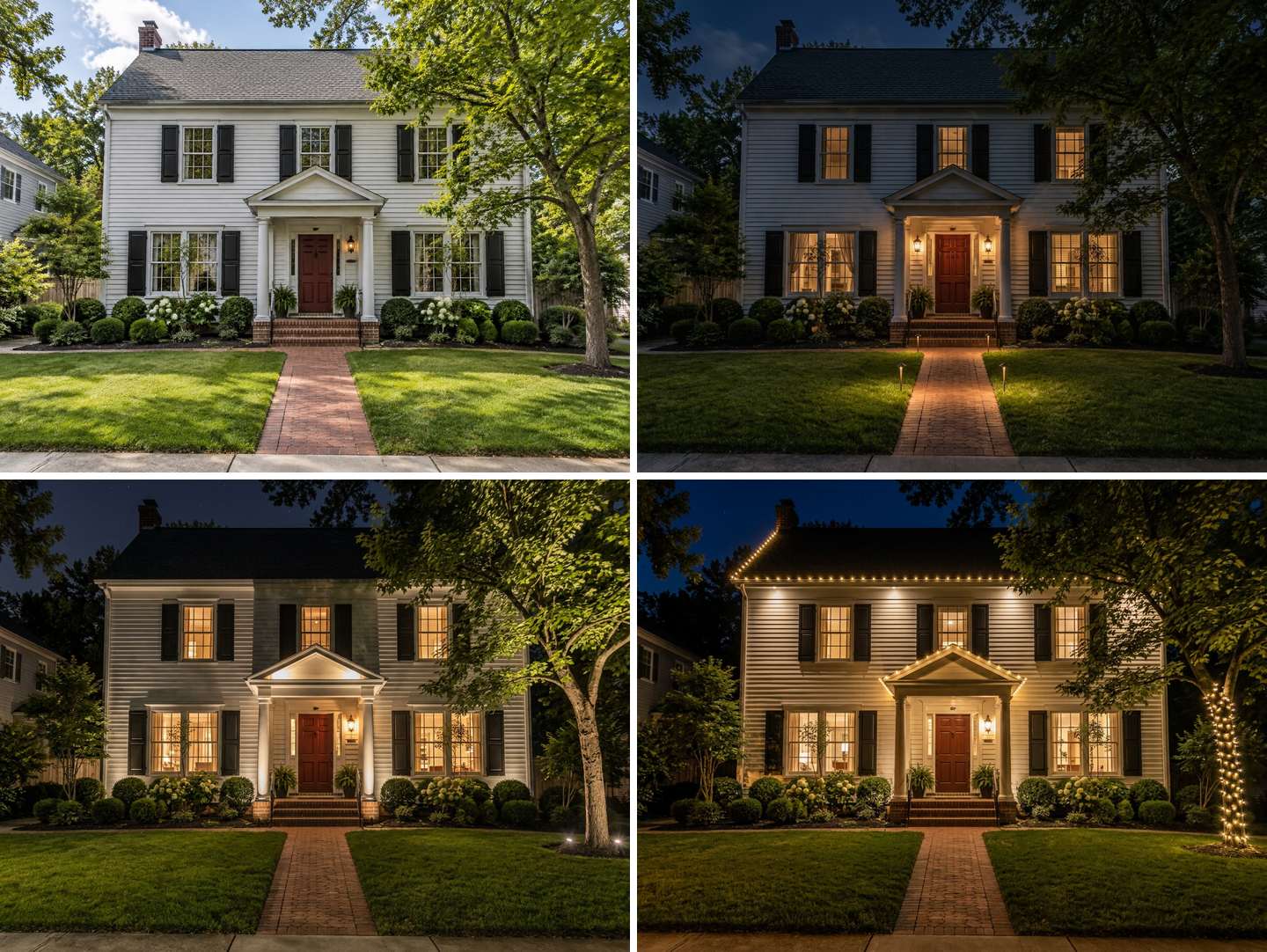 Real GenRoom results from one daytime photo. Top left: original. Top right: warm minimal. Bottom left: dramatic uplighting. Bottom right: festive string lights.
| Scheme | What we picked and typed | What came out | Who it suits |
|---|---|---|---|
| Warm minimal | Night + "two lanterns by the door, low path lights along the walkway, warm white, the rest of the facade dark" | Two door lanterns, low bollard path lights, the upper facade mostly in shadow | Quiet streets, traditional houses, anyone who hates glare |
| Dramatic uplighting | Facade lighting + Night + "uplights on the porch columns and the siding, two uplights into the maple" | Columns and pediment washed with light, the maple lit from below | Houses with strong architecture or a specimen tree |
| Festive string lights | Night + "warm white string lights along the roof eaves and the porch roof, wrapped around the maple trunk" | Bulbs along the eaves and the porch gable, a wrapped trunk | Holidays, parties, a temporary look |
Seen side by side, the choice gets easy. The uplighting version is the most "architectural", but it also lights the whole lawn far more than real uplights would (more on that below). The warm minimal version is the most realistic to install on a weekend. The string lights read as seasonal; if that is your goal, GenRoom's holiday modes (they switch on by themselves in season) decorate the entrance and add one line of lights while keeping the house as it is.
Two honest notes from this case. In the warm minimal run we wrote "two lanterns", but the house had only one, so the AI added a second lantern on the other side of the door where there may be no wiring. In the string-light run it also added soffit downlights nobody asked for. Both are typical: the model fills in the "complete" scheme it expects to see.
Case 3: a backyard, from evening to string lights
For yards the Studio has its own pair of tasks. On an ordinary daytime photo of a suburban backyard (paver patio with a table, lawn, a gravel path to a shed, a slatted fence and two trees) we ran Landscape lighting + Evening.
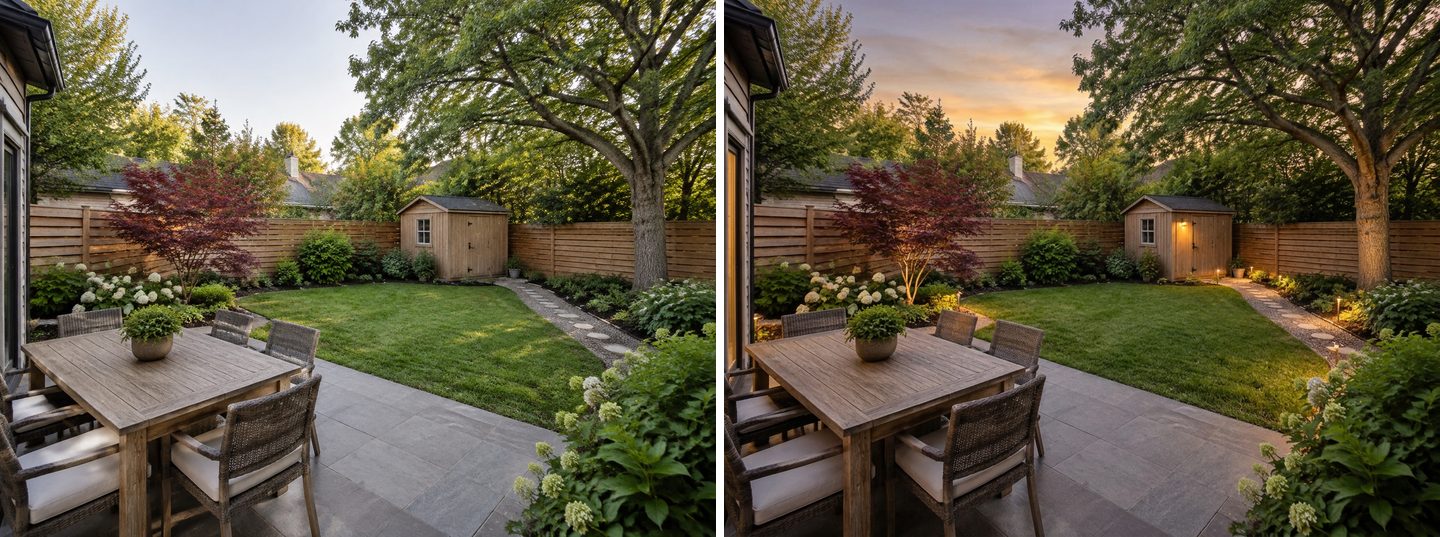 Real GenRoom result: Landscape lighting + Evening. Path lights follow the existing gravel path; the shed and the maple got a light each.
Then we wanted festoon lights over the table, in one exact place. That is a job for the brush: open the result in the editor, click Select area, choose Brush, paint the air above the patio and type what you want there.
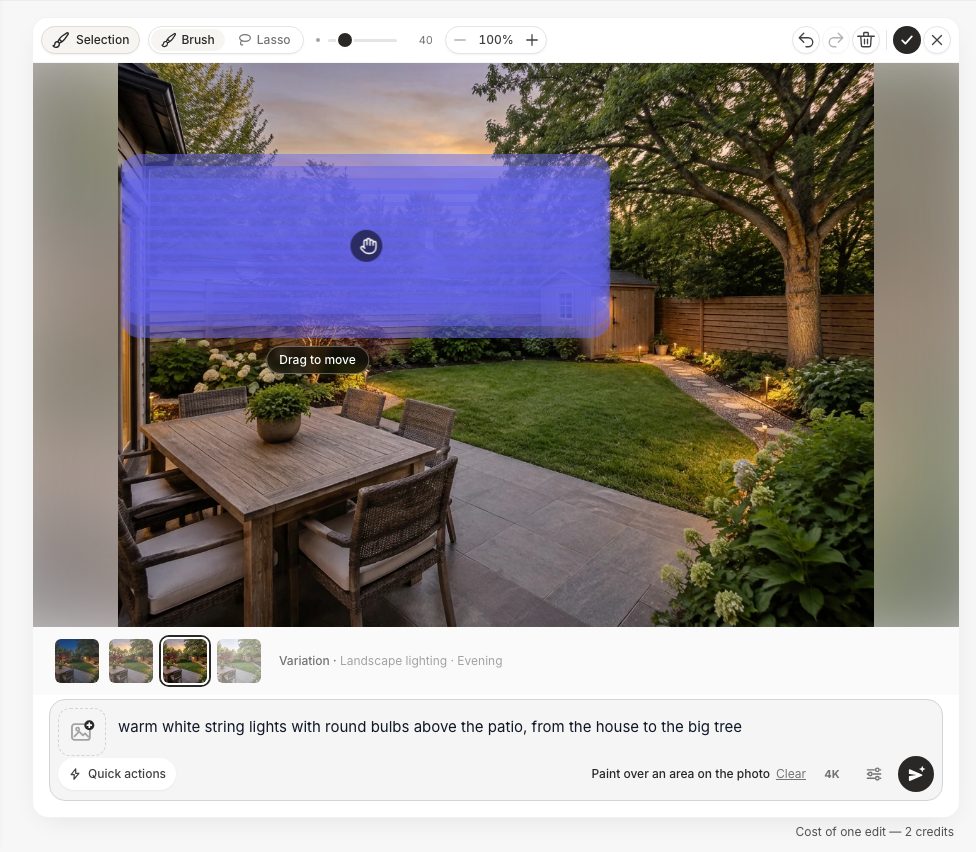 The editor's Select area brush: paint the place, describe the light. Only the painted area changes.
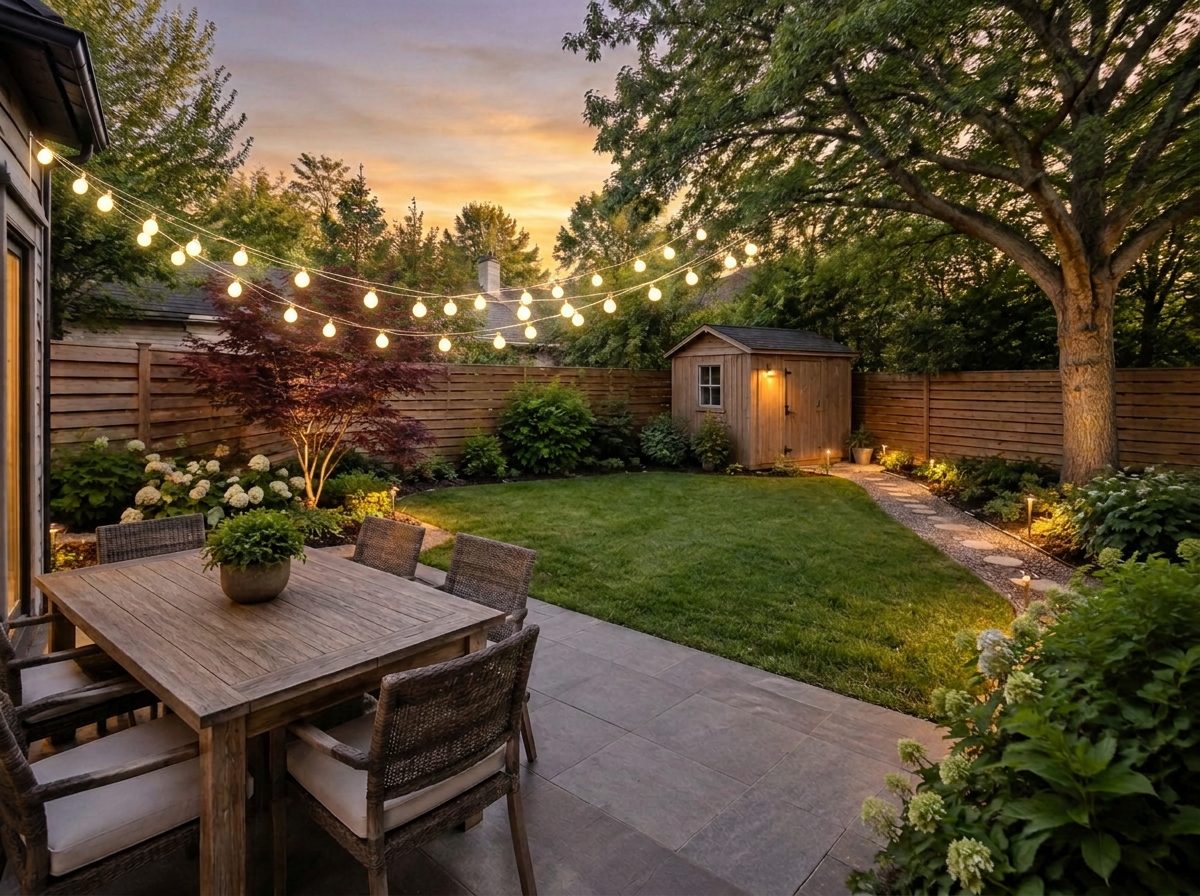 Real GenRoom result of the selection edit: string lights hung inside the painted area; the patio, table, lawn and path lights are unchanged.
This is the most precise way to test an idea like "bistro lights from the gutter to the oak": you decide where the strands go, the AI decides how they sag and glow. For full patio and terrace layouts, see AI patio design.
Create facade design with AI
Upload a photo of your home and get a new facade in the chosen style in 30 seconds. First generation is free.
Already have a design? Turn it into an evening or night view
Many night requests come after the design is done: "show this layout at night", "make the same scene a night shot". That is one quick action in the editor: open the result, click Quick actions, find Light & season and pick Night (or Sunset for a softer, golden-hour look).
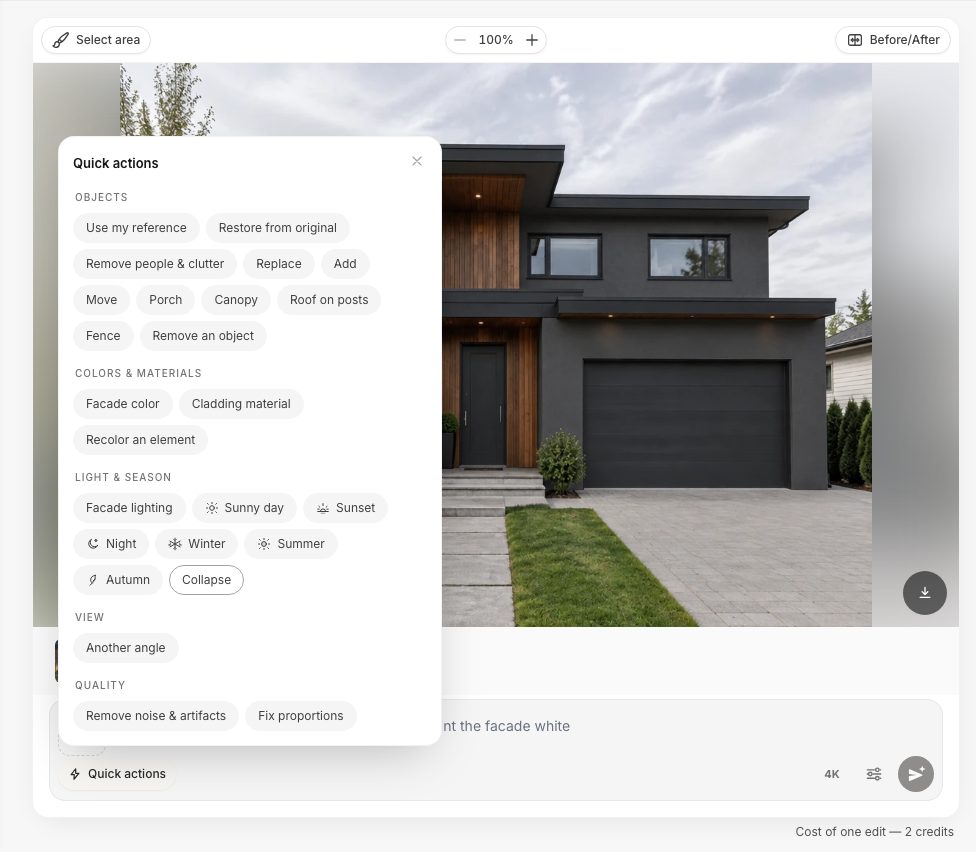 Editor → Quick actions → Light & season. Facade lighting, Sunset and Night work on any result, not only on the original photo.
Here we first repainted the modern house graphite with the Exterior colors mode, then applied Night to that design:
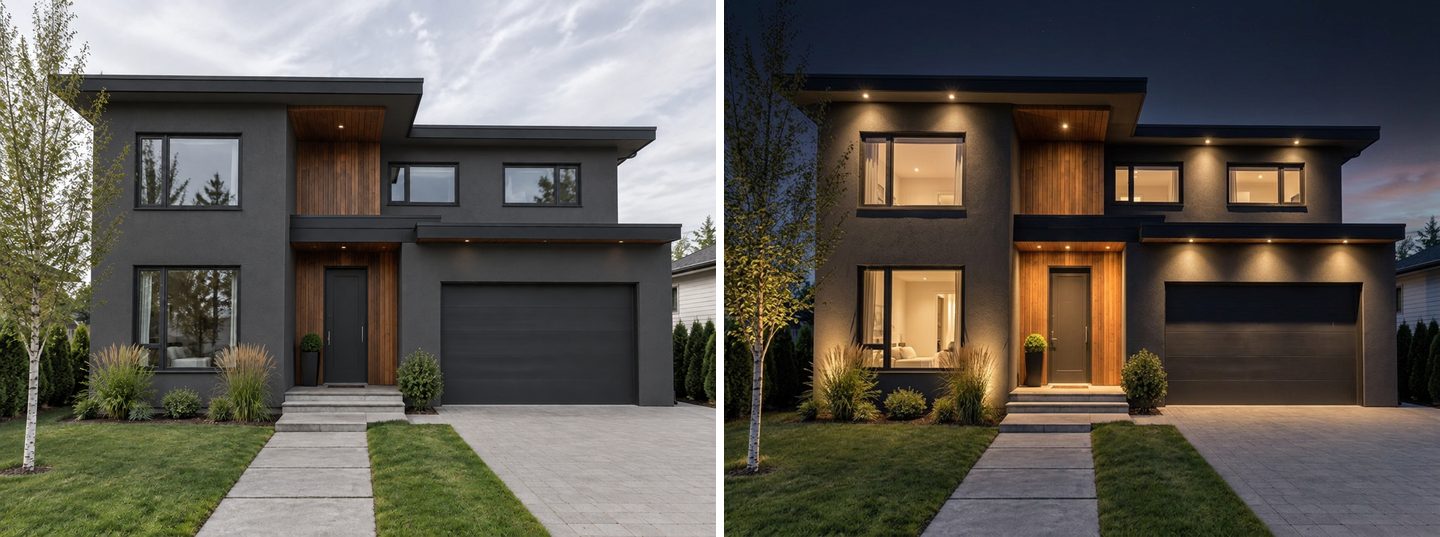 Real GenRoom results: Exterior colors (graphite) on the left, then the Night quick action on the right. The new color and the materials were kept.
Dark facades are where a night preview pays off most: graphite and black houses can disappear after dark, and the render shows how much the soffit lights and the warm wood panel do to keep the shape visible. One catch: in this run the small wall light next to the door disappeared. Always compare the night result with the day one and restore what you need (the editor has a Restore from original quick action).
The same works indoors. A finished living-room design plus the Evening light quick action gives you the lamps on and dusk in the window:
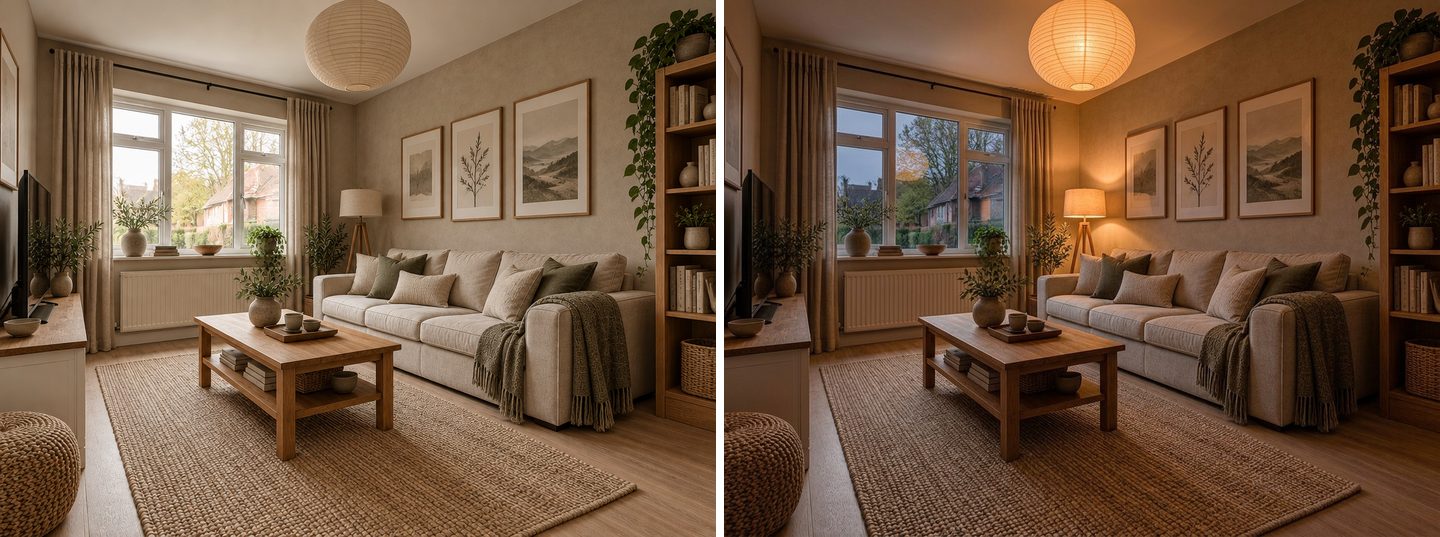 Real GenRoom results: a Japandi design of the room, then the Evening light quick action. Furniture and layout unchanged.
For indoor fixtures (pendants, spots, LED coves), see our room lighting design guide. For the mood side of evening light, see how to make a room cozy.
Exterior house lighting ideas worth testing on your photo
These are the ideas people request most, with what to type and what to watch for in the result.
| Idea | What to type (with Facade lighting or Night) | What the AI handles well | What to check |
|---|---|---|---|
| Wall sconces by the front door | "a pair of black lantern sconces either side of the door" | Size and style matched to the door | Whether a second sconce has wiring |
| Soffit downlights | "warm downlights in the soffit every two meters" | Even cones down the wall, modern look | Spacing on long walls; the AI may add them unasked |
| Uplighting columns or piers | "small uplights at the base of each column" | Grazing light on columns and pediments | Over-bright lawns and lit sky |
| Uplighting a tree | "two uplights into the maple" | Canopy lit from below | Tree size vs fixture count |
| Path lights | "low bollard path lights along the walkway" | Lights following the real path | They may be too many or too bright |
| Step and porch lights | "step lights in the porch stairs" | Safe-looking stairs | Tiny details; zoom in |
| Garage lights | "replace the lights above the garage with slim wall washers" | Fixture swaps | Use the brush for one fixture |
| LED strip on balconies | "a hidden LED strip under the balcony edge" | Linear glow | Paint the exact edge with the brush |
| String lights | "warm white string lights along the eaves" | Festive look, believable sag | Seasonal; holiday modes do it too |
If your house needs more than lighting (paint, a new door, a porch), start with the design and add the night view last. Our curb appeal guide and the AI exterior design page cover the daytime makeover.
What AI gets wrong with night lighting
AI night renders are persuasive, so it is worth knowing exactly where they mislead. Everything below happened in our test runs.
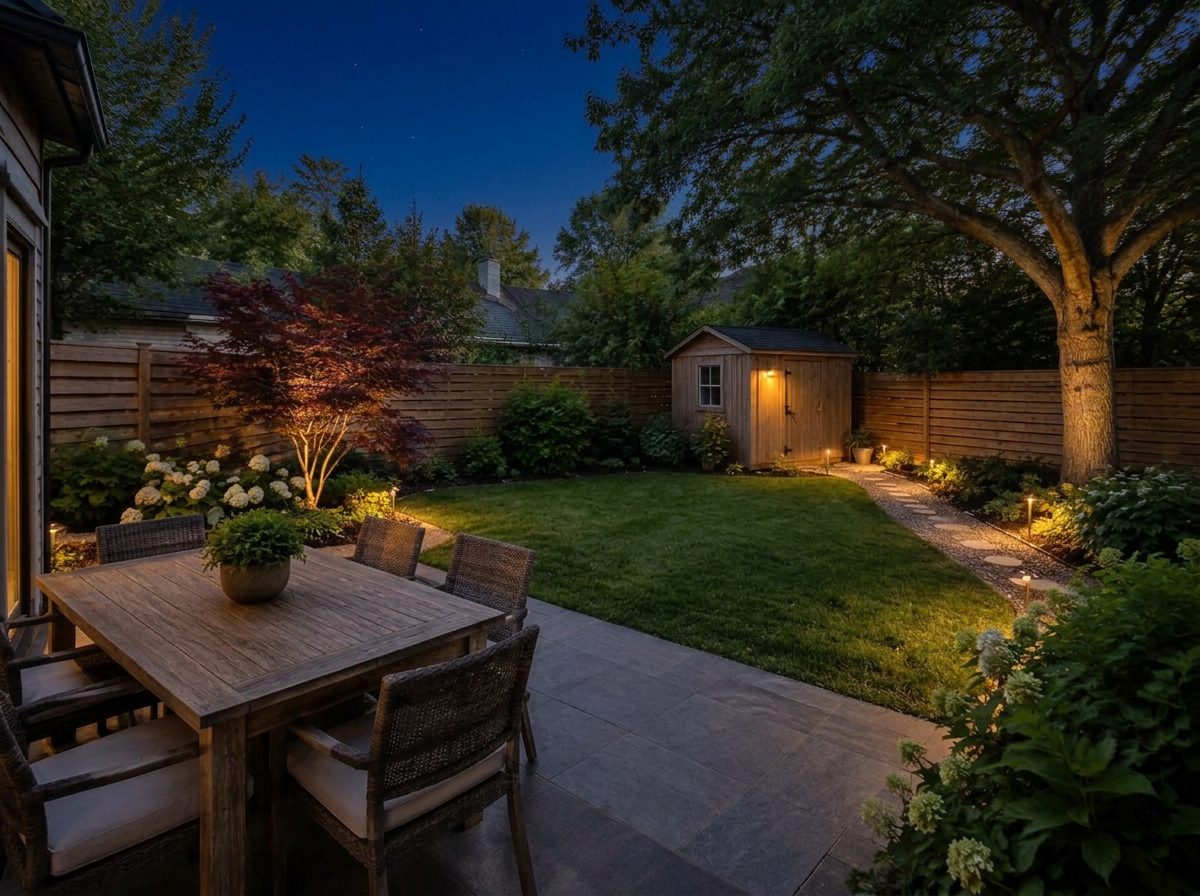 Real GenRoom result of "make it night" on the evening garden. The sky is night, but the lawn is lit like a stage: real path lights would leave most of the grass dark.
- It invents fixtures. A second lantern by the door, soffit spots on a house that has none, uplights in a bed with no power. The render shows a complete scheme, not your current wiring. Treat every new fixture as a question for the electrician.
- It over-brightens. Lawns, paths and walls come out far brighter and more even than real low-level fixtures would make them. Real uplights leave pools of light and plenty of dark between them; the AI often fills the gaps.
- It lights the windows and invents the rooms behind them. Nice for mood, irrelevant for planning, and occasionally odd (a bedroom in the living room).
- It can drop an existing fixture. Our graphite house lost its door sconce at night. Compare with the day photo and restore it.
- "Evening" is not "night". The yard's Evening task gives sunset light with the lights on. For full darkness, type "make it night" in the editor.
- It cannot calculate. No lumens, no beam angles, no cable runs, no transformer sizes. Use the picture to choose a look, then let a lighting supplier or electrician size it.
- Glare is invisible. A render does not show you what a bright bare bulb does to a neighbor's bedroom window. That is your job, and the next section helps.
Before you buy fixtures: a quick reality check
A night render tells you what you like. These points, from sources worth trusting, tell you whether it will work in real life.
- Light only what has a purpose, and aim it down. DarkSky International and the Illuminating Engineering Society publish five principles for responsible outdoor lighting: useful, targeted, low level, controlled and warm-colored. Shielded fixtures that point light down, where you need it, cut glare and light spill onto neighbors.
- Choose warm light. DarkSky's approval program for residential fixtures requires warm-toned light sources of 3000K or lower and fully shielded fittings. In the Studio, "warm white" in your note keeps the render in that range visually.
- Keep it low. Use the lowest light level that does the job. If the render already looks bright, the real thing at full power will look brighter.
- Add controls. Timers, dimmers and motion sensors keep lights on only when they are useful. Warm-white LED fixtures with a timer are the usual low-running-cost choice for facade lighting.
- Mind the wiring. Plug-in low-voltage kits are a common DIY route for path and garden lights; anything wired into the house circuit is a job for a licensed electrician under your local code.
Uplighting is the one technique that sends light upwards by design. If you want the dramatic scheme, keep it to a few narrow, shielded fixtures on specific features (columns, one tree) rather than washing the whole facade.
FAQ
Can I see what my house will look like at night with lights?
Yes. Upload a daytime photo of the house to GenRoom Studio, pick Facade lighting in Ready tasks → Lighting and Night in Time of day & season, and click Create design. You get the same house at night with an architectural lighting scheme in about 20–40 seconds. Add a short note to steer the scheme.
Is there a free outdoor lighting visualizer?
A new GenRoom account gets 6 free credits, and a design or an edit costs 2 credits, so you can try a few night versions of your house for free. Free results carry a watermark; paid packs remove it.
Can AI turn a daytime photo into a night photo?
Yes. In the editor, Quick actions → Light & season → Night turns any photo or design into a night view with the facade lighting on; Sunset gives a golden-hour version. For yards, use the Evening task or type "make it night". Always compare with the day photo: the AI may add or drop fixtures.
What color temperature is best for exterior house lighting?
Warm. DarkSky International recommends warm-colored light, and its approved residential fixtures use 3000K or lower. Warm white also flatters brick, wood and white siding more than cool white. In the Studio, type "warm white" in your note to keep the render consistent with that choice.
How do I show where to put each light?
Use the editor's Select area brush: paint the exact spot (the balcony edge, the space above the patio, one column) and describe the light. Only the painted area changes, so you can add lights one place at a time and keep the rest of the photo as it is.
Will the AI show exactly how bright my fixtures will be?
No. The render shows a look, not lumens. AI night images usually make lawns and walls brighter and more even than real low-level fixtures, and they cannot account for beam angles, spacing or wiring. Use the picture to choose a style and placement, then let a supplier or an electrician specify the fixtures.
The Bottom Line
Exterior lighting is easy to buy and hard to picture. A daytime photo, the Facade lighting and Night tasks, and a one-line note give you a believable night view of your own house in under a minute, and three versions side by side make the choice between warm minimal, dramatic uplighting and festive string lights obvious. Use the brush for exact placement and the Night quick action for any design you already like. Then check the picture against reality: fewer fixtures than the AI suggests, warm light, aimed down. Try it on your house in the Studio.