AI Sky Replacement for Real Estate Photos: Fix Gray Skies Fast
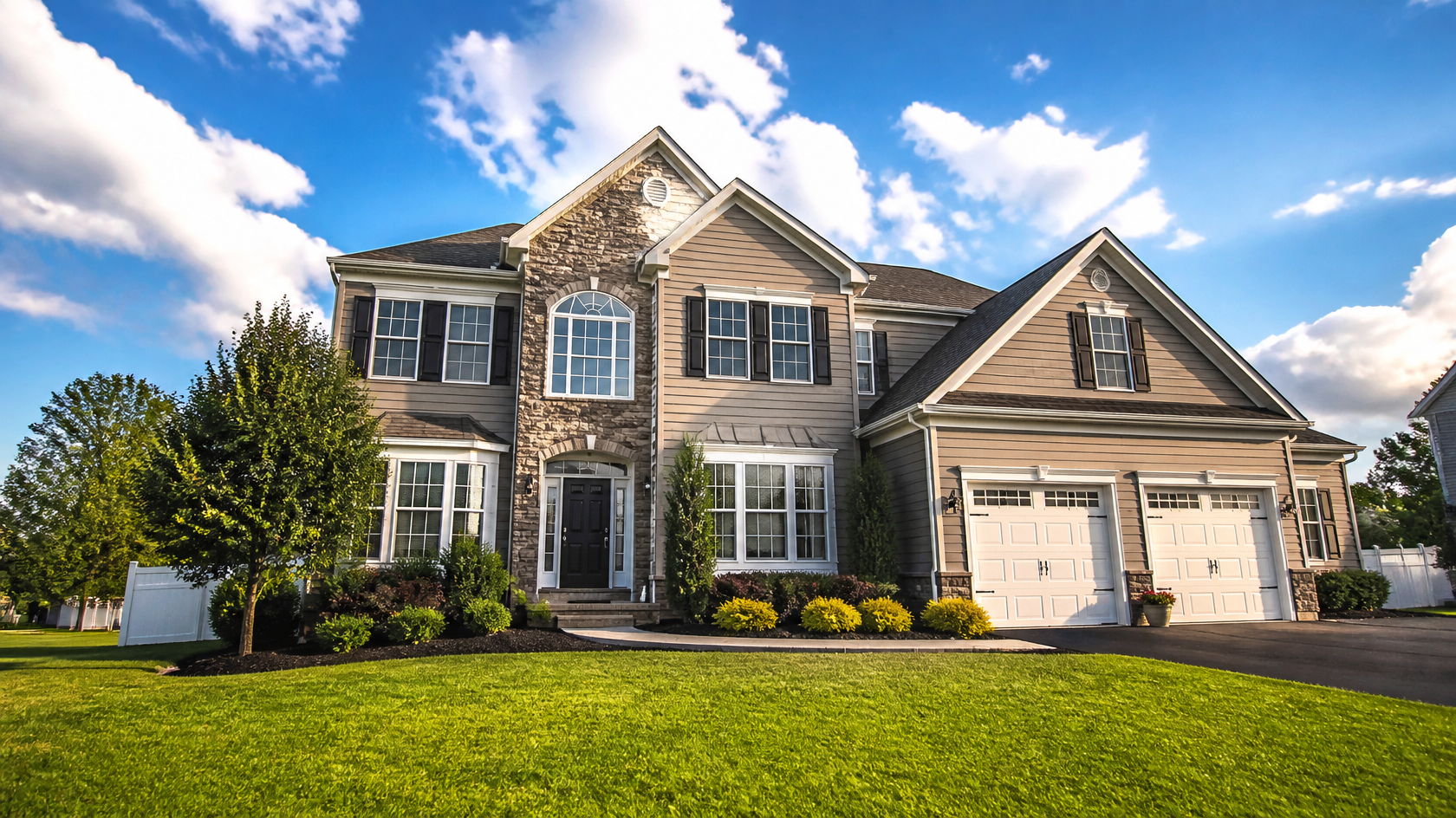
AI sky replacement swaps a dull, overcast sky in a real estate photo for a bright, natural-looking one in seconds. The AI detects the horizon line, masks the original sky, drops in a new one, and then rebalances the lighting, color temperature, and shadows across the whole frame so the result looks like it was shot on a good day — not photoshopped.
That last step is what separates a believable listing photo from a fake-looking one. In this guide you'll learn why the sky matters so much for listing clicks, how AI sky replacement actually works, how to keep your edits honest and natural, what MLS photo-disclosure rules generally expect, and how to run a full exterior clean-up — sky, lawn, and facade — using GenRoom. Everything here applies whether you shoot listings yourself or hire it out.
A bright, natural sky turns a flat exterior shot into a scroll-stopping lead photo.
Why does the sky matter so much for a listing?
The exterior shot is almost always the first photo a buyer sees, and it decides whether they keep scrolling. Photos are the single most influential element of an online listing: a 2021 National Association of Realtors study found that 89% of buyers said listing photos were the most useful feature in their home search, and roughly 87% treat photos as the primary factor in their first impression of a property.
That first impression is usually the front of the house against the sky. When the sky is flat, white, and gray, the whole image reads as low-effort — even if the home is beautiful. A bright sky does the opposite: it adds contrast, makes the roofline pop, warms up the siding, and signals "well cared for."
The business case is measurable. Redfin's analysis found homes marketed with professional-quality photos sell about 32% faster — roughly 89 days on market versus 123 — and, in the $200K–$1M range, sold for $3,400 to $11,200 more than comparable homes with weaker photos. Listings with strong photography also pull in around 118% more online views. You don't control the weather on shoot day. You do control whether the final image looks its best.
The problem: you can't always reshoot
Overcast skies are the most common reason an exterior photo underdelivers, and reshooting is often impractical.
 A flat white sky drains contrast and makes even a nice home look lifeless.
Sending a photographer back for blue sky costs time and money, and it can stall a listing that needs to go live now. Weather in many markets is overcast for weeks at a stretch. Twilight shoots require a separate booking. Sky replacement solves the timing problem: you fix the shot you already have, in minutes, without a second visit.
How does AI sky replacement work?
AI sky replacement works in four steps: horizon detection, sky masking, sky compositing, and light matching. The whole sequence runs automatically in seconds, but understanding each step helps you judge when a result is good and when it needs another pass.
- Horizon and sky detection. The model identifies exactly where the sky ends and the roofline, trees, chimney, and power lines begin. Good AI traces complex edges — bare branches, railings, antennas — without leaving a jagged cut.
- Masking. It separates the sky region from the building and landscaping so the replacement affects only the sky, not the house.
- Compositing. A new sky is dropped in behind the mask, sized and positioned to match the photo's perspective.
- Light and color matching. This is the important part. The AI adapts brightness, color temperature, and shadow direction across the entire image so the house appears to sit under the new sky. A warm sunset sky, for example, should warm the facade and window reflections — not just float behind an unchanged, cold-looking building.
A texture swap that skips step four is what produces the classic "fake sky" look: crisp blue behind a gray, flatly lit house that clearly belongs to a different day. Modern tools like GenRoom's sky replacement AI explicitly adjust window reflections, ambient color tint, and shadow behavior to match the chosen sky, which is why the output holds up at listing resolution.
 When lighting and color are matched to the new sky, even a dramatic golden hour looks real.
What the AI changes — and what it leaves alone
A well-built sky tool changes only the atmosphere, never the property. In GenRoom, the building structure, landscaping, camera angle, and composition stay exactly as photographed. What it modifies:
- The sky itself (clouds, color, time of day)
- Directional lighting — sun angle and the direction of shadows
- Window reflections, so glass mirrors the new sky
- Subtle ambient color tint on surrounding surfaces
- Optional atmospheric effects like light haze or falling snow
That boundary matters for ethics and MLS compliance, which we'll cover below. You're improving how the photo represents the home, not changing what the home actually is.
Natural vs. fake-looking results: how to keep it believable
The fastest way to spot a bad sky replacement is a mismatch between the sky and the ground. Keep these rules in mind and your edits will read as real photography.
| Choice | Natural result | Fake-looking result |
|---|---|---|
| Sky drama | Soft blue with light clouds | Over-the-top storm or neon sunset |
| Shadow direction | Sky implies sun from the same side as existing shadows | Bright sky, but shadows point the wrong way |
| Color temperature | Warm sky = warm facade and windows | Warm sky, cold blue-gray house |
| Cloud scale | Clouds sized to the photo's perspective | Giant clouds that dwarf the roofline |
| Season match | Sky matches the visible foliage and light | Summer-blue sky over bare winter trees |
Three practical tips from real estate photographers:
- Match shadows to the sun. If shadows fall hard to the right, choose a sky that implies light coming from the left. A good AI handles this, but always sanity-check it.
- Boring usually beats dramatic. A soft, clouded blue sky sells more homes than a cinematic thunderhead. The home should lead; the sky supports.
- Keep the weather plausible for your region and season. A brilliant desert-blue sky over a snowy New England street looks staged.
When you use GenRoom, you can generate a few sky options — clear blue, golden hour, soft overcast-but-bright — and pick the one that agrees with the existing shadows. If the first result looks off, the built-in AI Editor lets you refine it with words or a brush instead of starting over — in every plan, even Free.
Do MLS rules allow edited sky photos? Disclosure basics
Many MLSs allow sky replacement, but a growing number expect edited photos to be disclosed — and rules vary by board and region, so you must check your local MLS. This is the single most important compliance point, and it's one most quick tutorials skip.
Here's the general landscape as of 2026. Do not treat this as legal advice; treat it as a prompt to read your own MLS's photo policy.
- Corrective vs. deceptive edits. Editing that fixes how a photo represents reality — lens distortion, exposure, and in many boards' view, replacing a gray sky with a typical blue one — is often treated as standard practice. Edits that misrepresent the property or its setting are the problem.
- Disclosure is trending toward required. Several MLSs now ask that digitally altered images be marked in a "reasonably conspicuous manner" as altered, digitally altered, or AI altered, sometimes alongside an unedited version of the same photo. California's AB 723, for example, pushes disclosure for digitally altered listing images, and industry guidance specifically discusses sky replacement in that context.
- Honesty test. A safe rule of thumb: if the replaced sky reflects conditions that are typical and plausible for the property, you're on solid ground. If it invents a setting the buyer would never actually see, you're not.
- When in doubt, disclose and keep an original. Labeling an image as digitally enhanced and retaining the unedited file protects you and the seller.
Because policies differ between boards — even neighboring ones — the only reliable step is to open your MLS's current photo/advertising rules and confirm their stance on sky enhancement and disclosure before you publish. GenRoom's tool is built to keep the property itself untouched, which makes honest disclosure straightforward.
Create interior design with AI
Upload a photo of your room and get a professional design in 30 seconds. First generation is free.
The full exterior clean-up: sky, lawn, and facade
Sky replacement is the highest-impact single fix, but the best listing exteriors are enhanced as a set: sky, lawn, and facade together. GenRoom covers all three in one tool, so you can take one overcast photo to fully listing-ready without a photographer, a landscaper, or a paint crew.
 A complete exterior refresh — bright sky, healthy lawn, clean facade — from a single upload.
Here's a practical workflow:
- Start with the sky. Upload your exterior shot to the sky replacement tool and pick a sky that matches the existing shadows and season. This alone lifts the whole image.
- Green up a tired lawn. A patchy, brown, or dormant lawn ages a home. AI can restore it to a healthy green while keeping the layout intact — the same technique covered in our guide to AI front-yard design and curb appeal.
- Refresh the facade — as a visualization. Testing a new siding or trim color? Use GenRoom to preview paint options before anyone lifts a brush. For sellers weighing exterior updates, our AI exterior house design guide walks through style choices.
- Keep it honest. Green-lawn and sky edits generally read as corrective; a repainted facade is a visualization, not the current state, so label it clearly (e.g., "digital rendering of proposed color") to stay compliant.
For twilight-style hero shots — the ones that consistently outperform daytime photos in engagement — sky replacement can also convert a plain daytime exterior into a warm blue-hour image with glowing windows, no evening reshoot required.
 Twilight hero shots stop the scroll — and AI can create one from a daytime photo.
Where sky replacement fits in your listing kit
Exteriors are only half the story. Empty or dated interiors need their own treatment, and AI handles that too:
- Empty rooms can be furnished digitally — see AI virtual staging for real estate and our walkthrough on turning an empty room into a furnished pre-listing shot.
- Agents standardizing their whole workflow can start from the GenRoom for real estate agents hub, which ties exteriors, staging, and curb appeal together.
- Curb appeal specifically — the exterior-first impression that sky replacement supercharges — is covered in depth in our curb appeal AI design guide.
Is free AI sky replacement good enough?
Free tools can preview the idea, but listing-grade results usually need matched lighting and full-resolution export. Many free sky changers do a flat texture swap without adjusting the house's lighting, which produces exactly the fake look agents want to avoid. Others cap resolution or watermark the output, both dealbreakers for MLS use.
GenRoom's free account (no credit card) gives you 6 credits to test sky replacement, so you can see the quality on your own photo before committing. Free results carry a watermark; paid packs remove it, and images may be used commercially on every plan. Current pricing (one-time credit packs, no subscription):
| Plan | Price | Credits | Best for |
|---|---|---|---|
| Free | $0 | 6 credits (≈3 designs) | Testing the quality, no card needed |
| Start | $9.99 | 36 credits (≈18 designs and edits) | An occasional listing or two |
| Basic | $19.99 | 100 credits + free 4K | Regular agents, refined results |
| Pro | $39.99 | 300 credits + free 4K + private designs | High-volume agents and teams |
For real estate work, the AI Editor (every plan, even Free) is the feature that earns its keep: if a sky's shadows or color don't sit right, you fix it with words or a brush rather than regenerating blindly. The free 4K on Basic and Pro matters when your MLS or brokerage requires large, print-quality files.
Frequently asked questions
Is it legal to replace the sky in a real estate photo?
In most places, yes — sky replacement is widely used and often treated as a corrective edit. The catch is disclosure: a growing number of MLSs require digitally altered photos to be labeled as such, and rules vary by board. Replace skies to reflect plausible, typical conditions, check your local MLS's photo policy, and disclose when in doubt.
Will an AI-replaced sky look fake?
Not if the lighting matches. The fake look comes from swapping in a bright sky without adjusting the house's brightness, color temperature, and shadows. Tools that rebalance the whole frame to the new sky — including window reflections and shadow direction — produce results that read as genuine photography. Choosing a soft, believable sky over a dramatic one also helps.
How long does AI sky replacement take?
Seconds. With GenRoom, you upload an exterior photo, ask for a clear day, a sunset or a night view, and get a photorealistic result in well under a minute. That's the core advantage over reshooting or manual editing, which can take a return visit or an hour in Photoshop.
Is there a free AI sky replacement tool?
Yes. GenRoom gives you 6 credits on a free account, no credit card required — enough to test sky replacement on your own photos. Free results carry a watermark; watermark-free exports start with the $9.99 Start pack, and images may be used commercially on every plan.
Can I change the sky and enhance the rest of the exterior at once?
Yes. Beyond the sky, GenRoom can green up a tired lawn, preview a new facade color, and even convert a daytime shot into a twilight hero image. Keep corrective edits (sky, lawn) separate from visualizations (proposed paint colors) in your disclosures so buyers aren't misled.
Does sky replacement change the house itself?
No. A properly built tool masks and edits only the sky and its lighting effects. In GenRoom, the building structure, landscaping, camera angle, and composition stay exactly as photographed — only the atmosphere and matched lighting change.
The bottom line
The exterior photo is your listing's handshake, and a flat gray sky gives a weak one. AI sky replacement fixes that in about 30 seconds: it detects the sky, drops in a natural replacement, and — crucially — matches the lighting so the whole image looks like it was shot on a great day. Keep the sky believable, match it to the existing shadows, disclose edited images per your local MLS rules, and pair it with lawn and facade clean-up for a complete, listing-ready exterior.
Try it on your own overcast shot — GenRoom's AI sky replacement is free to test with a free account (no credit card), and results come back in seconds.