AI Halloween House Decorator: Decorate Your Home From a Photo
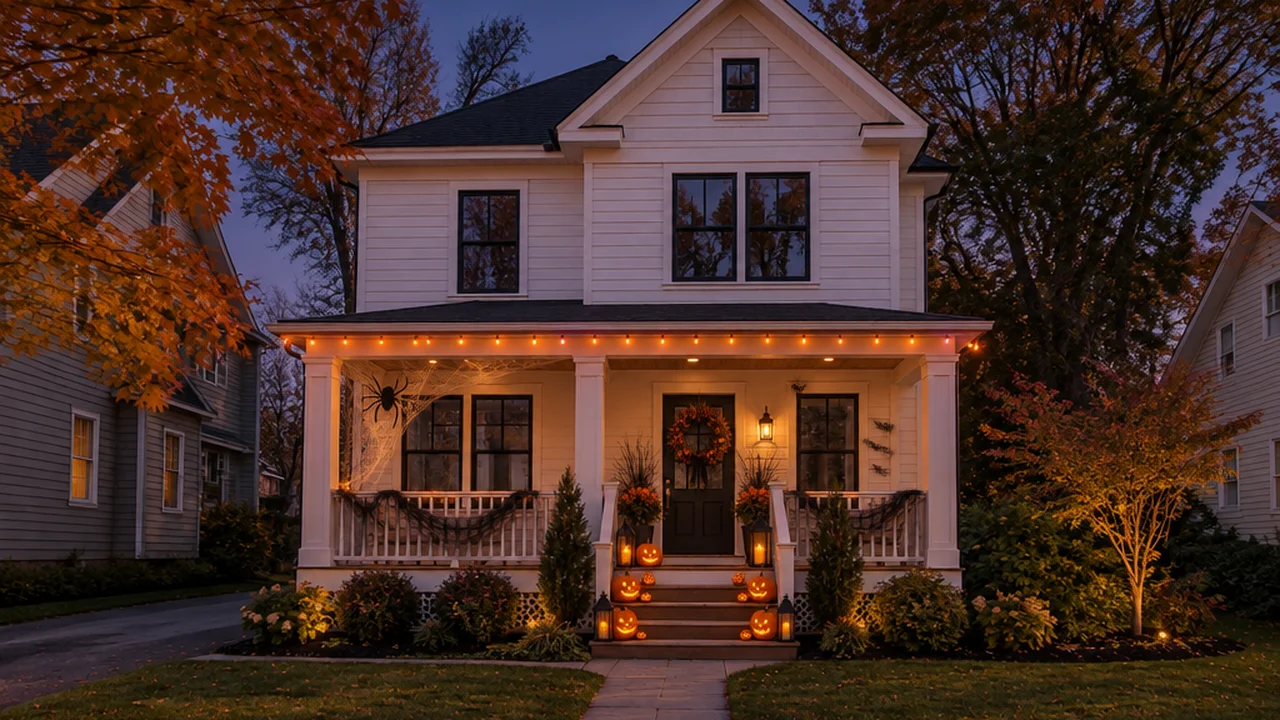
An AI Halloween house decorator takes a photo of your own room, porch or yard and returns the same space decorated for Halloween — carved jack-o'-lanterns with glowing faces, candles and lanterns, a wreath, cobwebs, bats and a skeleton or two — while the walls, furniture, windows and camera angle stay exactly as they are. The scene turns into early evening, so the decor glows the way it will on October 31. It takes about half a minute, and you see the result on your home, not on a Pinterest house that looks nothing like yours.
GenRoom has a seasonal Halloween mode in its design Studio, available every year from October 1 to November 1. We ran it on five spaces — a living room, a house front, a front porch, a dining room and a front yard. Every "after" picture in this guide is the real, unedited output of the Studio.
Below: what the decorator changes and what it never touches, how to do it in three steps, real before-and-after examples, how to steer the details, and how to turn a preview into real decor on a budget.
Why Preview Halloween Decor on Your Own Photo?
Decorating is one of the most common ways people celebrate. According to the National Retail Federation's 2026 Halloween survey, 74% of Americans plan to celebrate, 42% plan to decorate their home or yard, and decorations account for $4.3 billion of the expected $13.5 billion in Halloween spending. Nearly half of consumers (47%) say they are using AI platforms and tools to support their Halloween shopping this year.
The problem with inspiration photos is that they show someone else's house. A porch idea that looks great on a deep Victorian veranda can look cluttered on a narrow stoop; a dark gothic mantel can swallow a small living room. Previewing on your own photo answers the real questions before you buy anything:
- Does it fit the space? Jack-o'-lanterns, lanterns and cobwebs at the right scale for your steps and railing.
- Does it match the house? Orange glow on a white farmhouse, or a darker scheme on a grey one.
- How much do you actually need? A few strong groupings almost always beat twenty scattered props.
What an AI Halloween House Decorator Changes — and What It Never Touches
The difference between a Halloween decorator and an ordinary AI image generator is that the decorator works on your photo and keeps your home intact.
What stays exactly the same:
- Walls, windows, doors, floors and ceiling
- Your furniture and its placement
- The camera angle and framing
- The architecture of the house — siding, roof, porch, steps, railings, fences and paths
What gets added or changes:
- Carved jack-o'-lanterns with glowing faces, in groupings at the focal points — the mantel, the table, the steps, the gate
- Candles and lanterns, one line of lights
- Two or three spooky accents chosen to suit the space: a skull or a skeleton, a cobweb with a spider, a small flock of bats, a ghost hanging from a tree
- The time of day: the scene turns into early evening, so the decor is the main light
In GenRoom's Halloween mode the decor is planned as one concept — classic spooky, haunted gothic, witchy, ghostly, or playful for a kids' room — with three to five strong compositions and room to breathe, not a prop on every surface. Nothing outside is built or rebuilt: no new fences, steps or paving appear.
How to Decorate Your House for Halloween With AI in 3 Steps
We'll walk through it on one house — the same front you'll see in the examples below.
Step 1: Upload a photo
Open the GenRoom Studio and upload a photo of the room, the front of the house, the porch or the yard. A normal daytime photo is fine — the mode turns it into evening. Shoot straight on, from the angle a guest would see first, with the whole area you want to decorate in the frame.
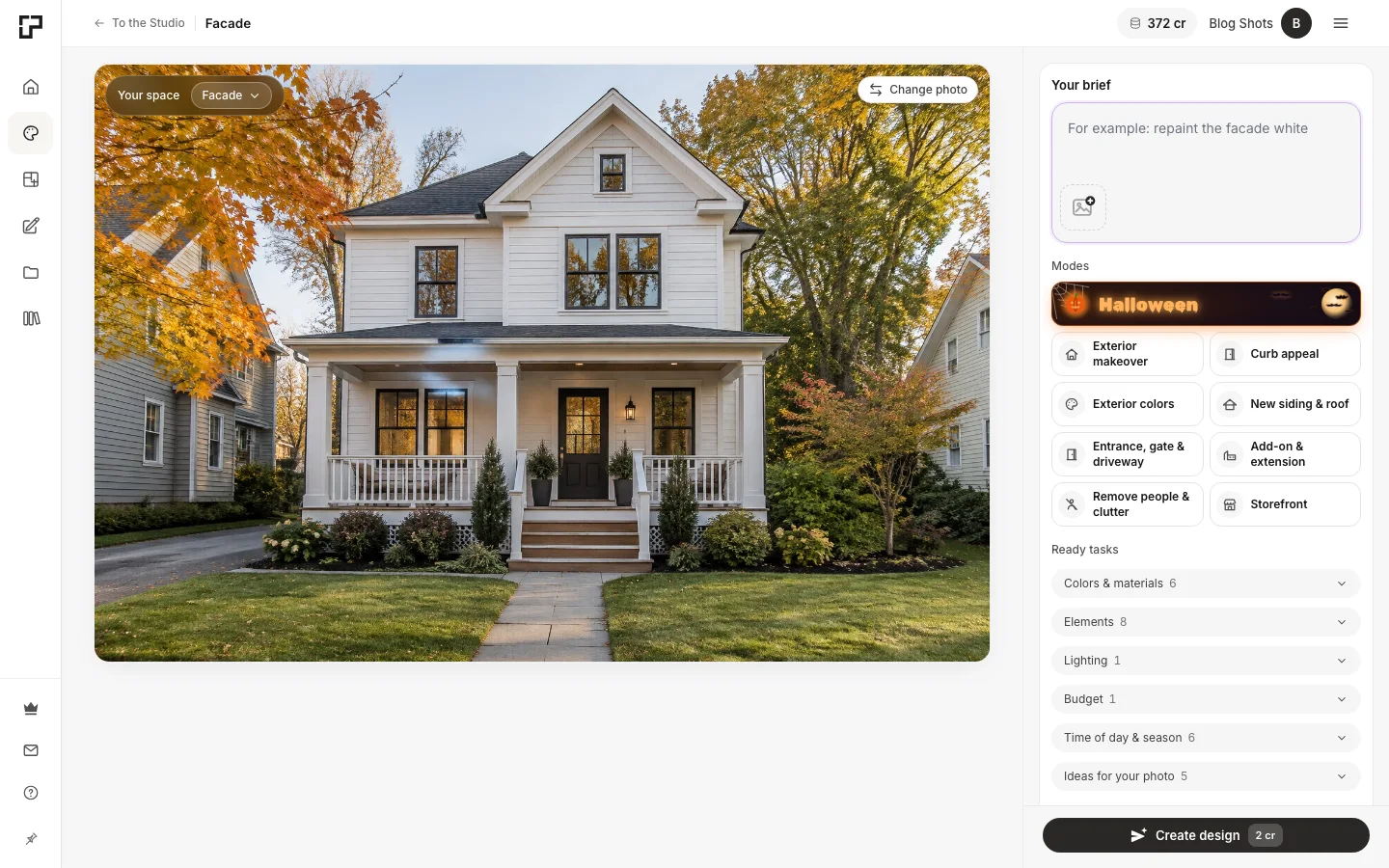 The photo is uploaded. During the season, Halloween is the first tile in the list of modes.
GenRoom detects whether it's a room, a facade or a yard. If a yard photo also shows the house, check that the space type says "Yard", so the decor goes along the fence and the path rather than only on the porch.
Step 2: Choose the Halloween mode
Pick Halloween. It appears in your brief; you can add your own wishes underneath — for example "playful for kids" — and press "Create design". One design costs 2 credits.
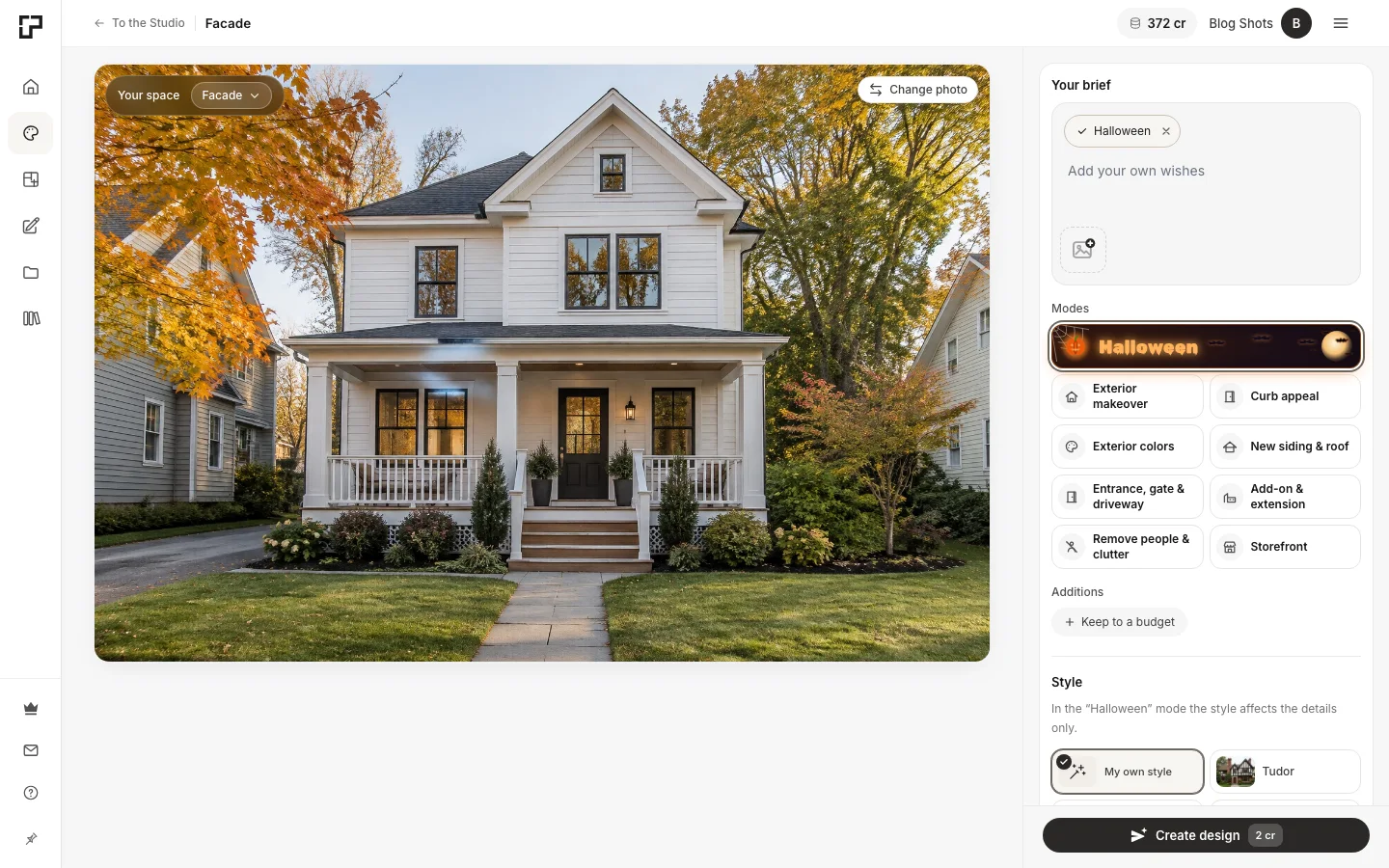 Halloween selected for the same house. The style only adjusts the details in this mode.
Step 3: Compare and download
In about half a minute you get the decorated version, with a before/after slider to check that nothing but the decor and the light has changed. If one detail is off — a wreath you don't like, a figure you'd rather not have — fix it with words or a brush: select the area and describe the change. Then download the picture and use it as your shopping and placement plan.
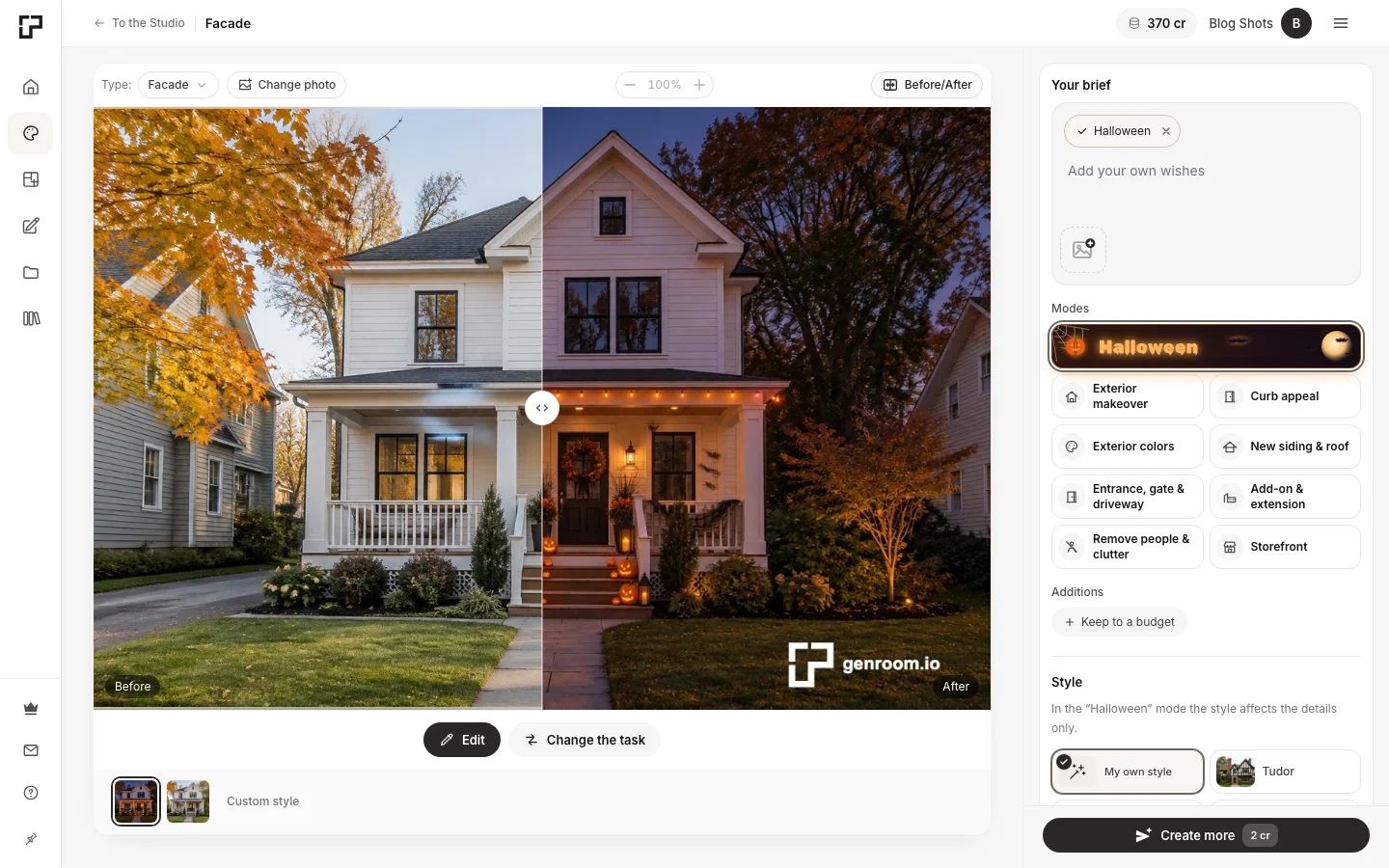 The before/after slider on the same house. Same walls, trees and angle — only the decor and the hour are new.
Before and After: Five Spaces Decorated by AI
All five "before" photos are ordinary daytime pictures without any seasonal decor. The "after" pictures are what the Halloween mode returned, with no wishes typed in.
Living room
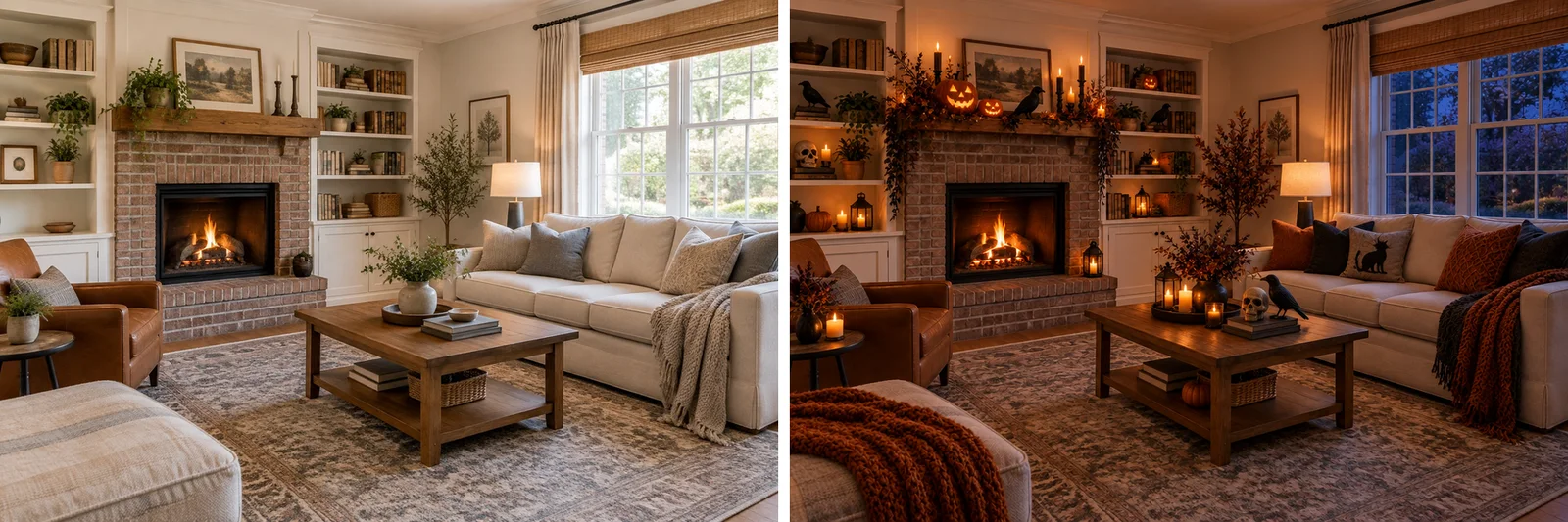 The mantel becomes the main composition, the coffee table the second one; a skull, a pair of crows and a black cobweb garland do the spooky work. The shelves, sofa and rug are untouched.
The living room is where restraint pays off: one dressed mantel, one centerpiece, a few candle groups and a handful of spooky accents read as Halloween at first glance without turning the room into a prop shop.
Front of the house
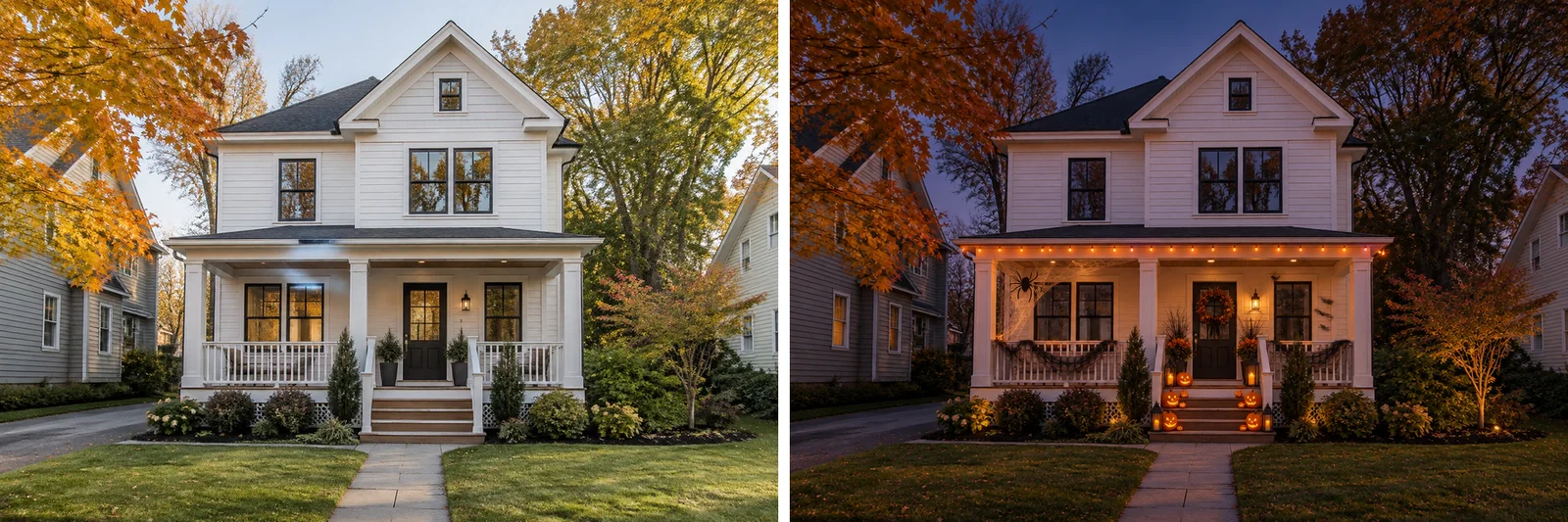 One line of lights along the porch, glowing jack-o'-lanterns on the steps, a wreath and cobwebs between the columns. The lawn and the path stay clean.
Front porch and door
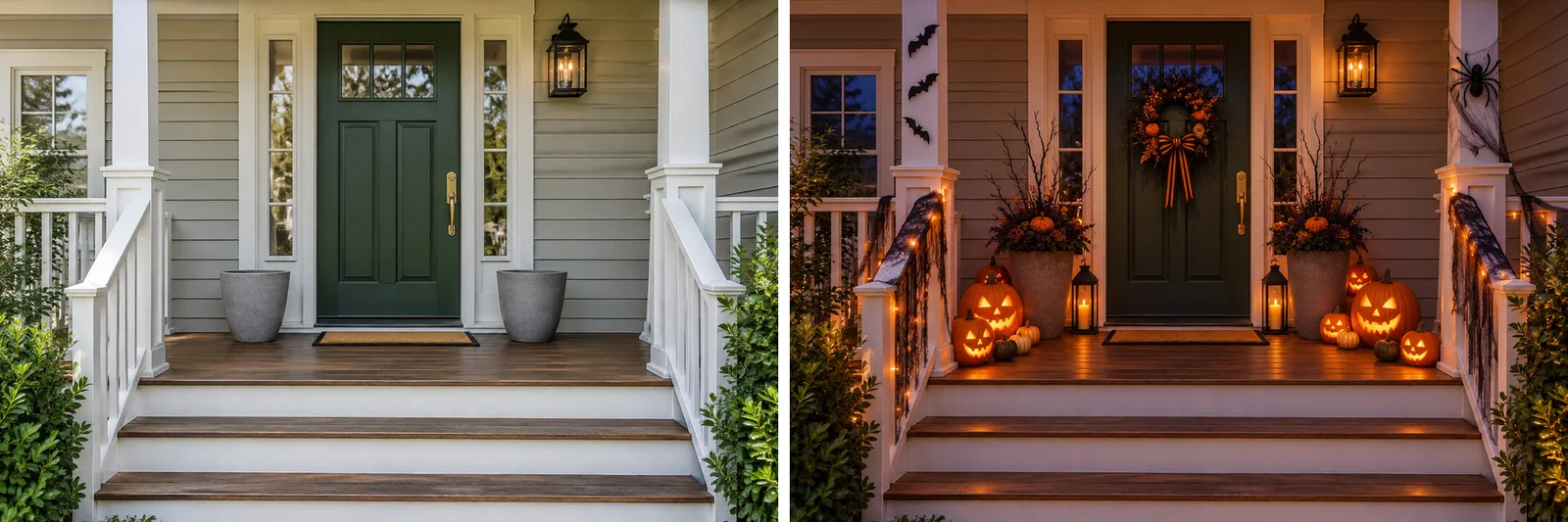 The existing planters stay; jack-o'-lanterns and lanterns gather at both sides of the door, with a few bats and a cobweb for the spooky note.
Dining room
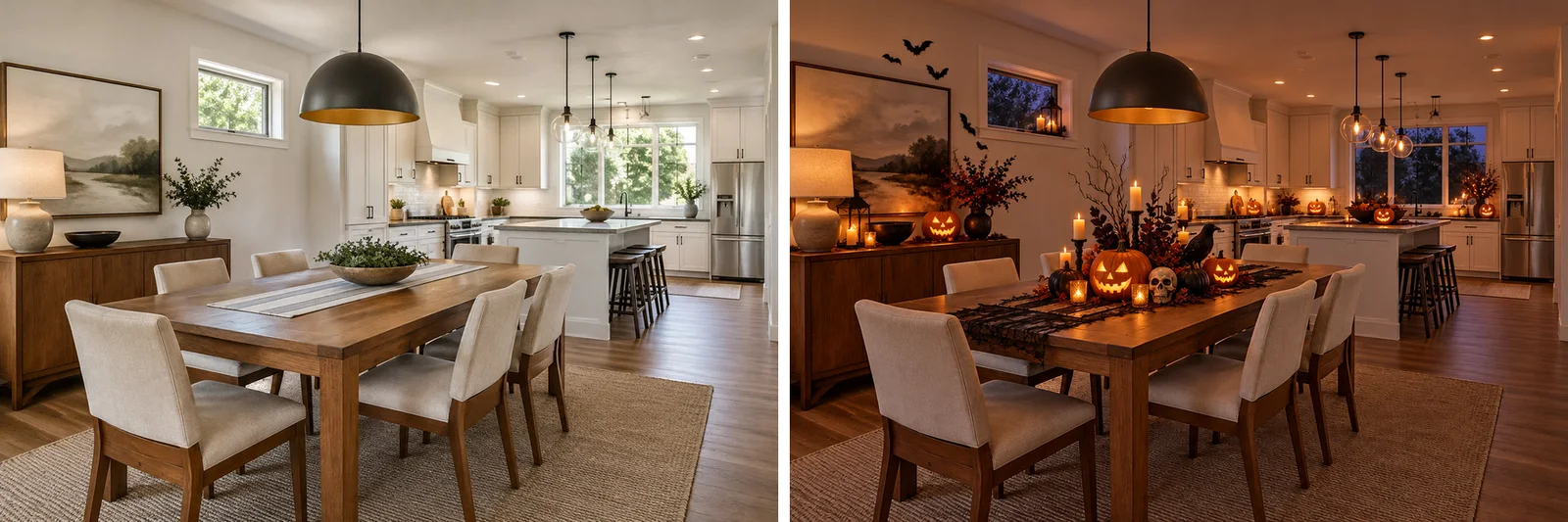 A Halloween dinner setting: the table as the main composition, the kitchen island as the second, bats above the sideboard.
Front yard
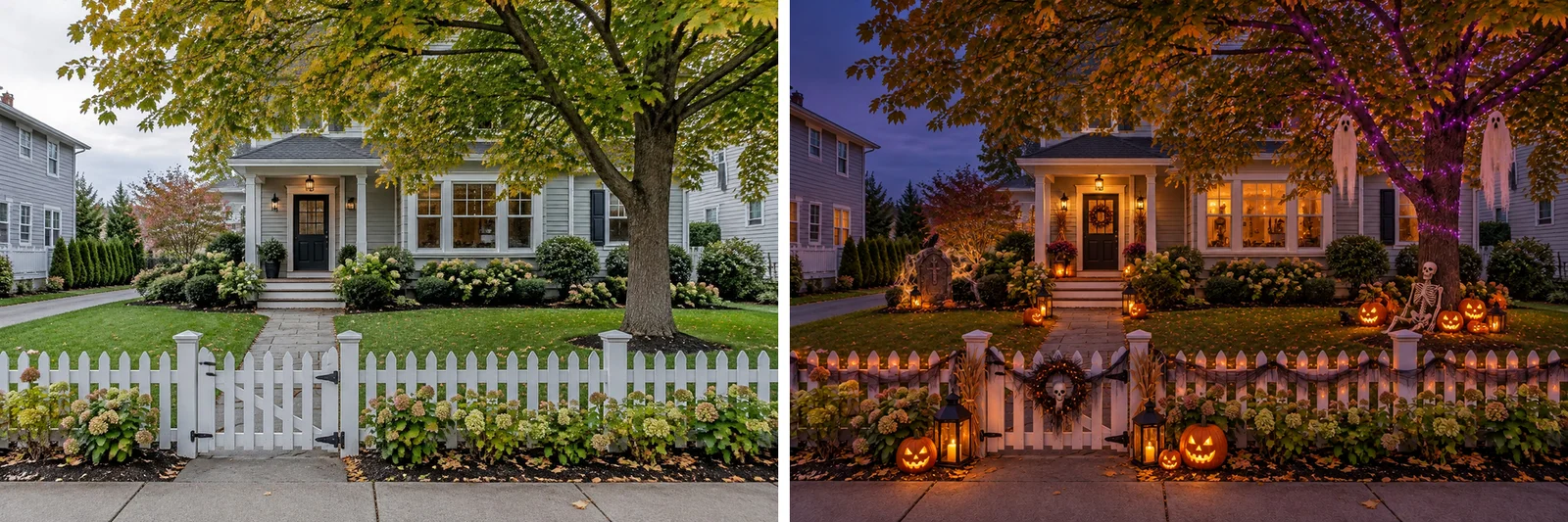 Jack-o'-lanterns at the gate, a skeleton under the tree, ghosts in the branches and one tree lit in purple — the places a trick-or-treater actually walks past.
Steering the Details: Your Own Wishes
The mode chooses one Halloween concept on its own — classic spooky, haunted gothic, witchy, ghostly or playful — to suit the space. You can nudge it by typing a few words into the wishes field. Here is the same living room without wishes and with "playful for kids: friendly ghosts and smiling pumpkins":
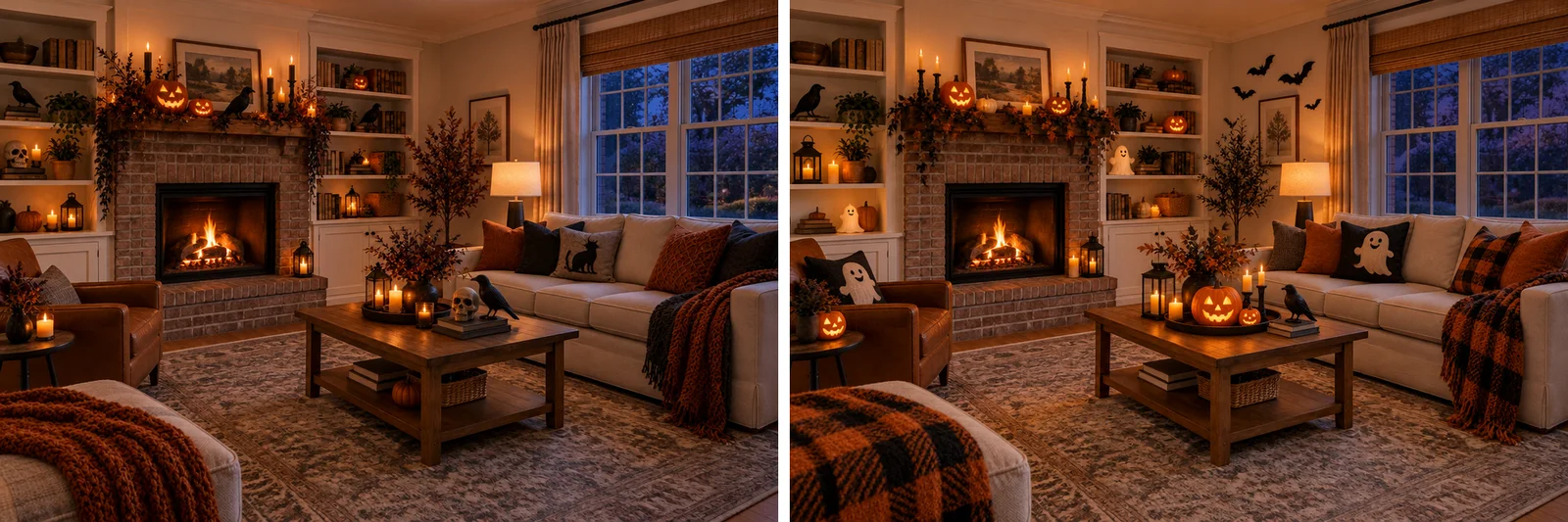 Left: no wishes. Right: "playful for kids" — ghost cushions and softer details instead of the skull.
Be realistic about what a wish does: it steers the details, while the Halloween essentials — the evening light and the glowing jack-o'-lanterns — stay. If you want a completely different palette, for example an all-white Halloween, generate the design first and then change the colors with an edit in words or with the brush.
Halloween Porch and Front Door Ideas You Can Preview First
The porch is the most photographed and most visited part of a Halloween house. Ideas that consistently looked good in our previews:
- Jack-o'-lanterns that step up the stairs. Two or three per step, mixed sizes, larger at the bottom — and carved faces that glow.
- One strong wreath. Dried leaves, black branches or a single bow — more elegant than a plastic skeleton and reusable through autumn.
- Lanterns in pairs. Flanking the door and the bottom step; they frame the entrance at night.
- Planters as vases. Fill existing planters with dried grasses, branches or mums instead of buying new stands.
- One line of lights. Along the porch railing or the eaves — not the whole outline of the house.
- Spooky accents, not a theme park. A cobweb with a spider in one corner and a few bats on the siding are enough.
Preview two of these combinations on your own porch photo and keep the one that suits the house. For year-round entrance ideas — door colors, lighting, planters — see our guide to AI front door and porch design.
Create interior design with AI
Upload a photo of your room and get a professional design in 30 seconds. First generation is free.
Living Room and Bedroom Halloween Decor Ideas
Inside, decor competes with furniture, so restraint matters more:
- Dress the mantel or the main shelf — one focal point instead of every surface.
- Swap textiles, not furniture. A rust, black or plaid throw and two cushion covers change the whole room for a few dollars.
- Group candles in threes at different heights; use LED candles near textiles and anywhere children or pets can reach.
- One centerpiece on the coffee or dining table — a jack-o'-lantern, a few small pumpkins and dried leaves.
- Bedroom: keep it soft. Warm string lights, a moody throw and a small jack-o'-lantern on the nightstand; leave skulls and skeletons for shared rooms.
From Preview to Real Decor: What to Buy and What to DIY
The AI preview is your shopping list. Before ordering anything:
- Count the items in the picture. Our previews used roughly 4–10 jack-o'-lanterns and pumpkins, a few lanterns or candle groups, one line of lights and two or three spooky accents per space — usually less than people buy.
- Buy the reusable base, DIY the rest. Lanterns, a wreath form, LED candles and a skeleton last for years; real pumpkins, dried leaves and branches are cheap or free.
- Carve or paint. Carved faces give the glow; white, black or metallic spray paint gives a different palette from grocery pumpkins.
- Keep it after October. Wreaths of leaves, white pumpkins and lanterns carry straight into an autumn look — take down only the bats, cobwebs and skeletons.
NRF expects the average shopper to spend $115.14 on Halloween in total this year; a preview helps make sure the decor share of it goes on things that actually suit your house.
How to Take a Photo That Works
The better the photo, the more convincing the decorated version:
- Daylight is fine. The mode turns the scene into early evening; a sharp, well-lit daytime photo gives it the most detail to work with.
- Straight on, from a guest's viewpoint. For a facade, stand on the sidewalk or at the end of the path; for a room, shoot from the doorway.
- Whole area in frame. Include the steps, the door and both sides of the porch if you want them decorated.
- No people in the frame. If there are, use the "Remove people & clutter" mode first — see how it works in our guide to AI furniture and clutter removal.
- Landscape orientation for houses and porches; it gives the decor room on both sides.
What AI Gets Wrong — and Halloween Safety
Previews are previews. Keep these limits in mind:
- Scale is an estimate. A pumpkin that looks right in the picture may be a different size in the shop; measure your steps and planters.
- Yards can be read as facades. If the house is in the picture, check the space type; otherwise the decor may cluster on the porch.
- The evening is staged. The AI draws the lanterns and lights glowing; you still need outdoor-rated lights and somewhere to plug them in.
- Wishes steer, they don't override. A few words change the details, not the whole palette — use an edit for that.
And because a preview won't trip anyone up but a real porch can:
- Keep steps and paths clear — decor on the sides, never in the walking line.
- Use LED candles in jack-o'-lanterns, lanterns and near dried leaves, garlands and costumes.
- Use outdoor-rated extension cords and keep cords off the walking path.
- Make sure the house number stays visible and the porch light works.
ChatGPT vs a Dedicated AI Halloween Decorator
You can ask a general chatbot to "decorate my house for Halloween" and attach a photo. It will often give good ideas — and sometimes a picture. The difference shows up in the details:
| General AI chatbot | Dedicated decorator (GenRoom Halloween mode) | |
|---|---|---|
| Keeps your house unchanged | Not guaranteed — the image can be redrawn | The home, furniture and angle stay; only decor and the hour change |
| Decor concept | Varies with the prompt | One concept, three to five strong compositions |
| Before/after comparison | No | Built-in slider |
| Fix one detail | Re-prompt the whole picture | Select an area with a brush and describe the change |
| Works for rooms, facades and yards | Depends on the prompt | Detects the space type |
For brainstorming, a chatbot is fine. For a picture of your house that you can actually decorate from, a dedicated tool is faster and more reliable.
FAQ
How do you get AI to decorate your house for Halloween?
Upload a photo of the room, porch or front of the house to an AI design tool with a Halloween mode — for example GenRoom's Studio, where the Halloween mode is available from October 1 to November 1 — choose the mode and press "Create design". In about half a minute you get the same space decorated at dusk, with a before/after slider.
Is there a free AI that can decorate my house?
GenRoom gives 6 free credits when you create a free account (no credit card), and one Halloween design costs 2 credits — enough for three previews. Free results carry a watermark; one-time credit packs start at $9.99, with no subscription.
Will the AI change my house or furniture?
No — that is the point of a dedicated decorator. The walls, windows, furniture, architecture and camera angle stay as they are; only the decor is added and the scene turns into early evening. If a detail still changes, fix it with a brush edit or generate again.
Can I use ChatGPT to decorate a room for Halloween?
You can get ideas and sometimes an image, but a general chatbot doesn't guarantee that your room stays the same, and editing one detail means re-prompting the whole picture. A dedicated tool keeps the room, adds a before/after comparison and lets you fix one area at a time.
How do I decorate my living room for Halloween cheaply?
Pick one focal point (the mantel or a shelf), swap textiles instead of furniture, group candles in threes, and add one centerpiece with a jack-o'-lantern and dried leaves. Preview it on your photo first so you buy only what the picture actually uses.
Can I decorate the outside of my house with AI too?
Yes. The Halloween mode works on facades, porches and yards. For a yard photo that includes the house, check that the space type is "Yard" so the decor goes along the fence and the path, not only on the porch.
The Bottom Line
An AI Halloween house decorator turns "would this look good on our porch?" into a half-minute answer on your own photo — at dusk, the way it will look on the night. Use it to choose a concept, count what you actually need and place it where guests will see it — then buy and DIY with a plan instead of a cart full of guesses.
Try it on your home: upload a photo to the GenRoom Studio and pick the Halloween mode while it's in season. A free account gets 6 credits — three Halloween previews — with no credit card.