AI ile Stüdyo Daire Tasarımı: Küçük Alanlar İçin Yerleşim Fikirleri
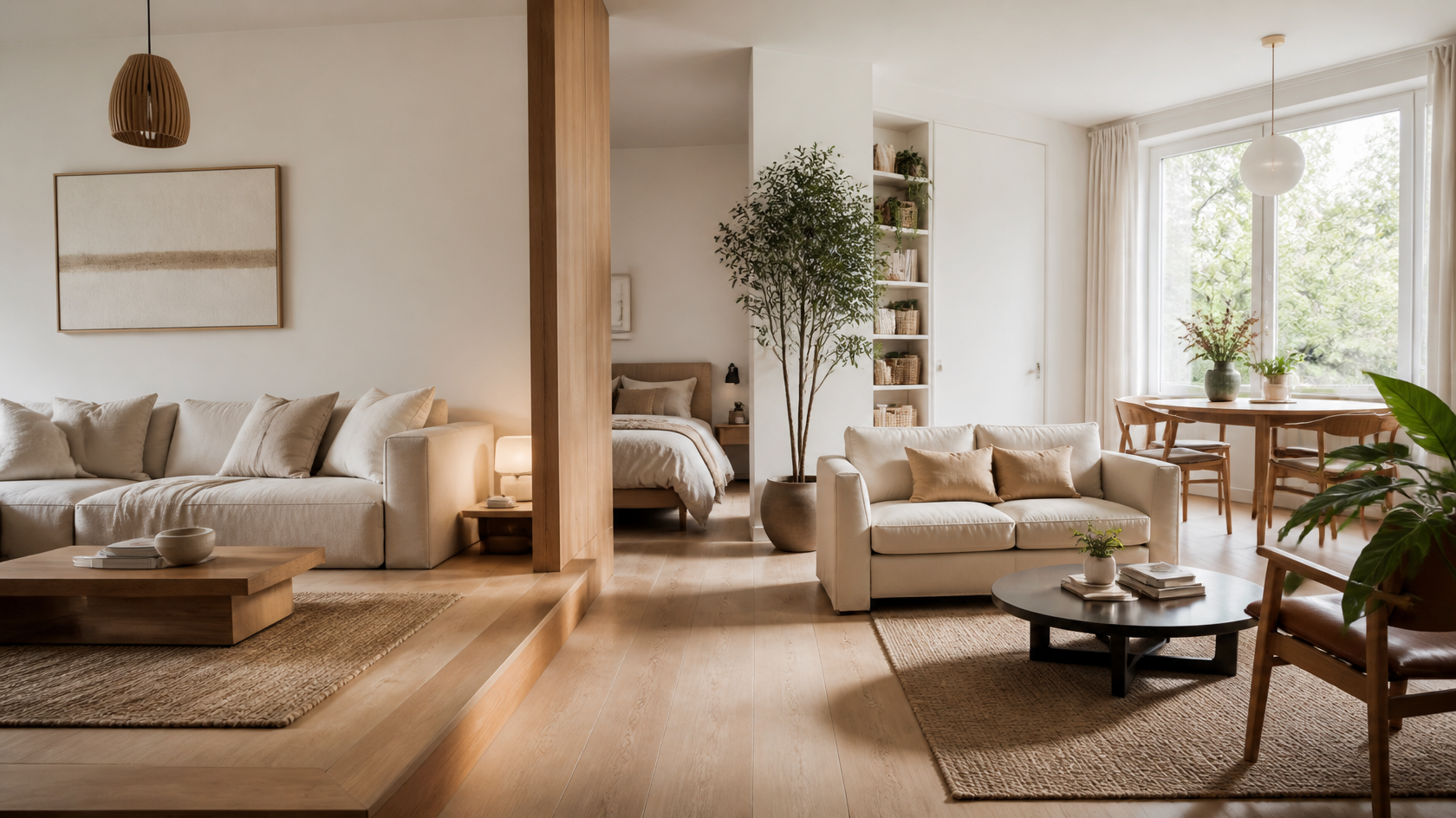
İyi planlanmış bir stüdyo birden fazla oda gibi okunur — püf noktası duvarlar değil, görsel bölgeleme.
Bir stüdyo ya da küçük daire tasarlamak tek bir soruya iner: tek bir açık odaya nasıl dört odanın işini yaptırırsın? Cevap bölgeleme — mobilya, halı, aydınlatma ve dikeyliği kullanarak tek bir ayak izinden ayrı uyku, çalışma, yemek ve yaşam alanları oymak, duvar gerekmez. Bir şey oynatmadan önce bir yerleşimi test etmenin en hızlı yolu, alanını fotoğraflamak ve bir AI tasarım aracının seçenekleri senin için canlandırmasına izin vermektir. GenRoom gibi AI araçları, stüdyonun tek bir fotoğrafını yaklaşık 30 saniyede fotogerçekçi yerleşim fikirlerine dönüştürür, böylece mobilyayı odanın karşısına taşımadan pencere kenarı yatak planını bir kanepe-bölücü planına karşı karşılaştırabilirsin.
Bu rehber, tek bir odayı değil, tüm daireyi kapsar. Yalnızca bir yatak odasını ya da oturma odasını yeniden tasarlıyorsan, AI ile küçük oda tasarım fikirleri yazımız buna daha derinlemesine giriyor. Burada stüdyoya özgü sorunu ele alıyoruz: tüm açık planlı bir evi bölgelemek, ayak izini hak eden mobilya, algılanan metrekare ekleyen görsel püf noktaları ve depozitonu koruyan kiracı dostu hamleler. Her fikir, herhangi bir şey satın almadan ya da inşa etmeden önce AI ile önizlenebilir.
Stüdyo Daire Tasarımını Tek Bir Odadan Farklı Kılan Nedir?
Bir stüdyo küçük bir yatak odası değildir — dayanacak iç duvarları olmayan tek bir açık alana sıkıştırılmış bütün bir evdir. O tek fark her tasarım kararını değiştirir. Normal bir dairede duvarlar bölgelemeyi senin için yapar. Bir stüdyoda sınırları kendin icat etmelisin ve her mobilya parçası ayak izini haklı çıkarmalı çünkü yatağınla, masanla, mutfağınla ve kanepenle aynı metrekare için yarışıyor.
ABD stüdyoları tipik olarak 400 ila 600 fit kare (yaklaşık 37–56 m²) arasındadır ve New York ya da San Francisco gibi yoğun şehirlerde 400'e daha yakın eğilim gösterir — Apartment Therapy ayak izinden çok daha büyük yaşayan pek çok akıllı 400 fit kare yerleşimi belgeledi. Bu, rahatça yaşamaya yetecek kadar alandır — ama yalnızca yerleşim kasıtlıysa. En yaygın hata bir stüdyoyu üzerine bir mini mutfak cıvatalanmış bir yatak odası gibi ele almaktır. Bunun yerine, onu "duvarların" halılar, mobilya arkaları, aydınlatma ve görüş hatlarıyla ima edildiği minik bir dört odalı daire olarak düşün. Tek büyük bölünmemiş alan olarak tasarlanmış bir stüdyo yurt gibi hissettirir; dört amaçlı bölge olarak tasarlanmış bir stüdyo ev gibi hissettirir.
Bir Stüdyoyu Uyku, Çalışma ve Yaşam Alanlarına Nasıl Bölersin?
Bir stüdyoyu, duvarlar yerine mobilya yerleşimi, halılar, oda bölücüler ve katmanlı aydınlatma kullanarak dört işlevsel alan — uyku, çalışma, yemek ve dinlenme — tanımlayarak bölgele. Bu, küçük daire tasarımındaki tek en önemli hamledir ve tamamen geri alınabilir, ki bu da onu kiracılar için ideal kılar.
 Bir kanepe arkası artı açık bir raf bölücü, ışığı ve görüş hatlarını açık tutarken uyku ve yaşam bölgelerini böler.
Önce dört bölgenin nereye gideceğine karar vererek başla, sonra aralarındaki görünmez sınırları çizmek için bu araçları kullan:
- Duvar olarak mobilya. Arkası uyku alanına dönük bir kanepe klasik stüdyo bölücüdür — ışığı engellemeden "oturma odası" ile "yatak odası" arasında net bir kenar oluşturur. Açık kitaplıklar aynı işi yaparken depolama ekler ve gün ışığının geçmesine izin verir.
- Halılar. Kanepenin altında bir halı ve yatağın altında farklı bir halı gözüne anında "burası ayrı bir alan" der. Halılar hiç zemin ayak izi tüketmeden bölgeler, ve sıcaklık ile renk ekler.
- Katmanlı aydınlatma. Aydınlatma en az kullanılan bölgeleme aracıdır. Her bölgeye kendi ışık kaynağını ver — kanepenin yanında bir yer lambası, masada bir çalışma lambası, uyku alanında yatak başı apliklerı. Her bölge bağımsız aydınlandığında, her biri kendi odası gibi okunur, özellikle geceleri.
- Perdeler ve paravanlar. Tavan raylı bir perde ya da katlanır bir paravan, misafirler geldiğinde yatağı gizleyebilir, sonra tüm stüdyoyu geri istediğinde kaybolabilir.
Uyku Bölgesine Biraz Mahremiyet Ver
Yatağı girişten en uzak köşeye sıkıştır, böylece bir ziyaretçinin gördüğü son şey olsun. Yüksek bir yatak başı, bir raydaki perde ya da yatağın arkasındaki açık bir raf birimi bir kapalılık hissi yaratır. Tavan yüksekliği izin veriyorsa, çatı katı ya da yükseltilmiş bir platform yatak uyumayı ana görüş hattından tamamen kaldırır ve altındaki zemini serbest bırakır.
Gerçek Bir Çalışma Bölgesi Oy
 İnce, duvara monteli bir masa ve bir aksan renk, bir köşeyi tanımlı bir ev-ofis bölgesine dönüştürür.
Uzaktan çalışma, 400 fit karede bile özel bir masayı tartışılmaz kılar. İnce, duvara monteli ya da kayan bir masayla bir köşeyi sahiplen, bir çalışma lambası ve üzerine kayan raflar ekle ve o duvarı, "ofisi" "evden" görsel olarak ayırmak için farklı bir renge boya ya da duvar kağıdı yap. Kanepenin arkasındaki bir konsol masa, dara düşüldüğünde ayakta çalışma masası olarak iki işlev görebilir. Amaç, beyninin odaklanmayla ilişkilendirdiği bir nokta — ve saat 18.00'de dizüstünü kapatabildiğin bir nokta.
Küçük Bir Dairede Ayak İzini Gerçekten Hangi Mobilya Hak Eder?
En iyi küçük daire mobilyası en az iki iş yapar — kıyafet saklayan bir yatak, kalkıp masaya dönüşen bir masa, misafir yatağına açılan bir puf. Bir stüdyoda her parça çifte görev yapmalı yoksa zemin alanını hak etmez. Uzun, dikey parçalar da senin dostundur: duvara tırmanan depolama, ayak izini minik tutarken kapasiteyi katlar.
 Yatağı yukarı çek, masayı altına koy ve depolamanın duvara tırmanmasına izin ver — dikey alan bedava mülktür.
İşte en yüksek değerli parçaların kendini nasıl kanıtladığı:
| Parça | Ayak izi işi | İkinci (ya da üçüncü) iş |
|---|---|---|
| Kanepe yatak ya da divan | Oturma odası oturması | Misafir uyuma, bölge bölücü |
| Çatı katı / platform yatak | Uyuma | Altında masa, kanepe ya da depolama |
| Kalkan üstlü sehpa | Sehpa | Ayakta masa + gizli depolama |
| Depolamalı puf | Ekstra oturma / ayaklık | Battaniyeler, sezon dışı depolama |
| İç içe geçen masalar | Bir yan masa | Misafirler için ekstra yüzeyler, sonra üst üste koy |
| Açılır kanatlı / duvar masası | İnce konsol | Açıldığında tam yemek masası |
| Uzun açık raf | Depolama | Bölgeler arası oda bölücü |
| Murphy / duvar yatağı | Geceleri yatak | Gündüz zemini tamamen boşaltır |
İki kural mobilyanın bir stüdyoyu kalabalıklaştırmasını engeller. Birincisi, ayaklı parçalar seç — altında zemin gösteren kanepeler, yataklar ve konsollar daha hafif okunur ve odayı katı, yere yapışan bloklardan daha büyük hissettirir. İkincisi, dikey git: uzun, dar bir kitaplık geniş, alçak olan kadar depolar ama ayak izinin bir kısmını yer, ve gözü tavan yüksekliğini vurgulamak için yukarı çeker.
Küçük Bir Daireyi Nasıl Daha Büyük Gösterebilirsin?
Küçük bir daireyi üç kaldıraçla daha büyük hissettir: ışık, yansıma ve dikeylik. Açık renkler ve bol doğal ışık bir alanı açar, aynalar onu görsel olarak ikiye katlar ve gözü uzun öğelerle yukarı çekmek tavanı daha yüksek hissettirir. Bunların hiçbiri tek bir metrekare eklemez — ama hepsi algılanan alan ekler, ki bir stüdyoyu gerçekten yaşanabilir kılan da budur.
 Pencerenin karşısındaki büyük bir ayna gün ışığını sektirir ve odayı görsel olarak ikiye katlar; yerden tavana perdeler gözü yukarı kaldırır.
- Açık renkler. Soluk duvarlar, zeminler ve büyük mobilya ışığı yansıtır ve görsel olarak geri çekilir, duvarları dışarı iter. Neredeyse tek renkli açık bir palet, yüksek kontrastın görsel dağınıklığını kaldırır, ki bu da sakin ve açık okunur.
- Aynalar. Bir pencerenin karşısına ya da yanına büyük bir ayna yerleştir; gün ışığını odanın derinlerine sektirirken manzarayı yansıtır — bir stüdyoyu boyutunun iki katı hissettirmek için tek en etkili püf noktası.
- Dikeylik. Perdeleri pencere çerçevesine değil tavana as, uzun kitaplıklar seç ve duvarların tepesine giden görüş hatlarını açık tut. Her dikey çizgi göze odanın olduğundan daha yüksek olduğunu söyler.
- Doğal ışığı maksimize et. Pencere kaplamalarını şeffaf ya da minimal tut ve pencereyi uzun mobilyayla engellemekten kaçın. Işık, ekleyeceğin en ucuz metrekaredir.
Bu püf noktaları ince olduğu için, kafanda hayal etmesi zor ve AI ile önizlemesi kolay olan tam da bu tür değişikliklerdir. Gerçek odanı açık bir palette ya da bir ayna duvarıyla canlandırmak, boyaya ya da bir satın almaya karar vermeden önce sana karşılığını gösterir.
Kiracı Dostu Stüdyo Tasarımı: Tadilat Gerekmez
Bu rehberdeki her fikir delme, depozitonu boyama ya da tek bir duvara dokunma olmadan işe yarar. Bu kasıtlıdır — çoğu stüdyo sakini kiracıdır ve en iyi küçük alan tasarımı tamamen geri alınabilir. Ayaklı bölücüler, soyulup yapıştırılan kaplamalar ve mobilya tabanlı bölgeleme, bir stüdyoyu dönüştürmene ve taşınma günü hepsini geri almana izin verir.
 Katlanır paravanlar ve tavan gergili perde çubukları sıfır inşaat ve sıfır depozito riskiyle gerçek bölgeler yaratır.
Bir stüdyoyu duvarsız bölmenin onlarca kiracı dostu yolu vardır ve en iyileri ortak bir özelliği paylaşır: kira sözleşmen bittiğinde temizce kalkarlar. Kiracı-güvenli bölgeleme ve yenileme seçenekleri şunları içerir:
- Ayaklı oda bölücüler — katlanır paravanlar, açık raf birimleri ve tekerlekli kıyafet askıları bölgeleri böler ve seninle taşınır.
- Gergi çubuklu perdeler — bir tavan ya da duvar gergi çubuğu artı bir perde paneli, tek bir vida olmadan yatağı gizler ya da bir çalışma köşesini böler.
- Her şeyde soyulup yapıştırılan — çıkarılabilir duvar kağıdı, yapışkan arka panel fayansları ve vinil zemin çıkartmaları kişilik ekler ve temizce kalkar.
- Halılar ve tekstiller — katmanlı halılar, duvar süsleri ve atkılar bölge, renk ve ses emilimi ekler, sonra ayrıldığında rulo yaparsın.
- Fişli ve pilli aydınlatma — fişli apliklerı ve şarj edilebilir lambalar hiç kablo olmadan bölge aydınlatması sağlar.
Kiracıların kolayca yapamadığı tek şey bitmiş sonucu hayal etmektir — işte burada AI görselleştirme kendini kanıtlar. Bir hafta sonunu ve mağazaya bir dönüş yolculuğunu kumar oynamak yerine, "sonrasını" önce canlandırabilirsin.
Yapay zekâ ile iç mekân tasarımı oluşturun
Odanızın fotoğrafını yükleyin ve 30 saniyede profesyonel bir tasarım elde edin. İlk tasarım ücretsiz.
Stüdyo Daireni AI ile Nasıl Yeniden Tasarlarsın: Adım Adım
Bir stüdyoyu AI ile yeniden tasarla: tek bir fotoğraf yükle, bir tarz seç ve yaklaşık 30 saniyede fotogerçekçi yerleşim seçenekleri üret — sonra kelimelerle ya da fırçayla iyileştir. Bu, haftalarca süren tahminleri yan yana karşılaştırmalı bir öğleden sonraya çevirir ve başlamak hiçbir şeye mal olmaz.
İşte GenRoom ile iş akışı:
- Tüm alanı fotoğrafla. Bir köşede dur ve açık zeminin mümkün olduğunca çoğunu yakala — yatak alanını, yaşam alanını ve varsa pencereleri karede istersin. İyi, eşit gün ışığı AI'ye çalışacak en fazla şeyi verir.
- Yükle, bir mod ya da tarz seç. 60'tan fazla tarz arasından en fazla üçünü seç — İskandinav ve Japandi stüdyo favorileridir çünkü açık paletleri ve az dağınık estetikleri ferah okunur. Kompakt modern ve minimalist de aynı derecede iyi çalışır.
- "Create design" düğmesine tıkla, yerleşim varyasyonları al. Kabaca 30 saniyede fotogerçekçi canlandırmalar alırsın. Aynı fotoğrafı birkaç tarz ve yapılandırmadan geçirerek bir kanepe-bölücü yerleşimini bir çatı katı yatak yerleşimine karşı yan yana karşılaştır.
- Kelimelerle ya da fırçayla iyileştir. Free dahil her planda AI Editor'de, "kanepenin arkasına bir oda bölücü ekle" ya da "daha açık bir halıyla değiştir" gibi düz metin talimatları, canlandırmayı baştan başlamadan ayarlar.
- Yer kazandıranları test et. Tek kuruş harcamadan önce bir Murphy yatak, bir kalkan üstlü masa ya da açık renk bir yeniden boyama önizle — canlandırma sana odayı gerçekten açıp açmadığını gösterir.
- Favorini bir alışveriş kılavuzu olarak kaydet. Kazanan canlandırmayı ne satın alacağın ve nereye yerleştireceğin için bir referans olarak kullan.
Binan sana bir kat planı verdiyse, doğrudan planından da tasarlayabilirsin — AI ile kat planından tasarım rehberimiz ve kat planı tasarım aracı, anahtarlarını bile almadan önce bir yerleşimi döşemeyi anlatıyor. GenRoom'da ücretsiz bir hesap, ücretli bir paketin değip değmeyeceğine karar vermeden önce stüdyonu test edebilmen için, kredi kartı olmadan 6 kredi (≈3 tasarım) verir. Tek seferlik paketler 9,99$'dan başlar, AI Editor ise Free dahil her planda var — tüm ayrıntılar fiyatlandırma sayfasında.
Boyuta Göre Stüdyo Daire Yerleşim Fikirleri
Doğru yerleşim büyük ölçüde metrekarene bağlıdır — 350 fit karelik bir mikro-stüdyo, geniş 600 fit karelik birinden farklı hamleler gerektirir. Aşağıda boyuta göre başlangıç noktası stratejileri var, hepsini taahhüt etmeden önce gerçek alanına karşı canlandırabilirsin.
| Boyut | Karakter | Öncelikli hamleler |
|---|---|---|
| 400 fit karenin altı | Mikro-stüdyo | Murphy ya da çatı katı yatak, duvara monteli açılır kanatlı masa, acımasız dikeylik, tek açık palet |
| 400 fit kare | Klasik şehir stüdyosu | Kanepe-bölücü bölgeleme, kalkan üstlü masa, uzun raf bölücü, pencere karşısı ayna |
| 450–500 fit kare | Rahat stüdyo | Ayrı uyku + çalışma + yaşam bölgeleri, bölge başına halılar, gerçek bir masa köşesi |
| 550–600 fit kare | Ferah stüdyo / niş | Yarı özel bir yatak odası için ayaklı bölücü ya da yarım duvar rafı, düzgün bir yemek noktası |
400 fit karelik ideal nokta. Çoğu şehir stüdyosu buraya iner ve kazanan formül tutarlıdır: yatağı en sessiz köşeye it, yaşamı uyumadan ayırmak için bir kanepe yüzdür, bir köşeye ince bir masa monte et, alanı birleştirmek için tek sürekli açık zemin rengi tut ve pencerenin ışığını sektirmek için büyük bir ayna as. O planı kendi dört duvarına karşı canlandır, saniyeler içinde işe yarayıp yaramadığını bilirsin.
Kaçınılması Gereken Yaygın Stüdyo Tasarım Hataları
Çoğu stüdyo tasarım başarısızlığı birkaç tekrarlayan suçludan gelir — ve her biri pahalı bir gerçek yaşam pişmanlığı olmadan önce bir AI canlandırmasında yakalanması kolaydır.
- Tüm mobilyayı duvarlara itmek. Ortayı açmaz; içi boş, yurt benzeri bir halka yaratır. Odayı bölgelemek için bir kanepe yüzdürmek daha ferah hissettirir, daha az değil.
- Bölgeleri tamamen atlamak. Ortasında bir yatak olan bölünmemiş tek bir açık alan bitmemiş okunur. Hafif bir bölgeleme bile — bir halı, bir lamba, bir raf — stüdyoyu kasıtlı hissettirir.
- Tek amaçlı mobilya satın almak. Hantal, tek işli bir sehpa ya da katı bir şifonyer ayak izini israf eder. Her büyük parça ikinci bir işlev hak etmeli.
- Her yüzeyde koyu, yüksek kontrastlı paletler. Küçük bir alanı görsel olarak küçültürler. Cesur rengi aksanlar için sakla — bir yastık, bir sanat eseri, tek bir aksan duvarı.
- Pencereyi engellemek. Doğal ışık en büyük varlığındır; önündeki uzun bir kitaplık algılanan alanı depolamayla takas eder. Başka yerde dikey git.
SSS: Stüdyo ve Küçük Daire Tasarım Soruları
Bir stüdyo daireyi duvar inşa etmeden nasıl bölerim?
İnşaat yerine mobilya, halılar ve aydınlatma kullan. Arkası yatağa dönük bir kanepe, bölgeler arasında açık bir kitaplık, her işlevsel alanın altında bir halı ve bölge başına ayrı ışık kaynakları — hepsi tamamen geri alınabilir net sınırlar oluşturur. Ayaklı katlanır paravanlar ve tavan gergili perdeler, bir uyku alanına hiç delme olmadan mahremiyet ekler — kiracılar için ideal.
400 fit karelik bir stüdyo daire için en iyi yerleşim nedir?
Yatağı kapıdan en uzak köşeye it, yaşam ve uyku bölgelerini ayırmak için bir kanepe yüzdür, çalışma için bir köşeye ince, duvara monteli bir masa ekle ve yemek için kalkan üstlü ya da açılır kanatlı bir masa kullan. Alanı birleştirmek için tek sürekli açık zemin rengi tut ve gün ışığını güçlendirmek için pencerenin karşısına büyük bir ayna as. Bu planı gerçek odana karşı AI ile canlandırmak, herhangi bir şeyi taşımadan önce akışı doğrular.
AI yalnızca bir odayı değil, tüm bir daireyi tasarlayabilir mi?
Evet. Açık stüdyonu yakalayan geniş bir fotoğraf yükle ve GenRoom gibi AI araçları tüm alanı — uyku, çalışma ve yaşam bölgeleri birlikte — tek bir fotogerçekçi görüntüde canlandırır. O tüm-daire görünümü, AI'yi özellikle stüdyolar için bu kadar yararlı kılan şeydir, çünkü bölgeler tek bir odayı paylaşır ve bir set olarak çalışmaları gerekir. Tek bir kapalı oda için, küçük oda tasarım rehberimize bak.
Bir stüdyo daire tasarlamak için ücretsiz bir uygulama var mı?
GenRoom'da ücretsiz bir hesap sana, kendi stüdyonda birkaç yerleşim ve tarz test etmeye yetecek kadar, kredi kartı gerektirmeden 6 kredi (≈3 tasarım) verir. Tek seferlik paketler daha fazla kredi için 9,99$'dan başlar; kelimelerle ya da fırçayla çalışan AI Editor Free dahil her planda var. Herhangi bir tarayıcıda çalışır, o yüzden kurulacak bir uygulama yok.
Hangi mobilya küçük bir daireyi daha büyük hissettirir?
Altında zemin gösteren ayaklı parçalar (kanepeler, yataklar, konsollar), geniş yerine dikey giden uzun dar depolama ve Murphy yataklar, kalkan üstlü masalar ve depolamalı puflar gibi çok işlevli öğeler. Cam ya da akrilik yüzeyler ve açık renkli, alçak profilli mobilya da görsel hacmi azaltır. Ortak nokta, görüş hatlarını ve zemini görünür tutarken ayak izini minimize etmektir.
Stüdyomu boya ve aynalarla nasıl daha büyük gösteririm?
Duvarları ve tavanı ışığı yansıtmak ve yüzeyler arasındaki sınırı bulanıklaştırmak için açık, uyumlu bir palette boya, sonra gün ışığını sektirmek ve odayı görsel olarak ikiye katlamak için bir pencerenin karşısına ya da yanına büyük bir ayna yerleştir. Gözü yukarı çekmek için perdeleri tavan yüksekliğinde as. Boyaya taahhüt vermeden önce etkiyi görebilmen için, önce bir AI aracıyla paleti gerçek duvarlarında önizle.
Sonuç
Bir stüdyo daire bir taviz değildir — net bir oyun kitabı olan bir tasarım meydan okumasıdır: açık alanı uyku, çalışma, yemek ve dinlenmeye bölgele; ayak izini iki kat hak eden mobilya seç; ve gözünün, kira sözleşmen inanmasa bile inanacağı metrekareyi eklemek için ışığa, aynalara ve dikeyliğe yaslan. Hepsinden iyisi, bu hamlelerin her biri kiracı dostu ve geri alınabilir.
En zor kısım her zaman taahhüt vermeden önce sonucu hayal etmek olmuştur. AI'nin ortadan kaldırdığı tam olarak budur. Stüdyonun tek bir fotoğrafını çek, GenRoom ile birkaç yerleşim seçeneği üret ücretsiz ve küçük alanını yaklaşık 30 saniyede en iyi halinde gör — sonra güvenle satın al, düzenle ve böl.