AI Curtain Visualizer: Try Curtains and Blinds on Your Room Photo
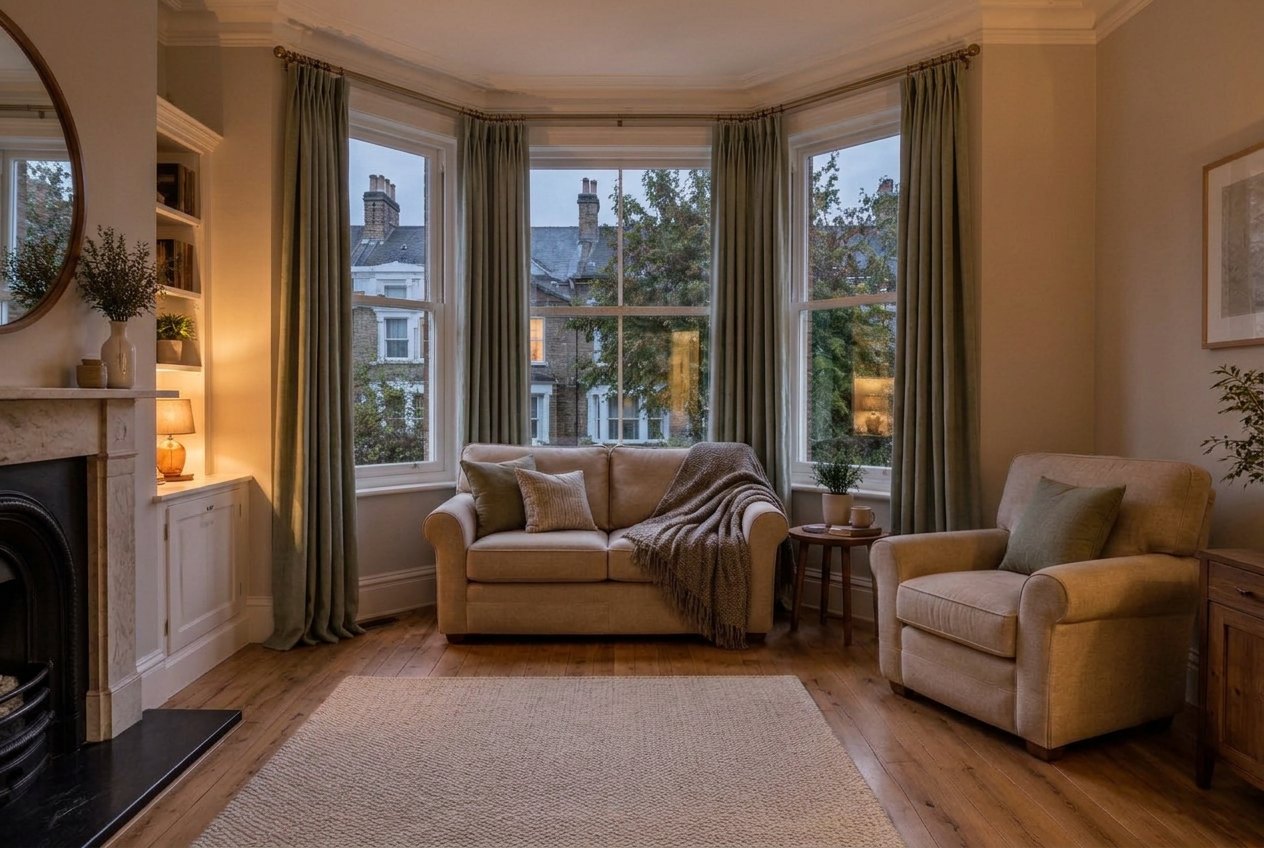
A real result from the GenRoom Studio: a bare bay window, a photo of a sage linen curtain, one edit to hang it, and one Evening light edit. The sofa, armchair, fireplace and floor are from the original photo.
An AI curtain visualizer lets you upload a photo of your own window and see it with new curtains, blinds or shutters before you order anything. You can compare white sheers with blackout linen, try a Roman blind on one window only, move the rod up to the ceiling, or hang a fabric you found online. In the GenRoom Studio, that's the Curtains quick action, the Select area brush, Use my reference for a product photo, the Curtains & blinds task inside a design, and Evening light to see the result after dark. Each edit takes about 20–55 seconds and costs 2 credits. A free account starts with 6 credits.
Window treatments are a steady request in our data. Between March and October 2026, 669 people asked GenRoom for new curtains, blinds or shutters in their own words. Below are the exact Studio paths, real before/after results on three test rooms (a living room with two bare windows, a dated room with a heavy valance, and a bay window), the mistakes the AI made, and the hanging rules worth checking before you buy a rod.
What Do People Actually Ask For?
People rarely ask for "curtains" on their own. In the requests we read, only about one in five was about window treatments alone; the rest bundled them with decor, wall colour, lighting or new furniture. Here are typical requests, paraphrased and anonymized:
| What people write | What they want to see | Best Studio tool |
|---|---|---|
| "Replace the curtains with white sheer panels" | The same window, lighter fabric | Curtains quick action → Sheers only |
| "A design with white shutters" | Plantation shutters instead of fabric | Curtains quick action, in your own words |
| "There's a big double window right of the bed, please add curtains" | Curtains where there are none | Curtains quick action (it also adds, not only replaces) |
| "Better curtains and a stylish light fixture" | Two changes at once | Curtains first, then Lighting as a second edit |
| "A continuous brass bay rod right under the crown moulding, soft sage panels" | Specific hardware and fabric on a bay | Use my reference with a fabric photo + your words |
| "A cornice box under the crown moulding, ivory" | A hard top treatment over the bay | Curtains quick action, in your own words |
| "Alternate solid light blue and cream curtains, matching cushions" | A colour scheme across fabrics | Curtains quick action, in your own words |
The pattern: people usually know the fabric or the colour and are unsure about everything around it. How high should the rod go? Will sheers look cheap at night? Will a dark curtain swallow a small window? A picture of your own room answers those faster than a fabric swatch.
Which Studio Tool Does What?
GenRoom gives you five ways to change window treatments. They differ in how much the AI decides for you.
| Tool | Where to find it | What it changes | Use it when |
|---|---|---|---|
| Curtains quick action | Editor → Quick actions → Colors & materials | Replaces (or adds) curtains; keeps the rest | You know the fabric, colour or type |
| Select area brush | Editor, top-left of the photo | Only the area you paint | One window of several, or one part of a wall |
| Use my reference | Photo button in the prompt bar → Add as a reference, then Quick actions → Use my reference | Copies a fabric or product from your photo | You have a picture of the exact curtain |
| Curtains & blinds task | Design → Ready tasks → Colors & materials | Window treatments as part of a design run | You are redesigning the room anyway |
| Evening light | Quick actions → Light & season → "1 more" | Turns the photo into evening with lamps on | You want to compare sheer and blackout after dark |
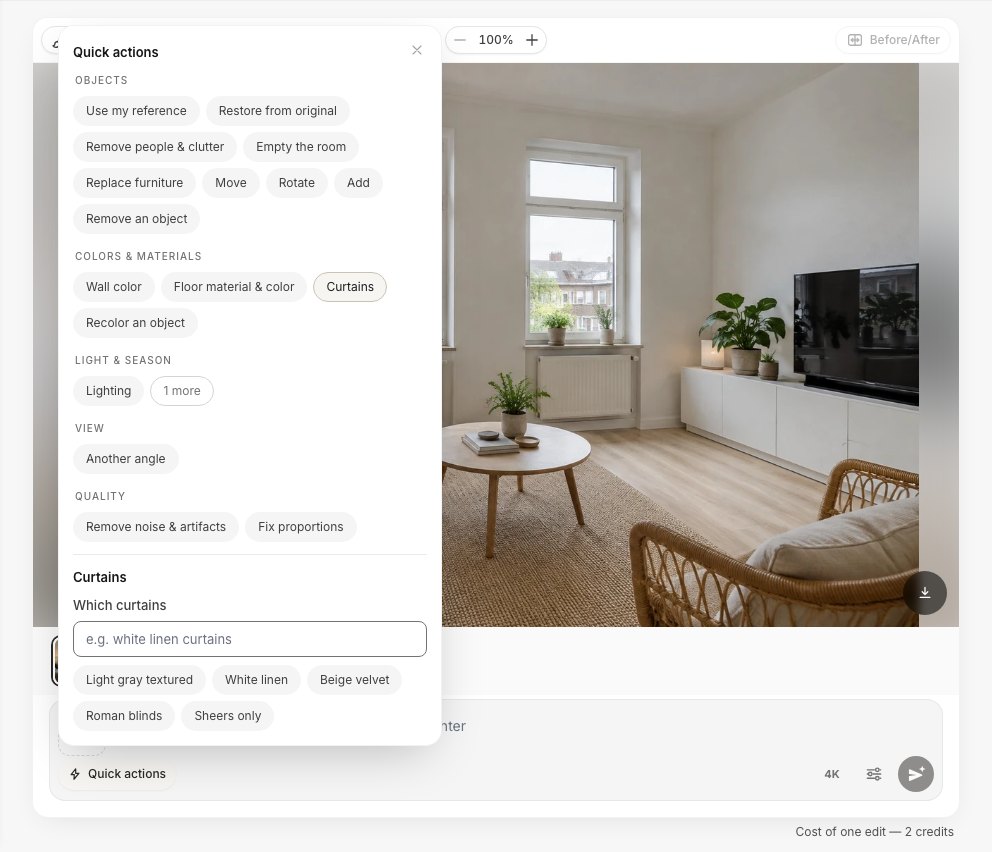 Quick actions → Curtains. Tap a ready choice, type your own (up to 500 characters), or do both.
The Curtains action has five ready choices: Light gray textured, White linen, Beige velvet, Roman blinds and Sheers only. If you tap a choice and then type in the prompt field, the Studio sends both: "Sheers only" plus "on a ceiling-mounted track, wider than the windows" becomes one instruction. The Studio adds "keep everything else unchanged" to every Curtains edit, so the sofa, the floor and the walls should stay as they are.
How to Try Curtains on a Bare Window, Step by Step
Our first test photo is an ordinary rented living room: two tall windows with radiators under them, no curtains, no rods, a grey sofa and a TV unit. Here is the path we used for white sheers.
- Upload the photo in the Studio and open it in the editor. A straight, daytime shot that shows the full window and some ceiling above it works best.
- Open Quick actions → Curtains and tap Sheers only.
- Type the details in the prompt field: "white floor-length sheer curtains on a ceiling-mounted track, wider than the windows".
- Press Apply. Our result came back in 38 seconds.
- Compare with the Before/After switch, or tap the original in the version strip under the photo.
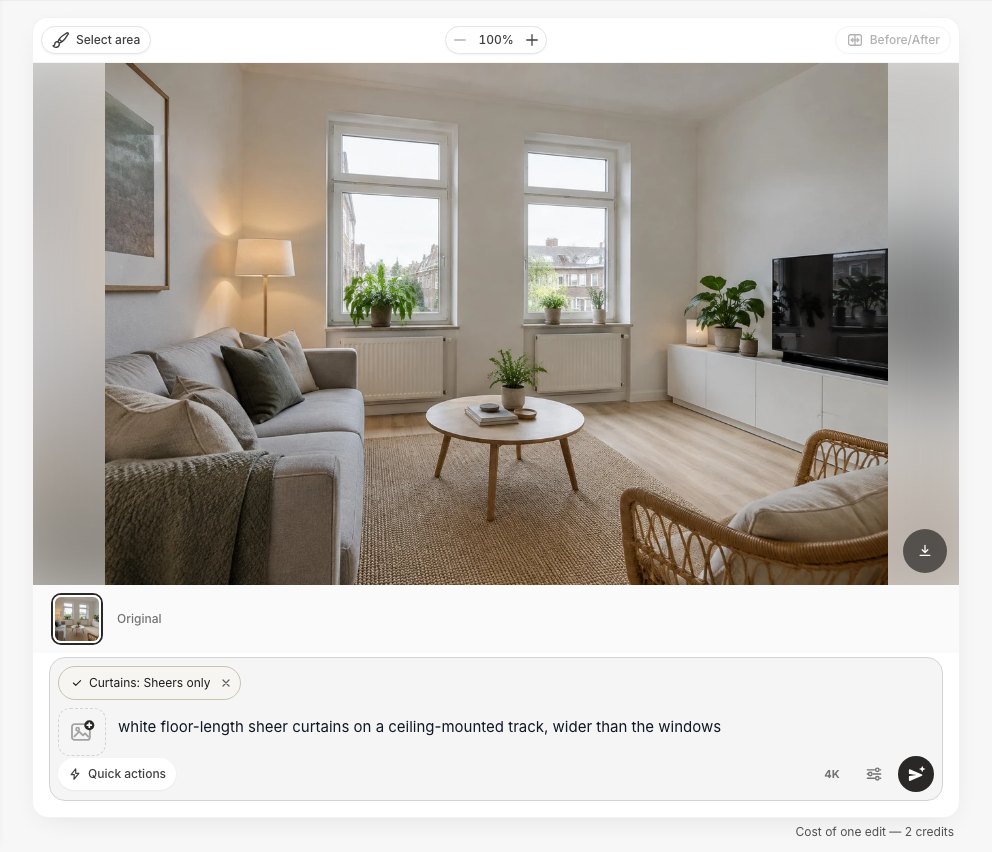 A ready choice and your own words go out as one edit. Here: Sheers only + track position + width.
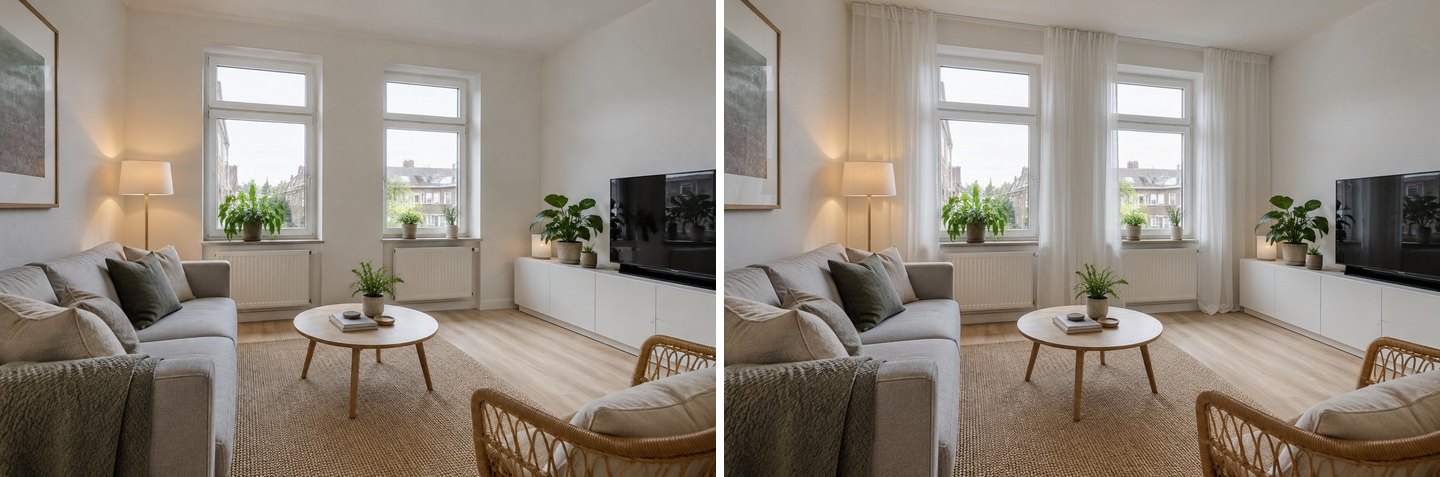 Before: two bare windows. After: white sheers on a ceiling track. The track sits right under the ceiling and runs past both frames, which is exactly what the words asked for.
The track went where we asked: right under the ceiling, running past both window frames, with fabric covering the wall between them. The windows, radiators, sofa, plants and TV stayed put. That's the main point of a curtain visualizer: you are judging the curtains against your own walls, not against a showroom.
Same room, linen blackout curtains
Next, the opposite choice on the same original photo: "warm grey linen blackout curtains, floor length, on a slim black rod close to the ceiling, extending past both windows". This time we typed it straight into the Curtains field without a ready choice. It took 31 seconds.
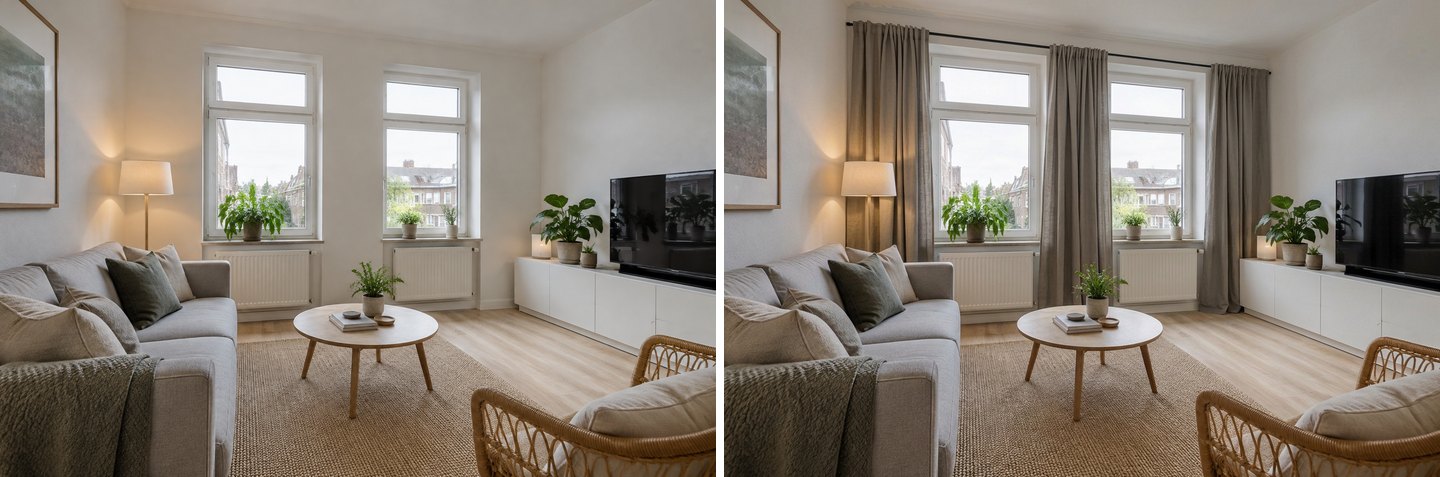 Grey linen blackout panels on a black rod near the ceiling. Heavier fabric reads darker and frames each window instead of veiling it.
In daylight, the difference is mostly about weight. Sheers blur the windows into one soft wall of light; the grey panels frame each window and make the room feel more finished but a little smaller.
Sheer or Blackout: How Do They Look at Night?
The daytime photo hides the biggest difference. To see it, run Evening light on each version and add one sentence: "the curtains are drawn closed over both windows". GenRoom then dims the room, switches on the lamps and closes the fabric.
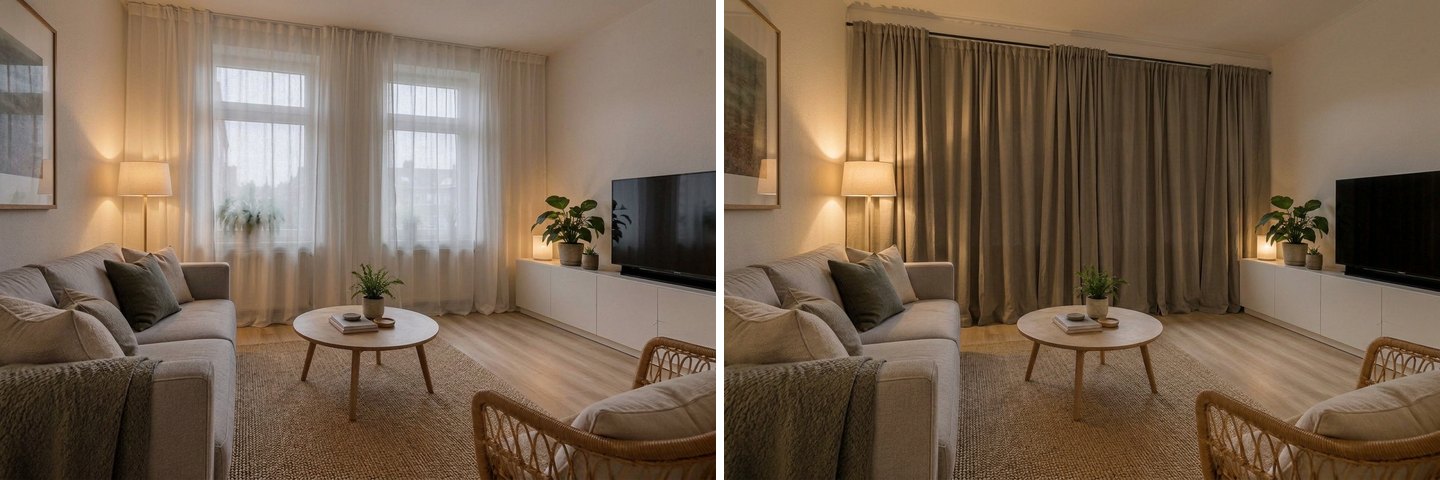 Evening light + "curtains drawn closed". Left: sheers let the window glow through and keep the window shapes visible. Right: blackout linen turns the window wall into fabric.
This is the picture worth showing to anyone who shares the room. Closed sheers still show the window frames and whatever light is outside, so they give softness, not privacy. Closed blackout panels give you a calm, dark wall, but at night the room depends entirely on your lamps. Many people end up layering both: sheers for the day, heavier panels for the evening. You can test that too: ask for "white sheers behind grey linen blackout curtains, both on a double ceiling track".
How to Change Just One Window With the Brush
Sometimes you want different treatments on different windows: a Roman blind over the desk and curtains elsewhere, or a test on one window before you buy for all of them. Use the brush.
- In the editor, press Select area (top-left of the photo).
- Choose Lasso and draw around the window you want to change. Include the frame and a little wall above it.
- Press Done — keep the selection. The prompt bar shows "Area selected".
- Type what you want: "a natural linen Roman blind on this window only, mounted inside the frame, half lowered".
- Press Apply.
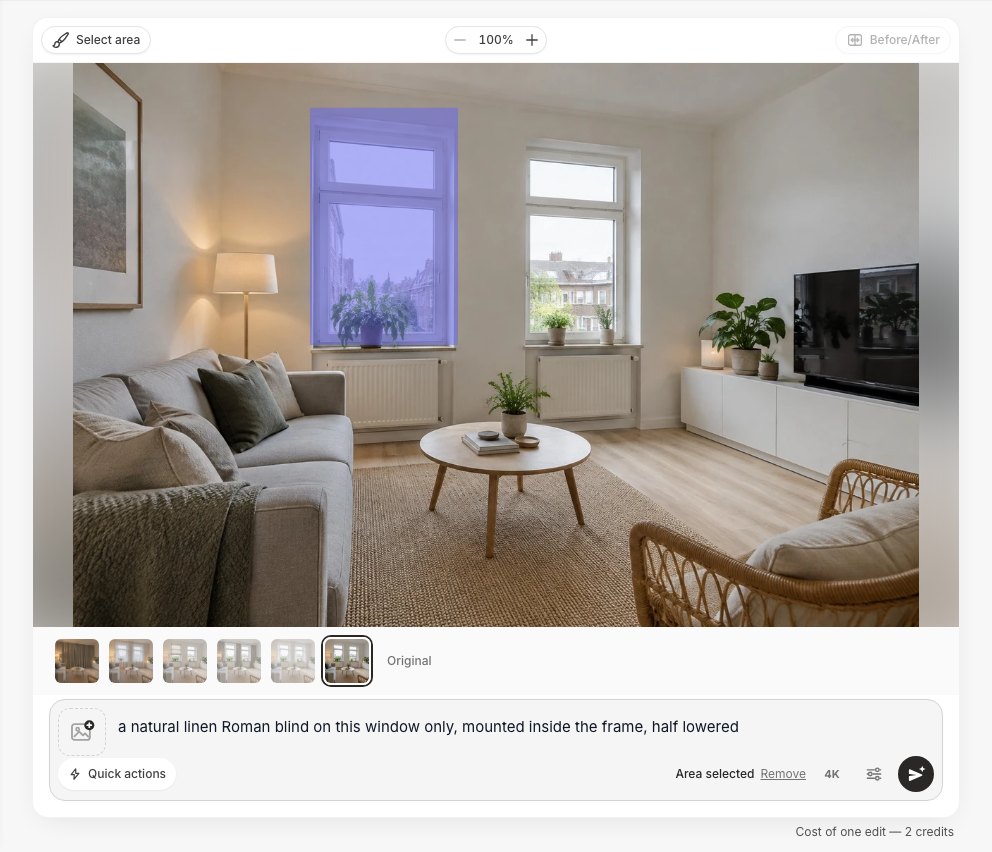 Select area → Lasso around the left window. Only the selected area should change.
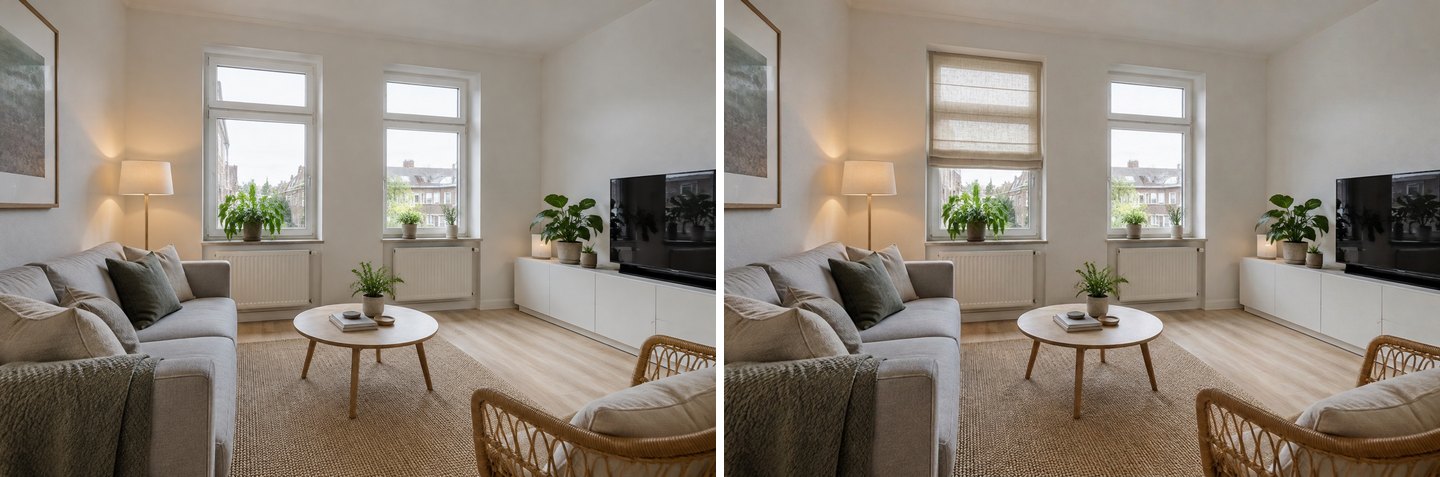 The Roman blind went into the left window only, mounted inside the frame. The right window is untouched. 33 seconds.
The brush is also the best way to test the "inside mount vs outside mount" question for blinds. An inside-mounted blind shows the whole window frame; an outside-mounted one covers it and makes the window look bigger. Run the same selection twice with different words and compare.
Colour Schemes: Alternating Panels and Matching Cushions
One of the most specific requests we saw asked for alternating light blue and cream curtains with cushions to match. That's a scheme across two kinds of fabric, which is exactly where a photo beats your imagination. We typed it into the Curtains field: "alternating solid light blue and cream floor-length curtain panels on a rod near the ceiling, plus matching light blue and cream cushions on the sofa".
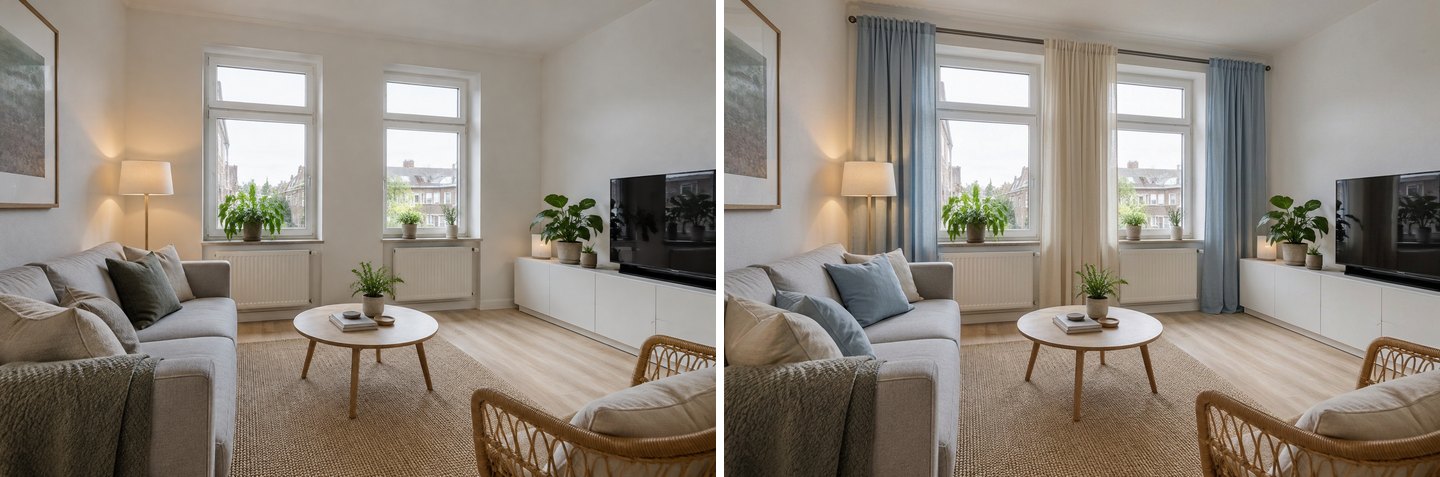 Blue, cream, blue on one long rod, and the sofa got matching light blue cushions. The rest of the room stayed the same.
The Curtains action added the cushions too, because we asked for them in the same sentence. If you like the curtains but not the cushions, open Quick actions → Restore from original and name the sofa cushions, or ask for the curtains alone in a new edit. For whole-room colour, pair this with our guide to trying paint colors on a photo of your room: a new wall colour changes how every curtain colour reads.
How to Replace Dated Curtains (and Valances)
Our second test room is a dated sitting room: a gathered floral valance, matching heavy drapes on tie-backs, and yellowed net curtains. This is where you learn the most about how the AI reads instructions.
First try: one tap. Quick actions → Curtains → White linen, nothing else. The AI swapped the fabric but kept the whole old arrangement: a white valance, white drapes on the same tie-backs, and the same net curtains behind. It did exactly what "replace the curtains with white linen curtains" says, and nothing more.
Second try: say what to remove. Same choice plus our words: "remove the valance, the tie-backs and the net curtains; simple floor-length panels on a slim black rod mounted close to the ceiling, extending well past the window frame". Now the result is modern, but look at the window: the AI had to invent the top of the window that the valance used to hide, and it redrew the glazing narrower than the original.
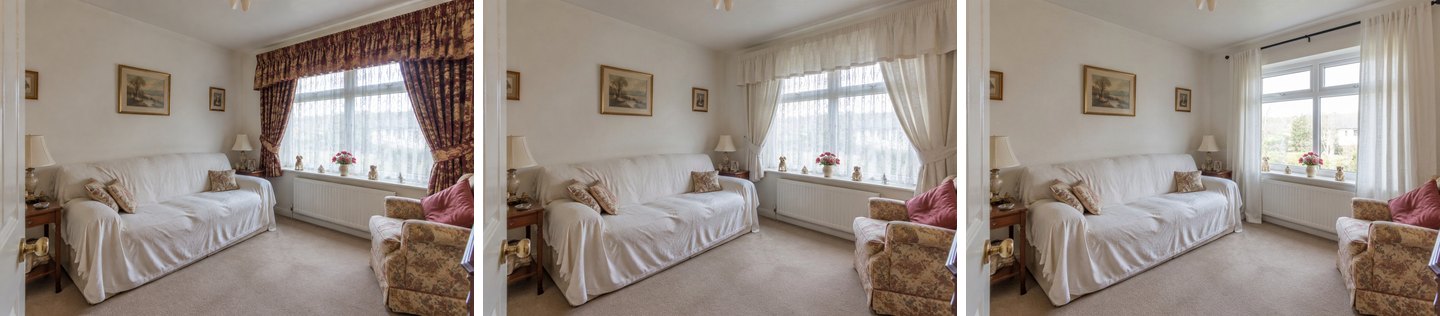 Left: the original. Middle: White linen alone keeps the valance, tie-backs and nets. Right: naming what to remove gives clean panels, but the window was redrawn narrower.
So: when you replace an old treatment, list everything that should go (valance, pelmet, nets, tie-backs), and check the window itself in the result. If the window changed, the curtains in that picture are hanging on a window you don't have.
Plantation shutters instead of fabric
Plantation shutters are a different product (they sit inside or on the window frame, not on a rod), so we described the fit: "white plantation shutters with wide louvres fitted inside the window frame, no curtains, no valance, no net curtains". 23 seconds.
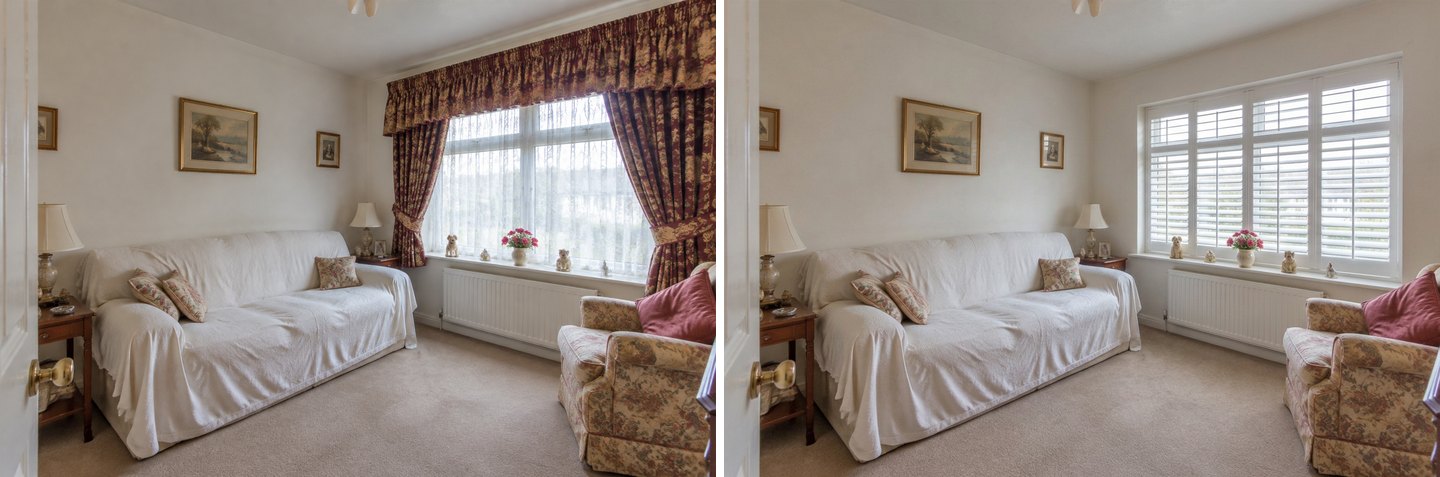 White plantation shutters with wide louvres. The radiator, the sofa, the floral armchair and the pictures stayed the same.
Of all the treatments we tried, shutters changed the character of the room the most. Without the floral fabric, the patterned armchair suddenly becomes the only "old" thing in the room. That's a useful thing to learn before you spend money on the window. (Our exterior shutter guide covers decorative shutters on the outside of a house, which is a different product.)
Create interior design with AI
Upload a photo of your room and get a professional design in 30 seconds. First generation is free.
How to Use a Photo of the Exact Fabric or Product
If you already have a curtain in mind (a shop listing, a sample, a picture from a friend's house), give GenRoom the photo instead of describing it.
- Press the photo button in the prompt bar and choose Add as a reference. Pick the photo of the curtain.
- Open Quick actions → Use my reference.
- In What to take and where, describe the item and its place: "the sage linen curtain from my photo; hang one panel at each corner of the bay on one continuous brass rod right under the crown moulding, floor length".
- Press Insert into the field, then Apply.
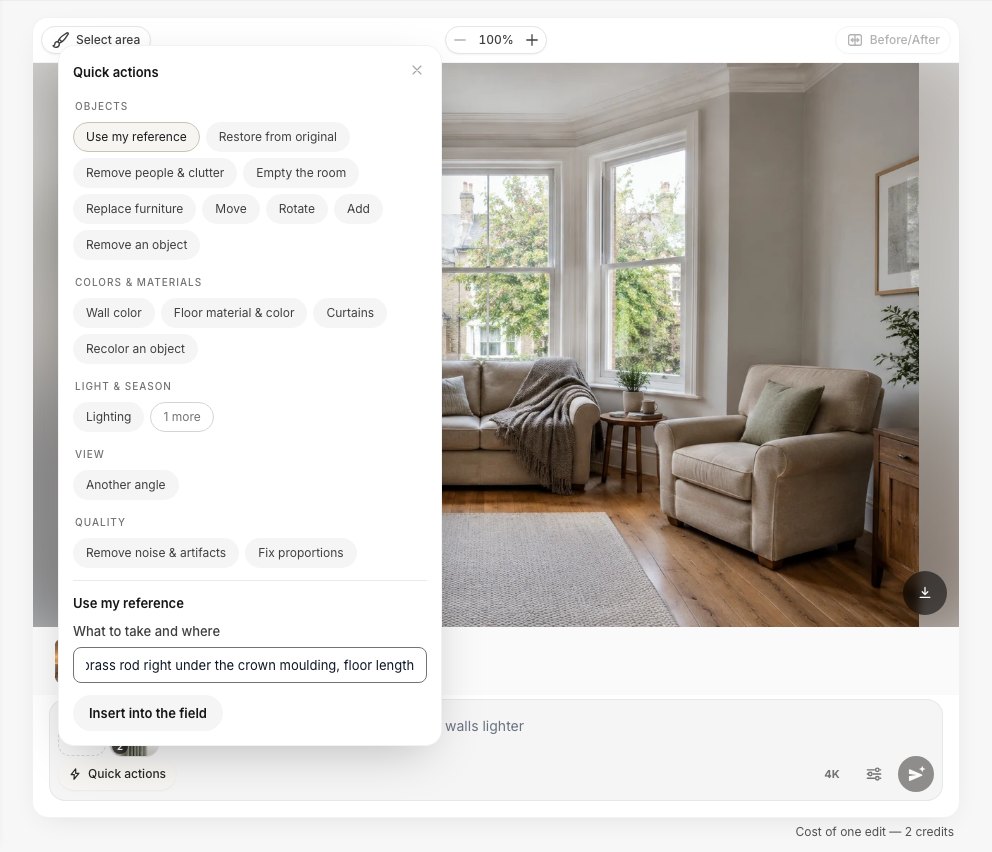 Use my reference: the curtain photo is attached in the prompt bar, and the field says what to take and where to put it.
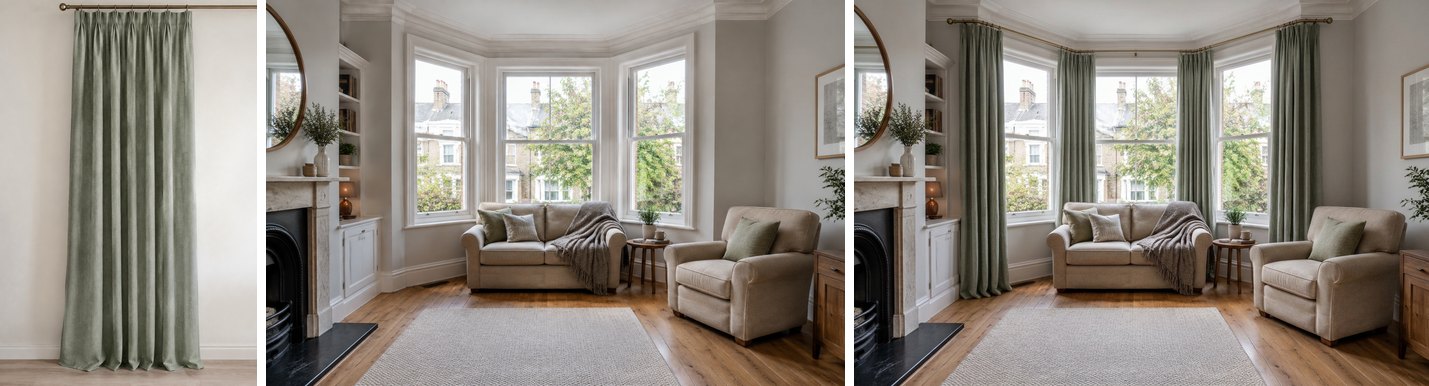 The reference photo, the bare bay, and the result. The colour, the pinch-pleat heading and the brass rod carried over; the rod follows the angles of the bay.
Use my reference asks the AI to reproduce the item's shape, material, pattern and colour exactly. In our test, the pinch pleats, the soft sage colour and the thin brass rod all came through, and the rod bent around the bay under the moulding. Every plan can attach a reference photo; a Pro account can attach up to 5 per design.
Hard top treatments and blinds on a bay
Bays are where rod position matters most, so we tried two more options on the same bare bay, typed straight into the Curtains field: an ivory upholstered cornice box under the crown moulding with ivory floor-length curtains at each corner, and the ready choice Roman blinds.
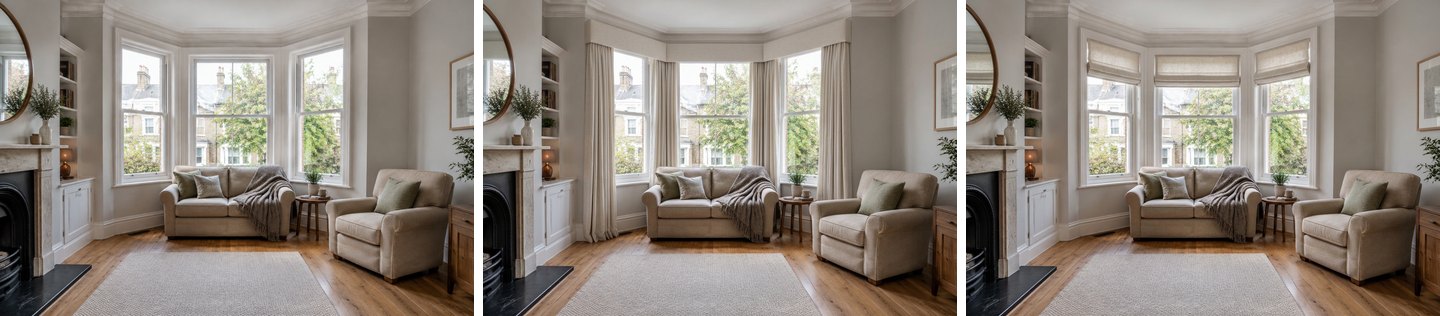 Bare bay, an ivory cornice box with matching panels (38 seconds), and Roman blinds in each sash (23 seconds).
The cornice box makes the bay look like one tall, built-in unit; the Roman blinds keep the sash windows and the moulding visible and leave the floor clear for the sofa. Both kept the fireplace, the sofa and the armchair unchanged.
Window Treatments Inside a Full Design
If you are redesigning the whole room, add window treatments as a task instead of a separate edit. In the design screen, open Ready tasks → Colors & materials → Curtains & blinds and pick one of five choices: Light beige linen curtains, White sheer curtains, Velvet curtains, Roman blinds or Wooden blinds. The field "Anything to keep in mind?" takes your details.
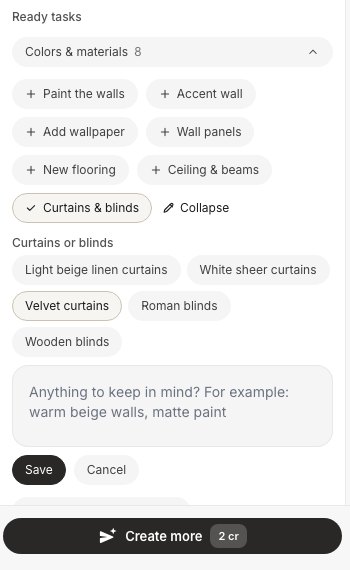 Design → Ready tasks → Colors & materials → Curtains & blinds. Choose a type, add a note, and press Create.
We picked Velvet curtains with the note "deep forest green velvet, floor length, on a brass rod mounted close to the ceiling", and ran it with no style and no mode, so the task was the only change.
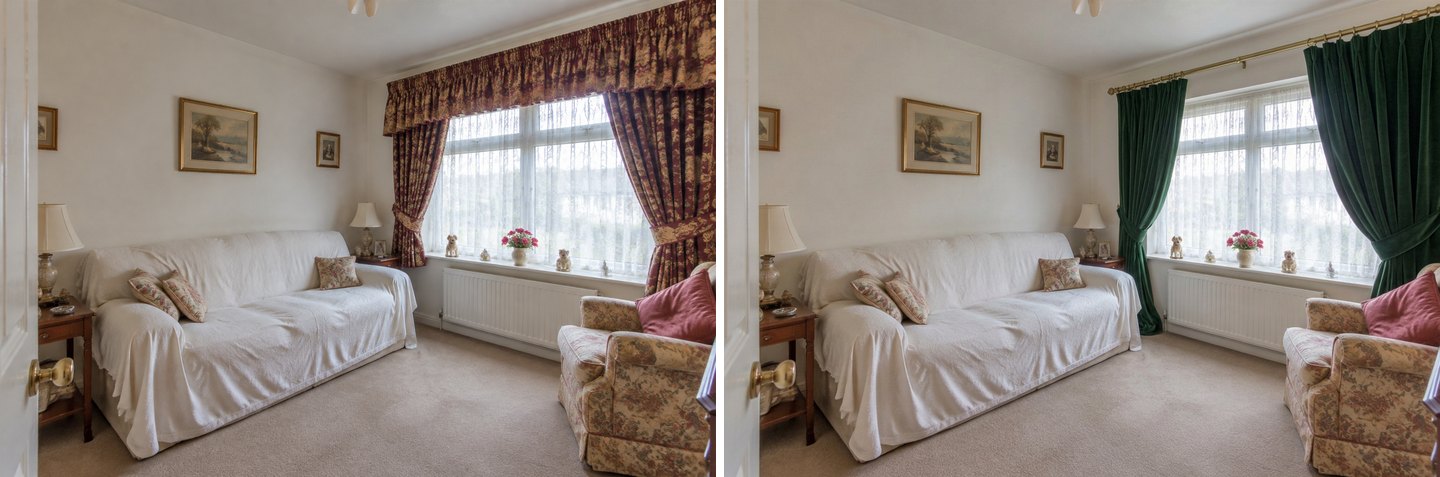 The Curtains & blinds task with a note: green velvet on a brass rod, valance gone. We didn't mention the nets, so they stayed.
With only one task selected, the design changed only the window. Add a style or other tasks (wall colour, flooring, lighting) when you want the room restyled around the new curtains. For adding cushions, throws and art in the same spirit, see our guide to adding decor to a room photo.
How High and How Wide Should You Hang Curtains?
AI can show you a rod near the ceiling, but it doesn't know your ceiling height or your window size. Use these rules of thumb from curtain and design professionals when you turn a picture into a shopping list.
| Decision | Rule of thumb | Source |
|---|---|---|
| Rod height | About 8–10 in (20–25 cm) above the window; in very tall rooms 12–24 in (30–60 cm) above, or just below the crown moulding | Homes & Gardens |
| Rod height, other view | A little more than halfway between the window frame and the ceiling | The Shade Store |
| Rod width | Extend the rod about 10–12 in (25–30 cm) past each side of the window (designer Emily Henderson suggests at least 6–10 in) | Homes & Gardens; Emily Henderson |
| Fullness | Combined panel width of 2 to 2.5 times the window width; for sheers, 3 to 3.5 times | Homes & Gardens, quoting designers Kelly Simpson and Noelle Isbell |
| Float length | No more than ½–1 in (1–2.5 cm) above the floor: measure rod to floor and subtract ½ or ¼ in | The Shade Store |
| Break length | Rod to floor plus 1–2 in (2.5–5 cm), so the fabric just kisses the floor | The Shade Store |
| Puddle length | Rod to floor plus 3–6 in (7.5–15 cm) | The Shade Store |
| Ready-made panels | 84 in (213 cm) panels are "almost always not long enough"; for an 8 ft ceiling, buy longer and hem | Emily Henderson |
Two practical notes from The Shade Store are worth keeping in mind when you choose a length in the visualizer. If you open and close the curtains every day, float or break length is easier to live with than a puddle. If you want the room as dark as possible, break or puddle length blocks more light at floor level.
How to use the table with GenRoom: put the rule into words. "Rod about 25 cm above the frame, extending 30 cm past each side, panels that just touch the floor" gives the AI a clear target. Then measure your real window before you buy: the picture is a direction, not a measurement.
What the AI Gets Wrong With Curtains
We ran 17 edits for this article. Most results were usable on the first try, but these are the mistakes we saw, and how to work around them.
| Problem | What we saw | What to do |
|---|---|---|
| Keeps the old arrangement | White linen alone kept the valance, tie-backs and nets | List what to remove: valance, pelmet, nets, tie-backs |
| Redraws the window | Twice, after removing a valance, the window came back narrower with different glazing | Check the window first; if it changed, try again or brush over the window and its surroundings only |
| Ignores the rod height | Asked for a rod near the ceiling, got one just above the frame | Repeat the position in plain words, or use the brush over the wall above the window |
| Invents the pattern scale | A "large-scale botanical print" is the AI's own print and repeat | Use a photo of the actual fabric with Use my reference |
| Evening is dusk, not night | Closed sheers still glowed with daylight from outside | Compare sheer and blackout in the same evening edit, side by side; treat it as mood, not a lighting plan |
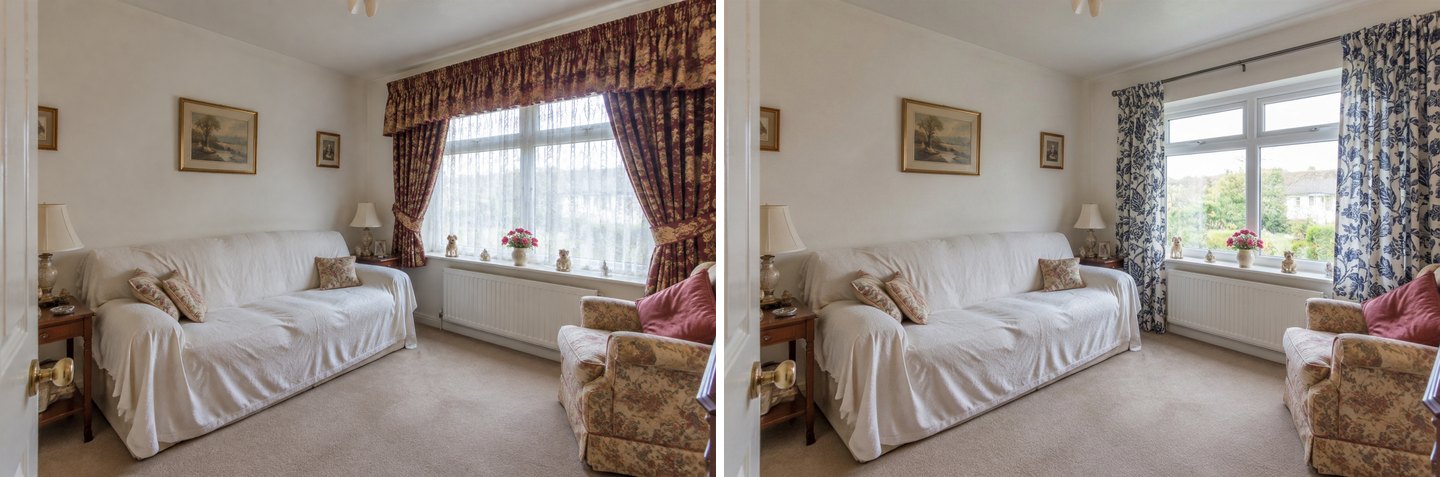 A limitation, shown on purpose: we asked for the rod near the ceiling; it went just above a window the AI redrew smaller, with a different frame. The print scale is the AI's guess.
The biggest risk is the window itself. Curtains are easy for the AI; the window behind them is the part it may "improve". Before you judge a curtain, compare the window frame, its width and its height with the original. If they changed, don't base your rod length or panel width on that picture.
Pattern scale is the second risk. A real fabric has a specific repeat (how often the pattern repeats in centimetres); the AI draws a pattern that looks right for the window. If you are choosing between a small and a large print, use reference photos of the actual fabrics.
Tips for Better Curtain Results
- Shoot straight on, in daylight, with some ceiling in the frame. The rod position only makes sense if the picture shows where the ceiling is.
- Name the hardware. "Slim black rod", "ceiling-mounted track", "brass bay rod", "inside mount" all change the result.
- Name the length. "Floor length", "just touching the floor", "puddling on the floor" or "to the sill".
- Say what to remove when you replace an old treatment.
- One window at a time with the brush when windows need different treatments.
- One idea per edit. "Curtains, then lighting" works better than both in one edit. The real request "better curtains and a stylish light fixture" is two edits: Curtains, then Lighting.
- Check the night view with Evening light before choosing sheer over blackout for a bedroom.
FAQ
Is there a free curtain visualizer that works with my own photo?
Yes. GenRoom's free account gives you 6 credits with no card, and one curtain edit costs 2 credits, so you can try three versions of your own window. Results on the free plan carry a watermark. Brand visualizers such as Graber's show only that brand's products, while GenRoom lets you describe any fabric or upload a photo of one.
Can I see how curtains will look at night?
Yes. Apply your curtains, then open Quick actions → Light & season → "1 more" → Evening light, and add "the curtains are drawn closed". That's the quickest way to compare sheers and blackout curtains. The evening view is a mood picture: it looks like dusk rather than full night, and the AI decides which lamps are on.
Can the AI show curtains on only one of my windows?
Yes. Use Select area, draw around that window, and describe the treatment with "on this window only". The other windows stay as they are.
How high should I hang curtains?
Common professional advice is about 8–10 in (20–25 cm) above the window frame, or a little more than halfway between the frame and the ceiling, with the rod extending about 10–12 in (25–30 cm) past each side. In rooms with tall ceilings, hanging just below the ceiling or crown moulding makes the window look taller. Try both positions on your photo before drilling.
Can I try curtains I found in a shop?
Yes. Add the product photo as a reference and use Quick actions → Use my reference. In our test the colour, the pleated heading and the brass rod carried over well. The texture and sheen are approximate, so check a real sample before you order a lot of fabric.
Does the visualizer work for blinds and shutters too?
Yes. The Curtains action has Roman blinds as a ready choice, and you can type "wooden blinds", "white plantation shutters fitted inside the frame" or "roller blinds" in your own words. The design task Curtains & blinds also offers Wooden blinds.
Will the AI keep my window the same size?
Usually, but not always. In two of our tests, removing a valance made the AI redraw the window narrower. Always compare the window frame with the original before you trust the curtain proportions.
The Bottom Line
A curtain visualizer is most useful for the decisions you can't make from a swatch: sheer or blackout at night, rod at the frame or at the ceiling, curtains or shutters, one window or all of them. In GenRoom, start with Quick actions → Curtains, add your own words for hardware and length, use the brush for single windows, a photo for a specific fabric, and Evening light for the night view. Then check the window in every result and measure the real one before you buy. You can try it on your own photo in the Studio; new accounts start with 6 free credits, and pricing lists the paid credit packs.