التصميم الداخلي بالذكاء الاصطناعي: كيف يعمل ولماذا هو المستقبل
ارفع صورة، اختر نمطاً، واحصل على تصميم جديد في ثوانٍ — بدون مصمم
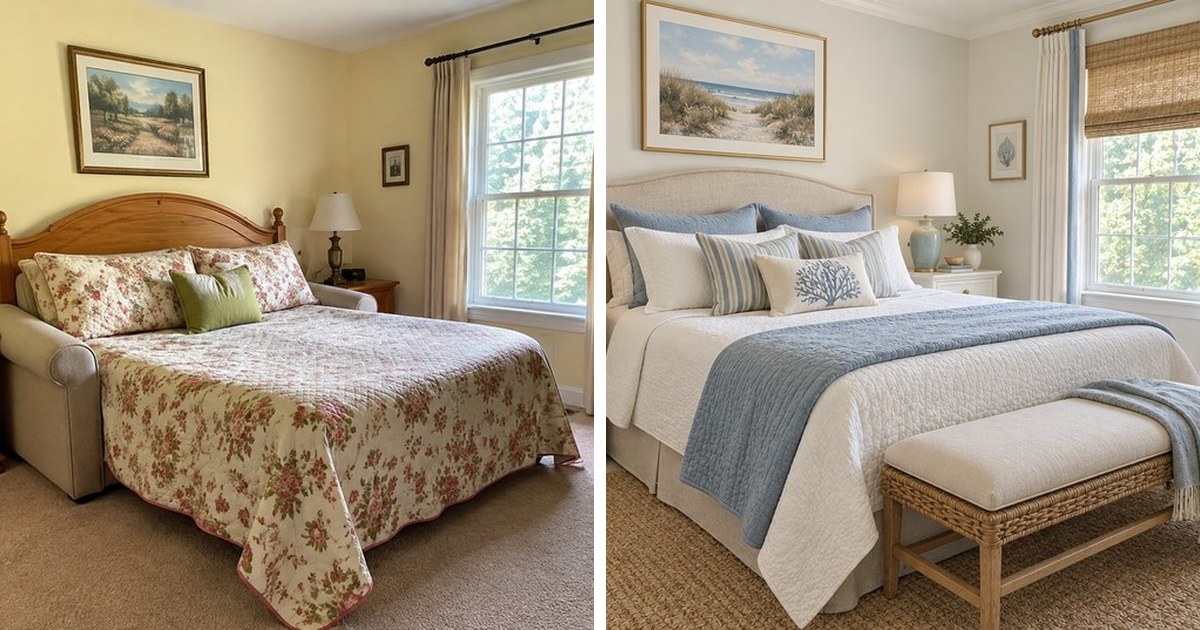
كيف يعمل التصميم الداخلي بالذكاء الاصطناعي؟
يستخدم التصميم الداخلي بالذكاء الاصطناعي نماذج التعلم العميق — تحديداً شبكات الانتشار الشرطي — لتحليل صورة غرفتك وإنشاء نسخة معاد تصميمها بنمط جديد. العملية تتم في 3 خطوات: ارفع صورة، اختر نمطاً، واستلم النتيجة خلال 10-30 ثانية.
يتعرف الذكاء الاصطناعي على العناصر الهيكلية مثل الجدران والأرضيات والأثاث والنوافذ والأبواب والإضاءة في صورتك. ثم يطبق نمط التصميم المختار مع الحفاظ على تخطيط الغرفة وهندستها المعمارية. التقنية الأساسية مشابهة لتلك التي تشغل مولدات الصور مثل Stable Diffusion وDALL-E، لكنها مخصصة للتصميم المعماري والداخلي.
لا حاجة لقياسات. لا حاجة لمخططات. فقط صورة من هاتفك الذكي.
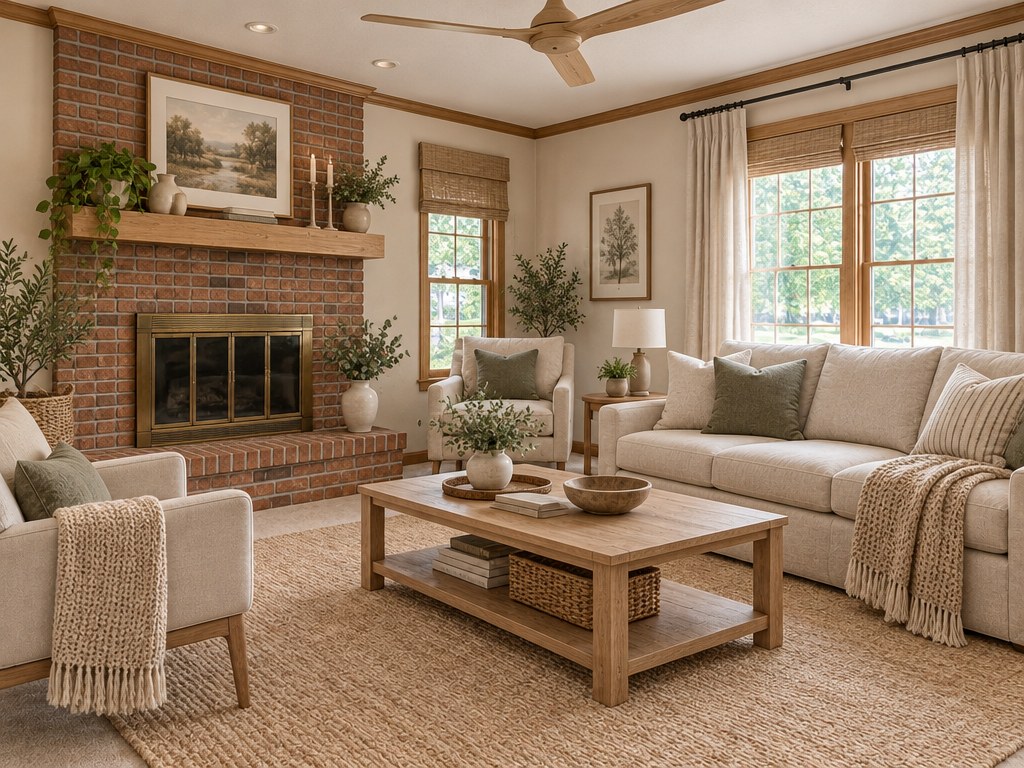
التقنية وراء إعادة تصميم الغرف بالذكاء الاصطناعي
فهم التقنية يساعدك في الحصول على نتائج أفضل. أدوات التصميم الداخلي بالذكاء الاصطناعي تعتمد على ثلاثة مكونات أساسية تعمل معاً.
1. التجزئة الدلالية. يقسم النموذج صورتك إلى مناطق — السقف، الجدران، الأرضية، الأثاث، النوافذ. كل منطقة تتلقى معالجة مختلفة أثناء نقل النمط. لهذا يحافظ الذكاء الاصطناعي على نافذتك في مكانها لكن يغير الستائر.
2. تكييف ControlNet. البنية المكانية لغرفتك (الحواف، العمق، التخطيط) تعمل كقيد. يولد الذكاء الاصطناعي صوراً جديدة تتناسب مع الهندسة الدقيقة لمساحتك. الممر الضيق يبقى ضيقاً. السقف المقبب يبقى مقبباً.
3. الضبط الدقيق حسب النمط. كل نمط تصميم (مينيمالست، إسكندنافي، صناعي، إلخ) هو نقطة فحص نموذج مضبوطة بشكل منفصل. الذكاء الاصطناعي لا "يلون" غرفتك فحسب — بل يفهم أي أثاث ومواد وإضاءة تنتمي لكل نمط.
ماذا يمكنك تصميمه بالذكاء الاصطناعي؟
أدوات التصميم الحديثة بالذكاء الاصطناعي تغطي ثلاث فئات رئيسية:
- الغرف الداخلية — غرف المعيشة، غرف النوم، المطابخ، الحمامات، المكاتب المنزلية، غرف الأطفال، غرف الطعام
- واجهات المباني — إعادة تصميم خارجي، تغيير المواد، مخططات الألوان، تحديثات السقف
- الحدائق والساحات — تنسيق الحدائق، الأثاث الخارجي، الأرضيات، التراسات، مناطق المسابح
يدعم GenRoom جميع الفئات الثلاث مع أكثر من 60 نمط تصميم. ارفع أي صورة واحصل على إعادة تصميم واقعية.
معظم المنافسين يتعاملون فقط مع الغرف الداخلية. إذا كنت تحتاج تصميم واجهات أو حدائق، خياراتك محدودة — GenRoom من الأدوات القليلة التي تغطي المجالات الثلاثة.
كم يكلف التصميم الداخلي بالذكاء الاصطناعي؟
مقارنة بين أدوات الذكاء الاصطناعي وخدمات التصميم التقليدية:
| الخيار | التكلفة | المدة | المراجعات | الأفضل لـ |
|---|---|---|---|---|
| مصمم داخلي تقليدي | 2,000–10,000$ | 4–12 أسبوع | 2–3 جولات | تجديدات كاملة |
| خدمة تصميم عبر الإنترنت | 300–2,000$ | 1–4 أسابيع | محدودة | مشاريع غرفة واحدة |
| أداة ذكاء اصطناعي (GenRoom) | 0–39.99$ لمرة واحدة | 10–30 ثانية | أنماط غير محدودة | تصور سريع |
| افعلها بنفسك مع Pinterest | مجاني | أسابيع من الجهد | لا ينطبق | لوحة إلهام فقط |
يمنحك GenRoom 6 أرصدة (≈3 تصاميم) مع حساب مجاني. تبدأ باقات الأرصدة المدفوعة (لمرة واحدة) من 9.99$ لـ 36 رصيداً وتصل إلى 39.99$ لـ 300 رصيد. في باقة Pro، تكلفة كل إعادة تصميم حوالي 0.27$.
الحساب بسيط: بسعر استشارة واحدة مع مصمم تقليدي، يمكنك توليد مئات التصاميم بالذكاء الاصطناعي لكل غرفة في منزلك.
ما الأنماط التي يمكن للذكاء الاصطناعي توليدها؟
تقدم أدوات التصميم بالذكاء الاصطناعي عادةً 20-50+ نمطاً. الأكثر شعبية:
- مينيمالست حديث — خطوط نظيفة، ألوان محايدة، أثاث قليل
- إسكندنافي — خشب فاتح، جدران بيضاء، أقمشة دافئة
- صناعي — طوب مكشوف، تركيبات معدنية، مواد خام
- ميد سنتشري مودرن — أثاث ريترو، ألوان دافئة، أشكال عضوية
- زن ياباني — مواد طبيعية، مساحة مفتوحة، بساطة
- آرت ديكو — أنماط جريئة، لمسات معدنية، أشكال هندسية
- بوهيمي — أنسجة متعددة الطبقات، ألوان غنية، مزيج انتقائي
- متوسطي — تيراكوتا، أقواس، درجات ترابية دافئة
- معاصر — اتجاهات حالية، مواد مختلطة، قطع مميزة
- عربي تقليدي — زخارف هندسية، أقواس، ألوان غنية
يتضمن GenRoom أيضاً أنماطاً إقليمية. في الشرق الأوسط، الأنماط العربية التقليدية والمتوسطية والمعاصرة شائعة بشكل خاص. الاستوائي والساحلي وعشرات غيرها متاحة لجميع أنواع المساحات.
نصيحة: لا تكتفِ بنمط واحد. أنشئ 5-10 تنويعات لاكتشاف ما يجذبك. كثير من المستخدمين يتفاجؤون بتفضيلهم لنمط لم يفكروا فيه أبداً.

دليل خطوة بخطوة: أول تصميم لك بالذكاء الاصطناعي
إليك بالضبط كيفية الحصول على أول تصميم غرفة بالذكاء الاصطناعي:
الخطوة 1: التقط الصورة الصحيحة. استخدم هاتفك الذكي. قف في زاوية الغرفة والتقط أكبر قدر ممكن من المساحة. حافظ على الكاميرا مستوية — لا تميلها لأعلى أو لأسفل. الضوء الطبيعي يعطي أفضل نتيجة.
الخطوة 2: ارفعها على GenRoom. اذهب إلى GenRoom وأنشئ حساباً مجانياً، ثم ارفع صورتك. يتعرّف GenRoom على نوع المساحة (داخلية، واجهة، أو حديقة) تلقائياً، ويمكنك تغييره.
الخطوة 3: اختر نمطك. اختر وضعاً أو حتى 3 من أكثر من 60 نمطاً، وأضف رغباتك بكلماتك. كل نمط يعرض صورة مصغرة للمعاينة لتعرف ما تتوقعه.
الخطوة 4: أنشئ. اضغط على "Create design" وانتظر 10-30 ثانية. يعالج الذكاء الاصطناعي صورتك ويعيد تصميماً واقعياً.
الخطوة 5: قارن وكرر. حمّل النتيجة. جرب 2-3 أنماط إضافية على نفس الصورة. قارنها جنباً إلى جنب لإيجاد اتجاهك المفضل، ثم حسّن التفاصيل بالكلمات أو بالفرشاة.
تحصل على 6 أرصدة مجانية للبدء — لا حاجة لبطاقة ائتمان.
أنشئ تصميمًا داخليًا بالذكاء الاصطناعي
حمّل صورة غرفتك واحصل على تصميم احترافي في 30 ثانية. التوليد الأول مجاني.
هل التصميم الداخلي بالذكاء الاصطناعي دقيق؟
التصاميم المولدة بالذكاء الاصطناعي واقعية الصورة لكنها ليست دقيقة معمارياً. تُظهر لك كيف سيبدو النمط في مساحتك — وليس أبعاد الأثاث الدقيقة أو رموز الطلاء.
الدقة تعتمد على جودة الصورة. الصور المضاءة جيداً والمأخوذة من الأمام تنتج أفضل النتائج.
نقاط القوة:
- دقة نمطية تزيد عن 90% مع الصور المضاءة جيداً
- وعي مكاني صحيح (النوافذ والأبواب تبقى في مكانها)
- عرض واقعي للإضاءة والظلال
- تطبيق نمطي متسق عبر أنواع الغرف المختلفة
القيود:
- لا يوفر روابط منتجات دقيقة أو أرقام مرجعية (حتى الآن)
- أشكال الغرف غير المعتادة (سداسية، جدران منحنية) قد تربك النموذج
- الغرف شديدة الفوضى تقلل جودة النتائج
- الصور بزاوية واسعة جداً أو عين السمكة تنتج نتائج مشوهة
لتحقيق أقصى دقة: رتب الغرفة قبل التصوير. أزل الفوضى المؤقتة (الغسيل، الأطباق، الأشياء العشوائية). كلما كان المدخل أنظف، كان المخرج أنظف.
من يستخدم التصميم الداخلي بالذكاء الاصطناعي؟
أدوات التصميم بالذكاء الاصطناعي تخدم جماهير متعددة — كل منها بأهداف مختلفة.
أصحاب المنازل يستخدمونه لتصور التجديدات قبل إنفاق المال. تجربة 10 أنماط في 5 دقائق أفضل من توظيف مصمم لكل مفهوم. بيانات الصناعة تشير إلى أن صاحب المنزل العادي يجرب 6-8 أنماط قبل الالتزام باتجاه التجديد.
وكلاء العقارات يستخدمون التجهيز الافتراضي لعرض العقارات الفارغة مفروشة. تجهيز الذكاء الاصطناعي يكلف 0.20$ للصورة مقابل 200$+ للتجهيز الافتراضي التقليدي. يُقدر أن 85% من المنازل المُجهزة تُباع أسرع.
مصممو الديكور الداخلي يستخدمونه لتوليد المفاهيم بسرعة. بدلاً من ساعات في إنشاء لوحات المزاج، يولدون 20 خياراً في دقائق ويصقلون الأفضل. حوالي 40% من المصممين المحترفين يستخدمون الآن أدوات الذكاء الاصطناعي في سير عملهم.
المستأجرون يستكشفون الممكن ضمن قيود عقد الإيجار. يرون كيف ستحول الأثاث الجديد أو ألوان الجدران شقتهم — دون المخاطرة بالتأمين.
مضيفو Airbnb يستخدمون تصميم الذكاء الاصطناعي لتحسين صور إعلاناتهم. المساحة المصممة جيداً تطلب أسعاراً ليلية أعلى بنسبة 20-30%.
أخطاء شائعة يجب تجنبها
هذه الأخطاء تهدر الأرصدة وتنتج نتائج سيئة:
1. استخدام صور ضبابية أو مظلمة. يحتاج الذكاء الاصطناعي معلومات بصرية واضحة. إذا لم تستطع رؤية التفاصيل، النموذج أيضاً لن يستطيع. استخدم ضوء النهار أو شغّل جميع الأضواء.
2. التصوير من زوايا متطرفة. اللقطات من الأعلى أو مستوى الأرض تربك النموذج المكاني. صوّر وأنت واقف، مباشرة للأمام.
3. توقع مطابقة دقيقة للأثاث. الذكاء الاصطناعي يُظهر اتجاه النمط، وليس منتجات محددة. استخدم النتيجة كإلهام، ثم ابحث عن عناصر مماثلة.
4. عدم ترتيب الغرفة. أزل الأشياء من الأسطح قبل التصوير. غرفة فوضوية تنتج تصميماً فوضوياً.
5. تجاهل نوع الغرفة المكتشف. تحقق من أن نوع الغرفة الذي تعرّف عليه الاستوديو يطابق صورتك؛ فإذا كان "غرفة نوم" والصورة لمطبخ، قد ينتج الذكاء الاصطناعي نتائج غير متسقة.
6. تجربة نمط واحد فقط. قيمة تصميم الذكاء الاصطناعي في التكرار السريع. أنشئ 3-5 أنماط على الأقل لكل غرفة.
الذكاء الاصطناعي للعقارات: التجهيز الافتراضي
التجهيز الافتراضي من أعلى تطبيقات الذكاء الاصطناعي عائداً على الاستثمار:
| المعيار | التجهيز التقليدي | التجهيز الافتراضي بالذكاء الاصطناعي |
|---|---|---|
| التكلفة لكل غرفة | 500–2,000$ | 0.27–1.10$ |
| وقت التسليم | 1–3 أيام | 10–30 ثانية |
| تغييرات النمط | رسوم إضافية | مشمولة |
| أثاث مادي | مطلوب | غير مطلوب |
| مرونة الإعلان | مظهر ثابت | خيارات متعددة |
سير العمل بسيط: صوّر العقار الفارغ، مرره عبر GenRoom بـ 3-4 أنماط مختلفة، وأضف أفضل النتائج لإعلانك.
مقارنة تصميم الذكاء الاصطناعي حسب نوع الغرفة
ليست كل الغرف تنتج نتائج متساوية:
| نوع الغرفة | جودة الذكاء الاصطناعي | أفضل الأنماط | نصائح |
|---|---|---|---|
| غرفة المعيشة | ممتازة | جميع الأنماط تعمل جيداً | ضمّن الغرفة كاملة في الإطار |
| غرفة النوم | ممتازة | مينيمالست، إسكندنافي، بوهيمي | اجعل السرير في المنتصف |
| المطبخ | جيدة جداً | حديث، ريفي، صناعي | أظهر الخزائن والأسطح |
| الحمام | جيدة | حديث، زن، متوسطي | الإضاءة الجيدة حاسمة |
| المكتب المنزلي | جيدة جداً | مينيمالست، صناعي، إسكندنافي | نظّف المكتب أولاً |
| الواجهة | جيدة | حديث، كلاسيكي، متوسطي | صوّر من الرصيف المقابل |
| الحديقة | جيدة | استوائي، متوسطي، حديث | ضمّن الحديقة كاملة في الإطار |
ما مستقبل التصميم الداخلي بالذكاء الاصطناعي؟
التقنية تتقدم بسرعة. في 2025، كان الذكاء الاصطناعي يستطيع فقط تبديل الأنماط. في 2026، أدوات مثل GenRoom تدعم:
- محرر الذكاء الاصطناعي — تعديل مناطق محددة من التصميم المولد بالكلمات أو بالفرشاة (تغيير الأريكة فقط أو لون الجدار فقط)
- المخططات الأرضية — يصيّر GenRoom كل غرفة من مخطط أرضي مرفوع
- أنواع متعددة من المساحات — داخلية، واجهات، وحدائق من منصة واحدة
- مزج الأنماط — دمج عناصر من أنماط تصميم مختلفة
بحلول 2027، من المتوقع أن توفر أدوات الذكاء الاصطناعي روابط شراء للأثاث المحدد، جولات ثلاثية الأبعاد حية، وتكامل مع أنظمة المنزل الذكي. توليد الفيديو أيضاً في الأفق.
مستقبل التصميم الداخلي مُعزز بالذكاء الاصطناعي، وليس مُستبدلاً به. المصممون الذين يتبنون هذه الأدوات سيعملون أسرع ويخدمون عملاء أكثر.
الأسئلة الشائعة
كم يستغرق إعادة تصميم غرفة بالذكاء الاصطناعي؟ معظم الأدوات تولد النتائج في 10-30 ثانية. في اختباراتنا، يستغرق تصميم GenRoom حوالي 20 ثانية. السرعة تعتمد على حمل الخادم وتعقيد الصورة.
هل يستطيع الذكاء الاصطناعي تصميم غرفة من الصفر (بدون صورة)؟ معظم أدوات التصميم الداخلي بالذكاء الاصطناعي تتطلب صورة كمدخل. تحول المساحات الموجودة بدلاً من الإنشاء من الصفر. للتصميم من لا شيء، أدوات 3D مثل Planner5D أكثر ملاءمة.
هل التصميم الداخلي بالذكاء الاصطناعي مجاني؟ كثير من الأدوات تقدم مستويات مجانية محدودة. GenRoom يمنح 6 أرصدة مجانية بدون بطاقة ائتمان. بعدها، تبدأ باقات الأرصدة المدفوعة من 9.99$ لمرة واحدة، بلا اشتراك.
هل سيحل الذكاء الاصطناعي محل المصممين الداخليين؟ لا. الذكاء الاصطناعي يتولى الاستكشاف البصري والنماذج الأولية السريعة. المصممون البشريون لا يزالون ضروريين لتخطيط المساحات وتوريد المواد والتنسيق مع المقاولين والخدمة المخصصة.
ما صيغة الصورة الأفضل؟ JPEG وPNG كلاهما يعمل جيداً. استهدف دقة 1024x768 على الأقل. صور الهواتف الذكية من آخر 3-4 سنوات عادة كافية. تجنب الصور المفلترة بشدة أو المعالجة بـ HDR.